🚀 A CloudSEK se torna a primeira empresa de segurança cibernética de origem indiana a receber investimentos da
Leia mais
.avif)

A proteção contra malware é a combinação de ferramentas, técnicas e práticas que previnem, detectam e removem softwares maliciosos. Ela defende sistemas contra vírus, ransomware, cavalos de Troia, spyware e outros malwares no endpoint, na rede e no gateway de e-mail.
A ameaça é implacável. Todos os dias, o AV-TEST Institute registra mais de 450.000 novos programas maliciosos, e seu banco de dados agora contém mais de 1,5 bilhão de amostras conhecidas.
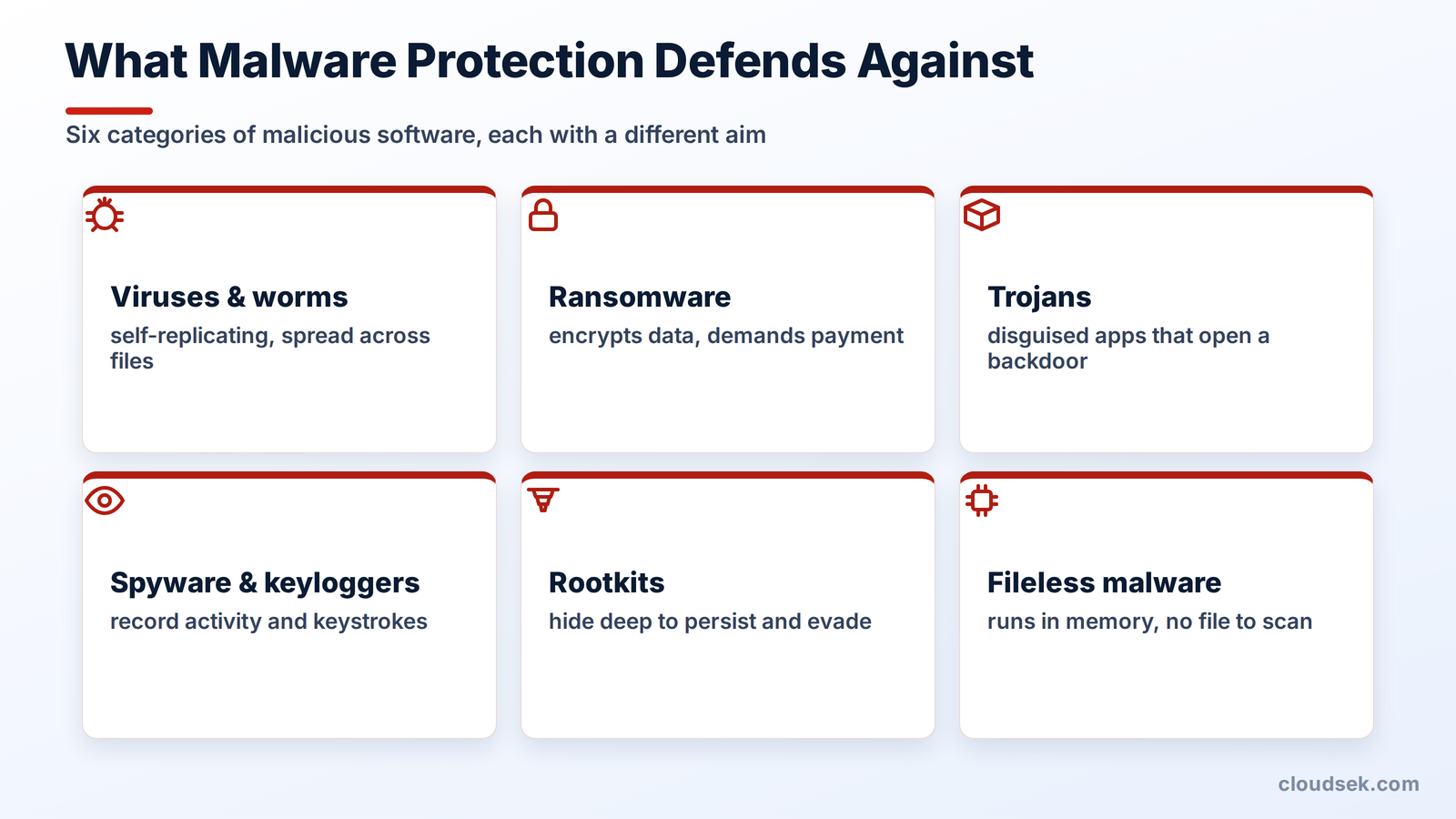
A proteção contra malware abrange todas as categorias de software malicioso, cada uma com um objetivo diferente. Os principais tipos incluem:
Cada tipo exige uma abordagem de detecção diferente, e é por isso que uma defesa em camadas contra malware é mais importante do que qualquer ferramenta isolada.
A proteção contra malware combina vários métodos de detecção, pois nenhuma técnica isolada consegue identificar todas as ameaças. As defesas mais robustas utilizam camadas, de modo que o que um método deixa passar, outro identifica. Aqui estão alguns dos melhores métodos de detecção de malware:
A detecção baseada em assinatura compara arquivos com um banco de dados de impressões digitais de malwares conhecidos. É rápida e precisa para ameaças já catalogadas, mas inútil contra malwares novos ou modificados, e os atacantes criam variantes únicas mais rápido do que as assinaturas conseguem acompanhar.
A análise heurística e comportamental observa o que um programa faz, em vez de como ele se parece. Ao sinalizar ações suspeitas, como um documento executando um script ou um processo criptografando arquivos em massa, esses métodos detectam malwares que não possuem uma assinatura conhecida.
O sandboxing executa um arquivo suspeito dentro de um ambiente virtual isolado e observa seu comportamento. Se o arquivo liberar uma carga maliciosa, contatar um servidor de comando ou adulterar o sistema, o sandbox o bloqueia antes que ele atinja um dispositivo real. Malwares avançados tentam contornar isso detectando o sandbox e permanecendo inativos, por isso os sandboxes modernos se disfarçam e simulam a atividade do usuário.
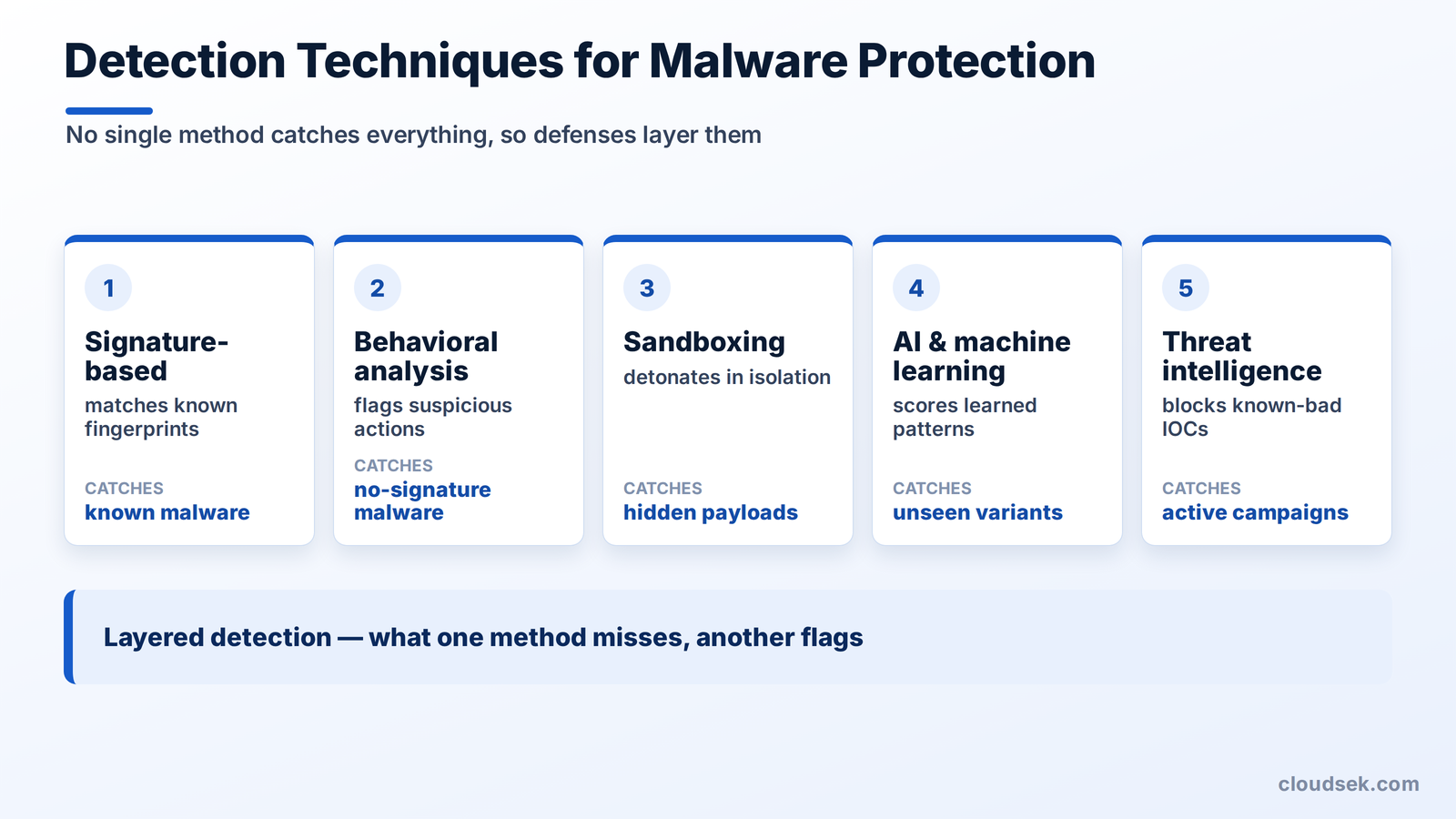
Modelos de IA e aprendizado de máquina avaliam arquivos e comportamentos com base em padrões aprendidos a partir de milhões de amostras. Eles conseguem generalizar para ameaças nunca vistas antes, o que é essencial quando centenas de milhares de novas variantes surgem todos os dias.
A inteligência contra malware aprimora todos os outros métodos. Feeds de indicadores de comprometimento (IOCs), como hashes de arquivos maliciosos, domínios e endereços IP, juntamente com técnicas de atacantes mapeadas em estruturas como o MITRE ATT&CK, permitem que as defesas bloqueiem atividades maliciosas conhecidas de forma proativa e identifiquem uma campanha precocemente.
Uma proteção eficaz contra malware é feita em camadas, com cada ferramenta cobrindo um ponto de entrada diferente.
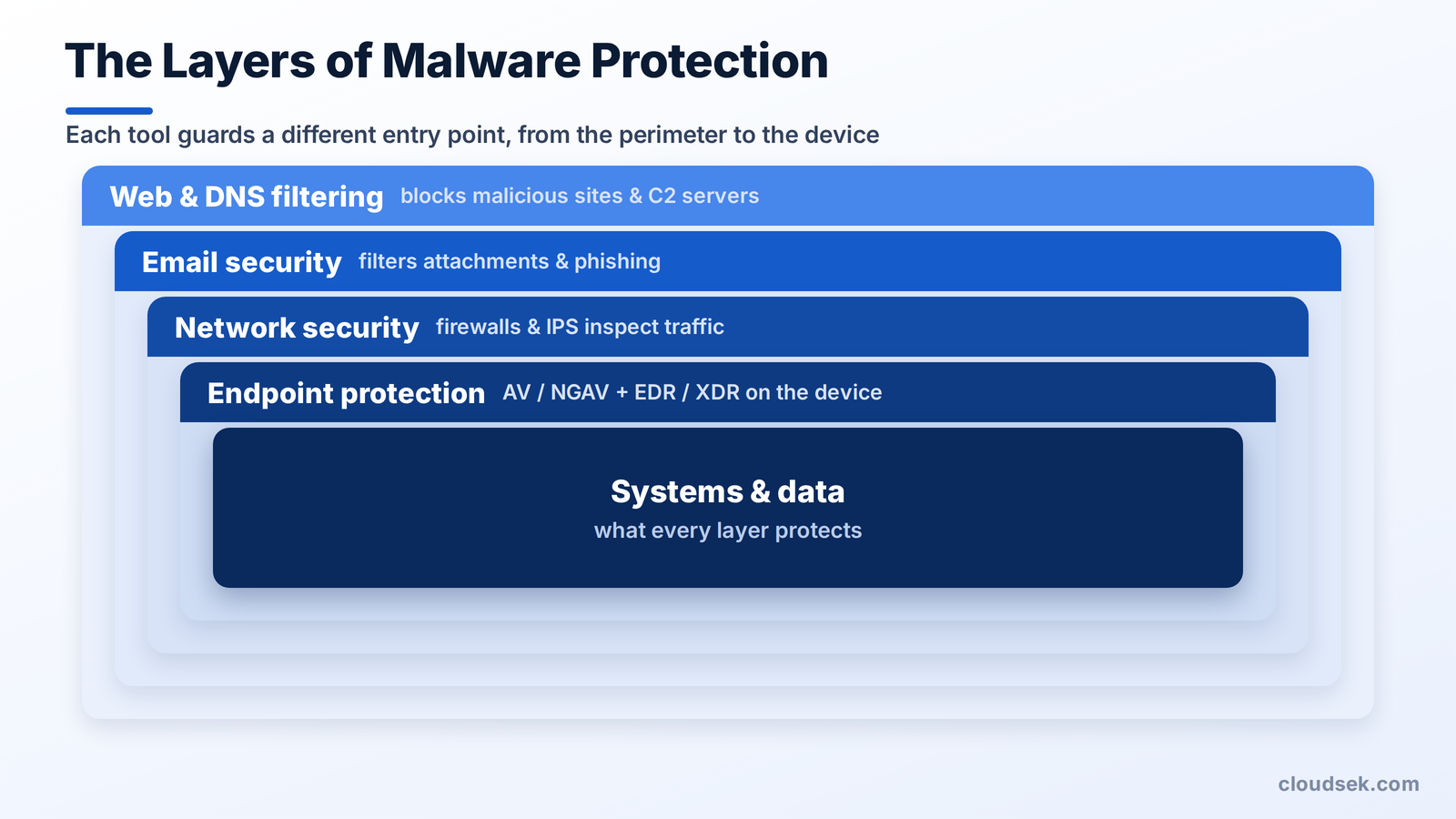
Um antivírus verifica os arquivos em um dispositivo em busca de malware. O antivírus de próxima geração (NGAV) adiciona detecção comportamental e de aprendizado de máquina, indo além das assinaturas para capturar ameaças modernas.
A detecção e resposta de endpoint (EDR) registra atividades detalhadas em cada dispositivo, permitindo que as equipes detectem, investiguem e contenham invasões. A detecção e resposta estendida (XDR) amplia essa visão para e-mail, rede, nuvem e identidade.
Firewalls filtram o tráfego entre redes e bloqueiam conexões maliciosas. Sistemas de prevenção de intrusão e ferramentas de detecção de rede adicionam uma inspeção mais profunda do tráfego em busca de sinais de propagação de malware.
A segurança de e-mail filtra o canal pelo qual a maioria dos malwares chega. Ela verifica anexos e links, executa arquivos suspeitos em um ambiente isolado (sandbox) e bloqueia phishing antes que chegue à caixa de entrada.
A filtragem de web e DNS bloqueia o acesso a sites maliciosos e servidores de comando. Impedir que um dispositivo acesse um domínio conhecido como perigoso interrompe tanto a infecção quanto o controle por parte do invasor.
Os compradores frequentemente confundem essas três ferramentas, mas elas diferem em escopo e finalidade.
O antivírus é adequado para um único dispositivo, o EDR oferece a uma equipe de segurança a profundidade necessária para investigar, e o XDR integra a detecção em todo o ambiente.
Uma proteção robusta contra malware combina as ferramentas certas com alguns hábitos consistentes. Estas práticas ajudam tanto indivíduos quanto organizações:
O guia do NIST para prevenção de malware estabelece uma estrutura completa para organizações que precisam de uma.
Uma suspeita de infecção por malware exige contenção rápida antes da remoção.
O primeiro passo é isolar. Desconectar o dispositivo afetado da rede impede que o malware se espalhe ou se comunique com um invasor, preservando-o para análise.
A remoção e a recuperação vêm em seguida. Ferramentas de segurança escaneiam e removem o malware, ou o sistema é restaurado a partir de um backup limpo, e os investigadores rastreiam como ele entrou, para que a mesma brecha não seja reaberta.
O CloudSEK não é uma ferramenta de proteção contra malware; ele não é executado em endpoints nem bloqueia arquivos. Ele fortalece a camada de inteligência da qual as ferramentas de proteção dependem e detecta o que o malware rouba apesar delas.
A inteligência contra ameaças do CloudSEK inclui um módulo de inteligência de malware que rastreia famílias de malware e grupos de ransomware, juntamente com seus indicadores de comprometimento, alimentando as defesas de uma organização com IOCs atuais. Como malwares do tipo infostealer coletam credenciais que posteriormente permitem ataques de ransomware, o XVigil monitora a dark web em busca dessas credenciais roubadas e as rotaciona antes que os invasores possam usá-las.
Não, o antivírus sozinho não é suficiente, pois a verificação baseada em assinaturas não detecta ataques novos, sem arquivos e do tipo "living-off-the-land". Uma proteção em camadas com detecção comportamental, EDR e segurança de e-mail fecha essas lacunas.
Os termos se sobrepõem, mas o antivírus historicamente foca em vírus clássicos, enquanto o anti-malware abrange uma gama mais ampla, incluindo ransomware, spyware e trojans. A maioria dos produtos de segurança modernos faz ambos.
Sim, o Windows inclui o Microsoft Defender, um antivírus integrado com proteção em tempo real e baseada na nuvem. Ele tem um bom desempenho em testes independentes, embora empresas frequentemente o combinem com EDR.
Sim, celulares enfrentam ameaças de malwarereais, especialmente dispositivos Android, onde aplicativos maliciosos e trojans bancários são comuns. Manter o sistema operacional atualizado e instalar aplicativos apenas de lojas oficiais reduz o risco.
A proteção contra malware moderna tem um impacto mínimo no desempenho, já que a verificação é executada em segundo plano e transfere análises pesadas para a nuvem. Os scanners de assinatura mais antigos eram muito mais pesados do que as ferramentas atuais.
Softwares antivírus gratuitos oferecem proteção básica contra malwares conhecidos, mas geralmente carecem de detecção comportamental, EDR e suporte que as empresas precisam. Eles são adequados para uso pessoal casual, e não para defesa corporativa.
