🚀 CloudSEK featured in the 2026 Frost Radar™!
Read more
.avif)

Cybersecurity threats no longer rely solely on malicious files to compromise systems. Modern attack strategies increasingly focus on evasion, persistence, and misuse of trusted operating system functionality.
Fileless malware reflects this shift by operating through memory and native tools rather than traditional executables. Such techniques significantly reduce forensic traces and challenge long-standing security models.
Security teams now contend with attacks that appear indistinguishable from legitimate system activity. Effective defense begins with understanding why conventional detection fails and how security controls must adapt to this behavior.
Fileless malware is a type of cyberattack that executes malicious activity directly in system memory rather than storing executable files on disk. Operating without file creation leaves few artifacts for traditional security tools to scan or analyze.
Malicious code linked to this threat resides temporarily in volatile memory or trusted system locations. Compromised systems may therefore appear clean at the storage level while harmful activity continues unseen.
Persistence depends on non-file-based techniques such as memory injection or configuration misuse instead of dropped binaries. Absence of a physical payload fundamentally defines fileless malware as a more evasive and distinct attack category.
Fileless malware works by executing malicious logic directly in system memory while relying on native operating system functionality instead of writing files to disk.
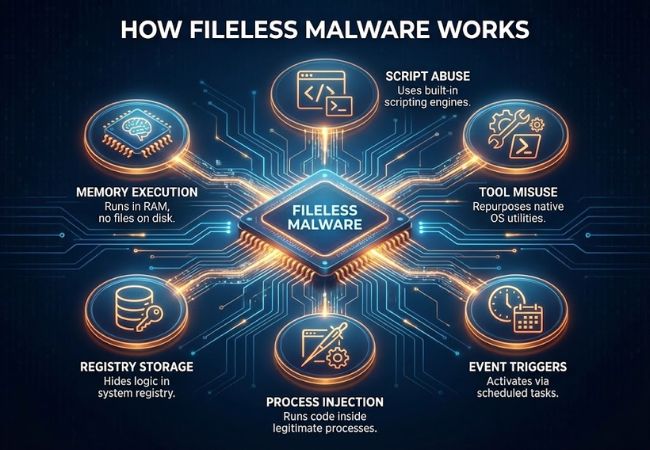
Malicious code loads directly into active memory and runs within legitimate system processes. Execution from RAM minimizes forensic traces and reduces exposure to file-based scanning.
Attackers commonly leverage built-in scripting engines to execute commands without dropping payloads. Scripted instructions allow rapid execution while appearing similar to normal administrative activity.
Native operating system utilities are repurposed to launch and control malicious actions. Trusted tools provide a camouflage layer that helps malicious behavior blend into routine system operations.
Malicious logic may be stored inside system configuration locations rather than executable files. Registry-based storage enables execution triggers without creating visible artifacts on disk.
Injected code runs inside legitimate processes instead of launching new ones. Process injection allows malicious activity to inherit trusted process identities and permissions.
Execution can be activated through scheduled events or system startup actions. Trigger-based activation enables repeated execution without relying on persistent files.
Fileless malware attacks vary based on how malicious activity executes, persists, or disguises itself within legitimate system operations.
Fileless malware is hard to detect due to its lack of disk-based artifacts and its reliance on legitimate system behavior rather than identifiable malicious files.
Traditional security tools scan files stored on disk to identify known threats. Memory-resident attacks leave no executable files behind, removing the primary surface area used by signature-based detection.
Malicious activity often runs inside trusted system processes instead of launching new ones. Trusted process execution makes harmful behavior appear similar to normal administrative or system operations.
In-memory code can execute and terminate quickly without establishing a permanent footprint. Short execution windows reduce the chance of detection during routine security scans.
Built-in system utilities are implicitly trusted by operating systems and security software. Misuse of these tools allows attackers to operate under the guise of legitimate functionality.
Memory activity is less visible than file activity without advanced monitoring. Limited visibility prevents basic security controls from observing execution context and behavioral anomalies.
Fileless malware detection relies on observing abnormal behavior in memory, processes, and system activity rather than scanning files stored on disk.
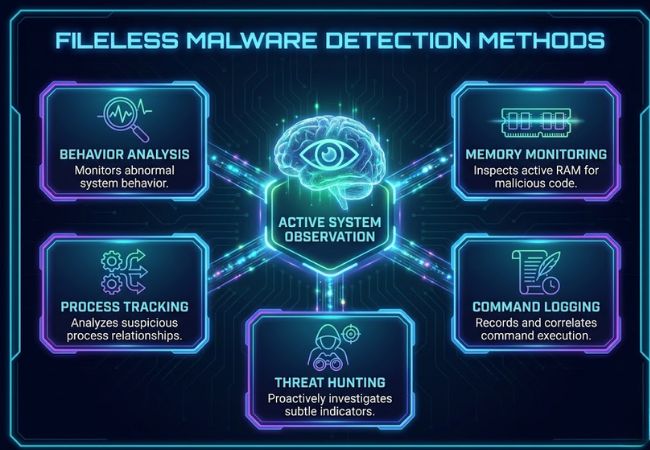
Unusual process behavior often signals malicious activity even when no files are present. Deviations from normal execution patterns help expose memory-resident threats.
Active memory inspection reveals injected code or unauthorized execution flows. Memory-focused visibility allows threats to be identified while running rather than after execution.
Process relationships and execution chains provide insight into suspicious activity. Abnormal parent-child process behavior frequently indicates misuse of trusted applications.
Command execution records expose suspicious script usage and system interactions. Logged activity helps correlate actions that would otherwise appear legitimate in isolation.
Proactive analysis focuses on identifying subtle indicators missed by automated tools. Manual investigation enables detection of stealthy attacks designed to evade standard controls.
Fileless malware prevention focuses on restricting misuse of native system capabilities, reducing execution opportunities, and enforcing controls that limit memory-based abuse.
Scripting engines should be limited to approved use cases and trusted sources only. Restricting script execution significantly reduces the attack surface for memory-resident threats.
Excessive privileges allow malicious code to perform high-impact actions once executed. Enforcing least-privilege access constrains what in-memory attacks can achieve.
Only approved applications and binaries should be allowed to execute. Application control prevents unauthorized processes from running even when launched indirectly.
Secure baseline configurations reduce exposure to native tool abuse. Hardening removes unnecessary features that attackers commonly exploit for execution.
Unused system utilities and services expand the pathways available for fileless attacks. Disabling or limiting access to these components minimizes exploitation vectors.
Unpatched vulnerabilities provide entry points for memory-based exploitation. Regular updates close known weaknesses before attackers can abuse them.
Ongoing monitoring of process and memory activity enables early identification of abnormal behavior. Continuous visibility helps interrupt attacks before persistence is established.
Fileless malware differs from traditional malware primarily in how it executes, persists, and avoids detection by operating without storing malicious files on disk.
Fileless malware reflects a shift toward stealth-focused attacks that rely on memory, trusted tools, and native system behavior rather than malicious files. This approach challenges traditional security assumptions and forces defenders to rethink how threats are identified and controlled.
Effective defense depends on understanding how these attacks operate, why they evade detection, and which controls limit their impact. Strong visibility, disciplined system configuration, and behavior-focused security practices remain essential for reducing exposure to fileless threats.
Fileless malware executes malicious activity primarily in system memory rather than relying on executable files stored on disk. The defining factor is execution behavior, not the complete absence of any disk interaction.
Memory-resident activity is cleared after a reboot, but persistence can be re-established through configuration abuse or execution triggers. Such mechanisms allow malicious code to run again without storing binaries.
Windows systems are the most common targets due to extensive scripting and management capabilities. Similar memory-based techniques can also be used on other operating systems that support in-memory execution.
Signature-based antivirus tools struggle because no malicious files exist to scan. Detection instead depends on behavioral analysis and visibility into memory and process activity.
Fileless malware attacks are increasingly common in modern threat campaigns. Attackers favor these techniques due to higher stealth and lower detection rates.
