What is Malware? Types, Examples & How To Prevent

Malware is malicious software that steals data, damages systems, and spreads infections. Learn its types, examples, and prevention methods.
Published on
Monday, March 9, 2026
Updated on
March 9, 2026

Attack chains now disguise malicious payloads inside everyday file formats and trusted cloud services, making detection far more complex than traditional signature scanning. Desktop entry files and legitimate storage platforms are increasingly weaponized to move malware quietly across systems.

An investigation report by CloudSEK detailed how APT36 conducted a malware campaign using desktop entry files and Google Drive for payload delivery. Attackers leveraged trusted cloud infrastructure to distribute malicious files, reducing suspicion and increasing infection success rates.

Such campaigns demonstrate how modern threat actors combine social engineering with stealthy technical execution. Organizations must adopt layered security controls and continuous monitoring to counter multi-stage malware operations effectively.

What is Malware?

Malware is malicious software designed to infiltrate systems, disrupt operations, steal data, or gain unauthorized access to digital environments. Cybercriminals develop malware to exploit security weaknesses in computers, mobile devices, servers, and network infrastructures.

Malicious code executes harmful instructions once activated, often without visible signs to the user. Attack objectives include credential theft, data encryption for ransom, surveillance, financial fraud, or long-term system control.

Why is Malware Dangerous?

Malware is dangerous because it enables attackers to compromise systems, steal information, and disrupt normal operations.

  • Data Theft: Sensitive data such as passwords, banking credentials, and confidential business records can be extracted and exploited for fraud or identity theft.
  • Operational Disruption: Malware like ransomware can encrypt files, disable systems, and bring business processes to a complete halt.
  • Unauthorized Control: Backdoors and rootkits allow attackers to gain hidden, long-term access to compromised devices or networks.
  • Financial Impact: Recovery expenses, ransom payments, regulatory fines, and downtime can result in significant monetary losses.
  • Reputational Damage: Security breaches reduce customer trust and may permanently affect brand credibility.

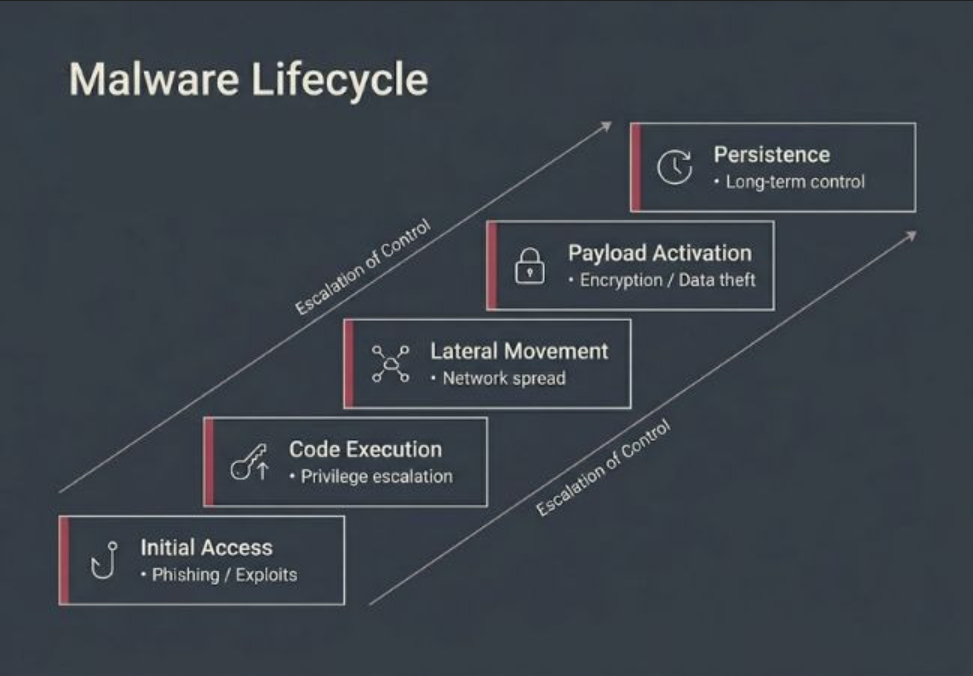
How Does Malware Work? (Malware Lifecycle)

Malware follows a step-based attack sequence where each phase prepares the system for the next stage of compromise.

Initial Access

Infection begins through phishing emails, malicious downloads, exposed services, or software vulnerabilities. User interaction or exploit execution grants the attacker entry into the system.

Code Execution

Malicious code runs after entry and establishes control within the environment. Privilege escalation or security bypass techniques strengthen attacker access.

Lateral Movement

Network-aware malware scans connected systems for additional vulnerabilities. Compromised credentials or shared resources allow expansion across the environment.

Payload Activation

Primary objectives are executed at this stage. Files may be encrypted, credentials extracted, or data exfiltrated to external servers.

Persistence Mechanisms

Long-term access is secured through registry changes, scheduled tasks, startup modifications, or memory-based techniques. Evasion methods reduce detection by security tools.

What are the Main Types of Malware?

Malware types differ based on how they gain access, how they spread, and what objective they execute after compromise.

types of malware

1. Virus

A virus attaches itself to legitimate executable files and activates only when the infected file runs. Propagation depends on user action, which distinguishes it from self-spreading malware such as worms.

Replication occurs when infected files are shared across systems or storage media. Damage typically aligns with the payload delivered during execution.

2. Worm

A worm spreads independently by exploiting network vulnerabilities without requiring user interaction. Automated propagation enables rapid infection across connected systems.

Unlike viruses, worms focus primarily on expansion before payload execution. Network congestion or system overload often signals widespread infection.

3. Trojan Horse

Trojan horse disguises itself as legitimate software to gain initial access through deception. Execution begins once the user installs or runs the malicious program.

Trojans frequently function as delivery mechanisms for additional malware such as ransomware or spyware. Post-installation control allows attackers to escalate privileges or exfiltrate data.

4. Ransomware

Ransomware encrypts files or locks operating systems to deny access to critical data. Attackers demand payment in exchange for a decryption key.

Impact centers on operational disruption rather than stealth persistence. Data recovery depends on backups or successful decryption.

Know More: Malware Vs. Ransomware

5. Spyware

Spyware focuses on covert surveillance after gaining system access. Monitoring includes browsing activity, credentials, and communication data.

Collected information is transmitted to attacker-controlled servers. Long-term data harvesting increases privacy and financial risk.

6. Keylogger

A keylogger records keystrokes entered by a user to capture sensitive input data. Deployment often occurs through Trojans or phishing attachments.

Captured credentials enable account takeover and fraud. Stealth operation minimizes immediate detection.

7. Adware

Adware generates intrusive advertisements within browsers or installed applications. Revenue generation motivates its distribution.

Some variants track browsing behavior to personalize ads or collect data. Excessive pop-ups or browser redirects indicate infection.

8. Rootkit

A rootkit modifies system-level processes to conceal malicious activity. Privileged access enables attackers to hide files, processes, or network connections.

Persistence remains the primary objective rather than direct damage. Detection typically requires advanced scanning techniques.

9. Botnet

A botnet consists of compromised devices connected to a centralized command infrastructure. Each infected system becomes a remotely controlled “bot.”

Coordinated control enables distributed denial-of-service attacks, spam campaigns, or large-scale credential stuffing. Scale amplifies overall attack power.

10. Fileless Malware

Fileless malware operates in system memory instead of installing traditional executable files. Legitimate administrative tools are abused for execution.

Absence of stored files reduces signature-based detection effectiveness. Behavioral monitoring improves identification accuracy.

11. Logic Bomb

A logic bomb remains dormant until a predefined trigger condition is met. Activation may depend on specific dates, user actions, or system events.

Delayed execution complicates early detection. Damage occurs suddenly once conditions are satisfied.

12. Backdoor

A backdoor bypasses authentication controls to provide unauthorized remote access. Installation frequently occurs after an initial compromise through another malware type.

Persistent entry allows attackers to return even after partial remediation. Backdoors often support data theft or surveillance operations.

13. Cryptojacker

Cryptojacking malware hijacks system resources to mine cryptocurrency without user consent. CPU and GPU usage increases significantly during operation.

Financial gain replaces data theft as the primary objective. Performance degradation often reveals infection.

14. Scareware

Scareware presents fake security warnings to pressure users into installing fraudulent software. Psychological manipulation drives compliance.

No legitimate threat typically exists on the system. Revenue is generated through deceptive payments.

15. Polymorphic Malware

Polymorphic malware alters its code structure with each infection cycle. Structural variation evades signature-based detection systems.

Behavior remains consistent despite code mutation. Advanced heuristic analysis improves detection capability.

16. Hybrid Malware

Hybrid malware combines multiple malicious techniques within a single attack framework. Infection, propagation, encryption, or backdoor access may occur simultaneously.

Integrated functionality increases overall impact and complexity. Defense requires layered security across endpoints and networks.

What are Real-World Examples of Malware Attacks?

Major malware incidents reveal how infection vectors, propagation mechanisms, deception tactics, and destructive payloads combine in coordinated cyber operations.

1. WannaCry (2017)

WannaCry launched in May 2017 by exploiting the EternalBlue vulnerability in Microsoft Windows, enabling worm-like propagation across networks. More than 200,000 computers in over 150 countries were infected within days, causing an estimated $4–8 billion in damages.

Spread slowed dramatically after security researcher Marcus Hutchins discovered a “kill switch” domain that unintentionally halted further infections. United States and United Kingdom authorities later attributed the attack to the North Korea-linked Lazarus Group.

2. Stuxnet (Discovered 2010)

Stuxnet was publicly identified in 2010 after targeting Iranian nuclear facilities using multiple zero-day exploits and infected USB drives to bypass air-gapped systems. Approximately 1,000 centrifuges were damaged through manipulated rotational speeds inside industrial control systems.

Malware altered monitoring feedback to display normal operational data while equipment was being sabotaged. Deceptive reporting mechanisms made detection significantly more difficult during active manipulation.

3. Zeus (2007)

Zeus emerged in 2007 as a banking Trojan designed to steal financial credentials using keylogging and Man-in-the-Browser techniques. Real-time browser manipulation allowed attackers to modify banking pages while victims were actively logged in.

Source code leaked publicly in 2011, enabling widespread derivative variants such as Citadel and Gameover Zeus. Financial losses linked to Zeus-related campaigns exceeded $100 million globally.

4. Emotet (2014–2022)

Emotet appeared in 2014 as a banking Trojan before evolving into a modular malware loader used by multiple criminal groups. Thread hijacking techniques allowed it to reply to legitimate email conversations with malicious attachments, increasing infection success rates.

International law enforcement disrupted Emotet infrastructure in early 2021, yet operations resurfaced later that year before declining again. Security agencies frequently described Emotet as one of the most dangerous malware threats due to its role as a delivery platform for ransomware.

5. NotPetya (2017)

NotPetya emerged in June 2017 after compromising the update server of Ukrainian accounting software M.E.Doc. Worm-based lateral movement enabled rapid global spread through enterprise environments.

Malware appeared to demand ransom but functioned as a destructive wiper with no recovery mechanism, even if payment was made. Estimated damages exceeded $10 billion, making it one of the most financially devastating cyberattacks recorded.

How Can You Detect Malware on Your System?

Malware detection depends on identifying behavioral deviations, hidden activity patterns, and unexplained system-level changes.

Performance Degradation

Noticeable decline in processing speed, excessive resource consumption, overheating, or repeated freezing may signal concealed execution of unwanted code within the device.

Suspicious Connectivity

Frequent communication with unfamiliar external servers or unexplained data uploads can indicate remote control channels or silent information transfer.

Configuration Alterations

Unexpected changes to security settings, modified access privileges, or unfamiliar programs launching at startup suggest embedded control mechanisms.

Browser Irregularities

Constant redirects, intrusive advertisements, modified search engines, or unknown extensions often indicate injected scripts operating inside the browsing environment.

Account Misuse

Unrecognized login attempts, altered account details, or abnormal transaction activity point toward stolen credentials or session manipulation.

Detection Warnings

Repeated threat notifications or unresolved scan results require immediate verification through updated security scanning tools to confirm system integrity.

How Can Individuals Prevent Malware Attacks?

Effective prevention focuses on reducing entry points, limiting execution opportunities, and minimizing damage if exposure occurs.

System Updates

Operating systems, browsers, and installed applications must remain updated to eliminate exploitable vulnerabilities. Automatic patching reduces exposure windows.

Application Control

Software should only be installed from official marketplaces or verified developers. Unknown installers and cracked programs frequently contain embedded threats.

Phishing Awareness

Email links, attachments, and urgent financial requests require verification before interaction. Social engineering remains a primary infection vector.

Strong Authentication

Unique passwords combined with multi-factor authentication reduce account takeover risk. Credential theft becomes less impactful when secondary verification is required.

Network Security

Home routers should use strong encryption standards and updated firmware. Public Wi-Fi usage should be limited or secured through encrypted connections.

Backup Strategy

Regular backups stored offline or in protected cloud environments safeguard against ransomware damage. Data recovery becomes possible without ransom payment.

Endpoint Protection

Reputable security software provides real-time scanning and threat blocking. Behavioral monitoring strengthens defense against advanced techniques such as fileless attacks.

How Can Small Businesses Prevent Malware Attacks?

Small businesses require structured security controls that address workforce access, infrastructure exposure, and operational continuity.

Access Governance

Role-based access control limits employees to only the data and systems necessary for their responsibilities. Reduced privilege scope lowers internal attack surface.

Centralized Endpoint Management

Business devices should be monitored through unified management platforms to enforce security policies across all workstations. Visibility across endpoints improves incident response speed.

Network Segmentation

Internal networks should be divided into isolated zones to restrict lateral movement. Sensitive systems remain separated from general user environments.

Email Filtering Systems

Advanced email security gateways help detect malicious attachments and impersonation attempts before they reach employee inboxes. Filtering reduces initial infection probability.

Incident Response Planning

Documented response procedures ensure coordinated action during a security event. Defined roles and communication plans minimize operational disruption.

Data Classification Policies

Sensitive business information should be categorized based on confidentiality level. Protection controls can then align with risk exposure.

Vendor Risk Management

Third-party software providers and service vendors should be evaluated for security practices. External weaknesses often become indirect entry points.

How Do Enterprise Networks Prevent Malware Attacks?

Enterprise environments require multi-layered security architecture designed to detect, isolate, and neutralize threats across distributed systems.

Zero-Trust Architecture

Zero-trust models enforce strict identity verification for every access request regardless of network location. Continuous authentication reduces implicit trust within internal systems.

Security Operations Centers

Dedicated security teams monitor logs, alerts, and behavioral anomalies across infrastructure in real time. Centralized visibility accelerates detection and containment.

Threat Intelligence Integration

External threat intelligence feeds provide indicators of compromise and emerging attack patterns. Proactive updates strengthen defensive posture against evolving campaigns.

Endpoint Detection and Response

Advanced EDR platforms analyze behavioral patterns instead of relying solely on signature matching. Rapid containment mechanisms isolate affected devices before lateral spread occurs.

Network Traffic Analysis

Deep packet inspection and anomaly detection tools identify suspicious communication across internal and external connections. Encrypted traffic inspection improves visibility into hidden channels.

Privileged Access Management

Administrative credentials are tightly controlled, monitored, and rotated frequently. Session recording and approval workflows reduce insider and credential-based risks.

Red Team Assessments

Simulated attack exercises evaluate defensive readiness under real-world conditions. Continuous testing reveals architectural weaknesses before adversaries exploit them.

What Is the Difference Between Malware and a Virus?

Malware and viruses are related terms, but they differ in scope, behavior, and classification within cybersecurity.

Comparison Factor Malware Virus
Definition Malware refers to any malicious software designed to harm, exploit, or disrupt systems. A virus is a specific type of malware that attaches itself to legitimate files.
Scope Broad umbrella category that includes many attack types. Narrow subcategory within malware.
Dependency on User Action May or may not require user interaction depending on type. Requires execution of an infected file to spread.
Propagation Method Can spread through networks, exploits, phishing, backdoors, or automated scripts. Spreads when infected files are shared or executed by users.
Examples Ransomware, worms, Trojans, spyware, rootkits, botnets. File-infecting viruses such as macro viruses or boot sector viruses.
Primary Objective Objectives vary: data theft, encryption, surveillance, sabotage, resource hijacking. Typically focuses on replication and file infection before delivering payload.
Infection Strategy May operate independently, remain fileless, or embed into system memory. Embeds into host files and activates during execution.
Detection Approach Detection may require behavioral analysis, threat intelligence, or memory inspection. Signature-based detection often identifies known virus patterns.
Relationship All viruses are malware. Not all malware is a virus.

How Does CloudSEK Provide Proactive Malware Protection?

CloudSEK delivers malware protection through an intelligence-driven model that focuses on identifying threats before they reach internal systems. Protection strategy centers on monitoring the external attack surface rather than reacting after infection.

Predictive threat intelligence powers its XVigil platform, which uses contextual AI to track Indicators of Attack across the surface, deep, and dark web. Threat actor discussions, planned campaigns, malicious infrastructure, and exposed credentials are identified early to reduce exploitation risk.

Attack vector mapping, malware infrastructure tracking, and phishing domain takedowns further limit delivery pathways used by adversaries. Specialized solutions such as BeVigil strengthen mobile application security, while SVigil monitors third-party supply chain risks to prevent indirect compromise.

Frequently Asked Questions

How to remove malware from Android?

Install a trusted mobile security application and run a full device scan to identify harmful apps or hidden code. Uninstall suspicious applications and reset app permissions if necessary.

How to check for malware on Mac?

Use built-in security features along with reputable security software to perform a complete scan. Review login items and activity monitor processes for unfamiliar behavior.

How to scan for malware?

Run a full system scan using updated security software rather than a quick scan. Ensure virus definitions and threat databases are fully updated before scanning.

How to check for malware on a PC?

Use Windows Security or a trusted endpoint protection tool to conduct a complete scan. Review startup programs and recently installed software for unfamiliar entries.

Can malware steal passwords and banking information?

Credential-stealing malware such as keyloggers and banking Trojans capture login details during active sessions. Stolen information is then used for financial fraud or identity theft.

Can malware spread through Wi-Fi networks?

Network-based threats such as worms can exploit unpatched devices connected to the same network. Weak router configurations increase exposure to lateral spread.

Does antivirus software remove all types of malware?

Traditional antivirus tools detect many common threats but may struggle with advanced memory-based or polymorphic variants. Layered security solutions improve overall detection capability.

What is the most dangerous type of malware?

Ransomware causes severe operational disruption by encrypting critical systems and demanding payment. Destructive wiper malware can cause even greater damage by permanently deleting data.

Can malware infect iPhones?

iOS devices are more restricted but not immune to sophisticated exploits or compromised configurations. Jailbroken devices face significantly higher exposure risk.

How do I know if my device is infected with malware?

Persistent slowdowns, unknown applications, unusual account activity, or repeated security warnings indicate possible infection. Immediate full system scanning confirms presence of harmful code.

Related Posts
Top 17 Application Security Best Practices
Application security best practices protect software from vulnerabilities across development, deployment, and runtime environments.
15 Data Loss Prevention (DLP) Best Practices
Data Loss Prevention (DLP) best practices help prevent data breaches using risk assessment, encryption, monitoring, and compliance controls.
Top 10 Cloud Security Risks and Threats In 2026
Top 10 cloud security risks and threats in 2026, from identity exploits to SaaS sprawl and quantum-ready challenges.

Start your demo now!

Schedule a Demo
Free 7-day trial
No Commitments
100% value guaranteed

Related Knowledge Base Articles

No items found.