🚀 A CloudSEK se torna a primeira empresa de segurança cibernética de origem indiana a receber investimentos da
Leia mais
.avif)

Account hijacking is a cyberattack in which attackers gain unauthorized access to user accounts to steal data, perform fraud, or misuse services.
Attackers target accounts such as email, banking, social media, and cloud platforms. They use stolen credentials or exploit weak security settings to log in. Once inside, they can change passwords, lock out the real user, and control account activity.
The main goal of account hijacking is misuse. Attackers steal personal data, perform financial transactions, or send malicious messages. In business environments, compromised accounts can lead to data breaches and unauthorized system access.
Account hijacking often goes unnoticed at first. Attackers act quietly to avoid detection while maintaining access. This makes early prevention and monitoring critical to reduce damage and regain control quickly.
Preventing account hijacking is important because it protects personal and sensitive data, prevents financial fraud, and maintains user trust.
According to the Verizon Data Breach Investigations Report (DBIR), over 80% of hacking-related breaches involve compromised or weak credentials, highlighting the critical role of identity security in preventing unauthorized access.
Account hijacking leads to identity theft and the misuse of sensitive information. Attackers access emails, personal details, and stored data. This information is used to impersonate users or launch further attacks.
Financial loss is a major risk. Attackers use compromised accounts to perform unauthorized transactions, make purchases, or transfer funds. In business environments, this can lead to significant monetary damage.
Service misuse affects both individuals and organizations. Hijacked accounts are used to send spam, spread malware, or access restricted systems. This damages reputation and disrupts normal operations.
Long-term impact increases if the attack remains undetected. Delayed response allows attackers to maintain control and expand access. Preventing account hijacking reduces risk, protects users, and ensures secure access to services.
Account hijacking attacks follow a step-by-step process that allows attackers to gain access, take control, and misuse accounts.
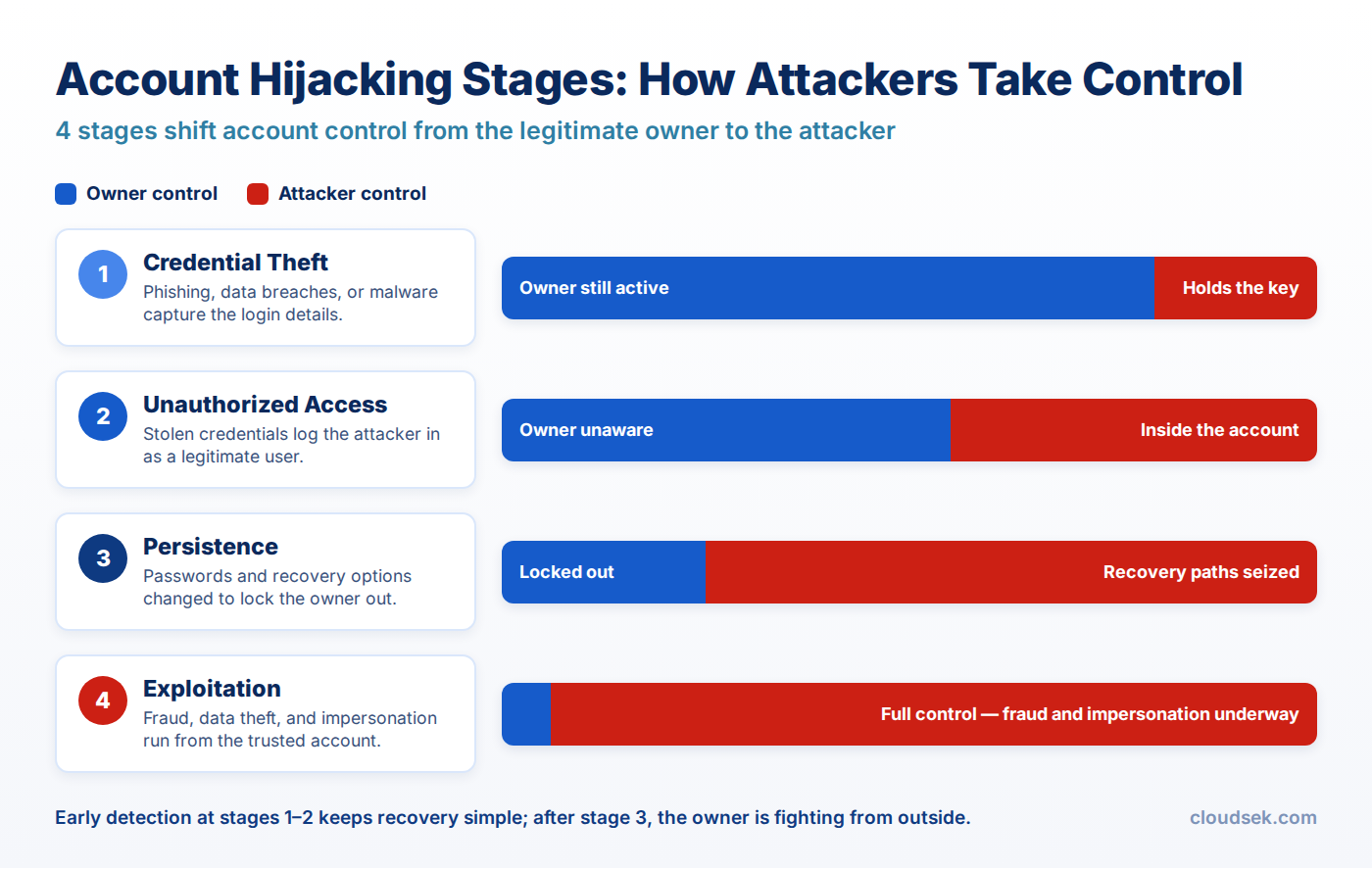
First, attackers obtain login details through phishing emails, keylogging, fake websites, malware, or data breaches. Users unknowingly share usernames and passwords, which gives attackers the initial access point.
After obtaining credentials, attackers use stolen credentials to log into the account. This access often appears legitimate because the correct login details are used. In many cases, attackers bypass weak security controls easily.
Attackers secure long-term access by changing passwords, adding recovery emails, or modifying security settings. These changes prevent the original user from regaining control quickly.
Attackers use the compromised account for malicious activities. This includes stealing data, sending phishing messages, making transactions, or accessing connected systems. Continuous access increases damage over time.
Account hijacking uses multiple attack methods that target credentials, sessions, and authentication systems to gain unauthorized access. Here are some common attack methods:
Phishing attacks trick users into sharing login details through fake emails or websites. Attackers create messages that appear legitimate and urgent. Users enter credentials on fake pages, which gives attackers direct access.
Credential stuffing uses leaked usernames and passwords from previous breaches. Attackers try these credentials across multiple platforms. This method works when users reuse the same password on different accounts.
Brute force attacks attempt many password combinations to guess the correct one. Automated tools test thousands of possibilities in a short time. Weak or simple passwords increase the success rate.
Malware and keyloggers capture user input and system activity. These tools record keystrokes, including usernames and passwords. Attackers use this data to access accounts without user awareness.
Session hijacking steals active login sessions instead of credentials. Attackers capture session cookies through unsecured networks or malicious scripts. Once obtained, they access accounts without entering login details.
Account hijacking shows clear signs through unusual activity, unexpected changes, and security alerts across accounts. Here are the signs you must look for:

Unrecognized logins appear from unknown devices or locations. Alerts may show access from different countries or at unusual times. This indicates possible unauthorized access.
Passwords, recovery emails, or security settings change without user action. These changes prevent the original user from accessing the account. Unauthorized modifications signal account takeover.
Unusual transactions, emails, or messages are sent without the user's knowledge. Accounts may send spam, phishing links, or perform financial actions. These activities indicate misuse of the account.
Repeated failed login attempts or sudden account lockouts occur. Attackers try multiple credentials or change access settings. This behavior often appears before or during account hijacking.
Security alerts notify users about suspicious activity or login attempts. In some cases, attackers disable features such as multi-factor authentication or notifications. Changes in security settings indicate unauthorized control.
Preventing account hijacking requires strong authentication, secure recovery settings, and continuous monitoring of account activity. Here are the best strategies to prevent account hijacking attacks:
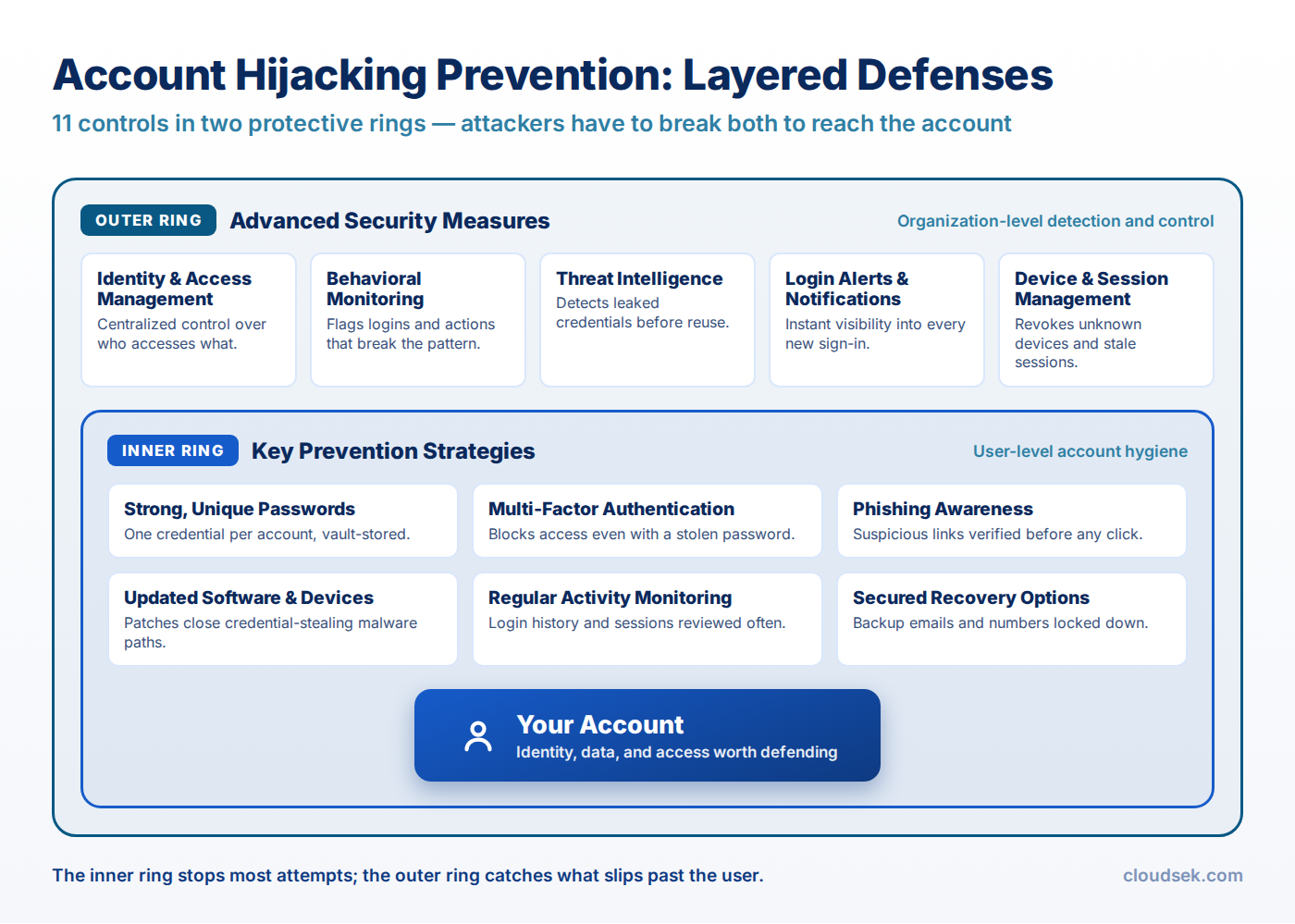
Keep strong passwords using a mix of letters, numbers, and symbols. Each account must have a unique password. Unique credentials reduce the risk of multiple accounts being compromised at once.
Multi-factor authentication adds an extra verification step during login. Users confirm identity through a code, app, or device. This blocks access even if passwords are stolen.
Users must avoid clicking unknown links or downloading untrusted files. Phishing attempts often look legitimate and request login details. Careful verification prevents credential theft.
Regular updates fix security vulnerabilities in systems and applications. Attackers exploit outdated software to gain access. Updated systems reduce these entry points.
Regular monitoring helps detect unusual logins, changes, or transactions. Early detection allows quick action to secure accounts. Continuous checks reduce long-term damage.
Recovery emails, phone numbers, and linked accounts must be protected with strong security settings. Attackers often target these to reset passwords and regain access. Secured recovery options prevent unauthorized account takeover.
Identity and Access Management controls who can access systems and accounts. It enforces role-based access and authentication policies. Centralized control reduces unauthorized access and improves security management.
Behavioral monitoring tracks user activity such as login patterns, device usage, and access behavior. Unusual activity, such as logins from new locations or abnormal actions, triggers alerts. This helps detect account compromise early.
Threat intelligence provides data on known attack patterns, malicious IPs, and compromised credentials. Security systems use this data to block suspicious activity. Updated intelligence improves detection accuracy and response speed.
Login alerts notify users about new or suspicious login attempts. Real-time notifications help users take immediate action if unauthorized access occurs. Early alerts reduce the risk of prolonged account compromise.
Device and session management tracks all logged-in devices and active sessions. Users can review and remove unknown sessions instantly. This control limits attacker access even after a successful login.
Best practices strengthen account security by improving user behavior, controlling access points, and reducing hidden risks across systems and connected services.
Regular password updates reduce the risk of long-term credential exposure. Strong passwords must include a mix of characters and avoid reuse across accounts. Frequent updates limit the usefulness of stolen credentials and reduce attack success.
Access to critical accounts must follow the principle of least privilege. Only authorized users receive access based on roles and responsibilities. Restricted access reduces the attack surface and prevents unnecessary exposure of sensitive systems.
Secure networks protect login data from interception during transmission. Encrypted connections such as HTTPS reduce the risk of credential theft. Avoiding public or unsecured Wi-Fi prevents attacks like session hijacking and man-in-the-middle interception.
Logging out from shared or public devices prevents unauthorized reuse of active sessions. Sessions remain valid if users do not sign out properly. Ending sessions ensures no one else can access the account without authentication.
User awareness reduces the risk of phishing, social engineering, and credential misuse. Training helps users identify fake emails, suspicious links, and unusual requests. Informed users act as a strong first layer of defense.
Accounts often connect to third-party applications and services over time. Each integration introduces a potential entry point for attackers. Regularly reviewing permissions helps identify unnecessary or outdated access. Removing unused apps and limiting permissions reduces hidden vulnerabilities and strengthens overall account security.
Preventing account hijacking requires more than passwords, MFA, and access policies. Many account takeover attacks begin with leaked credentials, phishing infrastructure, impersonation campaigns, or compromised authentication data operating outside internal environments.
CloudSEK’s XVigil platform helps organizations identify external risks linked to account hijacking through continuous monitoring of:
Early visibility into these signals helps security teams:
CloudSEK’s Threat Intelligence capabilities provide additional context on attacker behavior, credential abuse trends, malware campaigns, and emerging account compromise techniques. This broader threat visibility helps organizations improve detection, prioritize high-risk threats, and strengthen defenses against credential theft, phishing-led compromise, and unauthorized account access.
The following real-world cases show how attackers exploit weak security to take over accounts.
In July 2020, attackers targeted Twitter by using social engineering to access internal admin tools. They hijacked over 130 high-profile accounts, including those of Elon Musk and Barack Obama. The attackers posted fraudulent cryptocurrency messages, which led to financial losses for users. The incident exposed weaknesses in internal access controls and caused major reputational damage.
Between 2013 and 2015, attackers conducted a large-scale business email compromise targeting Google and Facebook. The attacker impersonated a trusted vendor and hijacked communication channels using fake invoices and email accounts. Employees authorized payments based on these compromised accounts. The attack resulted in losses of over $100 million and highlighted the risks of account-based fraud.
In 2013 and 2014, Yahoo suffered one of the largest account hijacking incidents in history. State-sponsored attackers accessed user databases and compromised over 3 billion accounts. Stolen data included email addresses, passwords, and security questions. Attackers used this information to hijack accounts and gain long-term access. The breach caused severe reputational damage and led to major changes in Yahoo’s business operations.
The fastest way is to reset the password and use account recovery options immediately. Contact support if access is fully lost, and secure linked accounts at the same time.
Account hijacking can happen without a password leak through session hijacking or malware. Attackers use stolen session tokens or infected devices to gain access.
Email, banking, and social media accounts are the most targeted. These accounts contain sensitive data and provide access to other connected services.
Hackers bypass MFA using phishing, SIM swapping, or session hijacking. They trick users into sharing codes or intercepting authentication processes.
A hacked account can lead to the compromise of other linked accounts. Attackers use access to reset passwords and move across connected services.
