🚀 A CloudSEK se torna a primeira empresa de segurança cibernética de origem indiana a receber investimentos da
Leia mais
.avif)

A brute force attack is a cyberattack where attackers repeatedly try different password combinations to gain unauthorized access, which leads to account compromise, data theft, and system disruption.
Attackers use automated tools to test thousands or even millions of password combinations in a short time. These tools target login pages, admin panels, and exposed services. Weak or commonly used passwords increase the success rate of these attacks.
Brute force attacks focus on gaining access rather than exploiting software flaws. Once attackers find the correct credentials, they enter the system as legitimate users. This makes detection harder because the login appears normal.
The impact is serious for both individuals and organizations. Attackers can take over accounts, steal sensitive data, and perform unauthorized actions. In business environments, this leads to data breaches, financial loss, and service disruption. Preventing brute force attacks protects access, data, and overall system security.
According to Akamai’s State of the Internet Report, over 30% of all login attempts across the internet are malicious, with many linked to brute force and credential stuffing attacks targeting user accounts at scale.
Brute force attacks follow a connected 4-step process that moves from target identification to full system exploitation.
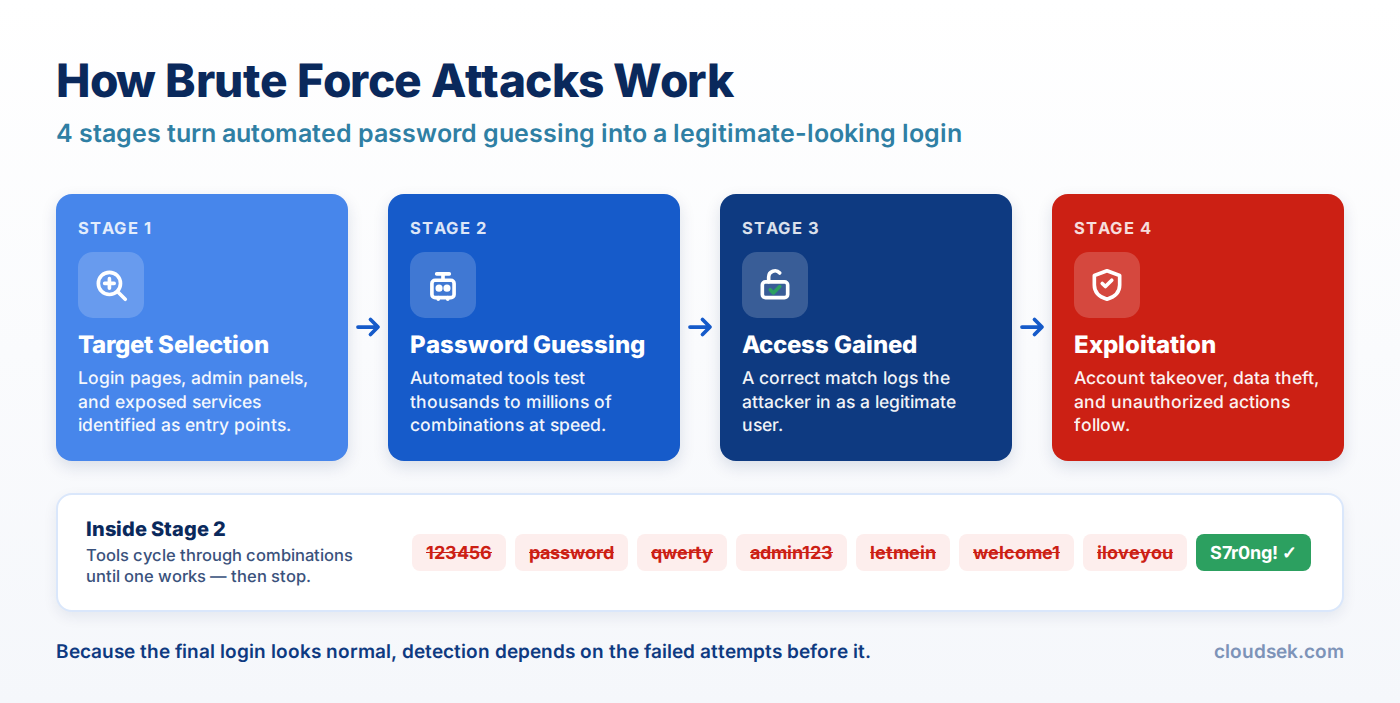
Target selection begins the attack by identifying exposed login points such as websites, admin panels, or remote access services. These endpoints allow repeated login attempts. Weak protections and publicly accessible interfaces increase the chances of being targeted.
After target selection, attackers perform password guessing by launching automated login attempts. Attackers use tools that test thousands of password combinations, including common passwords, wordlists, random combinations, or leaked credentials. High-speed attempts increase the probability of finding valid login details.
Access gained follows password guessing when the correct credentials match the system. The attacker logs in as a legitimate user without triggering immediate suspicion. Valid authentication allows direct entry into the account or system.
When attackers gain access, they use a compromised account for malicious actions. Attackers steal sensitive data, change settings, or escalate privileges. Continuous access allows long-term control and increases overall impact.
Brute force attacks show clear signs through repeated login failures, unusual access behavior, and noticeable system strain. Here are those signs:
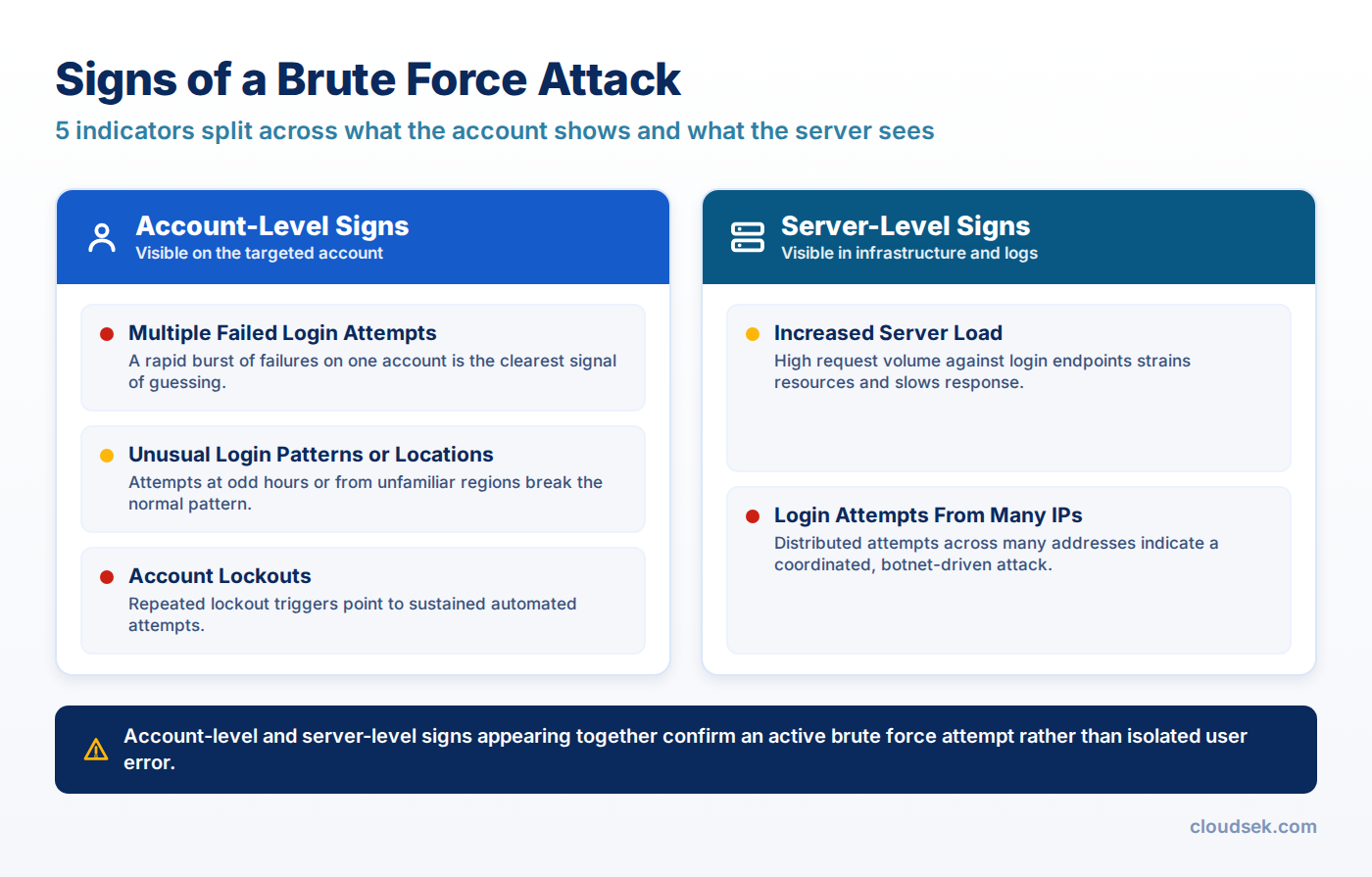
A large number of login failures appear within seconds or minutes. These attempts often target the same account or multiple accounts. This pattern shows that automated tools are trying different passwords continuously.
Login attempts occur at unusual times, such as late at night or early in the morning. Access requests may come from countries or regions where the user does not operate. These sudden changes indicate possible unauthorized activity.
Accounts get locked after too many incorrect password attempts. This happens because security settings block further login attempts. Frequent lockouts across multiple accounts suggest an ongoing brute-force attack.
The system becomes slow or unresponsive due to a high number of login requests. Servers process thousands of attempts simultaneously, increasing CPU and memory usage. This can affect normal users and reduce system performance.
Login attempts come from many different IP addresses in a short time. Attackers use distributed networks or botnets to spread their attempts. This makes the attack harder to detect and block using simple filters.
Preventing brute force attacks requires controls that reduce password guessing success and block repeated automated attempts. The following strategies are the best to prevent brute force attacks:
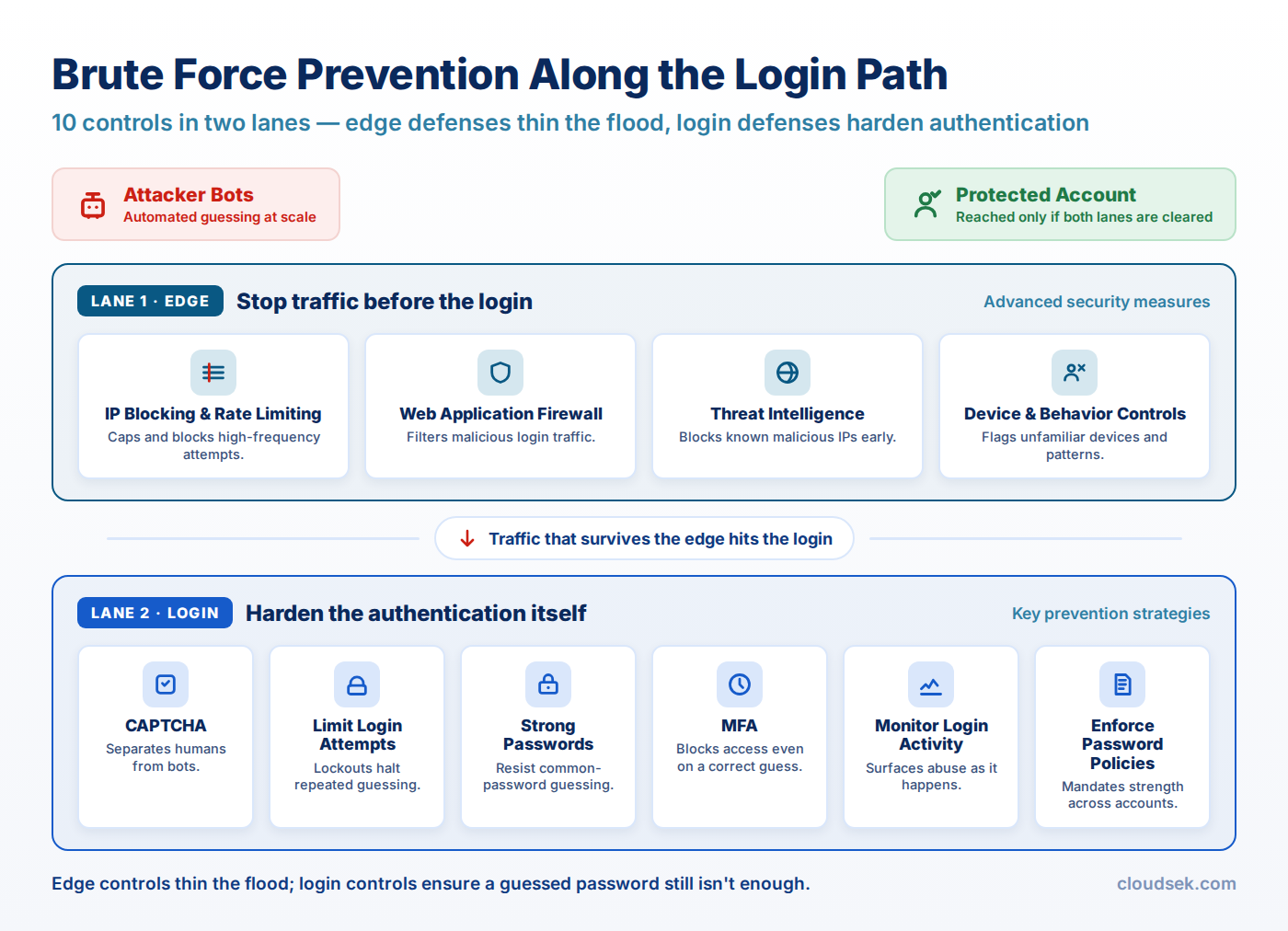
Strong passwords make guessing extremely difficult. Use at least 12–16 characters with a mix of uppercase letters, lowercase letters, numbers, and symbols. Avoid names, dates, or common patterns. Longer and more complex passwords increase resistance against automated attacks.
MFA adds an extra layer of security beyond the password. Users verify their identity through a second factor, such as a mobile app or OTP. Even if attackers guess the password, they cannot access the account without this second step.
Limiting login attempts blocks repeated guessing. Systems allow only a fixed number of failed attempts, such as 3–5 tries, before temporarily locking access. This slows down automated tools and reduces attack efficiency.
CAPTCHA adds a human verification step during login attempts. Automated bots fail to solve these challenges. This prevents scripts from continuously trying passwords at high speed.
Monitoring tracks login attempts, failures, and unusual patterns. Security systems identify suspicious behavior such as rapid login attempts or unknown locations. Early detection helps block attacks before access is gained.
Password policies define rules for creating and updating passwords. These rules include minimum length, complexity requirements, and regular password changes. Strong policies reduce the chances of weak or reused passwords.
Advanced measures stop automated attacks at scale, control access patterns, and detect suspicious behavior during login attempts.
Account lockout blocks access after a fixed number of failed login attempts. Systems temporarily disable login for a defined period, such as 15–30 minutes. This prevents continuous password guessing and protects targeted accounts from repeated attacks.
IP blocking denies access from sources that generate excessive login requests. Rate limiting restricts the number of attempts allowed within a short time frame. These controls slow down automated tools and reduce attack success rates.
A Web Application Firewall filters incoming traffic before it reaches the application. It identifies patterns linked to brute force tools, such as repeated login requests or abnormal traffic spikes. Suspicious requests are blocked early, which protects login endpoints.
Threat intelligence provides real-time data on malicious IPs, botnets, and attack techniques. Security systems use this data to block known attackers automatically. Continuous updates improve protection against new and evolving threats.
Device and behavior-based controls analyze login patterns such as device type, location, and user activity. Systems detect unusual behavior, such as login attempts from new devices or abnormal usage patterns. Suspicious access can be blocked or challenged, even when credentials are correct.
CloudSEK’s XVigil platform helps organizations strengthen brute-force attack prevention by uncovering external signals connected to authentication abuse, credential exposure, and attacker preparation.
Key monitoring areas include:
These external insights help security teams strengthen defensive controls through:
Additionally, CloudSEK’s threat Intelligence capabilities add deeper context by connecting credential abuse activity with attacker campaigns, malicious infrastructure, and evolving authentication attack techniques. This broader visibility helps organizations reduce brute-force exposure, improve response prioritization, and strengthen protection against unauthorized account access.
Brute force attacks succeed due to weak passwords and a lack of protection mechanisms.
Brute force attacks cannot be fully eliminated, but can be significantly reduced with strong controls.
The best defense is strong passwords combined with MFA and login restrictions.
Yes, brute force attacks are common due to automated tools and widespread weak credentials.
