🚀 A CloudSEK se torna a primeira empresa de segurança cibernética de origem indiana a receber investimentos da
Leia mais
.avif)

POS security is the set of controls that protect point-of-sale systems and the payment card data flowing through them from malware, skimming, and unauthorized access. It spans the terminal a customer taps, the software running on it, the store network behind it, and the backend that routes each transaction to a payment processor.
Money keeps that pressure constant. Payment card fraud cost $33.41 billion worldwide during 2024 against $51.9 trillion in card volume, according to the Nilson Report, with card-not-present transactions standing as the most fraud-prone category across every region.
POS security protects every component that touches cardholder data during a sale. A modern point-of-sale system behaves less like a single device and more like a small distributed environment.
Four layers make up that environment: the terminal hardware with its card reader and PIN pad, the POS application processing each sale, the store network connecting them, and the backend systems talking to acquirers and payment gateways.
Most guidance stops at the terminal, which holds the smallest share of the risk. Attackers seldom defeat a card reader directly, preferring the software, the network, or the credentials that reach both.
Card data converts to cash faster than almost any other stolen asset, which keeps payment systems permanently in scope for financially motivated groups.
Retail estates multiply the opportunity. A chain running hundreds of near-identical terminals hands an attacker one software build to study and hundreds of places to deploy the result.
Flat store networks finish the picture, since terminals frequently share a segment with back-office machines, guest Wi-Fi, and equipment managed remotely by outside vendors.
Refresh cycles compound every other weakness. Terminals stay in service for a decade or longer, often running embedded operating system builds well past their support dates, so known vulnerabilities stay open long after vendors stop issuing fixes.
Large POS breaches follow a recognizable sequence, and the terminal is rarely the entry point:
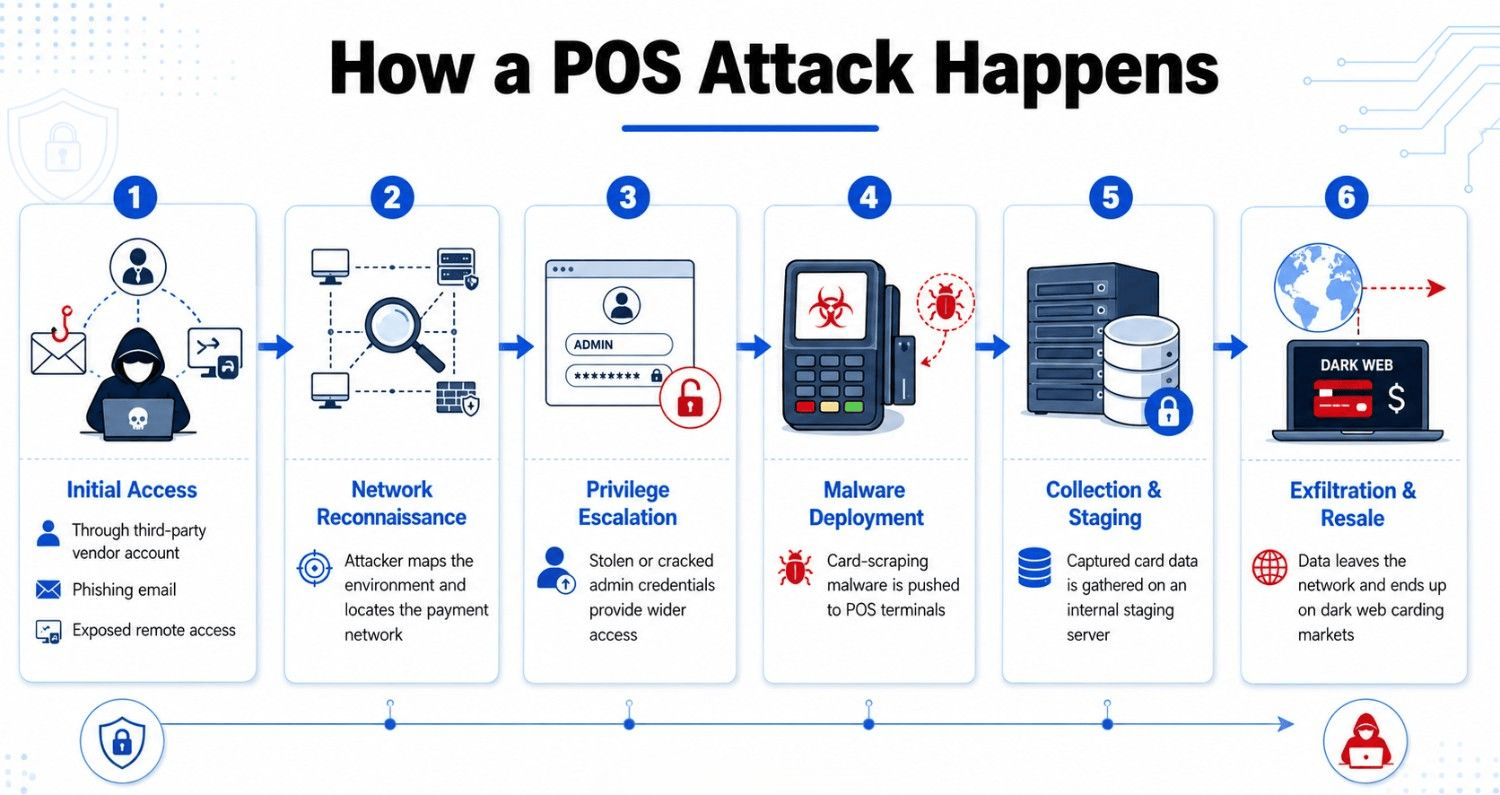
Card data arrives encrypted and sits decrypted in terminal memory for a fraction of a second while the transaction is authorized. RAM scrapers exist to capture that window, reading process memory for track-data patterns before encryption resumes.
Families such as BlackPOS, Alina, and MajikPOS built entire criminal economies on that single weakness, and variants continue to circulate wherever magnetic stripe fallback remains enabled.
Prilex shows how far POS malware has specialized. Instead of attacking a chip transaction directly, it blocks contactless payments outright, pushing the customer to insert the card so the malware captures data from a channel it knows how to read.
Skimmers attach over a card reader to copy magnetic stripe data, while shimmers sit inside the slot and intercept communication with the chip. Modern versions transmit over Bluetooth, so nobody has to return to the device to collect anything.
Online, the same theft runs in JavaScript. CloudSEK's reverse-engineering of a Magecart skimmer traced code that activates on page load, harvests the checkout form fields, encrypts the captured data with a hardcoded public key, and posts it to attacker infrastructure.
Encryption inside the skimmer defeats casual inspection of outbound traffic, and heavy obfuscation hides the code among legitimate scripts on the page.
These two cases still shape how the industry approaches POS security, and both failed at detection rather than prevention.
Target (2013). Attackers took 40 million payment cards along with personal records belonging to a further 70 million customers, according to a Congressional Research Service review. Security tooling flagged the intrusion while it was running, the alerts went uninvestigated, and an external payment processor eventually told Target what was happening. Costs passed $200 million.
Home Depot (2014). Custom malware ran on self-checkout systems across 2,200 stores from April to September, exposing 56 million payment cards in the largest point-of-sale compromise on record. Stolen vendor credentials opened the door, and five months passed before anyone noticed. Settlements reached $179 million.
Detection is the shared failure. Both retailers owned controls capable of catching the activity, and in both cases the card data left the building regardless.
EMV chip adoption rewrote the economics of card-present fraud. Cloned magnetic stripe data lost most of its value once terminals verified a chip, and the counterfeit fraud driving the Target and Home Depot era fell away.
Attackers followed the data. Card-not-present transactions require no chip, so the same groups moved to checkout pages, where one injected script harvests every card a shopper enters. That migration reshaped retail cybersecurity priorities well beyond the payment terminal.
Detection windows widened in the process. A checkout skimmer executes inside the customer's browser, invisible to server-side monitoring and web application firewalls, and campaigns routinely persist for months.
Four controls carry most of the defensive weight, and each one leaves a different gap:
PCI DSS sets the baseline every merchant handling card data works to, and version 4.0.1 raised it sharply. All 51 requirements previously treated as best practices became mandatory on 31 March 2025.
Two of them target e-skimming directly. Requirement 6.4.3 obliges merchants to inventory every script running on a payment page, document why each one belongs there, and confirm that none has been altered. Requirement 11.6.1 requires a tamper-detection mechanism that alerts staff when payment page content or security headers change without authorization.
Scope catches teams out here. Both requirements cover every script the page loads, including analytics tags, chat widgets, and testing tools that marketing adds without security review.
Effective POS security combines isolation, hygiene, and monitoring. The practices that carry the most weight:
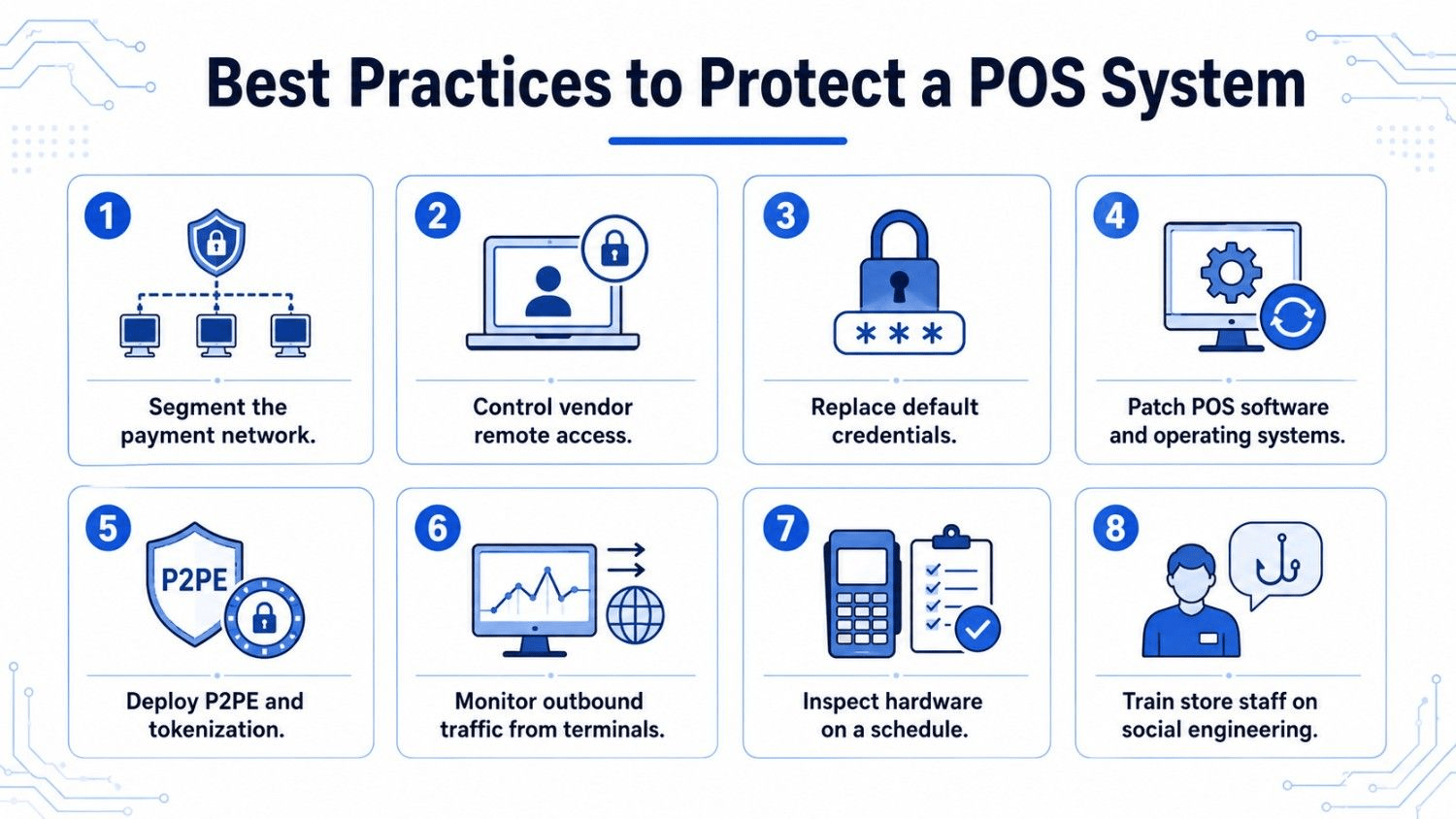
Compromise rarely announces itself, though several indicators surface before the losses do:
Merchants commonly learn of a POS breach from a card brand's common point of purchase alert, months after the malware landed. By that stage, the data has been packaged, priced, and sold.
CloudSEK's XVigil monitors carding forums, dark web markets, and messaging channels for a brand's card data, leaked employee credentials, and stolen vendor access, closing the gap between compromise and discovery. SVigil extends that visibility to suppliers, whose remote access remains the most common way attackers reach a payment environment in the first place.
Yes, smaller merchants face higher relative risk, since attackers target them for weaker controls and unpatched systems. PCI DSS obligations apply regardless of transaction volume.
Liability generally falls on the merchant when negligence or PCI DSS non-compliance contributed to the breach. Card brands assess fines, and issuing banks recover reissuance and fraud costs.
Yes, an offline POS system can be compromised through physical skimmers, infected USB devices, or malware introduced during servicing. Isolation reduces exposure without eliminating it.
POS security protects the systems handling a transaction at the point of sale, while payment security covers the whole payment lifecycle. Gateways, processors, and stored card data fall under the wider term.
Cloud POS shifts patching and infrastructure security to the provider, which helps smaller merchants considerably. Responsibility for endpoints, staff access, and network configuration stays with the merchant.
Mobile POS shifts risk rather than removing it. Card data stays encrypted in transit, while the device introduces mobile malware, app tampering, and untrusted network exposure.
