🚀 A CloudSEK se torna a primeira empresa de segurança cibernética de origem indiana a receber investimentos da
Leia mais
.avif)

ClearFake is a malicious JavaScript framework that compromises legitimate websites and shows visitors fake browser-update or fake-CAPTCHA prompts to trick them into running malware that steals their data. The operators inject hidden code into hacked sites, mostly WordPress sites, then use social engineering to make victims install information stealers themselves. First documented in 2023, ClearFake has evolved continuously and remains a widespread threat, with one recent campaign linked to roughly 147,521 infections.
What makes ClearFake notable is its blend of two evasive techniques: EtherHiding, which hides malicious code inside blockchain smart contracts, and ClickFix, which convinces users to paste and run the attacker's own commands. This guide explains what ClearFake is, how its attack chain works, what EtherHiding and ClickFix are, the malware it delivers, who operates it, and how to detect and defend against it.
ClearFake is a threat-activity cluster that uses a malicious JavaScript framework to distribute malware through compromised websites. Its name refers to the JavaScript it injects in clear text into the sites it hijacks. Rather than exploiting a software flaw on the victim's machine, ClearFake relies on deception: it presents a convincing prompt and lets the user carry out the infection.
The framework's consistent goal is to deliver information-stealing malware that harvests credentials, browser data, and cryptocurrency wallets. ClearFake reaches victims across both Windows and macOS, and its operators have hit sectors including e-commerce, travel, automotive, and hospitality. Security vendors rank it among the more active web-based malware-delivery operations, and its reach comes from volume: a single compromised, high-traffic site can expose every visitor who lands on it.
ClearFake runs a multi-stage chain that starts on a trusted website and ends with malware on the victim's device. Each stage hands off to the next.
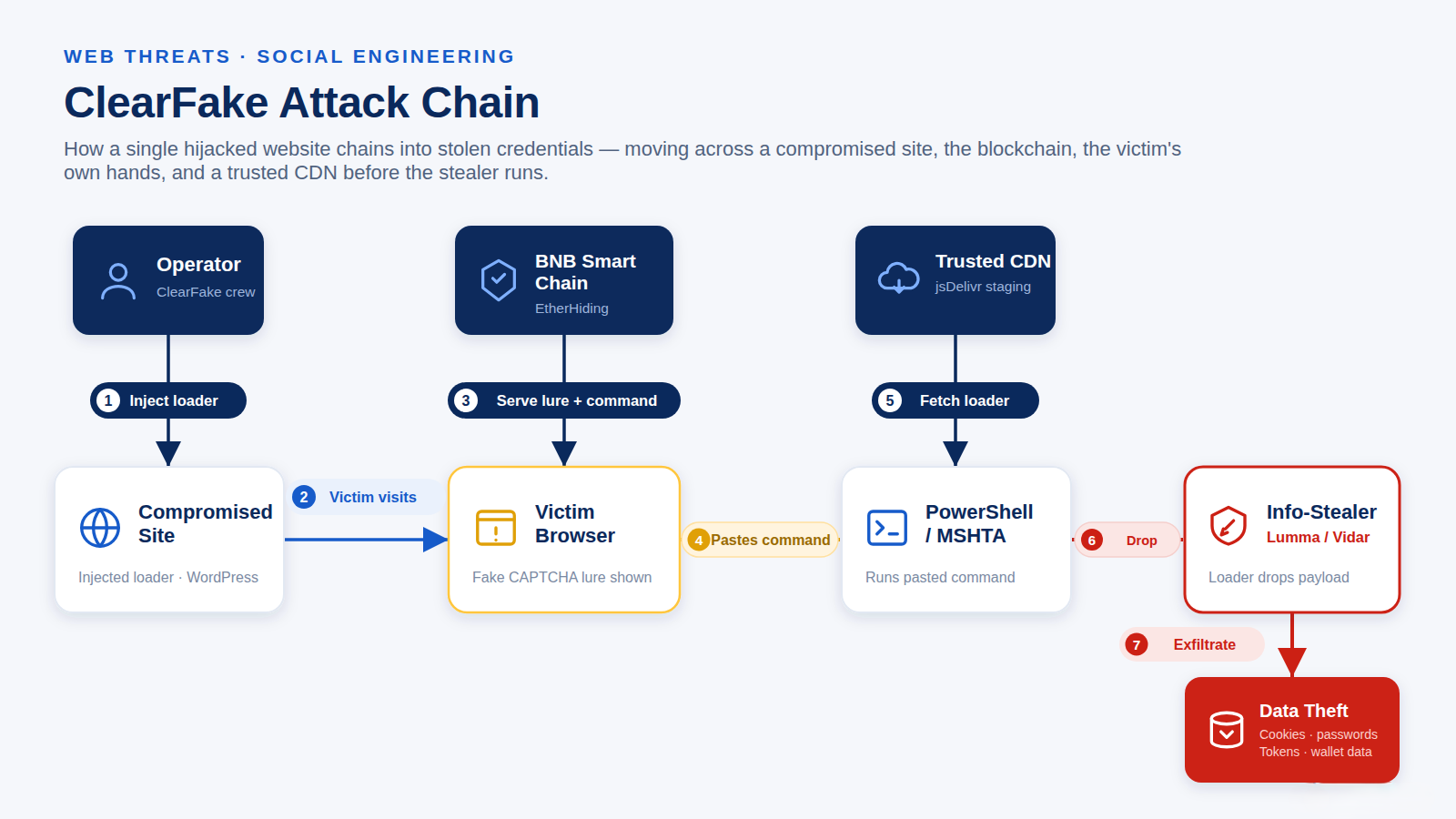
The operators first break into legitimate websites, most often WordPress sites with weak credentials or unpatched plugins, and inject a small loader script. Victims arrive at these sites through normal browsing, search engine optimization (SEO) poisoning, or malvertising, so the lure appears on a site they have no reason to distrust. Researchers have counted thousands of compromised sites carrying ClearFake injections at a single point in time, and the operators favor high-traffic targets so each hijacked page reaches many visitors.
The injected script overlays a fake prompt on the page. Early ClearFake used counterfeit browser-update pages for Chrome, Edge, and Firefox. Newer versions display a fake CAPTCHA or a fake reCAPTCHA and Cloudflare Turnstile challenge that asks the visitor to confirm they are human or to fix a technical issue.
When the victim interacts with the lure, the page silently copies a malicious command to the clipboard, then instructs the user to press Windows+R, paste the command, and press Enter. The command launches PowerShell or the Microsoft HTML Application Host (MSHTA) to fetch the next stage. Because the user runs the command, the activity looks user-initiated and slips past defenses that watch for downloaded files.
Before showing the lure, the script fingerprints the visitor's browser and operating system, and ClearFake has tailored its prompts across dozens of languages. The framework tracks which devices it has compromised to avoid infecting the same machine twice.
Instead of a normal server, ClearFake stores its code and configuration in smart contracts on the BNB Smart Chain. The injected JavaScript queries the blockchain to retrieve the next-stage script, the lure HTML, an AES decryption key, and the ClickFix command. This technique, named EtherHiding, makes the infrastructure hard to take down.
The retrieved command downloads a loader, such as Emmenhtal (known as PEAKLIGHT), which then drops the final payload: an information stealer like Lumma or Vidar. Recent chains stage the payload on trusted services such as the jsDelivr content delivery network to blend in with normal traffic.
Within seconds of execution, the stealer exfiltrates browser cookies, saved passwords, session tokens, and wallet data. Because stolen session tokens can let an attacker resume a logged-in session, this theft can sidestep multi-factor authentication entirely.
EtherHiding is a technique that stores malicious code inside blockchain smart contracts, turning a public blockchain into attacker infrastructure. Security researchers at Guardio Labs named it in 2023 after observing ClearFake use the BNB Smart Chain to host its payloads.
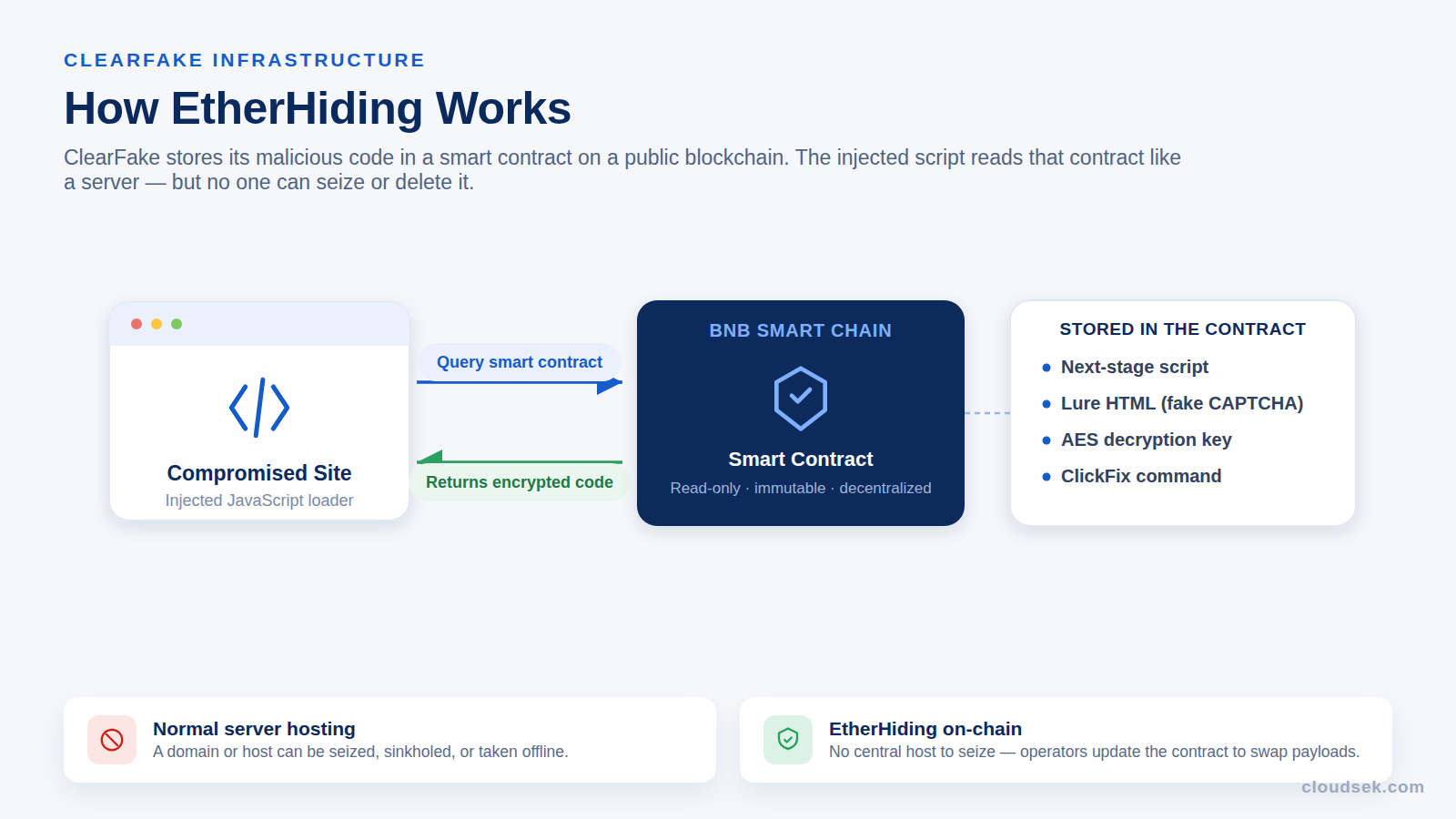
The approach gives attackers several advantages. Reading data from a smart contract is free and does not create a traceable transaction, so defenders cannot watch for tell-tale blockchain activity. The code on the chain is decentralized and effectively permanent, which means there is no server to seize and no domain to block. To update the malware, the operators simply point the contract at new code. The technique cuts both ways, because the immutability that frustrates takedown leaves the malicious code permanently visible to researchers.
ClearFake stores its JavaScript, AES keys, lure URLs, and ClickFix commands this way, and other threat actors have since adopted EtherHiding for their own campaigns. Security firms have observed the technique spread to other financially motivated and state-linked actors, a sign that blockchain-hosted malware is becoming a broader trend rather than one campaign's trick.
ClickFix is a social engineering technique that tricks a user into running malicious commands by disguising them as a verification step or a fix for a fake error. The lure copies a command to the clipboard and walks the victim through pasting and executing it, so the person becomes the one who launches the malware.
The relationship is straightforward: ClickFix is the technique, and ClearFake is one framework that uses it. ClearFake adopted ClickFix in May 2024, replacing its earlier fake-update downloads with fake-CAPTCHA copy-paste lures. ClickFix itself is widely shared across the threat landscape, with state-sponsored groups including APT28, Kimsuky, and MuddyWater all using it, so not every ClickFix attack is ClearFake. The fake-CAPTCHA idea spread quickly after a red-team proof of concept was published in 2024, and ClickFix kits are now sold by subscription, which has driven rapid adoption.
These three terms are often confused because they overlap, yet they sit at different levels. ClearFake and SocGholish are malware frameworks; ClickFix is a technique that frameworks like ClearFake use. The table sets them apart.
In short, a ClearFake attack often uses ClickFix, but a ClickFix attack is not always ClearFake, and SocGholish is a separate operation that shares the fake-update theme.
ClearFake is a delivery system, and its operators swap payloads frequently. The end goal is consistent: information theft. Microsoft has described Lumma Stealer as the payload most often tied to ClickFix-style delivery, and its analysis of Lumma's delivery documents the same EtherHiding and fake-CAPTCHA chain ClearFake uses. The table lists the malware families seen across ClearFake campaigns.
Whatever the specific family, the outcome concentrates on the identity layer. A single infection can hand an attacker the browser-stored cookies and passwords for an employee's email, cloud, and SaaS accounts, turning one careless click into a path to wider compromise.
The stolen credentials and session tokens are frequently sold on dark web markets and reused by other criminals for account takeover, fraud, and ransomware staging, so the damage often outlasts the initial infection.
ClearFake has persisted for years because it sidesteps the defenses most organizations rely on. Three traits make it hard to stop.
ClearFake has not stood still. Its operators update the framework, lures, and payloads frequently, which is part of why it has stayed effective for years. The timeline traces its main shifts.
Kroll, which tracks the campaign's delivery, has documented how the lures keep shifting, including MSHTA commands that disguise the payload behind fake "verification UID" text and an ".mp3" file extension. Its research on ClearFake's evolution shows operators changing techniques on a near-daily basis to stay ahead of detection.
ClearFake began as a financially motivated activity cluster rather than a single named group, defined by its shared toolkit rather than a known identity. It distributes commodity malware, much of it sold as a service on underground markets, which points to profit through stolen credentials and data rather than espionage. ClickFix kits and stealer subscriptions have lowered the barrier to entry, letting many operators run similar campaigns in parallel.
In October 2025, Mandiant attributed an evolved version of the framework, which it tracks as CLEARSHORT, to a financially motivated actor it calls UNC5142. This actor compromises WordPress sites and uses EtherHiding to distribute stealers, and its operations sit within a broader fake-update and ClickFix ecosystem. ClearFake remains distinct from SocGholish, an older fake-update operation run by the actor tracked as TA569, even though both lure victims with counterfeit browser updates.
Because ClearFake relies on the victim and on trusted infrastructure, it leaves behavioral traces rather than obvious malware files. Defenders can watch for several signals:
Defending against ClearFake means breaking the chain at the human step and the execution step. The following measures apply to individuals and organizations.
Endpoint controls stop execution, but security teams need to see the campaign and its fallout early. CloudSEK Threat Intelligence tracks fake-CAPTCHA and ClickFix campaigns, the infostealers they deliver, and their indicators of compromise and command-and-control infrastructure. CloudSEK's own research on fake CAPTCHA pages delivering Lumma Stealer maps the exact copy-paste chain ClearFake uses, giving defenders concrete detection signals.
That intelligence pairs with two further capabilities. CloudSEK XVigil monitors the dark web for the leaked credentials that ClearFake's stealers harvest, so teams learn when employee or customer logins surface for sale. CloudSEK BeVigil monitors an organization's external attack surface to flag whether its own web assets have been compromised to serve such lures. CloudSEK does not block malware on the endpoint; its role is threat intelligence and external visibility that help teams anticipate the campaign and contain its impact.
No. ClearFake is a malware-delivery framework, not a virus itself. It does not self-replicate; it uses fake prompts on compromised websites to trick users into installing other malware, usually information stealers.
ClickFix is the social-engineering technique of tricking users into pasting and running a command. ClearFake is a specific malware framework that uses ClickFix, among other methods. Many threat actors use ClickFix, so not every ClickFix attack is ClearFake.
ClearFake mainly installs information stealers such as Lumma Stealer and Vidar Stealer, often through loaders like Emmenhtal. Campaigns have delivered remote access trojans and macOS stealers, and the payload changes frequently.
Disconnect the device from the internet, run a full scan with reputable security software to remove the installed stealer, and change every password from another clean device. Because stealers exfiltrate data instantly, treat all stored credentials as compromised.
Um CAPTCHA legítimo nunca pede ao visitante que pressione Windows+R, abra o PowerShell ou cole e execute um comando. Qualquer etapa de verificação que exija atalhos de teclado ou a execução de texto é uma armadilha do tipo ClickFix; feche-a imediatamente.
Sim. A maior parte da atividade do ClearFake tem como alvo o Windows, mas as campanhas já distribuíram o malware Atomic (AMOS) para usuários de macOS por meio das mesmas armadilhas de CAPTCHA falso, portanto, os usuários de Mac correm um risco real.
