🚀 CloudSEK featured in the 2026 Frost Radar™!
Read more
.avif)

A macro virus is malware written in the macro language of a host application, in practice Visual Basic for Applications (VBA), that executes when a user opens an infected document and permits macro content to run. The malicious code lives inside the file itself rather than in a separate executable, so an infected document travels through ordinary business workflows without the file size, extension, or icon that would mark it as a program.
Macro viruses target the application rather than the operating system. A Word file carrying malicious VBA behaves the same way across Windows builds running a permissive Office configuration, and the same document logic executes in Office for Mac. That application-level dependency is what kept the category alive across three decades of endpoint security.
Two developments reshaped the threat after 2022. Microsoft began blocking macros by default in Office files that arrive from the internet, and criminal groups moved most commodity malware delivery to container files, shortcuts, and browser-based lures. Macro-based intrusion did not end. It narrowed into targeted espionage campaigns and into the specific conditions where the default block never applies.
A macro virus executes when the host application opens the infected file and runs an auto-executing macro procedure. Word triggers routines named AutoOpen or Document_Open, and Excel triggers Workbook_Open, which gives the embedded code control before the user reads a single line of the document.
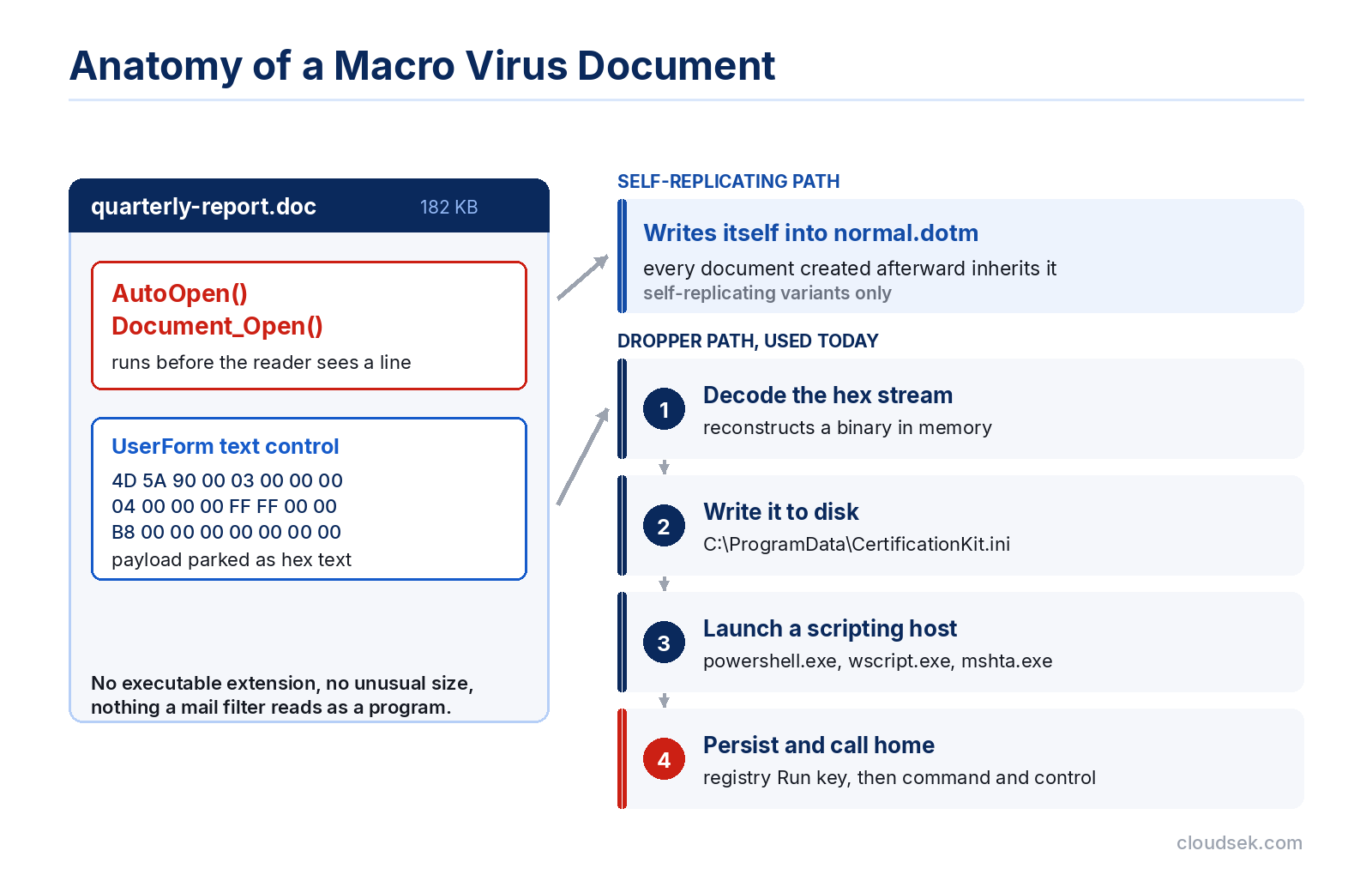
The classic macro virus achieves persistence by writing itself into the global template. In Word, that template is “Normal.dotm”, a file loaded every time the application starts. Once the global template carries the macro, every document created or saved afterward inherits the infection, which is the mechanism that turns a single opened attachment into a self-sustaining outbreak across a file share.
Modern macro code rarely performs damage directly. Instead, it stages a second payload: decoding an embedded binary, writing it to disk, and launching it through a scripting host such as PowerShell or WScript. This dropper behavior places macro abuse in the broader malware delivery chain rather than in the narrow category of self-replicating file infectors.
A macro virus self-replicates by infecting other documents or the application’s global template, while macro malware runs once as a dropper and never reproduces itself. Both arrive inside a document, and both depend on macro execution, and that shared delivery route is why the two terms became interchangeable in general usage.
Concept and Melissa were true viruses in the strict sense. They copied their own code into other files and spread without further attacker involvement. Almost nothing distributed today behaves that way, because self-replication generates noise that modern detection catches quickly and offers an attacker no advantage over simply sending more phishing emails.
The distinction changes the response. Recovering from a self-replicating macro virus means finding and cleaning every infected document and template across the estate, whereas recovering from a macro dropper means hunting the second-stage implant it installed, since the document itself is inert once the payload lands.
Four attributes separate a macro virus from the malware categories it gets confused with: whether it needs a host file, whether it needs user interaction, whether it reproduces on its own, and how it reaches the target.
Dependency is the defining trait. A macro virus cannot execute outside its host document and the application that interprets its macro language, which is precisely why blocking macro execution neutralizes the entire category rather than merely reducing its success rate.
Two outbreaks from the 1990s established the macro virus as a distinct malware class and drove the Office security defaults that remain in force today.
Concept was the first macro virus to spread widely, infecting Microsoft Word 6.0 and Word 95 documents from 1995 onward. It carried no destructive payload beyond displaying a dialog box containing a single digit, yet it became the most widespread virus in circulation within roughly a year.
Its significance was conceptual rather than technical. The concept proved that a data file, which security tools of the era treated as inert content, executed code as readily as a program did. Antivirus engines built to scan executables had no mechanism for parsing VBA streams inside a document, and the industry spent the following two years rebuilding detection to cover office formats.
Melissa combined macro infection with automated email distribution, and that pairing made it the fastest-spreading outbreak of its time. Released on 26 March 1999, it arrived as a Word document, and on execution its macro read the victim’s Microsoft Outlook address book and mailed a copy of the infected file to the first 50 contacts it found. According to the FBI, cleanup and repair of affected systems cost an estimated $80 million, and organizations, including government agencies, shut down mail servers entirely to halt the traffic. Its author, David L. Smith, was arrested on 1 April 1999 and later sentenced to 20 months in federal prison with a $5,000 fine.
Social trust propagated the infection faster than any technical exploit could have. Each infected message arrived from a genuine colleague’s mailbox, carrying a real name and a plausible subject line, and that authenticity defeated the judgment recipients would have applied to a message from a stranger.
Microsoft began blocking VBA macros by default in Office files carrying the Mark of the Web during 2022, removing the one-click Enable Content path that macro malware relied on. The change covers Access, Excel, PowerPoint, Visio, and Word on Windows, and it replaces the trust-bar button with a warning that offers no option to run the macro. Microsoft’s documentation confirms that a user now unblocks such a file deliberately by opening its properties and selecting Unblock or by running the Unblock-File cmdlet in PowerShell.
Mark of the Web is the mechanism underneath. Windows attaches a “Zone.Identifier” alternate data stream to files that arrive from the internet or a restricted zone, recording the originating zone, and Office reads that marker to decide whether the document deserves Protected View and a macro block.
Criminal groups abandoned macros faster than most defenders expected. Campaign telemetry gathered between October 2021 and June 2022 recorded a 66% decline in macro use alongside a 175% rise in container files, with malicious LNK shortcut files climbing by 1,675% over the same window. The replacements share one property: each delivers an executable payload without asking the victim to enable anything.
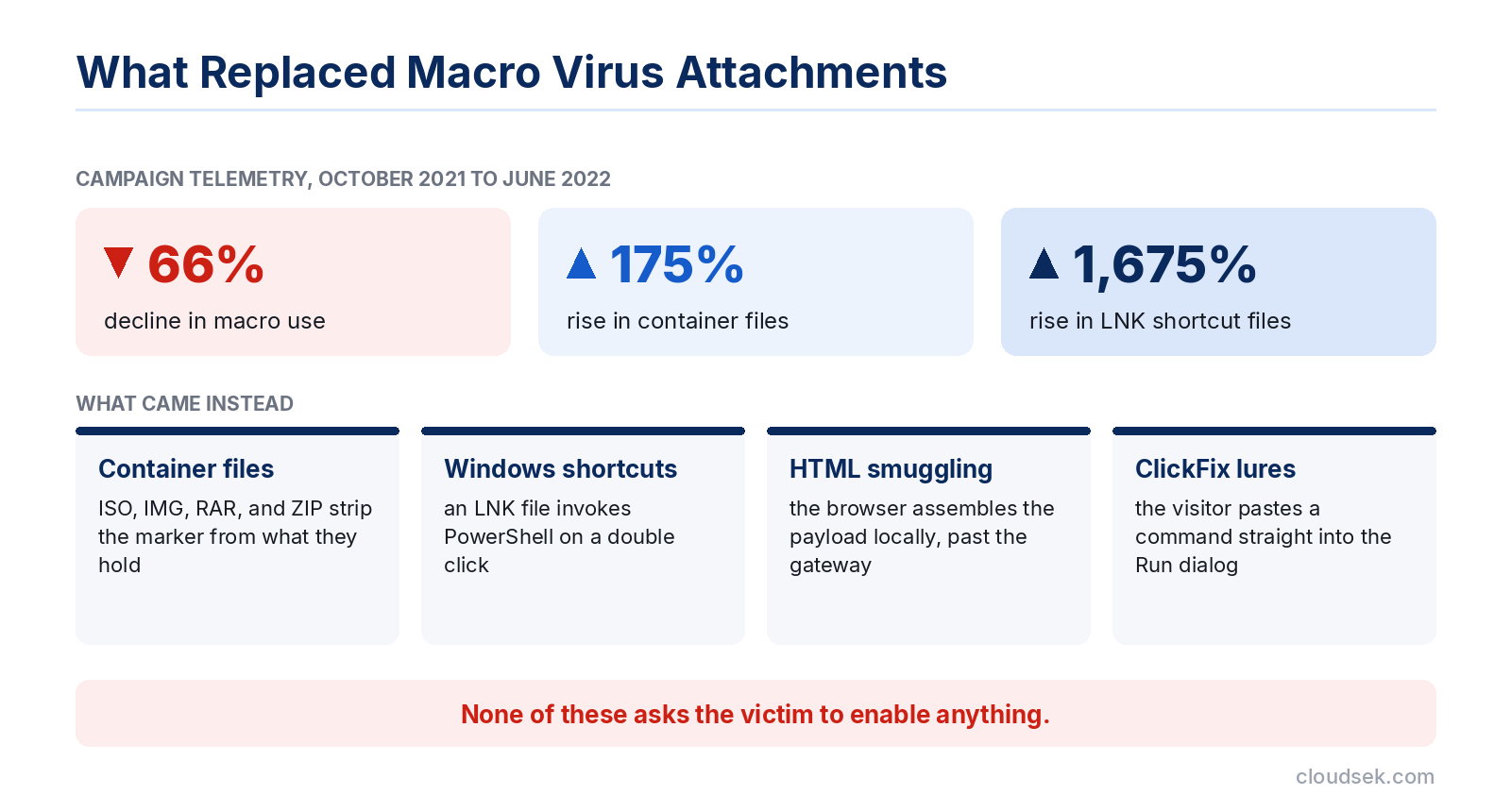
These chains carried the same follow-on payloads that macros once delivered, including loaders that hand access to ransomware operators further along the intrusion.
The default block applies only where the Mark of the Web exists, and several ordinary conditions strip it. CloudSEK research into Zone.Identifier bypasses documented the most reliable of them: when a malicious document is packed inside an ISO, the browser writes the zone marker to the container alone, and files extracted from that container reach disk with no “Zone.Identifier” stream at all. Windows treats the extracted document as a local file, Protected View stays silent, and the macro executes with no sandbox between it and the host.
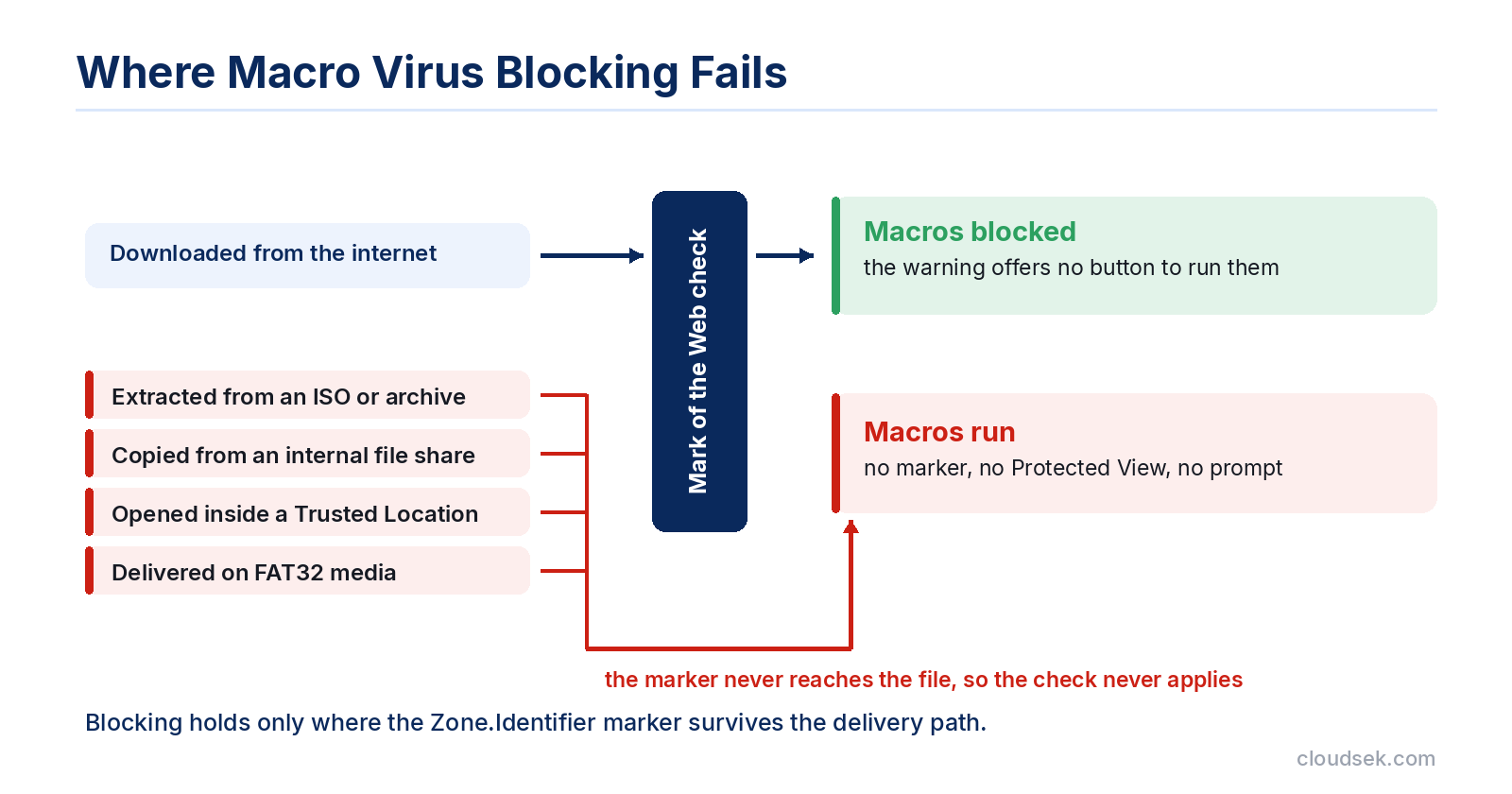
Three further gaps keep macro execution viable. Files copied from an internal file share or a mapped drive never receive the marker, so an attacker who reaches one share turns every downstream recipient into an unprotected target. Folders added to Trusted Locations bypass the check by design, and a user who designates the Downloads folder as trusted disables the protection for everything arriving there. FAT32-formatted media stores no alternate data streams, which means a document delivered on a USB stick carries no zone information at any point.
Yes, macro-based delivery remains operational, concentrated now in targeted intrusions where the attacker controls the pretext and the recipient has reason to trust the sender. Commodity crimeware moved on, but espionage operators kept macros because a convincing lure still persuades a specific person to unblock a specific file.
CloudSEK’s TRIAD team documented a live example in January 2026, attributing a spearphishing campaign delivering the RustyWater implant to the Iran-linked MuddyWater group. The emails posed as cybersecurity guidance and carried a Word attachment named Cybersecurity.doc, using icon spoofing to make the file resemble a trusted document type.
The macro chain inside that document illustrates current tradecraft precisely. Two VBA routines read a hex-encoded byte stream out of a UserForm text control, decode it, and write the reconstructed binary to C:\ProgramData\CertificationKit.ini, a path and extension chosen so the payload reads as configuration data. The dropped file is a Rust-compiled executable that scans for more than 25 antivirus and EDR products before acting, establishes persistence through a registry Run key, and layers JSON, base64, and XOR encoding over its command-and-control traffic.
Targeting covered diplomatic, maritime, financial, and telecom organizations across the Middle East, and some lures were sent from compromised legitimate accounts. That sender authenticity is the same property that made Melissa effective in 1999, applied to spear phishing against named individuals rather than mass distribution.
Macro infections announce themselves through changes to document behavior rather than through obvious system damage. The following indicators warrant investigation.
Macro virus detection pairs static inspection of the document’s VBA streams with behavioral monitoring of what the Office process does after the file opens. Signature scanning alone misses obfuscated and newly compiled samples, which makes the two-layer approach necessary rather than optional.
Office documents store macros in OLE streams that open-source tooling reads directly. The oletools suite is the standard starting point: oleid reports whether a file contains a VBA project, olevba extracts and deobfuscates the source, and oledump isolates individual streams for inspection.
Analysts look for a small set of high-signal constructs. Auto-execution entry points such as AutoOpen, Document_Open, and Workbook_Open indicate code that runs without further interaction. Calls to Shell, WScript.Shell, or CreateObject point to process launching. Long hex or base64 strings stored in form controls, hidden worksheets, or document properties signal a staged payload, exactly the pattern seen in the RustyWater documents. A mismatch between compiled p-code and stored VBA source indicates VBA stomping, a technique that hides the real logic from source-level scanners.
Process lineage produces the clearest behavioral signal, because a document editor has no legitimate reason to spawn a command interpreter. Microsoft’s Attack Surface Reduction rules encode this directly, block Office applications from creating child processes, and running those rules in audit mode first reveals which legitimate business macros would break before enforcement begins.
Process-creation logging captures the parent-child relationships that matter, whether through Sysmon or native Windows auditing. PowerShell script block logging records the decoded contents of obfuscated commands, which exposes the payload URL that static analysis of the document alone would not reveal.
Removal proceeds in a fixed order, because cleaning the document before hunting the payload leaves the actual implant running. Work through the following steps.
Prevention rests on removing macro execution as an available path rather than on catching malicious macros individually. The controls below run from the highest impact downward.
User training carries real weight here because macro execution requires a deliberate human action. Awareness programs that teach staff to treat an Enable Content prompt as a decision point, rather than as an obstacle, address the exact moment the attack depends on. Broader recognition of phishing techniques extends that judgment to the lures that carry these documents.
Yes. Microsoft Office for Mac runs VBA, so a malicious macro executes there as it does on Windows.
Google Docs runs Apps Script in Google’s cloud sandbox and will not execute VBA, so imported documents lose their macros. LibreOffice uses LibreOffice Basic and does not run VBA by default, though it offers a compatibility mode that interprets some VBA code.
The macro-enabled Office formats are .docm, .xlsm, .pptm, .dotm, .xltm, .potm, and the add-in formats .xlam and .ppam. Legacy .doc, .xls, and .ppt files store macros as well. The .docx and .xlsx formats cannot contain macros at all.
Yes, for known samples, where engines detect the VBA signature and quarantine the file. Automatic removal misses obfuscated macros and, more importantly, addresses only the document rather than the second-stage payload it installed.
Yes, and removable media bypasses the strongest control. FAT32-formatted drives store no alternate data streams, so documents copied from them carry no Mark of the Web and fall outside the default macro block entirely.
The macro itself stops when the application closes, persisting only if it infected the global template. Any payload it dropped survives independently through registry keys, scheduled tasks, or startup entries, and remains active until removed directly.
Macro viruses occupy a narrower position than they did before 2022, and that narrowing makes them easier to misjudge. Default blocking removed the mass-distribution path that made Melissa possible, which is why commodity crimeware moved to containers and shortcuts within months of the change.
What survives is more selective and better resourced. State-aligned groups continue to send macro-laden documents to named targets because the technique still works against a recipient who trusts the sender, and every gap in Mark-of-the-Web coverage, whether an internal file share, a trusted folder, or a USB drive, restores the conditions the default block was written to eliminate. Treating macro execution as a privilege to be granted deliberately, rather than a setting to be left alone, is what closes the remaining distance.
