🚀 CloudSEK featured in the 2026 Frost Radar™!
Read more
.avif)

Trojan Horse attacks rarely begin with anything suspicious. Most start with a file that looks normal enough to open without a second thought.
That single action is usually all it takes for the malware to get inside a system and stay there quietly. No warnings appear, and nothing obvious breaks at first.
According to the AV-TEST Institute, an independent German cybersecurity research organization, more than 450,000 new malware and potentially unwanted application (PUA) samples are registered every day, with Trojans consistently ranking as the most prevalent malware category detected. Over time, these infections lead to data loss, account compromise, or deeper system access that feels difficult to trace back. Knowing how Trojans work makes it easier to recognize risk before damage becomes visible.
A Trojan Horse virus is malware that hides inside something that looks harmless or useful, making it easy for users to trust and open it. Once launched, the malicious code inside begins operating quietly in the background.
Its name comes from an old story of soldiers concealed inside a wooden structure used to infiltrate a guarded city. In computing, attackers use a similar tactic by placing malicious code inside files that look completely ordinary.
Trojans do not spread automatically and rely on user interaction to begin their activity. This reliance on deception helps them blend into many environments and avoid early detection.
Early Trojan programs emerged during the first wave of personal computers, a time when many users had limited awareness of digital threats. Curiosity often led people to open unfamiliar files that carried destructive instructions.
Internet growth in the 1990s created new paths for distribution through email attachments and free software downloads. Trust in familiar senders made many individuals easy targets during that era.
By the 2000s, Trojan activity shifted toward financial theft, surveillance, and targeted attacks orchestrated by organized cybercrime groups. Gradual changes in technique allowed these threats to remain hidden for long periods in both home and business systems.
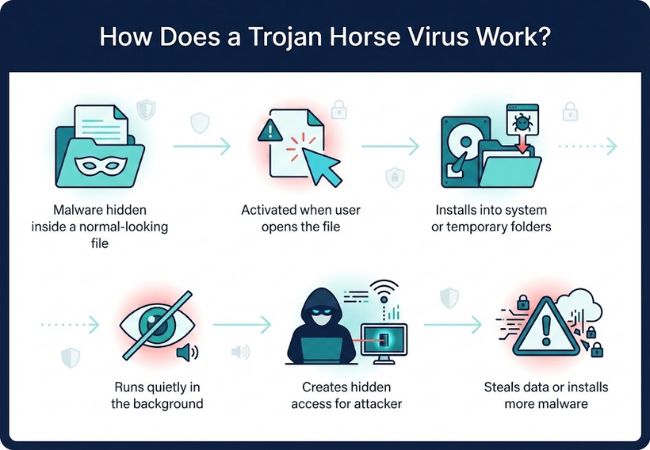
A Trojan starts its process by appearing safe, inviting users to interact with it without considering hidden risks. After that interaction, a chain of actions unfolds that quietly gives attackers access or control.
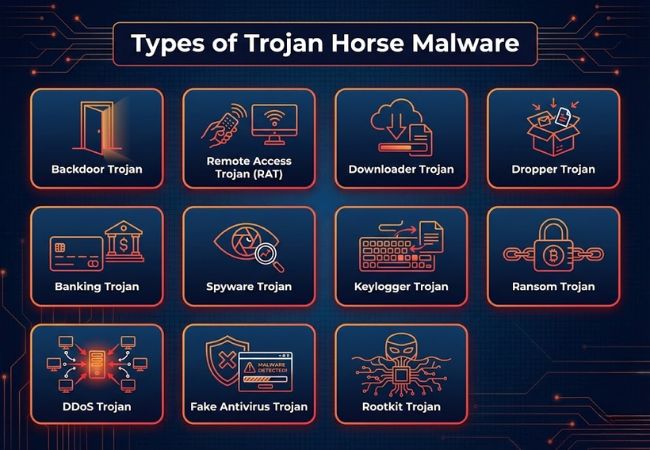
Trojan Horse malware appears in multiple forms because attackers adapt their methods based on goals such as access, control, data theft, or long-term concealment.
Their main value is persistence, not immediate disruption. A single successful infection can be reused for repeated access. A backdoor lets an attacker return later to manage files, change settings, or plant additional tools; many long-term breaches still depend on this kind of quiet foothold.
RATs grew out of the same concepts used in legitimate remote administration software, but without consent or visibility. What this means in practice:
Became more common as security tools got better at catching all-in-one malware. Splitting access from payload delivery made infections easier to scale and harder to block early these Trojans simply connect out and pull in whatever comes next, based on attacker goals. Ransomware, spyware, and credential stealers often arrive through this second stage.
Droppers exist for one reason: hide what's truly being installed until execution happens.
Rose with online banking and digital payments, where credentials translate directly into money. Rather than breaking systems, these Trojans quietly capture sensitive access fake login pages, altered browser sessions, and injected prompts during real transactions. Losses often show up first; the root cause becomes clear only later.
Spyware Trojans are built for ongoing collection rather than fast impact. Their strength comes from staying active long enough to gather valuable patterns and private content:
Keylogger Trojans focus on one job: recording what gets typed. Passwords, one-time codes, private messages, and search terms all become useful from that stream. Even a short infection can leak access to email, banking, and work logins. Attackers often combine keylogging with spyware to capture context around stolen credentials.
Existed before modern ransomware went mainstream; early versions mainly restricted access rather than encrypting everything.
DDoS Trojans expanded as botnets became a reliable way to monetize compromised devices. Many infections focus less on harming the device owner and more on using that device as infrastructure: compromised systems generate traffic floods against targets, often on command, while owners frequently notice nothing besides occasional performance dips.
Grew popular when scare tactics proved profitable at scale.
Rootkit Trojans exist for concealment, especially when attackers want long-term access without being hunted out. System-level hiding makes ordinary checks and many tools less effective, since core components can be modified to mask malicious processes and files. Removal often requires deep cleanup steps, and sometimes a full reinstall becomes the safest option.
Trojan infections usually happen when users unknowingly interact with files, links, or software that attackers have designed to appear legitimate.
Phishing emails deliver Trojans through attachments or links disguised as invoices, alerts, or shared documents, and opening the file or clicking the link starts the infection without requiring any technical exploit.
Trojans commonly ride along with free software, cracked programs, or fake tools from untrusted sources:
Attackers often imitate system or application updates to spread Trojans. Users who trust these prompts install malware while believing they are improving security or performance.
Urgency, fear, or curiosity do the real work here. A message that pressures someone to act fast leaves little room for careful inspection.
USB drives and other external storage can carry Trojan-infected files that execute through user interaction or autorun features once plugged in.
Trojan Horse malware causes harm by giving attackers control, visibility, or leverage over systems rather than creating immediate, obvious disruption.
Sensitive information such as personal files, login credentials, and financial records can be copied without notice. Stolen data is often reused for fraud, identity theft, or resale.
Usernames, passwords, and authentication tokens are frequently captured during normal activity, and access to one account often opens the door to wider exposure across connected services, the same escalation path covered in detail in how account hijacking unfolds.
This is where attackers move from watching to acting. Once inside, they may:
The most visible consequence for many victims. Banking Trojans and related payloads enable unauthorized transactions and account misuse, and losses often surface before any technical issue is even detected.
Compromised devices can be used as entry points into larger networks, exposing internal systems once trust boundaries are crossed, often through the same exposed or misconfigured assets tracked as part of an organization's attack surface.
Some Trojans aren't built for a quick payoff at all. They stay active for extended periods to monitor behavior and collect information, with impact building gradually rather than all at once.
Trojan infections stay hard to spot because many variants are built for stealth and long-term access rather than instant disruption.
Unusual lag, frequent crashes, or overheating can indicate hidden background processes consuming CPU and memory. Suspicion increases when the system slows down during simple tasks like browsing or opening files.
Unknown processes, odd file names, or unsigned executables in Task Manager, along with startup entries and scheduled tasks that don't ring a bell, often reveal the persistence mechanisms Trojans depend on.
Command-and-control communication often appears as:
Endpoint Detection and Response tools often flag suspicious process injection, credential dumping attempts, or abnormal script execution. Repeated detections tied to the same parent process usually signal an active infection chain.
Unauthorized logins, repeated failed sign-in attempts, or password reset emails you didn't request. MFA prompts that you did not trigger are also a strong warning sign, and any of these can point back to a keylogger or spyware Trojan.
Disabled antivirus, modified firewall rules, or blocked updates rarely happen by accident, since Trojans commonly weaken protection first to lower their own risk of detection.
Preventing Trojan infections depends on limiting user exposure, reducing system trust by default, and detecting suspicious behavior before damage occurs.
Trojan Horse malware remains effective because it relies on trust rather than technical force. A single careless interaction can give attackers access that lasts far longer than expected.
Understanding how Trojans work, how they spread, and how damage unfolds makes early detection far more likely. Strong security controls combined with informed user behavior remain the most reliable defense against this type of threat.
