SafePay Ransomware: TTPs, IOCs, Victims & Defense Guide

SafePay is a closed, LockBit-derived double-extortion ransomware group. See how it gains access, its attack chain, IOCs, MITRE mapping, and defenses.
Published on
Monday, September 21, 2026
Updated on
September 20, 2026

SafePay ransomware is a double-extortion ransomware operation that steals data, encrypts files with a .safepay extension, and threatens to publish the stolen data on its leak site.

A closed core team runs every stage of the operation, with no ransomware-as-a-service (RaaS) affiliates. That team gains access, moves through the network, steals data, and deploys an encryptor built on leaked LockBit Black code.

Valid VPN and RDP credentials open most SafePay intrusions, followed by standard administration tools that blend into normal activity. Identity controls and behavioral detection decide whether an attack stops at the login or ends in encryption.

SafePay Ransomware Profile at a Glance

SafePay's profile combines a centralized operating model, LockBit-derived malware, and credential-based intrusions.

  • First observed: Huntress analysts investigated two unrelated SafePay intrusions in October 2024, and later reporting confirmed activity at least a month earlier.
  • Operating model: A private group that develops its own encryptor, runs its own infrastructure, and negotiates directly with victims.
  • Malware lineage: An encryptor with extensive code overlap with the leaked LockBit Black (LockBit 3.0) builder, including shared command-line flags.
  • Extortion method: Data theft before encryption, followed by a leak site listing on Tor and a mirror on The Open Network (TON).
  • File artifacts: Encrypted files end in .safepay, and each affected folder receives a ransom note named readme_safepay.txt.
  • Stated motive: Financial gain, with the ransom note saying the group is not politically motivated.

How SafePay Ransomware Gains Initial Access

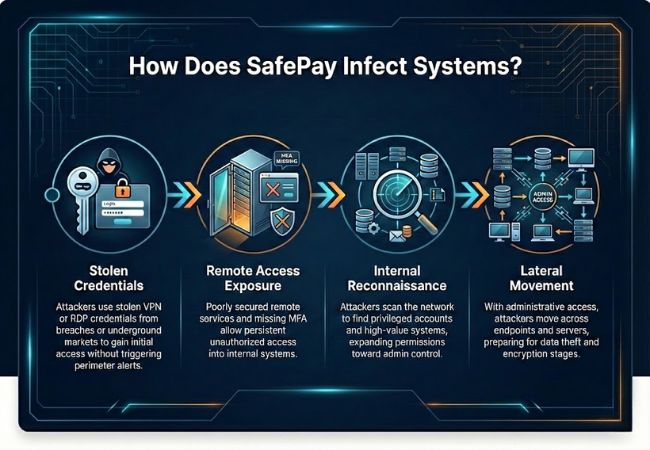
SafePay gains initial access mainly through valid remote access credentials, supported by weak passwords, social engineering, and purchased access.
‍

safeplay infection process

Stolen VPN and RDP Credentials

In both intrusions Huntress investigated, SafePay operators signed in through the victim's VPN gateway with valid credentials, then connected to servers over RDP.

The operators did not need to create new accounts or install persistence because the stolen logins kept working.

Infostealer malware harvests the kind of VPN and browser credentials that open this access path. Ransomware.live, using Hudson Rock data, found infostealer infections linked to 20.5% of SafePay victims with a known domain, a pattern that makes leaked credential monitoring a frontline control against this group.

Weak Passwords and Missing MFA

NCC Group published an incident analysis that traced a SafePay intrusion back to weak passwords. Accounts protected only by a password convert a single guessed or reused credential into full network entry.

Email Bombing and Help Desk Vishing

Barracuda researchers described SafePay intrusions that flood employee inboxes with spam, then contact those employees through Microsoft Teams while posing as internal IT support.

The caller offers to fix the spam problem and persuades the employee to grant remote access through a tool such as Microsoft Quick Assist.

Help desk impersonation mirrors earlier Black Basta campaigns and turns the help desk itself into an attack vector, one of several social engineering attacks that bypass technical controls entirely.

Initial Access Brokers and Exploits

SafePay operators break in themselves and buy network access from initial access brokers. Reporting links the group to exploited vulnerabilities and security misconfigurations on internet-facing systems, although stolen credentials remain the most consistent entry point.

SafePay Ransomware Attack Chain From Access to Extortion

A SafePay attack moves from a valid login to share discovery, data theft, recovery sabotage, and network-wide encryption. Here are the main attack stages of the SafePay ransomware attack:

  1. Access: The operator logged in through the VPN gateway and connected to an endpoint over RDP.
  2. Defense evasion: When Microsoft Defender blocked a script, the operator disabled Defender protections through the Windows Settings interface.
  3. Share discovery: The operator ran ShareFinder.ps1 from the PowerView toolkit to map accessible network shares.
  4. Collection: About 40 minutes later, WinRAR archived user files from three hosts, excluding media and executable file types.
  5. Exfiltration: FileZilla was installed, used, and uninstalled, and the same collection cycle repeated the next day.
  6. Encryption: Two days after share discovery, the operator returned over RDP and launched the encryptor within about 15 minutes, targeting the mapped shares.
  7. Recovery sabotage: The ransomware ran bcdedit to disable Windows recovery and wmic to delete volume shadow copies.
  8. Extortion: A ransom note signed by the "SafePay team" directed the victim to the group's Tor portal.

The pace of SafePay intrusions varies between documented incidents and victims. Other vendors report SafePay moving from initial access to encryption within 24 hours, while the Huntress case above spanned several days of staging before a fast final deployment.

SafePay Encryptor: LockBit Black Code and Capabilities

The SafePay encryptor is a Windows DLL, observed as locker.dll, that runs through regsvr32.exe and reuses large parts of the leaked LockBit Black codebase.

SafePay Command-Line Flags

The encryptor inherits LockBit Black's password argument, which operators supply at launch. Huntress documented 8 command-line flags:

  • -pass: Supplies the password that unlocks the encryptor.
  • -enc: Sets the encryption level, trading thoroughness against speed.
  • -path: Limits encryption to a specified local or network path.
  • -uac: Triggers a user account control bypass for elevated execution.
  • -network: Enables propagation across the network.
  • -netdrive: Targets mapped network drives.
  • -selfdelete: Removes the encryptor after it runs.
  • -logging: Writes execution details to a log file.

Process, Service, and Privilege Behavior

Before encryption, SafePay terminates database, email, and office processes, such as SQL Server, Oracle, Outlook, and Word, so their files unlock. It stops services tied to shadow copies and backups, including VSS, Veeam, and Sophos components.

The encryptor enables SeDebugPrivilege, duplicates access tokens for privileged threads, and hides worker threads from debuggers. Bitdefender reports that it encrypts files with ChaCha20, using a unique symmetric key per file protected by a key embedded in the ransomware.

Cyrillic Language Kill Switch

Early SafePay samples checked the system's default user interface language and stopped if it matched a Cyrillic language. ThreatLocker reported that later samples removed this check.

Relationship to LockBit

Code lineage, not confirmed organizational continuity, connects SafePay to LockBit.

The LockBit 3.0 builder leaked in 2022, and several unrelated groups built encryptors from it, so shared code alone does not identify the people behind SafePay.

Detection rules written for LockBit 3.0 command-line patterns catch part of SafePay's execution behavior. Credential-based access and hands-on-keyboard staging still need their own detections.

Is SafePay a Ransomware-as-a-Service Group?

No, SafePay is not a ransomware-as-a-service group. SafePay states on its leak site that it does not run an affiliate program, and researchers have found no affiliate recruitment posts from the group on cybercrime forums.

In a ransomware-as-a-service model, developers rent malware to affiliates who carry out their own intrusions, which produces varied tactics across victims of groups such as Qilin. SafePay's single team produces a consistent playbook, and some researchers assess that the group recruited experienced operators from collapsed operations such as Conti and Black Basta.

SafePay Ransomware Victims and Targeting

SafePay targets small and mid-sized businesses, managed service providers, and IT distributors, with the heaviest activity in the United States and Germany. Ransomware.live listed 569 SafePay victims across 47 countries as of September 17, 2026.

  • Top sectors: Manufacturing with 101 victims, professional services with 100, retail and e-commerce with 63, technology with 59, and healthcare with 46.
  • Top countries: The United States with 215 victims, Germany with 128, the United Kingdom with 33, Canada with 32, and Italy with 17.
  • Recent activity: The group posted new victims on its leak site as recently as September 15, 2026.

Leak-site counts undercount real activity, because victims who pay are not listed. Ransom demands reportedly fall between 1% and 3% of a victim's annual revenue, according to Infosecurity Magazine reporting.

MSP and distributor victims carry outsized risk for their downstream customers. One compromised provider exposes the downstream clients that trust its remote access, the same dynamic behind a supply chain attack.

Notable SafePay Ransomware Attacks

Ingram Micro (July 2025)

Ingram Micro, one of the world's largest IT distributors, suffered a global outage starting July 3, 2025, that took down its website, online ordering, the Xvantage distribution platform, and the Impulse license provisioning platform.

Sources told BleepingComputer that SafePay was behind the Ingram Micro attack and that access likely came through the company's GlobalProtect VPN using compromised credentials, not a flaw in the VPN itself. SafePay added Ingram Micro to its leak site later that month and threatened to publish 3.5 TB of data.

Microlise (October 2024)

SafePay attacked Microlise, a UK provider of fleet tracking and transport management technology, in October 2024.

The incident disrupted Microlise customers, including DHL deliveries and security systems on UK Ministry of Justice prisoner transport vans, and SafePay claimed to have stolen 1.2 TB of data.

SafePay Ransomware Indicators of Compromise (IOCs)

SafePay IOCs include file artifacts, execution patterns, tool traces, and attacker infrastructure. Hashes and hostnames change between campaigns, so behavioral indicators outlast static ones.

  • Encrypted file extension: .safepay appended to encrypted files.
  • Ransom note: readme_safepay.txt, opening with "Greetings! Your corporate network was attacked by the SafePay team."
  • Encryptor file: locker.dll, with SHA-256 hash a0dc80a37eb7e2716c02a94adc8df9baedec192a77bde31669faed228d9ff526 from the first Huntress incident.
  • Execution pattern: regsvr32.exe /n /i: with arguments containing -pass=, -enc=, -uac, or -path= followed by a DLL path.
  • Recovery sabotage commands: bcdedit /set {default} recoveryenabled no and wmic shadowcopy delete.
  • Discovery tool: ShareFinder.ps1 or Invoke-ShareFinder in PowerShell logs.
  • Staging and exfiltration tools: WinRAR, 7-Zip, FileZilla, and Rclone, uninstalled after use in observed incidents.
  • Attacker workstation names: WIN-SBOE3CPNALE and WIN-3IUUOFVTQAR in authentication logs.
  • Leak infrastructure: Tor onion addresses and a TON site referenced in the ransom note.

SafePay Ransomware MITRE ATT&CK Mapping

SafePay activity maps to more than a dozen MITRE ATT&CK techniques across initial access, defense evasion, exfiltration, and impact. The table below maps publicly reported behavior to the MITRE ATT&CK framework.

Tactic Technique ID SafePay Behavior
Initial Access Valid Accounts T1078 Stolen VPN and RDP credentials
Initial Access External Remote Services T1133 Logins through VPN gateways
Initial Access Phishing: Spearphishing Voice T1566.004 Teams calls impersonating IT support
Execution PowerShell T1059.001 ShareFinder.ps1 execution
Privilege Escalation Bypass User Account Control T1548.002 CMSTPLUA COM interface abuse
Defense Evasion System Binary Proxy Execution: Regsvr32 T1218.010 locker.dll launched through regsvr32.exe
Defense Evasion Impair Defenses: Disable or Modify Tools T1562.001 Microsoft Defender protections disabled
Defense Evasion Indicator Removal: File Deletion T1070.004 Tool uninstallation and self-deletion
Discovery Network Share Discovery T1135 Share mapping before encryption
Lateral Movement Remote Services: Remote Desktop Protocol T1021.001 RDP sessions between hosts
Collection Archive Collected Data: Archive via Utility T1560.001 WinRAR and 7-Zip archives
Exfiltration Exfiltration Over Alternative Protocol T1048 FileZilla FTP transfers
Exfiltration Exfiltration to Cloud Storage T1567.002 Rclone transfers
Impact Service Stop T1489 Backup, database, and security services stopped
Impact Inhibit System Recovery T1490 Shadow copy deletion and recovery disabled
Impact Data Encrypted for Impact T1486 File encryption with .safepay extension

How to Detect SafePay Ransomware

To detect SafePay ransomware, security teams watch for its staging behavior between the first login and encryption, because that window gives defenders the most time to act.

Identity and Remote Access Signals

  • Flag VPN logins from new devices, unusual locations, or hostnames that follow the default WIN- naming pattern.
  • Alert on failed logins to non-existent accounts from a host that has just authenticated as an administrator.
  • Review RDP sessions from VPN address ranges to servers that users do not normally access.
  • Investigate unexpected Microsoft Teams calls from external tenants, especially after an email flood.

Endpoint and Defense Tampering Signals

  • Alert on Microsoft Defender events 5001 and 5007, which record real-time protection being disabled or configuration changes.
  • Flag SystemSettingsAdminFlows.exe changing Defender settings, since administrators rarely use the settings interface for this.
  • Detect DllHost.exe with the CMSTPLUA COM object identifier launching scripts or system binaries.
  • Detect regsvr32.exe loading a DLL with /i: arguments that contain -pass=.

Data Staging and Pre-Encryption Signals

  • Flag WinRAR runs that recurse through remote user directories with volume size switches such as -v5g.
  • Alert on FileZilla or Rclone installed and removed within a short period on a server.
  • Treat bcdedit recovery changes and shadow copy deletion as signs that encryption has started, and isolate the host immediately.

Each signal above has a legitimate explanation when viewed alone. Defender tampering, share enumeration, and bulk archiving from the same account within days form a pattern that justifies containment without waiting for encryption.

How to Prevent SafePay Ransomware Attacks

Preventing SafePay ransomware starts with removing the credential access paths the group relies on, then limiting what an intruder reaches.

  1. Enforce phishing-resistant MFA on every VPN, RDP gateway, and remote management login, including service and vendor accounts.
  2. Remove direct RDP exposure from the internet, and place remote access behind a zero trust access broker or VPN with device checks.
  3. Monitor for exposed credentials from infostealer logs and breach dumps, and reset any account that appears.
  4. Verify help desk contacts through a known channel, and restrict external Microsoft Teams access and Quick Assist to approved users.
  5. Turn on tamper protection for Microsoft Defender or the installed EDR so a signed-in operator cannot disable it.
  6. Block unapproved archiving and transfer tools such as FileZilla and Rclone through application control on servers.
  7. Segment networks so a VPN user cannot reach every file share and server directly.
  8. Keep immutable, offline backups of critical systems, and test restores on a schedule.

Responding to a SafePay Ransomware Attack

Responding to a SafePay attack requires containing the operator's access before restoring anything, because the group enters with valid credentials that survive a system rebuild.

  1. Isolate affected hosts from the network while keeping them powered on for memory capture.
  2. Terminate active VPN and RDP sessions, then reset passwords and revoke tokens for every account the operator touched.
  3. Preserve evidence such as VPN logs, Defender event logs, and command history before reimaging systems.
  4. Determine what data left the network by reviewing archive files, FileZilla or Rclone traces, and outbound traffic volumes.
  5. Confirm backup integrity before restoring, since SafePay targets shadow copies and backup services.
  6. Hunt for remaining access, including remote management tools and unfamiliar accounts, before reconnecting systems.
  7. Report the incident to national authorities, such as the FBI's IC3 in the United States or CERT-In in India, and assess breach notification duties with legal counsel.

Paying SafePay does not guarantee a working decryptor or deletion of stolen data. Payments to sanctioned entities create legal exposure in the United States and other jurisdictions, so any payment decision involves legal counsel and law enforcement guidance.

Tracking SafePay Activity With CloudSEK Threat Intelligence

Security teams need to know when SafePay starts hitting their sector, region, or suppliers, before a listing appears with their own name.

CloudSEK Threat Intelligence delivers ransomware intelligence with live alerts on global ransomware activity, impact assessments, and visibility into the sectors and victims being targeted.

That context shows when a peer, vendor, or MSP appears on a leak site and which access methods the group is using. Teams then check their own VPN logs, credential exposure, and third-party access for the same entry points.

SafePay Ransomware FAQs

Is SafePay ransomware still active?

Yes, SafePay Ransomware remains an active and emerging threat.

Is SafePay ransomware related to Bitdefender Safepay?

No. Bitdefender Safepay is a secure browser feature in Bitdefender products, while SafePay ransomware is an unrelated criminal group that shares the name.

Where can victims check for a SafePay decryptor?

Victims can check the No More Ransom project, which hosts free decryptors from law enforcement and security companies, before engaging with the attackers.

Can antivirus stop SafePay ransomware?

No, not reliably. In one Huntress investigation, Microsoft Defender detected the SafePay process but failed to stop it, and encryption continued.

Does paying SafePay guarantee stolen data is deleted?

No. Victims have no way to verify deletion, and double-extortion groups retain stolen copies regardless of what they promise.

Is it legal to pay a SafePay ransom?

It varies by jurisdiction. Payments to sanctioned individuals or groups violate US sanctions rules, and Australia requires businesses to report ransom payments.

Related Posts
What is Malware Sandboxing? How It Works and Its Limits
Malware sandboxing runs suspicious files in an isolated environment to observe their behavior safely. How malware sandboxing works, its types, and evasion.
What is Google Dorking? Operators, Risks, and Defense
Google dorking uses advanced search operators to find sensitive data exposed on the web. How it works, what it exposes, and how to defend against it.
6 Best Digital Risk Protection (DRP) Platforms in 2026
CloudSEK XVigil, Recorded Future, ZeroFox, Rapid7, Group-IB, and Flare cover key DRP needs across external risk, takedown, SOC workflows, scams, and illicit monitoring.

Start your demo now!

Schedule a Demo
Free 7-day trial
No Commitments
100% value guaranteed

Related Knowledge Base Articles

No items found.