🚀 Introducing Cloudsek Launchpad: a incubator for early-stage cybersecurity founders, apply today!
Read more
.avif)

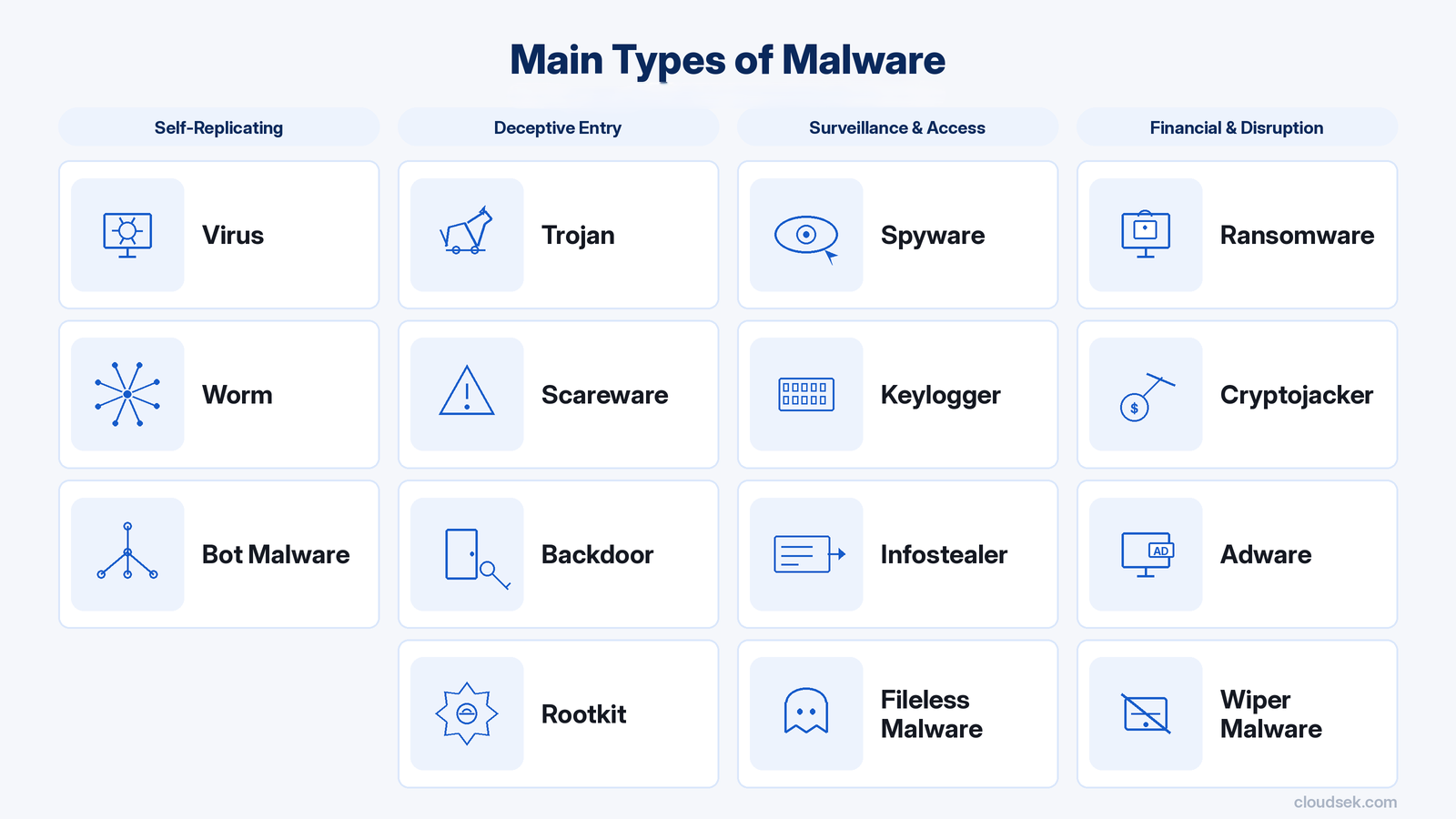
Common types of malware include viruses, worms, Trojans, ransomware, spyware, infostealers, keyloggers, rootkits, backdoors, Remote Access Trojans (RATs), bot malware, fileless malware, wiper malware, cryptojacking malware, scareware, and adware. These categories describe different malicious characteristics, and the same sample sometimes fits more than a single type.
Different malware behaviors show up differently in endpoint telemetry, authentication records, application changes, and network traffic. This guide separates the 16 types by what they do, how they differ from related categories, and which examples or warning signs make those differences visible. A suspicious indicator deserves investigation, but it does not confirm infection or broader compromise by itself.
Real intrusions often combine several malicious capabilities instead of staying within a neat category boundary. Classification becomes more useful when it focuses on the behavior being observed, the distinction from related malware, and the technical evidence supporting that conclusion.
Malware, short for malicious software, is code or software created to perform harmful or unauthorized actions. Attackers deploy it to steal information, conduct surveillance, disrupt operations, extort victims, misuse computing resources, or obtain unauthorized access. The term covers a broad class of malicious software rather than a specific technical mechanism.
How malicious code arrives or begins running does not determine its category by itself. Classification depends on traits such as propagation, objective, execution style, access or control, information collection, concealment, and persistence.
The categories below separate common malware by defining behavior, with representative evidence included where useful.
Replication depends on host content because viral code must attach to a program or file before reproducing through other host material. New Zealand's NCSC characterizes a virus through this host-dependent infection relationship.
Melissa demonstrated the pattern through Microsoft Word documents carrying macro code. Opening one of those documents activated the macro, which then sent additional copies through Microsoft Outlook.
Self-propagation removes the host-file dependency that characterizes a virus. With a path to the next target, a worm continues spreading through reachable systems or software resources. During the 2026 ChainDrop/Shai-Hulud npm campaign, Singapore's Cyber Security Agency traced that behavior across compromised package versions. Stolen developer credentials and altered packages kept the campaign spreading.
Routine-looking software can conceal actions that have nothing to do with what the user believes they are installing. UK Crown Prosecution Service guidance describes Trojans as malicious programs disguised as useful or expected software to persuade victims to run them.
After launch, concealed code performs actions the user never authorized. No single payload defines the category. Trojan classification rests on the deceptive presentation that induces execution.
Emotet fits that model. CISA has described it as a sophisticated Trojan that commonly functioned as a downloader or dropper for additional malware.
Ransomware turns denied access to data, systems, or services into coercive leverage against the victim. Encryption often creates the pressure, but it serves an extortion demand rather than standing as the defining outcome by itself. The attacker is trying to compel payment or another concession.
The Conti campaign illustrates how far that coercive model can scale. In September 2026, the U.S. Department of Justice published figures tied to Conti activity from 2020 through 2022.
A device can be monitored without any obvious interruption to the person using it. Spyware occupies that less-visible space by collecting information or observing activity without the subject's informed authorization.
CERT-EU noted in September 2026 that Apple mercenary-spyware notifications had reached users in 110 countries. Those users were notified of suspected targeting. The notification count does not establish confirmed infections across 110 countries.
Credentials and session artifacts remain useful beyond the environment from which they are taken, making them prime targets for an infostealer. Its theft-focused purpose is narrower than spyware's broader surveillance role. Once acquired, those records can be sold, traded, or applied elsewhere.
Keyboard input is the collection point for a keylogger, allowing typed text to be recorded without authorization. Depending on what the user enters, those keystrokes may expose information from applications and other interactive fields. Keylogging appears either as dedicated malware or as one function inside a broader toolkit. Jamaica CIRT documented the latter in the CTRL remote-access toolkit, whose keylogging module stored captured input in C:\Temp\keylog.txt.
Rootkit techniques hide programs, files, connections, services, drivers, and other components from normal visibility. MITRE ATT&CK technique T1014 covers concealment across these and other components.
Rootkit capability is not limited to a single technical layer. MITRE lists user, kernel, hypervisor, and system-firmware levels as possible locations.
LoJax demonstrates how deeply that capability can reside. MITRE documents it as a UEFI rootkit associated with persistence for remote-access software. Its placement shows how concealment can extend into a privileged layer of the machine.
An attacker may retain a route into a system that bypasses the expected authentication process. A backdoor creates or preserves an alternate path that remains available after the initial foothold exists. That path can preserve continued entry without defining what happens after the attacker returns.
CISA's April 2026 FIRESTARTER analysis supplies the concrete evidence. The agency classified FIRESTARTER as backdoor malware for persistence on publicly accessible Cisco Firepower and Secure Firewall devices running ASA or FTD.
Interactive tasking begins once malware gives an attacker control over a compromised host. After execution, a RAT turns that foothold into an operator-controlled session.
A backdoor preserves a route into the environment; a RAT gives the operator a way to act through an established compromise. Nigeria's ngCERT classified Backdoor.ClickFix as a RAT in a July 2026 advisory. Its post-installation capabilities extend beyond simple entry.
Bot malware turns a single infected device into a remotely directed node within a larger network. That endpoint is a bot, while the collection of controlled devices is the botnet. Bot malware establishes the command relationship that lets the individual node receive attacker-issued tasks.
Code does not have to depend on a conventional malware file stored on disk to execute. "Fileless" names that execution characteristic rather than the attacker's final objective.
Memory, scripts, or legitimate runtime components can serve as execution environments for malicious code. Relevant artifacts may therefore appear outside the locations emphasized by file-focused analysis. The execution style does not determine whether the end goal is theft, persistence, disruption, or something else.
Canada's Cyber Centre observed this pattern in its SharpViewStateKing investigation: arbitrary ASP.NET assemblies were loaded directly into memory, and 67 distinct code modules appeared during the first 30 minutes. All 67 unique malware samples retrieved produced no detection in the Cyber Centre's analysis environment, which leveraged more than 75 antivirus products; that result applies only to those samples and that specific environment.
Permanent loss is the intended end state of a wiper. A wiper is designed to destroy data or system functionality so severely that restoration becomes impossible or impractical. Unlike ransomware, the attacker does not preserve recoverability primarily as leverage for payment. CERT Polska found this destructive pattern in the December 29, 2025 attacks against Poland's energy sector. Custom wiper malware appeared in the incident, although defensive controls stopped an attempted activation.
Unauthorized cryptocurrency mining turns another party's processing power into a resource for the attacker. In malware-based cryptojacking, that consumption occurs without the owner's permission.
The Netherlands NCSC encountered this outcome during active exploitation of CVE-2026-65400 against internet-exposed macOS Screen Sharing systems in August 2026. Every incident submitted to the NCSC involved attackers gaining root privileges and installing a Monero cryptominer on the affected machines.
A user may see a warning that claims the computer is infected and demands immediate action even though the supposed problem has not been verified. Scareware turns that fabricated condition into pressure for a purchase, installation, or other requested response. The deception works by making the warning itself feel urgent and credible.
Microsoft's Rogue:JS/FakeAV and FakeAlert documentation captures this pattern in rogue-security software. Fake scans and false infection claims pushed users toward a product presented as the remedy.
Advertising alone does not make software malicious. Adware requires context because ads also appear in legitimate ad-supported programs and potentially unwanted applications without placing them in the same category. Microsoft classifies Hiddad as Android adware. The 2026 AdwareZoo study captures the technical variety within this category.
Intrusions often combine distinct malicious functions, with early code passing execution to later components as attacker goals develop. A common progression runs from initial execution through authentication reuse, remote tasking, movement across reachable infrastructure, reduced defender visibility, and disruption of business functions.
Early code often performs a narrow task: launch a follow-on payload. A loader or script starts a follow-on component without carrying an attacker's final objective itself. New functionality arrives with the second component rather than during initial launch. Parent-child process relationships help defenders separate entry from later execution.
Stolen credentials or session material remain useful wherever another application accepts them. An authenticated browser session accepted by a second portal bypasses the need to repeat initial execution. Reused identity material crossing a privilege boundary places an attacker under a different permission set. Successful reuse shifts available permissions without changing the original foothold. Investigators trace where credentials or sessions remain valid next, not only where they were acquired.
A command channel connects a compromised endpoint with an operator after execution. Instructions move inward while task results or collected data return outward. Two-way exchange keeps later actions responsive to attacker decisions instead of a fixed sequence.
A reachable neighboring host extends compromise beyond its starting point. A reachable interface on another host exposes additional connections. Existing trust relationships bridge network boundaries without self-propagation. Newly reached infrastructure reveals routes unavailable from outside. Movement follows connectivity and trust rather than a single propagation method. Mapping those links shows how far compromise extends from its origin.
Hidden files, connections, or services shrink defender visibility. Fewer observable artifacts delay recognition of command traffic or data transfer. Blind spots give later malicious actions more time to continue. Downstream effects sometimes appear before concealed execution or communication is reconstructed.
Attacker-directed changes become operational impact when they interrupt a function people or processes depend on. Lost availability, damaged data, or stalled workflows mark the shift from technical compromise to business disruption. A failed application, production process, or customer-facing function ties technical damage to business consequence. Work slows, stops, or moves to degraded alternatives. Final impact is measured through the disrupted function rather than an earlier foothold or command path.
Malware warning signs matter most as deviations from an established baseline, not as isolated oddities. Security teams look for shifts in processor demand, process lineage, authentication history, file integrity, network behavior, application state, or defensive telemetry. Timing, frequency, source, and surrounding context determine investigative value; no single observation confirms infection.
Malware identification begins with preserving what happened, not naming it. Endpoint telemetry, files, process history, network records, and threat context reveal different parts of an event. Classification becomes defensible only after those sources are examined in sequence and contradictory explanations are ruled out.
Preserve volatile and durable artifacts ahead of remediation or testing that could alter them. Useful material includes process trees, timestamps, file paths, relevant logs, memory where available, and network records tied to the period under review. Maintaining sequence and provenance gives analysts a reliable chronology for later analysis.
Static analysis examines an executable, script, or document without running it. Hashes, headers, imports, strings, metadata, embedded content, and document properties can expose internal characteristics or similarities with documented samples. These features help narrow hypotheses, but a hash or string match alone does not establish that a file is malicious.
Controlled execution shows what an artifact actually does. A sandbox or isolated lab captures child processes, file writes, registry or configuration changes, persistence attempts, and outbound connections as they occur. Runtime behavior can reveal capabilities that were not apparent during static inspection.
Compare structural traits and runtime actions with YARA rules, behavioral detections, tracked indicators, and current threat intelligence. A rule hit can link code characteristics with a known family, while infrastructure or hash matches place an artifact near previously tracked malicious activity. Correlation should explain how those matches relate to the analyzed code rather than simply accumulate detections; an IOC association still does not prove compromise or attribution.
Assigning a family or category requires testing the leading explanation against conflicting findings, false positives, and plausible alternatives. Confidence should reflect how well execution characteristics, code traits, and correlated context agree while preserving any unresolved uncertainty. Record the conclusion at the level the material supports rather than extending detection into unsupported attribution.
Organizations lower malware risk by closing exploitable weaknesses, restricting code execution, reducing unnecessary privileges, and separating sensitive workloads from easier entry points. Trusted software sources, tested recovery, safer user decisions, and current threat context strengthen the remaining defensive layers.
Patch urgency depends on exploit status, internet exposure, and the importance of the affected technology rather than severity scores alone. Public-facing software under active exploitation deserves faster remediation than a lower-value weakness with no comparable exposure. A patch backlog organized around those conditions directs effort toward vulnerabilities most likely to matter first.
Application allowlisting and execution policies define which code is permitted to run in managed environments. Valid code signing, trusted publishers, and an approved application inventory give enforcement tools concrete criteria for making that decision. Anything outside those conditions is blocked or held for examination instead of receiving execution by default.
Least privilege narrows the authority available to a user, service identity, or process if malicious code begins running in that context. Administrative permissions remain limited to roles that require them, while elevation approval adds scrutiny when higher rights are requested. Periodic entitlement checks remove permissions that no longer match current responsibilities. The result is a smaller set of actions available under a compromised identity.
Installers, packages, and dependencies inherit trust from the path through which they arrive. Provenance checks verify origin, while signatures and integrity validation confirm whether expected content has been altered. Vendor channels and controlled repositories provide a clearer chain of custody for code entering production. This control focuses on whether software came from an expected and intact source, not merely whether execution is permitted.
Segmentation separates high-value workloads from parts of the environment that face greater exposure. Policy boundaries restrict identities, workloads, and network paths that reach sensitive infrastructure. If compromise occurs elsewhere, those boundaries reduce direct routes into protected zones.
Backups provide little assurance unless usable copies survive destructive activity. Immutable or isolated copies keep restoration data separate from changes affecting production, while restore testing verifies that protected data is recoverable. Recovery points reflect acceptable data loss, and recovery objectives define how quickly essential business functions need to return. Tested restoration procedures turn backup storage into a practical recovery capability.
Awareness programs are more useful when they focus on decisions employees actually face, such as opening unfamiliar files, running unexpected installers, or responding to unsolicited prompts. Clear verification paths give staff a way to check questionable requests without guessing. Simple reporting channels shorten the gap between a suspicious interaction and analyst attention. Training therefore supports both safer choices and earlier escalation.
External threat context changes which attack scenarios deserve immediate defensive attention. Sector targeting, active campaigns, and evidence of exploitation reveal where adversary interest is currently concentrated. Mapping that intelligence to exposed technologies and business priorities gives teams a clearer basis for deciding which defensive gaps warrant action first.
Initial access often starts with a leaked credential, public-facing weakness, or exploitable vulnerability before a payload reaches managed infrastructure. Such conditions do not prove compromise; they indicate routes an attacker could pursue. Earlier visibility shifts focus toward those routes rather than waiting for malicious code to execute inside the environment.
CloudSEK operates at this pre-execution layer rather than as endpoint protection. CloudSEK Threat Intelligence covers adversary intelligence, XVigil tracks leaked organization data, BeVigil maps public-facing weaknesses, and Nexus AI correlates related exposures into attack-path intelligence.
Security teams then focus remediation and disruption on connected weaknesses instead of treating every externally visible issue as an isolated alert.
