🚀 CloudSEK featured in the 2026 Frost Radar™!
Read more
.avif)

Adware is advertising-supported software that automatically displays or downloads advertisements on a device. It commonly operates inside web browsers, desktop applications, or mobile apps. Its primary purpose is to generate revenue by showing ads such as pop-ups, banners, or redirect pages.
Adware earns money through ad impressions, clicks, and affiliate promotions. In some cases, it is part of a legitimate business model where users receive free software in exchange for viewing advertisements. These programs clearly disclose their advertising behavior during the installation process.
Adware becomes malicious when it installs without clear consent, aggressively injects ads, changes browser settings, or tracks user activity without transparency. Instead of simply supporting a free application, malicious adware interferes with normal browsing, collects data quietly, and exposes users to unwanted or unsafe content.
Adware appears in different forms depending on how it operates and how much control it takes over a device. Some versions function within clear advertising models, while others behave aggressively and interfere with normal system use.
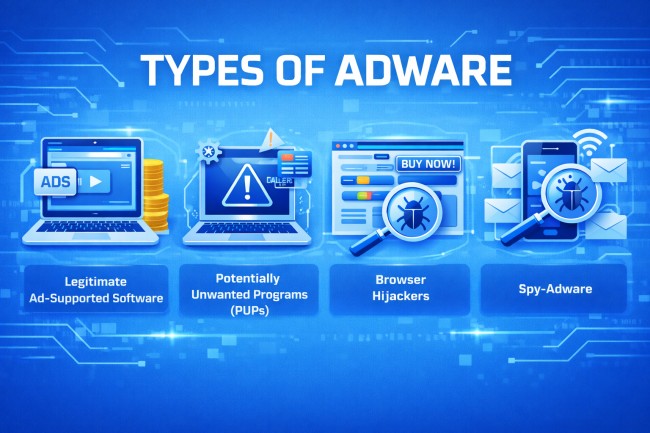
Here are the main types of adware:
This type of adware operates as part of a transparent business model. Users install free software and agree to view advertisements in return. Ads are displayed within the application without secretly modifying system settings.
PUPs are programs that include advertising components but are often installed through bundled downloads. While not always malicious, they may display excessive ads, track user activity, or install additional unwanted software.
Browser hijackers modify browser settings without proper permission. They may change the homepage, default search engine, or redirect searches to advertising pages. Their goal is to drive traffic and generate revenue from forced ad views.
Spy-adware combines advertising behavior with data tracking. It collects browsing habits, search queries, or usage patterns and uses that information to deliver targeted advertisements. In some cases, it shares collected data with third parties without clear consent.
Adware works by inserting advertisements into a user’s browsing or application experience and spreads through common software distribution methods.
Most adware installs through bundled software downloads. When users install free programs, advertising components may be included in the setup process. If installation steps are skipped or default settings are accepted, adware installs alongside the intended software.
Adware can also spread through malicious websites, deceptive advertisements, or fake software updates. Clicking misleading download buttons or pop-up alerts may trigger automatic installation.
On mobile devices, adware often spreads through free apps that request excessive permissions. Granting unnecessary access allows the app to display ads outside the application or collect usage data.
Once installed, adware integrates into the browser or operating system. It may add extensions, modify browser settings, create scheduled tasks, or register startup entries to remain active after reboot. These persistence methods ensure advertisements continue to display.
Some adware tracks browsing activity to deliver targeted advertisements. It monitors visited websites and search queries to increase ad engagement and revenue generation.
Adware spreads quietly, maintains persistence, and continues displaying ads until it is manually removed or blocked.
Adware often reveals itself through noticeable changes in browsing behavior, installed programs, and overall system performance. These signs may appear gradually and become more disruptive over time.

Frequent pop-ups appear even when browsing trusted websites or when no browser window is open. These ads often promote suspicious products, fake updates, or questionable services.
Search results or website visits redirect to unfamiliar or advertising-heavy pages. Instead of reaching the intended destination, the browser sends traffic to promotional or affiliate sites.
The homepage, default search engine, or new tab settings change without approval. New toolbars or browser extensions may appear unexpectedly.
Applications or browser add-ons appear that were never intentionally downloaded. These programs often relate to advertising or tracking services.
The device may respond slowly due to background processes loading advertisements or communicating with remote servers.
Internet usage may rise unexpectedly because adware constantly loads ads and sends tracking information.
Built-in security features or browser protections may stop working properly. Some adware interferes with security settings to avoid detection.
Adware may appear harmless because it focuses on advertising, but sometimes it creates real privacy and security risks. Here are some risks of adware:
Many adware programs monitor browsing habits, search queries, clicked links, and online activity. This data may be shared with third parties to deliver targeted ads. In aggressive cases, personal information can be collected without clear consent.
Adware often redirects users to unknown or unsafe websites. Some of these pages host scams, phishing forms, or malware downloads. Clicking on deceptive ads increases the risk of further infection.
Malicious adware may collect device information such as IP address, location data, installed software, or browser details. Users are often unaware of how much information is being gathered or how it is used.
Adware can act as a gateway to more serious threats. Redirected pages may attempt to install spyware, ransomware, or trojans. One unwanted program can lead to multiple infections.
Continuous ad loading consumes system resources. Over time, this can slow down devices, cause browser crashes, and reduce overall stability.
Some adware interferes with browser settings or security tools to maintain persistence. This weakens defenses and makes systems more vulnerable to exploitation.
Detecting adware requires checking both system behavior and installed programs. Since adware often hides behind normal applications or browser extensions, careful inspection and security tools are necessary to identify it.
Use reputable antivirus or anti-malware software to perform a complete system scan. These tools compare files and programs against known adware signatures and suspicious behavior patterns.
Check the list of installed applications in the system settings. Look for unfamiliar or recently installed programs that were not intentionally downloaded.
Open the browser’s extension or add-on manager and review every installed extension that is unknown, unnecessary, or related to advertising.
Verify that the homepage, default search engine, and new tab settings have not been changed. Unexpected modifications often indicate adware activity.
Watch for unusual slowdowns, frequent crashes, or high CPU and memory usage linked to unknown processes. Task Manager or system monitoring tools can help identify suspicious background activity.
Examine network usage for unexplained spikes or repeated connections to unfamiliar domains. Adware frequently communicates with advertising servers in the background.
Frequent redirects, aggressive pop-ups, or ads appearing outside normal websites suggest adware presence.
You can remove adware by eliminating the unwanted program, cleaning browser changes, and ensuring no hidden components remain.
Here is the complete cleanup process that prevents the adware from reinstalling or continuing to display ads.
Open the system’s installed programs list and remove unfamiliar or recently added applications. Focus on the software installed around the time the ads began appearing.
Access the browser’s extensions or add-ons menu and delete any unknown or advertising-related extensions. Restart the browser after removal.
Restore browser settings to their default state. This step removes altered homepages, search engines, and hidden scripts that inject advertisements.
Use trusted security software to scan the entire system. A full scan detects leftover files, registry entries, and hidden components related to adware.
Clear browser cache, cookies, and temporary system files. This removes stored advertising scripts and tracking data.
Review startup settings and disable unknown programs that launch automatically. Some adware registers itself to run every time the device starts.
After removal steps, restart the device and monitor for recurring pop-ups or redirects. Continued symptoms may require a deeper security scan.
Preventing adware requires cautious downloading habits, strong browser protection, and consistent system maintenance. Most adware infections occur because users unknowingly approve bundled software or click deceptive advertisements.
Here are the best methods to prevent adware:
Install programs only from official websites or verified app stores. Avoid third-party download sites that bundle additional software with installers.
During software setup, select “custom” or “advanced” installation. Review each step carefully and decline optional programs or advertising components.
Install security updates and patches regularly. Updated systems close vulnerabilities that adware may attempt to exploit.
Install reputable antivirus or anti-malware software with real-time protection. Continuous monitoring blocks suspicious downloads and malicious scripts.
Activate built-in browser protections such as pop-up blockers, safe browsing filters, and extension controls. These features reduce exposure to malicious advertisements.
Do not click on flashy banners, fake alerts, or “update now” messages. Close suspicious windows using the browser’s close button rather than interacting with the content.
Before installing mobile apps, check the requested permissions. Deny unnecessary access to contacts, storage, or background activity that may enable ad display outside the app.
Adware often spreads through malicious advertising networks, compromised websites, and deceptive download campaigns. CloudSEK provides digital risk protection and threat intelligence solutions that help organizations identify malicious domains, rogue advertising infrastructure, and brand impersonation attempts.
By monitoring the open web, deep web, and dark web for emerging threats, CloudSEK enables early detection of malicious campaigns that distribute unwanted software. Its external attack surface monitoring helps identify exposed assets that may redirect users to harmful advertising networks. This proactive visibility reduces the risk of adware infections and protects users from deceptive online content.
