🚀 CloudSEK featured in the 2026 Frost Radar™!
Read more
.avif)

DNS hijacking is a cyberattack where attackers manipulate the Domain Name System (DNS) to redirect users from legitimate websites to malicious ones. Instead of connecting to the correct server, the user is unknowingly sent to a fake destination controlled by the attacker.
DNS is a translation system that converts domain names into IP addresses, enabling users to access websites. In a DNS hijacking attack, this process is altered so that the domain points to a different, unauthorized IP address. As a result, even when users enter the correct website address, they may land on a fraudulent page without realizing it.
The main goal of DNS hijacking is to control web traffic for malicious purposes. Attackers use it to steal login credentials, distribute malware, or carry out financial fraud. Because the redirection happens at the network or system level, users often do not notice the attack immediately.
DNS hijacking works by manipulating the DNS resolution process so that a domain name resolves to a malicious IP address instead of the legitimate one. This alteration can occur at different points in the DNS infrastructure, including the local device, network, or DNS server.
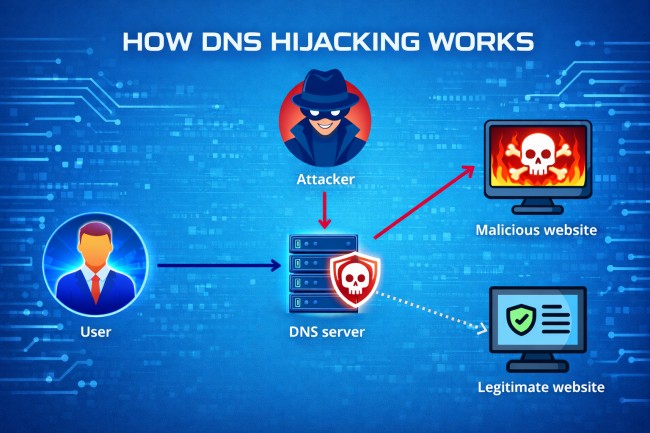
Here is the step-by-step attack process of a DNS Hijacking:
When a user enters a website URL, the device sends a DNS query to resolve the domain name into an IP address. This request is directed to a configured DNS resolver, such as a local router or external DNS server.
The DNS resolver processes the query by contacting authoritative DNS servers to retrieve the correct IP address for the domain. The resolved IP address is then returned to the user’s device to establish a connection with the intended server.
In a DNS hijacking attack, the DNS query or response is intercepted or altered. Attackers modify DNS settings, compromise routers, or manipulate DNS servers to control how domain names are resolved.
Instead of returning the legitimate IP address, the system provides an attacker-controlled IP address. This mapping redirects traffic to a malicious server that mimics the intended website.
The user’s browser connects to the malicious server without a visible warning. The attacker can then capture credentials, inject malicious content, or perform further exploitation while maintaining the appearance of a legitimate website.
A DNS hijacking attack follows a simple but dangerous sequence that redirects users without their knowledge:
The process begins when a user enters a trusted website address in the browser. Instead of reaching the correct server, the DNS request is manipulated by the attacker at some point in the network or system.
Once the DNS query is altered, the system returns a fake IP address that points to a malicious server. The user’s browser connects to this server, which hosts a website that looks almost identical to the real one. Because the page appears legitimate, most users do not realize anything is wrong.
As the user interacts with the fake website, the attacker can capture login credentials, financial details, or other sensitive information. In some cases, the malicious site may install malware on the device. This step-by-step redirection shows how DNS hijacking can quietly lead to data theft and system compromise.
DNS hijacking occurs in different forms depending on where attackers manipulate the DNS process. Each type targets a specific point in the system to control how domain names are resolved.

Local DNS hijacking occurs when malware modifies DNS settings on a user’s device. The attacker changes the configured DNS server so all domain requests are redirected through a malicious resolver. This allows continuous control over the user’s web traffic.
Router DNS hijacking targets network devices such as home or office routers. Attackers gain access to the router and change its DNS configuration. All devices connected to that network are then redirected to malicious destinations.
In this type, attackers intercept DNS queries between the user and the DNS server. They alter the response before it reaches the user’s device. This allows attackers to redirect traffic without modifying local or router settings.
A DNS server compromise occurs when attackers gain control over authoritative or recursive DNS servers. They modify DNS records so that legitimate domain names resolve to malicious IP addresses. This type can affect a large number of users at once.
ISP-level DNS hijacking happens when internet service providers manipulate DNS responses at the network level. This may be done intentionally for traffic control or maliciously through compromise. Users are redirected without any changes on their own devices.
Between 2007 and 2011, cybercriminals behind the DNSChanger malware infected millions of computers worldwide by modifying DNS settings on compromised devices. The malware redirected users to malicious servers controlled by the attackers. More than 4 million systems were affected globally, including individuals and businesses. The attackers generated revenue through fraudulent advertising and traffic redirection, leading to one of the largest DNS hijacking operations uncovered by law enforcement.
In 2016, attackers targeted Brazilian banks by compromising DNS records at the domain registrar level. They redirected users trying to access legitimate banking websites to fake pages that mimicked the original sites. Thousands of users were affected during the attack window. Victims unknowingly entered login credentials into fraudulent pages, allowing attackers to steal sensitive financial information and access bank accounts.
Between 2017 and 2019, a cyber-espionage campaign known as Sea Turtle targeted government agencies and organizations across multiple countries. Attackers compromised domain registrars and DNS infrastructure to redirect traffic to malicious servers. Organizations in over 40 countries were affected, including government institutions and telecom providers. The attackers used DNS hijacking to intercept communications and collect sensitive data, causing long-term security risks and data exposure.
DNS hijacking shows specific warning signs that indicate DNS settings or traffic may have been altered without authorization. Recognizing these signs helps identify potential redirection attacks early.

Here are the key signs of a typical DNS hijacking:
Users may be redirected to unfamiliar or incorrect websites even after entering the correct URL. This behavior often indicates that DNS queries are resolving to malicious destinations.
Infected systems may display excessive pop-ups or advertisements. These are often injected through malicious servers after DNS redirection.
Browsers may show security warnings about invalid or mismatched SSL certificates. This occurs when users are redirected to fake websites that do not match the original domain.
DNS server settings on a device or router may be altered without the user's knowledge. Unauthorized changes to these settings can indicate a hijacking attempt.
Network performance may degrade due to redirection through malicious servers. Unusual delays or inconsistent website loading can signal DNS manipulation.
DNS hijacking is dangerous because it allows threat actors to enable traffic redirection to malicious websites without user awareness. They manipulate DNS responses so users reach fake sites that appear legitimate. This allows credential theft, phishing attacks, and financial fraud to occur without suspicion.
According to IDC, more than 80% of organizations have experienced DNS-based attacks in recent years, underscoring how frequently attackers exploit DNS infrastructure for techniques such as hijacking, spoofing, and traffic redirection.
This attack increases the risk of malware distribution and system compromise. Once redirected, users may download infected files or interact with malicious content. Attackers use this access to install malware, steal sensitive data, or expand control across networks.
DNS hijacking leads to data exposure, identity theft, and loss of trust in online services. In large-scale attacks such as DNS server compromise or ISP-level hijacking, thousands of users may be affected at once. This broad impact increases operational risks for organizations and security threats for individuals.
Security teams detect DNS hijacking by analyzing DNS traffic, system behavior, and network activity for signs of unauthorized redirection. Detection focuses on identifying abnormal DNS patterns that indicate manipulation.
Security teams monitor DNS queries and responses across the network. Unusual domain resolutions or repeated requests to suspicious domains can indicate hijacking activity.
Detection systems analyze normal DNS behavior and flag deviations. Unexpected changes in IP mappings or unusual query patterns may signal DNS manipulation.
Endpoint protection and network security solutions track system configurations and traffic flow. These tools detect unauthorized DNS changes, malicious processes, or suspicious connections.
Security teams compare DNS activity with known threat intelligence data. Matching domains, IP addresses, or patterns linked to known attacks helps identify potential DNS hijacking incidents.
Prevent DNS hijacking by securing DNS configurations, network devices, and endpoints before attackers can manipulate traffic. Strong preventive measures reduce the risk of unauthorized DNS changes and traffic redirection.
Use strong passwords and disable remote access on routers. Attackers often target routers to change DNS settings. Securing access prevents unauthorized configuration changes.
Enable Domain Name System Security Extensions (DNSSEC) to validate DNS responses. DNSSEC ensures that DNS data comes from trusted sources and has not been altered.
Keep routers, operating systems, and applications updated. Security updates fix vulnerabilities that attackers exploit to gain access and modify DNS settings.
Configure systems to use reliable and secure DNS services. Trusted providers reduce the risk of malicious DNS resolution.
Install endpoint security solutions to detect malware that alters DNS settings. These tools help prevent local DNS hijacking on devices.
After a DNS hijacking attack, here are some quick best actions that help stop traffic redirection and prevent further data exposure.
Restore the DNS configuration on your device to the default or trusted DNS servers. This removes any unauthorized DNS entries set by attackers.
Run a full system scan using security software to detect and remove malicious programs. Malware often changes DNS settings to maintain control over traffic.
Access the router settings and restore them to default if necessary. Update login credentials and configure secure DNS servers to prevent repeated attacks.
Clear the DNS cache stored on your system. This removes any incorrect or malicious DNS records saved during the attack.
Check all network settings to ensure no unauthorized DNS changes remain. Confirm that devices and routers are using legitimate DNS servers.
DNS hijacking, DNS spoofing, and DNS cache poisoning are types of DNS attacks, but they differ in how they manipulate DNS processes. Each method leads to traffic redirection, but the technique and point of attack are different.
DNS hijacking redirects users by changing DNS settings or infrastructure, DNS spoofing forges fake DNS responses to mislead systems, and DNS cache poisoning injects incorrect DNS records into a cache so users receive false IP addresses repeatedly. Here is the comparison table to understand the differences easily:
Yes, DNS hijacking is illegal when used to redirect users for malicious purposes such as fraud, data theft, or malware distribution.
Yes, DNS hijacking can affect home users, especially through compromised routers or malware that changes local DNS settings.
DNS hijacking redirects users to fake websites by manipulating DNS, while phishing tricks users into clicking on malicious links or messages.
Signs include unexpected website redirects, changed DNS settings, security warnings, and unusual network behavior.
