Endpoint protection is a cybersecurity approach that defends end-user devices such as laptops, desktops, servers, and mobile phones by preventing, detecting, and responding to cyber threats directly on the device. It runs where attacks actually execute, not at the network edge.
An endpoint means any device that connects to an organization's environment. That includes laptops, desktops, servers, smartphones, tablets, printers, point-of-sale terminals, and IoT hardware. Each one is a possible entry point, so each one needs the same baseline of protection.
How Does Endpoint Protection Work?
Endpoint protection runs as a continuous loop of prevention, detection, and response. A lightweight agent on the device does most of the work, and a central console manages policy across the fleet.
Agent deployment. A small piece of software installs on the device. It enforces policy and watches what happens on the system.
Continuous monitoring. The agent records processes, file changes, network connections, and user actions as they occur.
Behavioral analysis. The platform compares that activity against known threat signatures, behavioral patterns, and threat intelligence.
Alerting. Anything matching a known cyber threat, or deviating from normal behavior, raises an alert for review.
Containment. The platform blocks the process, quarantines the file, or isolates the device from the network to stop it from spreading.
Investigation. Analysts review the alert and supporting telemetry to confirm what happened and how far it reached.
Remediation. The team cleans or rebuilds the system, then monitors it to confirm the threat has gone.
Basic antivirus stops at step three. Modern endpoint protection continues through containment, investigation, and recovery, which is the practical difference between the two.
What Threats Does Endpoint Protection Stop?
Endpoint protection covers threats that execute on or reach a device. The list below runs roughly in order of how commonly each appears in real incidents.
Malware: software built to damage systems, steal data, or open unauthorized access. Malware remains the broadest category, and the one signature detection handles best.
Ransomware: encryption of files followed by an extortion demand. Endpoint tooling detects the mass file changes that ransomware produces during execution.
Credential theft: attackers harvest saved passwords and session tokens from the device, then reuse those stolen credentials elsewhere in the environment.
Phishing payloads: malicious attachments and downloads delivered through phishing messages that reached the user despite email filtering.
Fileless attacks: code that runs in memory using built-in tools such as PowerShell, leaving no file for a scanner to inspect.
Zero-day exploitation: attacks against flaws with no patch or signature available yet, and long-running advanced persistent threat campaigns built on them.
Malicious applications: software that looks legitimate and carries hidden functionality, common on mobile endpoints.
Insider misuse: employees or contractors abusing access they already hold, whether deliberately or through social engineering by an outsider.
Data exfiltration: sensitive files leaving the device through removable media, personal cloud storage, or an attacker-controlled channel.
Core Capabilities of an Endpoint Protection Platform
Modern platforms bundle several distinct capabilities behind a single agent. Each one closes a gap the others leave open.
Next-Generation Antivirus (NGAV)
NGAV blocks malware using signatures, behavioral analysis, machine learning, and cloud lookups together. It forms the prevention layer and catches both known families and new variants that no signature covers.
Endpoint Detection and Response (EDR)
EDR collects telemetry continuously and analyzes it for suspicious behavior. It gives analysts the visibility to investigate an incident, identify every affected device, and contain threats that slipped past prevention. EDR is the component that feeds endpoint data into wider threat detection and response workflows.
Application Control and Attack Surface Reduction
Application control decides which programs are allowed to run and blocks everything else. Attack surface reduction rules disable common attacker techniques before they execute, such as scripts launched from Office documents.
Host Firewall and Network Protection
A host firewall filters traffic at the device level, independent of the corporate network. Network protection blocks connections to known malicious destinations, which stops many payloads before they reach their command server.
Device Control
Device control governs which removable drives and peripherals can connect. It limits malware introduced through USB media and prevents unauthorized data transfers to physical devices.
Endpoint Encryption
Full-disk encryption keeps stored data unreadable if a device is lost or stolen. This is the one capability that protects data when every other control is powerless, because the device is no longer in the organization's hands.
Centralized Management
A single console deploys policy, reports agent health, surfaces alerts, and triggers response actions across the whole fleet. Consistency matters more than any individual setting, because an unmanaged device is an unprotected device.
Types of Endpoint Protection
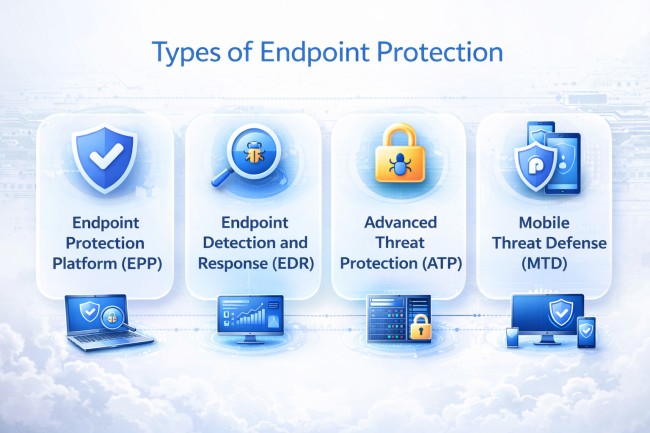
Endpoint protection solutions are commonly categorized by what they focus on protecting, how they detect threats, and the depth of response they provide. The four primary types are:
Endpoint Protection Platform (EPP)
EPP is designed to prevent threats before execution. It uses signatures, heuristics, and behavioral detection to block malware, ransomware, and known attack techniques at the endpoint. EPP serves as the baseline, prevention-first layer of endpoint security.
Endpoint Detection and Response (EDR)
EDR focuses on detecting, investigating, and responding to threats that bypass prevention controls. It provides continuous monitoring, detailed telemetry, and forensic visibility into endpoint activity, enabling security teams to hunt threats and respond after suspicious behavior occurs.
Advanced Threat Protection (ATP)
ATP targets sophisticated and evasive attacks, including zero-day exploits, fileless malware, and advanced persistent threats. It combines behavioral analytics, threat intelligence, and machine learning to identify attack patterns that traditional endpoint controls may miss.
Mobile Threat Defense (MTD)
MTD protects mobile endpoints such as smartphones and tablets from mobile-specific threats. It detects malicious apps, network-based attacks, phishing, OS exploits, and device compromise, extending endpoint protection to mobile operating systems outside traditional desktop environments.
Endpoint Protection vs Antivirus: What Is the Difference?
Antivirus forms one component of endpoint protection, not a synonym for it.
The older tool finds and removes malware, mostly by matching files against known signatures. It works well against threats that have been seen before. It offers little against fileless techniques, behavior-based attacks, or anything without a published signature.
Endpoint protection includes antivirus and adds behavioral analysis, application control, device management, host firewalling, and investigation tooling. The difference is not detection quality alone. Antivirus reports that a file was blocked. Endpoint protection reports what happened on the device and what the response needs to cover.
EPP vs EDR vs XDR in Endpoint Protection
These three layers build on one another. Vendors sell products under all three labels at once, which makes the distinction worth pinning down before an evaluation.
Aspect
EPP
EDR
XDR
Primary Purpose
Prevent threats from executing
Detect and investigate what gets through
Correlate signals across the environment
Data Scope
The endpoint only
The endpoint, with full activity history
Endpoint, network, cloud, email, identity
Main Output
A block or a quarantine
An investigable alert with context
A linked incident across multiple sources
Who Operates It
IT or security administration
Security analysts
Security operations with correlation tooling
Answers the Question
Can this be stopped?
What happened on this device?
How far did this attack reach?
In short, EPP stops what it recognizes, EDR catches and explains what gets past it, and XDR connects those findings to activity elsewhere in the environment.
How Do Attackers Bypass Endpoint Protection?
Attackers no longer try to outrun endpoint agents. They disable them first. ESET research published in March 2026 tracked close to 90 EDR killer tools active in the wild. Fifty-four of them use the bring-your-own-vulnerable-driver technique, abusing 35 signed but flawed drivers between them.
Bring Your Own Vulnerable Driver
Windows verifies that a kernel driver came from a known vendor. It cannot verify that the driver is free of flaws. An attacker with local administrator rights loads a legitimate signed driver with a known vulnerability, gains kernel access through it, and terminates the security agent from below. Cloud Security Alliance researchers documented this pattern reaching ordinary criminal operators through malvertising campaigns, not just well-resourced groups.
Living Off the Land
PowerShell, Windows Management Instrumentation, and other administration tools are signed by Microsoft and expected on every system. An attacker using them produces no malicious file and no unusual binary. Detection depends entirely on command-line auditing and process lineage, which maps to the defense evasion tactic in the MITRE ATT&CK framework.
Delivery Built to Evade Scanning
Some operators avoid the agent by never presenting it with a readable file. CloudSEK's TRIAD team traced a Pakistan-based infostealer delivery network to SEO-poisoned download sites. Those sites pushed Lumma, Meta, and AMOS stealers inside password-protected archives, which an endpoint scanner cannot open or inspect. The investigation into that network recorded more than 449 million clicks and 1.88 million installs, generating $4.67 million in tracked revenue at roughly $0.47 per stolen credential log.
Infostealers compound the problem after execution. Many run for a few seconds, copy saved browser credentials and session cookies, then delete themselves. The agent sees a short-lived process and nothing else, while the stolen session token stays valid on an attacker's machine.
Credential-Based Access
An attacker holding valid credentials logs in as a legitimate user. No malware is deployed, and no exploit is fired. The endpoint agent records a normal session, because from the device's perspective that is exactly what it sees.
Disabling Protection Before Encryption
Ransomware crews now treat agent removal as a standard first step, a pattern visible across current ransomware intelligence. Ransomware-as-a-service operations ship EDR killers to their affiliates, so the encryptor itself needs no evasion capability at all. By the time files start encrypting, the security stack has already gone quiet.
What Endpoint Protection Cannot Do
Endpoint protection works as a strong control with a clearly defined boundary. Knowing where that boundary falls prevents a false sense of coverage.
Devices without an agent: personal phones, contractor laptops, and IoT hardware that accepts no agent stay invisible. A fleet with 90 percent agent coverage carries a 10 percent blind spot, and attackers look there first.
Operational technology: industrial controllers, medical devices, and embedded systems commonly cannot run an agent at all, which is one reason IoMT security is handled as a separate discipline.
Cloud and SaaS activity: an attacker using a stolen session token reads email through a browser and touches no managed endpoint. The endpoint console shows nothing at all.
Identity-layer attacks: session hijacking, token theft, and OAuth consent abuse happen away from the device. Endpoint telemetry has no visibility into any of them.
Pre-device exposure: credentials sold on criminal markets, phishing domains, and exposed services all exist before any endpoint is touched. That is where attack path mapping starts.
None of this argues against endpoint protection. It argues for pairing it with identity monitoring, network telemetry, and external attack surface visibility, so the gaps are covered by something instead of assumed away.
How to Evaluate an Endpoint Protection Solution
Most platforms claim the same feature list. These criteria separate them in practice.
Behavioral detection quality: how well the platform catches threats by what they do, tested against fileless and living-off-the-land techniques, not against known malware samples.
Tamper resistance: whether the agent survives an attempt to disable it, including driver-based attacks. This has become the single most important differentiator.
Investigation depth: how much history the platform retains and how quickly an analyst can reconstruct what happened on a device.
Automated response: the ability to isolate a host or kill a process without waiting for a human, and the granularity of control over when that happens.
Platform coverage: support across Windows, macOS, Linux, and mobile, since attackers select the least-defended operating system in the fleet.
Telemetry export: whether endpoint data flows into the security operations stack, or stays locked inside the vendor console.
Management at scale: one console for policy, agent health, and response across every device, including machines that rarely connect to the corporate network.
Performance cost: measured on the oldest hardware in the fleet, because users disable agents that make their machines unusable.
How to Deploy Endpoint Protection Without Gaps
Deployment order decides how much of the fleet ends up protected. These steps run in sequence, because each one supplies what the next needs.
Build an asset inventory first. Count the devices that exist before counting the ones with agents. A console can only report on machines it already knows about, so the gap lives outside it.
Classify devices by risk. Separate servers, executive laptops, developer machines, and general user devices. Policy strictness follows what each group holds and reaches.
Pilot on a representative group. Include the oldest hardware and the noisiest applications in the pilot. Performance problems surface there, not on new machines.
Run in monitor mode before enforcing. Record what the policy would have blocked and review it. Blocking a business-critical application on day one loses the team's trust in the tool.
Enable tamper protection and the driver blocklist. Turn both on during rollout instead of afterwards. Retrofitting them across a live fleet is considerably harder.
Connect telemetry to the wider stack. Route endpoint data into the central monitoring platform at deployment, so it is usable from the first day and not months later.
Close the coverage gap deliberately. List every device that cannot take an agent and assign it a compensating control, such as network segmentation or restricted access.
Endpoint Protection Best Practices
Deployment decides most outcomes. These practices matter more than the choice of product.
Enable the vulnerable driver blocklist: Windows maintains a list of drivers known to be exploitable. Turning it on removes the most common route to disabling an agent.
Remove standing administrator rights: driver-based attacks need local admin. Users working without it cannot load a malicious driver, whatever else they run.
Turn on tamper protection: many platforms ship it disabled or partially configured, and it is the setting that stops an attacker from uninstalling the agent.
Alert on agent health, not just threats: an agent that stops reporting is an incident. Silence from a device should raise an alert the same way a detection does.
Patch endpoints and agents on a schedule: outdated agents miss detections the vendor has already shipped, and unpatched systems give attackers the admin rights they need.
Extend coverage to every device type: include servers, contractor machines, and mobile devices. Partial deployment produces partial protection.
Apply zero trust to device access: require zero trust conditions such as device compliance before a machine reaches sensitive systems, so an unprotected endpoint reaches less.
Review alerts rather than trusting automatic blocking: a blocked file means someone was targeted. That context matters even when the block succeeded.
Responding to a Compromised Endpoint
An endpoint alert is the start of an investigation, not the end of an incident. The order below matters, because cleaning a device early destroys the evidence needed to judge scope.
Isolate before cleaning: cut the device off the network first. Most platforms isolate a host while keeping the agent connected, which preserves the investigation.
Preserve memory and process history: capture volatile data before a rebuild. Fileless activity exists only in memory, so a reimage erases the record of what ran.
Treat every credential on the device as compromised: reset passwords and revoke active sessions. A password reset alone leaves stolen session tokens working, which is the most common remediation error.
Search the fleet for the same indicators: query other devices for the same process, parent, or outbound destination. One alert usually means a campaign rather than a single target.
Check for persistence before restoring: look for scheduled tasks, services, and startup entries created during the exposure window. Restoring a backup taken afterwards restores those too.
Feed the findings back into detection: turn the observed behavior into a rule, so the same technique raises an alert earlier next time.
Measuring Endpoint Protection Coverage
Coverage remains the metric most programs never track, and attackers exploit exactly that gap. These measures show whether a deployment is real.
Agent deployment rate: the percentage of known devices running a healthy agent, measured against an asset inventory, never against the console's own device list.
Unmanaged device count: machines seen on the network with no agent installed. This number is rarely zero and is worth knowing precisely.
Agent health and reporting gaps: devices that have not checked in recently, which indicates either a disabled agent or a machine nobody is tracking.
Mean time to contain: the interval between detection and isolation of an affected device, which reflects workflow quality more than product capability.
Detection coverage by technique: the share of relevant attacker techniques with working detection content, measured against a documented matrix.
Endpoint Protection and the Exposure That Precedes It
The limits section above ends on a practical problem. An endpoint agent activates only when something reaches the device. The credentials, lookalike domains, and phishing infrastructure used to get there were assembled days or weeks earlier, in public view. CloudSEK XVigil monitors surface, deep, and dark web sources for that preparation: leaked employee credentials, access listings naming the organization, and cloned login pages built to harvest more. A stolen password taken off the market before use never becomes an endpoint alert at all.
Endpoint Protection FAQs
Is endpoint protection the same as endpoint security?
Yes. The two terms are used interchangeably. Endpoint protection platform, or EPP, refers specifically to the product category.
Does endpoint protection replace a firewall?
No. A host firewall is one component of endpoint protection. Network firewalls still govern traffic between segments and at the perimeter.
Can endpoint protection be disabled by an attacker?
Yes, with local administrator rights. Driver-based attacks terminate agents from the kernel level, so tamper protection and privilege control matter.
Do Macs and Linux servers need endpoint protection?
Yes. Attackers target the least-defended platform in a fleet, and Linux servers hold the data worth stealing in most environments.
Is endpoint protection enough on its own?
No. It cannot see identity-layer attacks, cloud sessions, or unmanaged devices, so it works alongside network and identity monitoring.
How much performance impact does an endpoint agent have?
Modern agents use a small share of processor and memory. Impact matters most on older hardware, which is where it should be tested.
What is the difference between EDR and antivirus?
Antivirus blocks known malware. EDR records device activity, detects suspicious behavior, and gives analysts the data to investigate and respond.
Cybersecurity risk management is the process of identifying, assessing, and treating cyber risk. Explore its steps, frameworks, quantification, and best practices.
A keylogger secretly records every keystroke to steal passwords and data. Learn its types, how it works, its infostealer evolution, and how to detect and remove it.
Smishing is phishing by text message, using fake SMS to steal data and money. Learn how it works, its scam types, red flags, and how to spot and prevent it.
.avif)