🚀 أصبحت CloudSek أول شركة للأمن السيبراني من أصل هندي تتلقى استثمارات منها
اقرأ المزيد
.avif)

اختطاف DNS هو هجوم إلكتروني حيث يتلاعب المهاجمون بنظام أسماء النطاقات (DNS) لإعادة توجيه المستخدمين من مواقع الويب الشرعية إلى المواقع الضارة. بدلاً من الاتصال بالخادم الصحيح، يتم إرسال المستخدم دون علم إلى وجهة وهمية يتحكم فيها المهاجم.
DNS هو نظام ترجمة يقوم بتحويل أسماء النطاقات إلى عناوين IP، مما يتيح للمستخدمين الوصول إلى مواقع الويب. في هجوم اختطاف DNS، يتم تغيير هذه العملية بحيث يشير المجال إلى عنوان IP مختلف وغير مصرح به. ونتيجة لذلك، حتى عندما يقوم المستخدمون بإدخال عنوان موقع الويب الصحيح، فقد يصلون إلى صفحة احتيالية دون أن يدركوا ذلك.
الهدف الرئيسي من اختطاف DNS هو التحكم في حركة مرور الويب لأغراض ضارة. يستخدمه المهاجمون لسرقة بيانات اعتماد تسجيل الدخول أو توزيع البرامج الضارة أو تنفيذ الاحتيال المالي. نظرًا لأن إعادة التوجيه تحدث على مستوى الشبكة أو النظام، فغالبًا ما لا يلاحظ المستخدمون الهجوم على الفور.
تعمل عملية اختطاف DNS من خلال معالجة عملية حل DNS بحيث يتحول اسم النطاق إلى عنوان IP ضار بدلاً من العنوان الشرعي. يمكن أن يحدث هذا التغيير في نقاط مختلفة في البنية التحتية لـ DNS، بما في ذلك الجهاز المحلي أو الشبكة أو خادم DNS.
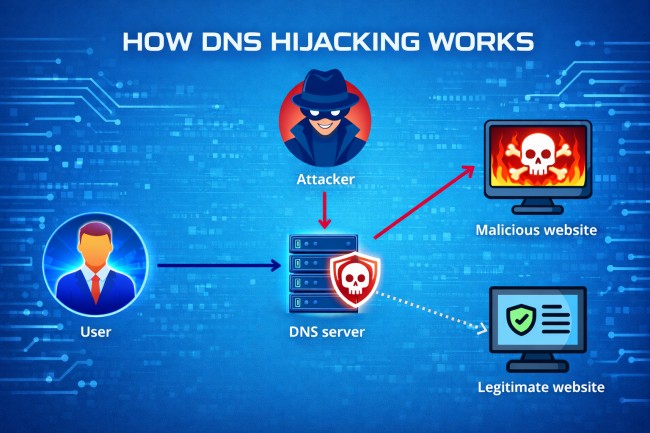
فيما يلي عملية الهجوم خطوة بخطوة لاختطاف DNS:
عندما يقوم المستخدم بإدخال عنوان URL لموقع ويب، يرسل الجهاز استعلام DNS لحل اسم المجال إلى عنوان IP. يتم توجيه هذا الطلب إلى محلل DNS الذي تم تكوينه، مثل جهاز توجيه محلي أو خادم DNS خارجي.
يقوم محلل DNS بمعالجة الاستعلام عن طريق الاتصال بخوادم DNS الموثوقة لاسترداد عنوان IP الصحيح للمجال. ثم يتم إرجاع عنوان IP الذي تم حله إلى جهاز المستخدم لإنشاء اتصال بالخادم المقصود.
في هجوم اختطاف DNS، يتم اعتراض استعلام DNS أو الاستجابة أو تغييرها. يقوم المهاجمون بتعديل إعدادات DNS أو اختراق أجهزة التوجيه أو التلاعب بخوادم DNS للتحكم في كيفية حل أسماء النطاقات.
بدلاً من إرجاع عنوان IP الشرعي، يوفر النظام عنوان IP يتحكم فيه المهاجم. يقوم هذا التعيين بإعادة توجيه حركة المرور إلى خادم ضار يحاكي موقع الويب المقصود.
يتصل متصفح المستخدم بالخادم الضار بدون تحذير مرئي. يمكن للمهاجم بعد ذلك التقاط بيانات الاعتماد أو إدخال محتوى ضار أو إجراء مزيد من الاستغلال مع الحفاظ على مظهر موقع ويب شرعي.
يتبع هجوم اختطاف DNS تسلسلاً بسيطًا ولكنه خطير يعيد توجيه المستخدمين دون علمهم:
تبدأ العملية عندما يقوم المستخدم بإدخال عنوان موقع ويب موثوق به في المتصفح. بدلاً من الوصول إلى الخادم الصحيح، يتم معالجة طلب DNS من قبل المهاجم في مرحلة ما في الشبكة أو النظام.
بمجرد تغيير استعلام DNS، يقوم النظام بإرجاع عنوان IP مزيف يشير إلى خادم ضار. يتصل متصفح المستخدم بهذا الخادم، الذي يستضيف موقع ويب يبدو مطابقًا تقريبًا للموقع الحقيقي. نظرًا لأن الصفحة تبدو شرعية، فإن معظم المستخدمين لا يدركون وجود أي خطأ.
عندما يتفاعل المستخدم مع موقع الويب المزيف، يمكن للمهاجم الحصول على بيانات اعتماد تسجيل الدخول أو التفاصيل المالية أو غيرها من المعلومات الحساسة. في بعض الحالات، قد يقوم الموقع الضار بتثبيت برامج ضارة على الجهاز. تُظهر عملية إعادة التوجيه خطوة بخطوة كيف يمكن أن يؤدي اختطاف DNS بهدوء إلى سرقة البيانات واختراق النظام.
يحدث اختطاف DNS بأشكال مختلفة اعتمادًا على المكان الذي يتعامل فيه المهاجمون مع عملية DNS. يستهدف كل نوع نقطة محددة في النظام للتحكم في كيفية حل أسماء النطاقات.

يحدث اختطاف DNS المحلي عندما البرمجيات الخبيثة يعدل إعدادات DNS على جهاز المستخدم. يقوم المهاجم بتغيير خادم DNS الذي تم تكوينه بحيث تتم إعادة توجيه جميع طلبات المجال من خلال محلل ضار. هذا يسمح بالتحكم المستمر في حركة مرور الويب للمستخدم.
تستهدف عملية اختطاف DNS الخاصة بجهاز التوجيه أجهزة الشبكة مثل أجهزة التوجيه المنزلية أو المكتبية. يمكن للمهاجمين الوصول إلى جهاز التوجيه وتغيير تكوين DNS الخاص به. يتم بعد ذلك إعادة توجيه جميع الأجهزة المتصلة بهذه الشبكة إلى وجهات ضارة.
في هذا النوع، يعترض المهاجمون استعلامات DNS بين المستخدم وخادم DNS. يقومون بتغيير الاستجابة قبل أن تصل إلى جهاز المستخدم. يسمح هذا للمهاجمين بإعادة توجيه حركة المرور دون تعديل الإعدادات المحلية أو إعدادات جهاز التوجيه.
يحدث اختراق خادم DNS عندما يتحكم المهاجمون في خوادم DNS الموثوقة أو المتكررة. ويقومون بتعديل سجلات DNS بحيث تتحول أسماء النطاقات الشرعية إلى عناوين IP الضارة. يمكن أن يؤثر هذا النوع على عدد كبير من المستخدمين في وقت واحد.
يحدث اختطاف DNS على مستوى ISP عندما يقوم مزودو خدمة الإنترنت بمعالجة استجابات DNS على مستوى الشبكة. قد يتم ذلك عن قصد للتحكم في حركة المرور أو بشكل ضار من خلال التسوية. تتم إعادة توجيه المستخدمين دون أي تغييرات على أجهزتهم الخاصة.
بين عامي 2007 و 2011، أصاب مجرمو الإنترنت الذين يقفون وراء برنامج DNSChanger الضار ملايين أجهزة الكمبيوتر في جميع أنحاء العالم عن طريق تعديل إعدادات DNS على الأجهزة المخترقة. أعادت البرامج الضارة توجيه المستخدمين إلى خوادم ضارة يتحكم فيها المهاجمون. تأثر أكثر من 4 ملايين نظام عالميًا، بما في ذلك الأفراد والشركات. حقق المهاجمون إيرادات من خلال الإعلانات الاحتيالية وإعادة توجيه حركة المرور، مما أدى إلى واحدة من أكبر عمليات اختطاف DNS التي كشفت عنها سلطات إنفاذ القانون.
في عام 2016، استهدف المهاجمون البنوك البرازيلية من خلال اختراق سجلات DNS على مستوى مسجل النطاق. لقد أعادوا توجيه المستخدمين الذين يحاولون الوصول إلى مواقع الويب المصرفية الشرعية إلى صفحات مزيفة تحاكي المواقع الأصلية. تأثر آلاف المستخدمين أثناء نافذة الهجوم. قام الضحايا دون علمهم بإدخال بيانات اعتماد تسجيل الدخول إلى صفحات احتيالية، مما سمح للمهاجمين بسرقة المعلومات المالية الحساسة والوصول إلى الحسابات المصرفية.
بين عامي 2017 و 2019، أ التجسس الإلكتروني استهدفت الحملة المعروفة باسم Sea Turtle الوكالات والمنظمات الحكومية في العديد من البلدان. قام المهاجمون باختراق مسجلي النطاقات والبنية التحتية لـ DNS لإعادة توجيه حركة المرور إلى الخوادم الضارة. تأثرت المنظمات في أكثر من 40 دولة، بما في ذلك المؤسسات الحكومية ومقدمي خدمات الاتصالات. استخدم المهاجمون اختطاف DNS لاعتراض الاتصالات وجمع البيانات الحساسة، مما تسبب في مخاطر أمنية طويلة الأجل وتعرض البيانات.
يُظهر اختطاف DNS علامات تحذير محددة تشير إلى أن إعدادات DNS أو حركة المرور ربما تم تغييرها دون إذن. يساعد التعرف على هذه العلامات في تحديد هجمات إعادة التوجيه المحتملة مبكرًا.

فيما يلي العلامات الرئيسية لاختطاف DNS النموذجي:
قد تتم إعادة توجيه المستخدمين إلى مواقع ويب غير مألوفة أو غير صحيحة حتى بعد إدخال عنوان URL الصحيح. غالبًا ما يشير هذا السلوك إلى أن استعلامات DNS يتم حلها إلى وجهات ضارة.
قد تعرض الأنظمة المصابة نوافذ منبثقة أو إعلانات مفرطة. غالبًا ما يتم حقنها من خلال خوادم ضارة بعد إعادة توجيه DNS.
قد تعرض المتصفحات تحذيرات أمنية حول شهادات SSL غير الصالحة أو غير المتطابقة. يحدث هذا عندما تتم إعادة توجيه المستخدمين إلى مواقع ويب مزيفة لا تتطابق مع المجال الأصلي.
قد يتم تغيير إعدادات خادم DNS على جهاز أو جهاز توجيه دون علم المستخدم. يمكن أن تشير التغييرات غير المصرح بها لهذه الإعدادات إلى محاولة اختطاف.
قد يتدهور أداء الشبكة بسبب إعادة التوجيه من خلال الخوادم الضارة. يمكن أن تشير التأخيرات غير العادية أو التحميل غير المتسق لموقع الويب إلى التلاعب بـ DNS.
يعد اختطاف DNS أمرًا خطيرًا لأنه يسمح بذلك الجهات الفاعلة في مجال التهديد لتمكين إعادة توجيه حركة المرور إلى مواقع الويب الضارة دون وعي المستخدم. فهي تتلاعب باستجابات DNS حتى يصل المستخدمون إلى المواقع المزيفة التي تبدو شرعية. هذا يسمح سرقة بيانات الاعتمادوهجمات التصيد الاحتيالي والاحتيال المالي التي تحدث دون شك.
وفقًا لـ IDC، تعرضت أكثر من 80% من المؤسسات لهجمات تستند إلى DNS في السنوات الأخيرة، مما يؤكد مدى تكرار قيام المهاجمين باستغلال البنية التحتية لـ DNS لتقنيات مثل الاختطاف والخداع وإعادة توجيه حركة المرور.
يزيد هذا الهجوم من مخاطر توزيع البرامج الضارة واختراق النظام. بمجرد إعادة التوجيه، يمكن للمستخدمين تنزيل الملفات المصابة أو التفاعل مع المحتوى الضار. يستخدم المهاجمون هذا الوصول لتثبيت البرامج الضارة والسرقة بيانات حساسة، أو توسيع نطاق التحكم عبر الشبكات.
يؤدي اختطاف DNS إلى التعرض للبيانات وسرقة الهوية وفقدان الثقة في الخدمات عبر الإنترنت. في الهجمات واسعة النطاق مثل اختراق خادم DNS أو الاختطاف على مستوى ISP، قد يتأثر آلاف المستخدمين في وقت واحد. يزيد هذا التأثير الواسع من المخاطر التشغيلية للمؤسسات والتهديدات الأمنية للأفراد.
تكتشف فرق الأمان اختطاف DNS من خلال تحليل حركة مرور DNS وسلوك النظام ونشاط الشبكة بحثًا عن علامات إعادة التوجيه غير المصرح بها. يركز الاكتشاف على تحديد أنماط DNS غير الطبيعية التي تشير إلى التلاعب.
تراقب فرق الأمان استعلامات DNS والاستجابات عبر الشبكة. يمكن أن تشير قرارات النطاق غير العادية أو الطلبات المتكررة للنطاقات المشبوهة إلى نشاط الاختطاف.
تقوم أنظمة الكشف بتحليل سلوك DNS العادي وتحديد الانحرافات. قد تشير التغييرات غير المتوقعة في تعيينات IP أو أنماط الاستعلام غير العادية إلى معالجة DNS.
حماية نقطة النهاية وتقوم حلول أمان الشبكة بتتبع تكوينات النظام وتدفق حركة المرور. تكتشف هذه الأدوات تغييرات DNS غير المصرح بها أو العمليات الضارة أو الاتصالات المشبوهة.
تقوم فرق الأمان بمقارنة نشاط DNS مع بيانات معلومات التهديدات المعروفة. تساعد مطابقة المجالات أو عناوين IP أو الأنماط المرتبطة بالهجمات المعروفة في تحديد حوادث اختطاف DNS المحتملة.
امنع اختطاف DNS من خلال تأمين تكوينات DNS وأجهزة الشبكة ونقاط النهاية قبل أن يتمكن المهاجمون من معالجة حركة المرور. تقلل التدابير الوقائية القوية من مخاطر تغييرات DNS غير المصرح بها وإعادة توجيه حركة المرور.
استخدم كلمات مرور قوية وقم بتعطيل الوصول عن بُعد على أجهزة التوجيه. غالبًا ما يستهدف المهاجمون أجهزة التوجيه لتغيير إعدادات DNS. يؤدي تأمين الوصول إلى منع تغييرات التكوين غير المصرح بها.
قم بتمكين ملحقات أمان نظام أسماء النطاقات (DNSSEC) للتحقق من استجابات DNS. تضمن DNSSEC أن بيانات DNS تأتي من مصادر موثوقة ولم يتم تغييرها.
حافظ على تحديث أجهزة التوجيه وأنظمة التشغيل والتطبيقات. تعمل تحديثات الأمان على إصلاح الثغرات الأمنية التي يستغلها المهاجمون للوصول وتعديل إعدادات DNS.
قم بتكوين الأنظمة لاستخدام خدمات DNS الموثوقة والآمنة. يقلل الموفرون الموثوق بهم من مخاطر حل DNS الضار.
قم بتثبيت حلول أمان نقطة النهاية لاكتشاف البرامج الضارة التي تغير إعدادات DNS. تساعد هذه الأدوات في منع اختطاف DNS المحلي على الأجهزة.
بعد هجوم اختطاف DNS، إليك بعض أفضل الإجراءات السريعة التي تساعد على إيقاف إعادة توجيه حركة المرور ومنع المزيد من التعرض للبيانات.
قم باستعادة تكوين DNS على جهازك إلى خوادم DNS الافتراضية أو الموثوقة. يؤدي هذا إلى إزالة أي إدخالات DNS غير مصرح بها تم تعيينها من قبل المهاجمين.
قم بإجراء فحص كامل للنظام باستخدام برنامج الأمان لاكتشاف البرامج الضارة وإزالتها. غالبًا ما تقوم البرامج الضارة بتغيير إعدادات DNS للحفاظ على التحكم في حركة المرور.
قم بالوصول إلى إعدادات جهاز التوجيه واستعادتها إلى الوضع الافتراضي إذا لزم الأمر. قم بتحديث بيانات اعتماد تسجيل الدخول وتكوين خوادم DNS الآمنة لمنع الهجمات المتكررة.
امسح ذاكرة التخزين المؤقت لـ DNS المخزنة على نظامك. يؤدي هذا إلى إزالة أي سجلات DNS غير صحيحة أو ضارة تم حفظها أثناء الهجوم.
تحقق من جميع إعدادات الشبكة لضمان عدم وجود تغييرات DNS غير مصرح بها. تأكد من أن الأجهزة وأجهزة التوجيه تستخدم خوادم DNS شرعية.
يعد اختطاف DNS وانتحال DNS وتسمم ذاكرة التخزين المؤقت لـ DNS أنواعًا من هجمات DNS، ولكنها تختلف في كيفية معالجتها لعمليات DNS. كل طريقة تؤدي إلى إعادة توجيه حركة المرور، ولكن الأسلوب ونقطة الهجوم مختلفة.
يؤدي اختطاف DNS إلى إعادة توجيه المستخدمين عن طريق تغيير إعدادات DNS أو البنية التحتية، ويؤدي انتحال DNS إلى تزوير استجابات DNS المزيفة لتضليل الأنظمة، ويؤدي تسمم ذاكرة التخزين المؤقت لـ DNS إلى إدخال سجلات DNS غير الصحيحة في ذاكرة التخزين المؤقت حتى يتلقى المستخدمون عناوين IP خاطئة بشكل متكرر. فيما يلي جدول المقارنة لفهم الاختلافات بسهولة:
نعم، يعد اختطاف DNS غير قانوني عند استخدامه لإعادة توجيه المستخدمين لأغراض ضارة مثل الاحتيال أو سرقة البيانات أو توزيع البرامج الضارة.
نعم، يمكن أن يؤثر اختطاف DNS على المستخدمين المنزليين، خاصة من خلال أجهزة التوجيه المخترقة أو البرامج الضارة التي تغير إعدادات DNS المحلية.
يؤدي اختطاف DNS إلى إعادة توجيه المستخدمين إلى مواقع الويب المزيفة عن طريق التلاعب بـ DNS، بينما يخدع التصيد الاحتيالي المستخدمين للنقر على الروابط أو الرسائل الضارة.
تتضمن العلامات عمليات إعادة توجيه غير متوقعة لموقع الويب وإعدادات DNS المتغيرة وتحذيرات الأمان وسلوك الشبكة غير المعتاد.
