🚀 أصبحت CloudSek أول شركة للأمن السيبراني من أصل هندي تتلقى استثمارات منها
اقرأ المزيد
.avif)

Adware هو برنامج مدعوم بالإعلانات يقوم تلقائيًا بعرض الإعلانات أو تنزيلها على الجهاز. يعمل بشكل شائع داخل متصفحات الويب أو تطبيقات سطح المكتب أو تطبيقات الهاتف المحمول. والغرض الأساسي منه هو تحقيق إيرادات من خلال عرض إعلانات مثل النوافذ المنبثقة أو اللافتات أو صفحات إعادة التوجيه.
تكسب Adware الأموال من خلال مرات ظهور الإعلان والنقرات والعروض الترويجية التابعة. في بعض الحالات، يعد جزءًا من نموذج أعمال شرعي حيث يتلقى المستخدمون برامج مجانية مقابل مشاهدة الإعلانات. تكشف هذه البرامج بوضوح عن سلوكها الإعلاني أثناء عملية التثبيت.
تصبح البرامج الإعلانية ضارة عندما يتم تثبيتها دون موافقة واضحة، أو تقوم بإدخال الإعلانات بقوة، أو تغيير إعدادات المتصفح، أو تتبع نشاط المستخدم دون شفافية. بدلاً من مجرد دعم تطبيق مجاني، تتداخل البرامج الإعلانية الضارة مع التصفح العادي، وتجمع البيانات بهدوء، وتعرض المستخدمين لمحتوى غير مرغوب فيه أو غير آمن.
تظهر البرامج الإعلانية بأشكال مختلفة اعتمادًا على كيفية عملها ومقدار التحكم الذي تستولي عليه في الجهاز. تعمل بعض الإصدارات ضمن نماذج إعلانية واضحة، بينما تتصرف إصدارات أخرى بقوة وتتداخل مع الاستخدام العادي للنظام.
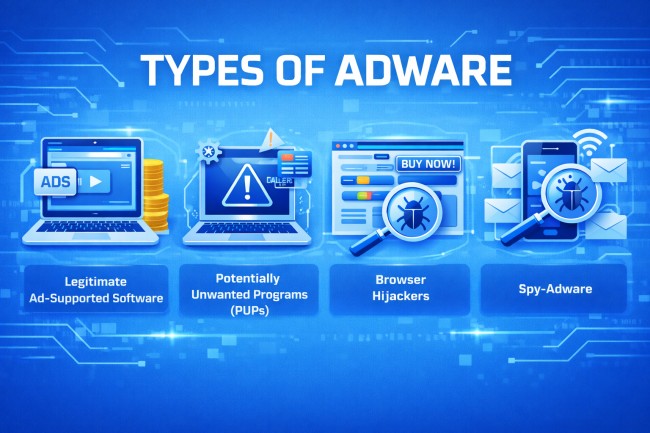
فيما يلي الأنواع الرئيسية من البرامج الإعلانية:
يعمل هذا النوع من البرامج الإعلانية كجزء من نموذج أعمال شفاف. يقوم المستخدمون بتثبيت برامج مجانية ويوافقون على عرض الإعلانات في المقابل. يتم عرض الإعلانات داخل التطبيق دون تعديل إعدادات النظام سراً.
PUPs هي برامج تتضمن مكونات إعلانية ولكن غالبًا ما يتم تثبيتها من خلال التنزيلات المجمعة. على الرغم من أنها ليست ضارة دائمًا، إلا أنها قد تعرض إعلانات مفرطة أو تتبع نشاط المستخدم أو تثبيت برامج إضافية غير مرغوب فيها.
يقوم مخترقو المتصفح بتعديل إعدادات المتصفح دون إذن مناسب. قد يقومون بتغيير الصفحة الرئيسية أو محرك البحث الافتراضي أو إعادة توجيه عمليات البحث إلى الصفحات الإعلانية. هدفهم هو زيادة حركة المرور وتحقيق إيرادات من مشاهدات الإعلانات القسرية.
تجمع Spy-adware بين السلوك الإعلاني وتتبع البيانات. فهو يجمع عادات التصفح أو استعلامات البحث أو أنماط الاستخدام ويستخدم تلك المعلومات لتقديم إعلانات مستهدفة. في بعض الحالات، تشارك البيانات المجمعة مع أطراف ثالثة دون موافقة واضحة.
تعمل Adware عن طريق إدراج إعلانات في تجربة تصفح المستخدم أو التطبيق وتنتشر من خلال طرق توزيع البرامج الشائعة.
يتم تثبيت معظم البرامج الإعلانية من خلال تنزيلات البرامج المجمعة. عندما يقوم المستخدمون بتثبيت برامج مجانية، قد يتم تضمين مكونات الإعلان في عملية الإعداد. في حالة تخطي خطوات التثبيت أو قبول الإعدادات الافتراضية، يتم تثبيت البرامج الإعلانية جنبًا إلى جنب مع البرنامج المقصود.
يمكن أن تنتشر البرامج الإعلانية أيضًا من خلال مواقع الويب الضارة أو الإعلانات الخادعة أو تحديثات البرامج المزيفة. قد يؤدي النقر فوق أزرار التنزيل المضللة أو التنبيهات المنبثقة إلى تشغيل التثبيت التلقائي.
على الأجهزة المحمولة، غالبًا ما تنتشر البرامج الإعلانية من خلال التطبيقات المجانية التي تطلب أذونات مفرطة. يسمح منح الوصول غير الضروري للتطبيق بعرض الإعلانات خارج التطبيق أو جمع بيانات الاستخدام.
بمجرد التثبيت، يتم دمج البرامج الإعلانية في المتصفح أو نظام التشغيل. قد تضيف ملحقات أو تعدل إعدادات المتصفح أو تنشئ مهام مجدولة أو تسجل إدخالات بدء التشغيل لتظل نشطة بعد إعادة التشغيل. تضمن أساليب الثبات هذه استمرار عرض الإعلانات.
تتعقب بعض البرامج الإعلانية نشاط التصفح لتقديم إعلانات مستهدفة. تراقب مواقع الويب التي تمت زيارتها واستعلامات البحث لزيادة تفاعل الإعلانات وتوليد الإيرادات.
تنتشر البرامج الإعلانية بهدوء وتحافظ على الثبات وتستمر في عرض الإعلانات حتى تتم إزالتها يدويًا أو حظرها.
غالبًا ما تكشف Adware عن نفسها من خلال التغييرات الملحوظة في سلوك التصفح والبرامج المثبتة والأداء العام للنظام. قد تظهر هذه العلامات تدريجيًا وتصبح أكثر اضطرابًا بمرور الوقت.

تظهر النوافذ المنبثقة المتكررة حتى عند تصفح مواقع الويب الموثوقة أو عندما لا تكون نافذة المتصفح مفتوحة. غالبًا ما تروج هذه الإعلانات للمنتجات المشبوهة أو التحديثات المزيفة أو الخدمات المشكوك فيها.
تتم إعادة توجيه نتائج البحث أو زيارات موقع الويب إلى صفحات غير مألوفة أو مليئة بالإعلانات. بدلاً من الوصول إلى الوجهة المقصودة، يرسل المتصفح حركة المرور إلى المواقع الترويجية أو التابعة.
تتغير إعدادات الصفحة الرئيسية أو محرك البحث الافتراضي أو علامة التبويب الجديدة دون موافقة. قد تظهر أشرطة الأدوات الجديدة أو ملحقات المتصفح بشكل غير متوقع.
تظهر التطبيقات أو إضافات المتصفح التي لم يتم تنزيلها عن قصد. غالبًا ما تتعلق هذه البرامج بالإعلانات أو خدمات التتبع.
قد يستجيب الجهاز ببطء بسبب عمليات تحميل الإعلانات في الخلفية أو الاتصال بالخوادم البعيدة.
قد يرتفع استخدام الإنترنت بشكل غير متوقع لأن البرامج الإعلانية تقوم باستمرار بتحميل الإعلانات وإرسال معلومات التتبع.
قد تتوقف ميزات الأمان المضمنة أو حماية المتصفح عن العمل بشكل صحيح. تتداخل بعض البرامج الإعلانية مع إعدادات الأمان لتجنب الاكتشاف.
قد تبدو البرامج الإعلانية غير ضارة لأنها تركز على الإعلانات، ولكنها في بعض الأحيان تخلق مخاطر حقيقية تتعلق بالخصوصية والأمان. فيما يلي بعض مخاطر البرامج الإعلانية:
تراقب العديد من برامج الإعلانات عادات التصفح واستعلامات البحث والروابط التي تم النقر عليها والنشاط عبر الإنترنت. قد تتم مشاركة هذه البيانات مع جهات خارجية لتقديم إعلانات مستهدفة. في الحالات العدوانية، يمكن جمع المعلومات الشخصية دون موافقة واضحة.
غالبًا ما تعيد Adware توجيه المستخدمين إلى مواقع ويب غير معروفة أو غير آمنة. تستضيف بعض هذه الصفحات عمليات الاحتيال أو نماذج التصيد الاحتيالي أو البرمجيات الخبيثة التنزيلات. يؤدي النقر فوق الإعلانات الخادعة إلى زيادة خطر الإصابة بمزيد من العدوى.
قد تجمع البرامج الإعلانية الضارة معلومات الجهاز مثل عنوان IP أو بيانات الموقع أو البرامج المثبتة أو تفاصيل المتصفح. غالبًا ما يكون المستخدمون غير مدركين لمقدار المعلومات التي يتم جمعها أو كيفية استخدامها.
يمكن أن تعمل البرامج الإعلانية كبوابة للتهديدات الأكثر خطورة. قد تحاول الصفحات التي تمت إعادة توجيهها تثبيت برامج التجسس أو برامج الفدية أو أحصنة طروادة. يمكن أن يؤدي برنامج واحد غير مرغوب فيه إلى إصابات متعددة.
يستهلك التحميل المستمر للإعلانات موارد النظام. وبمرور الوقت، يمكن أن يؤدي ذلك إلى إبطاء الأجهزة والتسبب في تعطل المتصفح وتقليل الاستقرار العام.
تتداخل بعض البرامج الإعلانية مع إعدادات المتصفح أو أدوات الأمان للحفاظ على الثبات. هذا يضعف الدفاعات ويجعل الأنظمة أكثر عرضة للاستغلال.
يتطلب اكتشاف البرامج الإعلانية التحقق من سلوك النظام والبرامج المثبتة. نظرًا لأن البرامج الإعلانية غالبًا ما تختبئ خلف التطبيقات العادية أو ملحقات المتصفح، فإن أدوات الفحص والأمان الدقيقة ضرورية للتعرف عليها.
استخدم برامج مكافحة الفيروسات أو برامج مكافحة البرامج الضارة ذات السمعة الطيبة لإجراء فحص كامل للنظام. تقارن هذه الأدوات الملفات والبرامج بتوقيعات البرامج الإعلانية المعروفة وأنماط السلوك المشبوهة.
تحقق من قائمة التطبيقات المثبتة في إعدادات النظام. ابحث عن البرامج غير المألوفة أو المثبتة حديثًا والتي لم يتم تنزيلها عن قصد.
افتح ملحق المتصفح أو مدير الإضافات وراجع كل إضافة مثبتة غير معروفة أو غير ضرورية أو ذات صلة بالإعلانات.
تحقق من عدم تغيير الصفحة الرئيسية ومحرك البحث الافتراضي وإعدادات علامة التبويب الجديدة. غالبًا ما تشير التعديلات غير المتوقعة إلى نشاط البرامج الإعلانية.
راقب حالات التباطؤ غير العادية أو الأعطال المتكررة أو الاستخدام العالي لوحدة المعالجة المركزية والذاكرة المرتبطة بعمليات غير معروفة. يمكن أن تساعد أدوات إدارة المهام أو مراقبة النظام في تحديد نشاط الخلفية المريب.
افحص استخدام الشبكة بحثًا عن الزيادات غير المبررة أو الاتصالات المتكررة بالنطاقات غير المألوفة. تتواصل Adware بشكل متكرر مع خوادم الإعلانات في الخلفية.
تشير عمليات إعادة التوجيه المتكررة أو النوافذ المنبثقة القوية أو الإعلانات التي تظهر خارج مواقع الويب العادية إلى وجود برامج إعلانية.
يمكنك إزالة البرامج الإعلانية عن طريق التخلص من البرنامج غير المرغوب فيه وتنظيف تغييرات المتصفح وضمان عدم وجود مكونات مخفية.
في ما يلي عملية التنظيف الكاملة التي تمنع البرامج الإعلانية من إعادة تثبيت الإعلانات أو الاستمرار في عرضها.
افتح قائمة البرامج المثبتة للنظام وأزل التطبيقات غير المألوفة أو المضافة حديثًا. ركز على البرنامج المثبت في الوقت الذي بدأت فيه الإعلانات في الظهور.
قم بالوصول إلى قائمة الإضافات أو الوظائف الإضافية للمتصفح وحذف أي إضافات غير معروفة أو ذات صلة بالإعلانات. أعد تشغيل المتصفح بعد الإزالة.
قم باستعادة إعدادات المتصفح إلى حالتها الافتراضية. تعمل هذه الخطوة على إزالة الصفحات الرئيسية المعدلة ومحركات البحث والنصوص المخفية التي تضخ الإعلانات.
استخدم برنامج أمان موثوق به لفحص النظام بأكمله. يكتشف الفحص الكامل الملفات المتبقية وإدخالات التسجيل والمكونات المخفية المتعلقة بالبرامج الإعلانية.
امسح ذاكرة التخزين المؤقت للمتصفح وملفات تعريف الارتباط وملفات النظام المؤقتة. يؤدي هذا إلى إزالة نصوص الإعلانات المخزنة وبيانات التتبع.
راجع إعدادات بدء التشغيل وقم بتعطيل البرامج غير المعروفة التي يتم تشغيلها تلقائيًا. تقوم بعض البرامج الإعلانية بتسجيل نفسها للتشغيل في كل مرة يبدأ فيها تشغيل الجهاز.
بعد خطوات الإزالة، أعد تشغيل الجهاز وراقب النوافذ المنبثقة أو عمليات إعادة التوجيه المتكررة. قد تتطلب الأعراض المستمرة فحصًا أمنيًا أعمق.
يتطلب منع البرامج الإعلانية عادات تنزيل حذرة وحماية قوية للمتصفح وصيانة متسقة للنظام. تحدث معظم حالات الإصابة بالبرامج الإعلانية لأن المستخدمين يوافقون دون علمهم على البرامج المجمعة أو ينقرون على الإعلانات الخادعة.
فيما يلي أفضل الطرق لمنع البرامج الإعلانية:
قم بتثبيت البرامج فقط من مواقع الويب الرسمية أو متاجر التطبيقات التي تم التحقق منها. تجنب مواقع التنزيل التابعة لجهات خارجية التي تجمع البرامج الإضافية مع برامج التثبيت.
أثناء إعداد البرنامج، حدد التثبيت «المخصص» أو «المتقدم». راجع كل خطوة بعناية وارفض البرامج الاختيارية أو المكونات الإعلانية.
قم بتثبيت تحديثات الأمان والتصحيحات بانتظام. تعمل الأنظمة المحدثة على إغلاق الثغرات الأمنية التي قد تحاول البرامج الإعلانية استغلالها.
قم بتثبيت برامج مكافحة الفيروسات أو برامج مكافحة البرامج الضارة ذات السمعة الطيبة مع الحماية في الوقت الفعلي. تعمل المراقبة المستمرة على حظر التنزيلات المشبوهة والبرامج النصية الضارة.
قم بتنشيط الحماية المضمنة للمتصفح مثل أدوات حظر النوافذ المنبثقة وفلاتر التصفح الآمن وعناصر التحكم في الإضافات. تعمل هذه الميزات على تقليل التعرض للإعلانات الضارة.
لا تنقر على اللافتات البراقة أو التنبيهات المزيفة أو رسائل «التحديث الآن». أغلق النوافذ المشبوهة باستخدام زر إغلاق المتصفح بدلاً من التفاعل مع المحتوى.
قبل تثبيت تطبيقات الأجهزة المحمولة، تحقق من الأذونات المطلوبة. ارفض الوصول غير الضروري إلى جهات الاتصال أو التخزين أو نشاط الخلفية الذي قد يمكّن عرض الإعلانات خارج التطبيق.
غالبًا ما تنتشر البرامج الإعلانية عبر شبكات الإعلانات الضارة ومواقع الويب المخترقة وحملات التنزيل الخادعة. يوفر CloudSek حماية المخاطر الرقمية و ذكاء التهديدات حلول تساعد المؤسسات على تحديد المجالات الضارة والبنية التحتية للإعلانات الخادعة ومحاولات انتحال هوية العلامة التجارية.
من خلال مراقبة الويب المفتوح والويب العميق والويب المظلم بحثًا عن التهديدات الناشئة، يتيح CloudSek الاكتشاف المبكر للحملات الضارة التي توزع البرامج غير المرغوب فيها. إنها مراقبة سطح الهجوم الخارجي يساعد في تحديد الأصول المكشوفة التي قد تعيد توجيه المستخدمين إلى شبكات الإعلانات الضارة. تقلل هذه الرؤية الاستباقية من خطر الإصابة بالبرامج الإعلانية وتحمي المستخدمين من المحتوى المخادع عبر الإنترنت.
