🚀 أصبحت CloudSek أول شركة للأمن السيبراني من أصل هندي تتلقى استثمارات منها
اقرأ المزيد
.avif)

In March 2026, TeamPCP compromised LiteLLM through its CI/CD pipeline and swept credentials from more than 2,500 organizations and roughly 434,000 pipelines in under 40 minutes. CloudSEK's investigation into that breach showed exactly what gets taken when an AI dependency is compromised: LLM API keys, cloud credentials, Kubernetes secrets, SSH keys, and gateway configuration, the credentials to an organization's entire AI stack, harvested automatically from CI runners before anyone noticed the package was malicious.
That investigation is the reason this guide exists. If your organization uses LiteLLM, pulls AI dependencies through CI/CD, or runs AI workloads in any cloud environment, the steps below tell you how to check whether your keys were among them, and what to do if they were.
A leaked AI key carries two harms, and only one is loud. The loud harm is LLMjacking, the unauthorized use of paid AI models through a stolen key, where attackers run inference on the owner's account and leave the bill behind.
Sysdig's team named LLMjacking in 2024 and tracked its growth into an organized trade, with marketplace operations reselling access across more than 30 AI providers by 2026. Stolen keys feed reverse proxies that pool credentials, so one leaked key joins a fleet renting out its owner's quota. Attacker scripts probe a found key quietly first; Sysdig documented the exact tell: a request with the token limit set to an invalid negative value returns a validation error. That error confirms the key works without billing a real call. The same scripts check whether invocation logging is enabled before running a single prompt.
The quiet harm reaches data. A key valid for a provider API reads what that account holds: uploaded files, fine-tuned models, stored assistants, and conversation logs, every item retrieved through ordinary calls that need no exploit. A fine-tuned model embodies proprietary training data, and a stored assistant carries its system instructions and connected files, both readable with the same key. Billing spikes get noticed in days; silent data access goes unnoticed for far longer.
Six recurring sources account for most AI key exposure, and few of them involve sophisticated intrusion. The LiteLLM breach showed the most dangerous: a trusted CI/CD dependency that ran with root access on every build runner that installed it. The list below runs from the most common developer mistake to the widest-blast-radius compromise.
To check whether AI API keys have leaked, work through 7 steps from provider dashboards outward to the open web. Each step covers a surface the others miss.
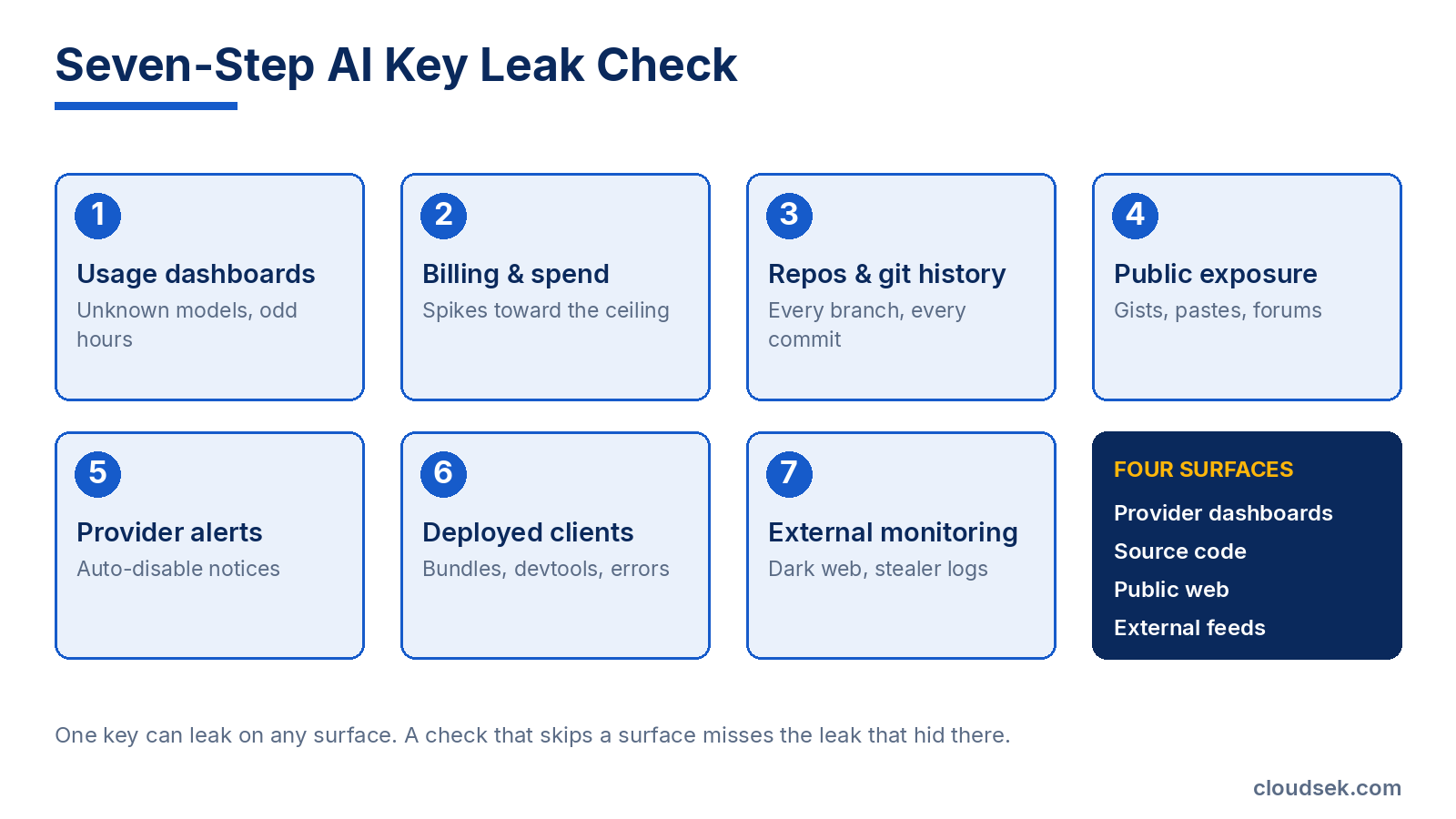
Open the per-key usage view and look for models the team never calls, request volumes above baseline, and activity during idle hours. OpenAI's account security guidance confirms usage tracks by individual key, which isolates the leaked one. On cloud-hosted models, the equivalent signal is a model-invocation record in the provider audit log, where a validation error against an unused model is the reconnaissance fingerprint attackers leave.
Compare current spend against the monthly trend and set threshold alerts if none exist. A sudden climb toward the quota ceiling signals inference abuse before the invoice confirms it. Enable model-invocation logging where the provider offers it, since attackers check for that logging specifically and prefer keys that leave no prompt trail.
Run secret scanning across current code, commit history, and every branch. A value deleted from the working tree survives untouched in past commits. Cover notebooks, config files, and infrastructure code alongside application source.
Query public code search, gists, paste sites, package registries, and developer forums for the key prefix, the project name, and the organization name. Attacker bots search the same places, so matching their reach matters.
Read provider emails and dashboard notices for automatic key disablement. OpenAI disables any key it detects on the public internet or inside an app-store app, and GitHub secret scanning alerts partnered providers when a matching key reaches a public repository.
View page source, shipped bundles, and the browser network tab for keys embedded in frontend code, and review error-tracking captures for logged secrets. Client-side leaks stay invisible in the repository while sitting exposed in production.
Search dark web markets, stealer-log dumps, and underground forums for the organization's exposed keys, the sources provider scanning never reaches. Continuous dark web monitoring covers this surface where a one-time manual search cannot.
Key formats speed the search. The prefix pins which provider a found string belongs to and which surface it most often leaks from.
Confirmation starts a 5-step response, and the order is deliberate. Scrapers validate a public key within minutes, so the sequence front-loads the one action that stops active abuse.
A leak that reaches pipeline secrets or cloud keys extends past the single provider. CloudSEK's investigation found that TeamPCP swept cloud credentials, Kubernetes tokens, repository access, and package publishing credentials from the same runners that held AI keys, meaning a single compromised dependency triggered rotation requirements across an organization's entire credential estate, not just its AI provider keys.
A one-time check catches today's leak and misses tomorrow's. The LiteLLM breach lasted 40 minutes on PyPI; automated build systems had already copied the malicious package to thousands of pipelines before removal. Continuous monitoring converts the 7-step check into a standing control across 3 layers.
The LiteLLM investigation showed that AI infrastructure is becoming a strategic target precisely because it sits at the junction of data, identity, compute, and autonomous action. An AI gateway that holds credentials for models, databases, cloud services, and internal tools is worth compromising not just for the AI access it provides but for everything connected to it. Watching that external surface continuously is where CloudSEK operates.
CloudSEK XVigil monitors dark web markets, code platforms, paste sites, and stealer logs for an organization's leaked credentials, including AI provider keys, and flags a match before an attacker drains the quota. For the AI infrastructure layer specifically, AIVigil monitors exposed model endpoints, MCP servers, vector databases, leaked AI credentials, and shadow AI, the same attack surface the LiteLLM breach demonstrated can be swept in under an hour. CloudSEK Threat Intelligence adds the campaign context behind a surfaced key, including attribution to active groups like TeamPCP and the FBI FLASH advisories that follow.
External monitoring complements provider scanning and secret detection instead of replacing them. Push protection stops the commit, provider scanning catches public GitHub, and XVigil covers the sources neither one sees.
The LiteLLM breach lasted 40 minutes on PyPI. The credential exposure it created will last months, because stolen keys don't expire when a malicious package is removed, they expire when they're rotated, and most organizations don't know to rotate what they don't know was read.
The seven steps in this guide are built around that gap: dashboards and billing tell you abuse is already underway, repository and public-exposure scans tell you what left your codebase, and external monitoring tells you what neither of those can see. CloudSEK's full investigation covers the breach mechanics, the credential classes taken, and the response scope in detail, including the regional breakdown for organizations across India, the TeamPCP campaign timeline, and the FBI FLASH advisory that followed.
