🚀 Introducing Cloudsek Launchpad: a incubator for early-stage cybersecurity founders, apply today!
Read more
.avif)

At roughly 20 kilobytes, the Tiny Banker Trojan is smaller than the image on most web pages, yet it has stolen banking credentials from customers of more than two dozen major banks. Tinba is a banking trojan, malware built to hijack online banking sessions and capture the login details, card numbers, and personal data that lead to financial fraud.
Size is its signature. Malware researchers catalog Tinba as one of the smallest banking trojans ever written, and that tiny footprint is exactly what helps it slip past scanners and run unnoticed while a victim banks online.
Tinba, short for Tiny Banker Trojan, and tracked under aliases like TBT, Tinybanker, and Zusy, is a strain of malware that targets online banking. It belongs to the family of banking trojans, malware written specifically to compromise banking sessions and harvest financial credentials.
What sets Tinba apart is compression, not capability. Its core file runs around 20 kilobytes, a fraction of the size of comparable malware, yet it packs man-in-the-browser interception, web injection, form grabbing, and encrypted command-and-control into that space. A smaller file is harder for scanners to catch and faster to execute.
Tinba earns its keep in three phases, staying invisible until a victim logs in to a bank.
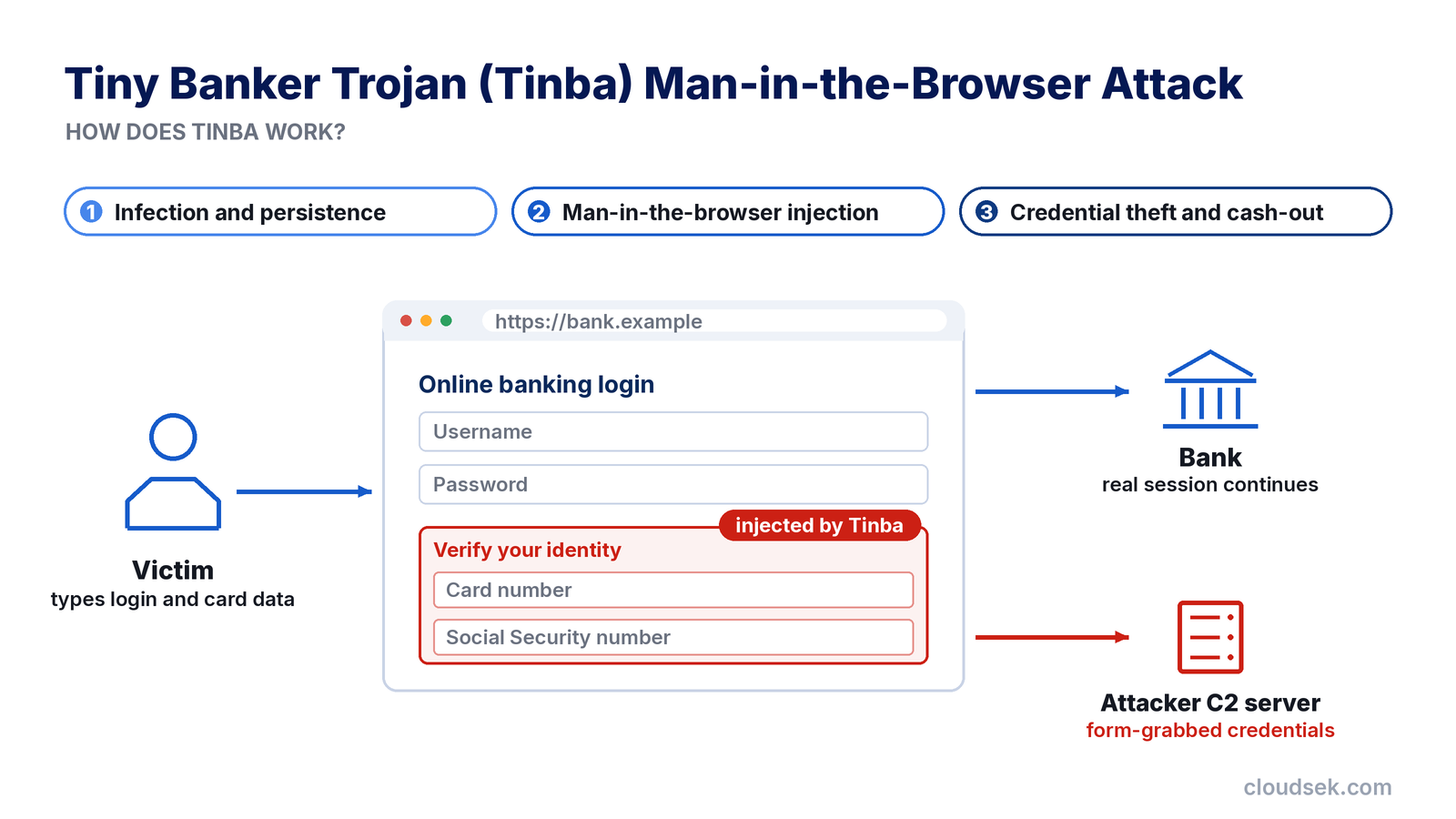
After landing on a Windows machine, Tinba injects itself into trusted processes such as explorer.exe and svchost.exe, and sets a small executable to run at startup. It encrypts its own memory, hides behind a custom packer, and uses anti-debugging checks to frustrate analysis. A domain generation algorithm keeps its command-and-control servers reachable even as individual domains are taken down, so the trojan survives reboots and takedowns alike.
Tinba hooks the browser and waits. When the victim visits a targeted banking site, it injects code that alters the page, adding fake fields or a convincing pop-up that asks for card numbers, Social Security numbers, or security answers. The injected content matches the bank's real design, so nothing looks out of place.
Form grabbing captures the victim's keystrokes as they type them into the browser. Tinba sends the stolen credentials to its operators, whose cash mules withdraw and move the money, and the compromised data often resurfaces later on dark web markets.
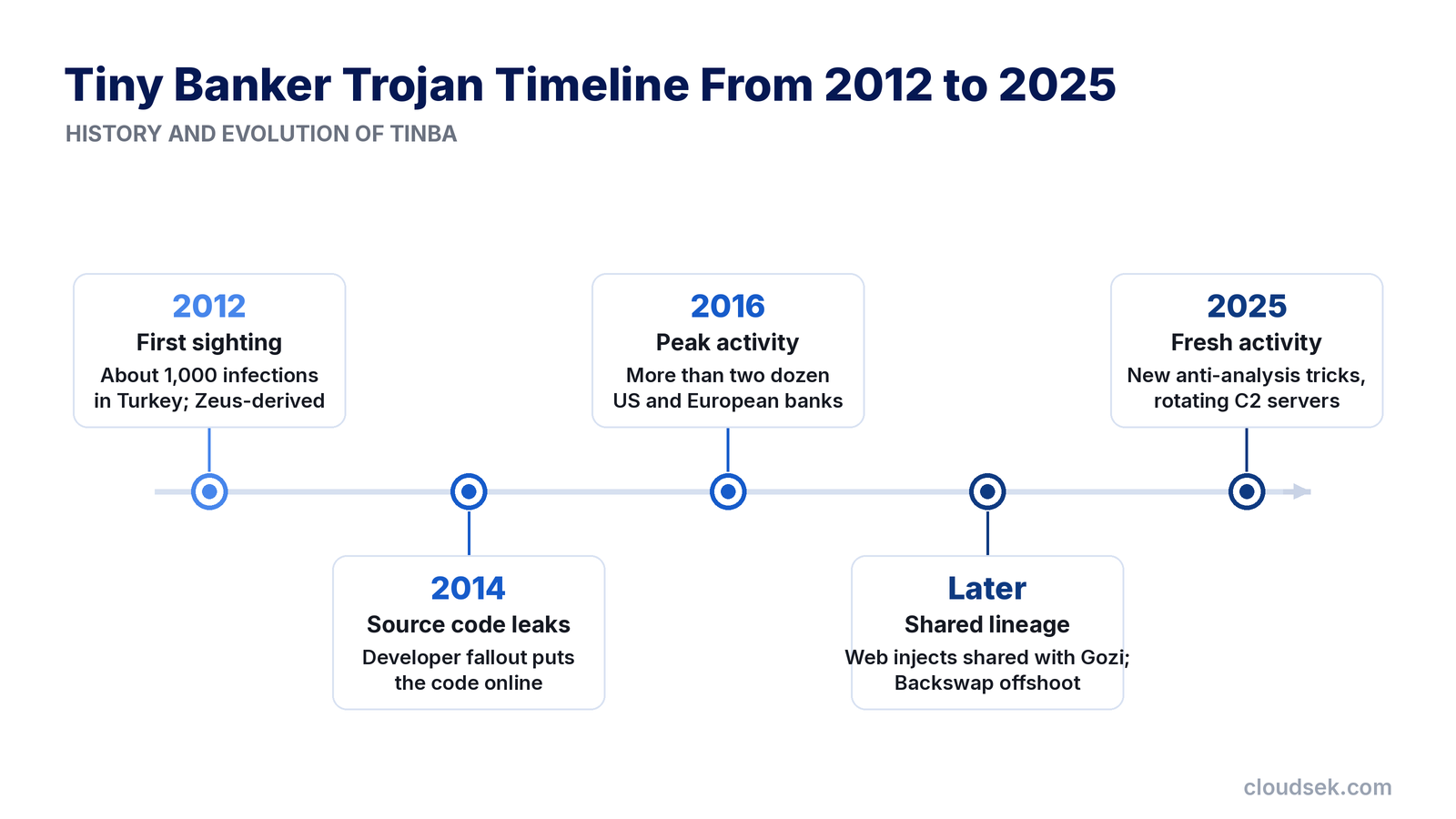
Tinba first appeared in 2012, infecting around a thousand computers in Turkey. Researchers traced its architecture to Zeus, the banking trojan whose leaked code shaped a generation of successors.
A turning point came in 2014, when Tinba's own source code leaked online after a falling-out among its developers. Freely available, the code spawned a wave of variants, and by its 2016 peak Tinba was hitting more than two dozen major banks across the United States and Europe, including household names like Bank of America and Wells Fargo.
Later strains borrowed from and lent to other families. Tinba shared web injects with the Gozi Trojan, and offshoots such as Backswap carried its lineage forward against European banks.
Tinba occupies one branch of a broad family, and each major banking trojan carries its own signature.
Tinba reaches victims through the standard malware-delivery channels:
Tinba hides well, though an infection leaves subtle traces:
Removing Tinba calls for a methodical approach, since its stealth defeats casual cleanup. Here are the most effective methods:
Preventing Tinba comes down to closing the doors it relies on:
Tinba is old by malware standards, but it has not disappeared. Security researchers reported fresh Tinba activity in 2025, with updated variants adding anti-analysis tricks and rotating command-and-control servers to target smaller financial institutions.
The wider category has moved on, though. Desktop banking trojans have given ground to mobile banking malware that overlays fake login screens on Android apps, and to infostealers that scrape saved credentials in bulk. What unites them with Tinba is the endgame: stolen financial data sold and reused through criminal markets.
That resale stage is where exposure becomes visible. CloudSEK's XVigil monitors dark web forums, card shops, and leaked-data markets for a brand's compromised credentials and payment cards, giving banks early warning when customer data from a trojan surfaces for sale. It addresses the aftermath of infection, complementing rather than replacing the endpoint and email defenses that stop the malware itself.
Tinba is a trojan, not a virus, which means it relies on tricking users into running it rather than self-replicating. It disguises itself as legitimate content to gain entry, then acts on its own.
Tinba is attributed to Eastern European cybercriminal networks rather than any named nation-state group. No single author has been publicly identified, and its leaked code has since passed through many hands.
No, Tinba runs only on Windows, so Macs, Linux systems, and phones are not affected by it. Separate malware families target those platforms instead.
No, Tinba sniffs all web traffic on an infected machine, not only banking sessions, so any data entered while infected is exposed. Its operators simply prioritize financial targets.
No, Tinba's form grabbing captures keystrokes inside the browser before HTTPS encrypts them, so the padlock offers no protection. The theft happens before the secure connection begins.
Yes, a full factory reset or a clean operating system reinstall removes Tinba, since it cannot survive a drive wipe. A system restore point is less reliable, because the infection often predates the chosen point.
