What Is a Banking Trojan? Techniques, Families & Defenses

A banking Trojan steals credentials and hijacks banking sessions. See how overlays, accessibility abuse, and NFC relay work, plus current families and defenses.
Published on
Sunday, September 27, 2026
Updated on
September 26, 2026

What Is a Banking Trojan?

A banking trojan is malware that steals financial credentials and manipulates banking sessions, disguising itself as legitimate software to stay resident on the device.

The category changed platforms once before. Classic Windows trojans such as Zeus injected code into browsers to alter what a customer saw on a banking page, and once banks moved authentication into mobile apps, the malware followed.

Today's version arrives as an Android application. It abuses accessibility permissions, draws fake screens over real banking apps, intercepts one-time codes, and increasingly runs fraudulent transactions on the victim's device instead of exporting credentials.

How a Banking Trojan Works

A banking trojan runs through six stages, and the credential theft everyone associates with it happens late in the sequence.

  1. Delivery: A smishing link, a fake app store page, a dropper published on an official store, a sideloaded APK from a support scam, or a QR code on a printed notice.
  2. Permission acquisition: The app requests accessibility services, notification access, or device administrator rights, with on-screen instructions coaching the user through the warnings.
  3. Persistence and evasion: It hides its icon, blocks uninstallation, disables Play Protect where possible, and delays activity to defeat sandbox analysis.
  4. Targeting: The malware watches which app opens. A list of targeted banking and wallet packages, refreshed from the command server, decides when it acts.
  5. Capture: Overlays, keylogging through accessibility events, screen recording, and SMS or notification interception collect credentials and one-time codes.
  6. Monetization: Operators either exfiltrate the data for later use or take remote control of the handset and move money from inside the legitimate app session.

That last step changed the economics of the whole category. On-device fraud runs the transaction from the victim's own phone, with the correct device fingerprint, IP address, and app instance, which strips away most of the signals a bank's fraud engine uses to spot an unfamiliar session.

Why Banking Trojans Matter to Organizations

Coverage of this malware tends toward consumer advice, which leaves out the three ways it lands on an enterprise balance sheet.

  • Corporate account takeover: Finance staff bank from the same laptops and phones they use for email, and a trojan on one of those devices reaches payment approval rather than a personal current account.
  • Fraud losses at financial institutions: Banks absorb the cost of malware running on customer devices they never controlled, alongside the regulatory scrutiny that follows a spike in unauthorized transactions.
  • Brand damage through impersonation: Fake apps and lookalike portals carrying a bank's logo do the distribution, so the institution's name is attached to every infection it never caused.

Those three effects share one root cause outside the perimeter: a device the organization does not manage, reached through infrastructure that borrows its brand.

How Banking Trojans Defeat Multi-Factor Authentication

MFA slowed credential resale, and it did not stop the trojan, because the malware runs on the device where the second factor arrives.

  • SMS and notification interception: Reading one-time codes directly from messages or notification content, then deleting the alert so the customer never sees it.
  • Accessibility abuse: Reading screen content and injecting taps, which lets the malware approve a push prompt without the user touching anything.
  • Overlay capture: Drawing a pixel-perfect login screen above the real app to harvest the PIN or password before the session starts.
  • Remote access takeover: Operating the handset through a built-in RAT during idle hours, using the session the customer already authenticated.
  • NFC relay: Capturing contactless card data on the infected phone and replaying it to a terminal elsewhere, the technique behind the PhantomCard trojan that hit Brazilian bank customers, as ThreatFabric reported.

Only phishing-resistant authentication bound to a separate device, or transaction signing that displays the real payee, holds up against a compromised handset. Codes, prompts, and confirmations that live on the infected phone are all reachable by the malware on it.

Where Banking Trojan Activity Concentrates Today

Volume has moved decisively to Android, and it is growing rather than tapering.

Kaspersky recorded 255,000 mobile banking trojan installation packages during 2025, inside 815,000 malicious packages overall, with banker-related attacks growing 1.5 times year over year, according to its mobile threat report.

That trend carried into 2026 without pause. Kaspersky counted 162,275 banking trojan packages in the first quarter alone, with Trojan-Banker the largest single category at 52.96% of detected applications, per its Q1 2026 statistics.

Families that mass-produce variants drive those numbers, since a fresh package defeats signature detection until someone samples it.

Distribution mechanics explain part of that volume. Droppers reach official app stores disguised as PDF readers, QR scanners, and file managers, pass review with no malicious code present, then fetch the banking payload after installation.

Notable Banking Trojan Families

Families differ in platform, signature technique, and current status, and several older names now survive mainly as code inherited by newer malware.

Family Platform Signature technique Status
Zeus Windows Browser web injects that rewrote banking pages Source code leaked in 2011, reused widely
Dridex Windows Macro-laden document attachments, corporate targeting Largely displaced by loader and ransomware operations
TrickBot and Emotet Windows Modular credential theft Pivoted into malware delivery, then disrupted
Grandoreiro Windows Remote overlay fraud against Latin American banks Active despite repeated arrests
Anatsa (TeaBot) Android Droppers published on official app stores Active, target lists refreshed regularly
Octo (Coper) Android Malware-as-a-service with remote access and overlays Active, rented to multiple operators
Mamont Android High-volume variant production, messaging-app delivery Dominant by package count

Chasing family names has limited defensive value for most teams. Overlay capture, accessibility abuse, and notification interception appear across nearly all of them, and detection built on those behaviors survives the next rebrand.

What Banking Trojans Steal

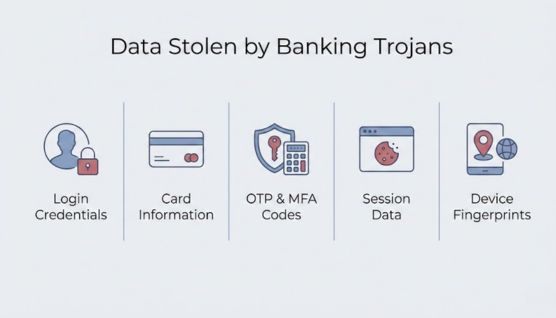
Banking trojans collect a wide range of digital and behavioral data that enables attackers to take over accounts and execute financial fraud.
banking trojans data theft
  • Banking and wallet credentials, including PINs entered on overlay screens.
  • One-time codes and push approval prompts, taken from SMS and notifications.
  • Session cookies and tokens that permit account takeover without a password.
  • Card data, including numbers, CVV, and expiry captured through fake forms.
  • Cryptocurrency wallet credentials and seed phrases displayed on screen.
  • Device and behavioral data that helps operators mimic a legitimate session.

Stolen data rarely stays with the original operator. Credentials surface later in combolists and dark web markets, so leaked credential monitoring catches exposure that no endpoint alert produced.

Signs of a Banking Trojan Infection

On the Device

  • An app holding accessibility or notification-listener permissions with no functional reason to need them.
  • Login screens that look subtly wrong, or credential prompts that appear before the banking app finishes loading.
  • Missing SMS messages and transaction alerts, deleted by the malware after reading them.
  • Battery drain, heat, or data usage during idle periods, and failed attempts to uninstall an app.

In Bank Fraud Telemetry

  • Transactions from a known device and IP address at times that break the customer's established pattern.
  • Accessibility services active during a banking session, visible to apps using integrity and threat detection SDKs.
  • Screen-sharing or remote-control indicators, and touch input with machine-like timing.
  • Contactless authorizations at a terminal far from where the customer's handset has been reporting.

The second list matters more than the first for an institution. Customers report infections rarely and late, while fraud telemetry sees the same malware family across thousands of accounts.

Who Is Most at Risk from Banking Trojans?

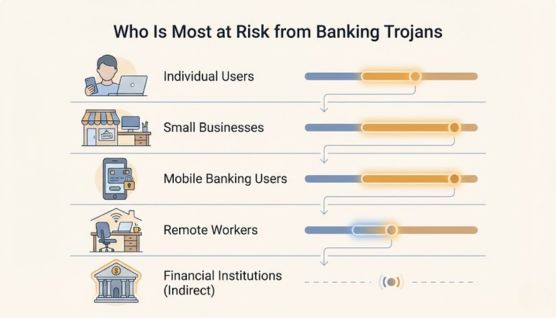
Banking trojans target users and organizations that regularly access financial services online, especially where security awareness or controls are weak.
who is most at risk from banking trojans

Individual Users

Everyday users who access online banking from personal computers or smartphones are common targets. Those who click phishing links or install unverified apps face higher risk.

Small and Medium Businesses

Small businesses are attractive targets due to limited cybersecurity defenses. Compromised business accounts can lead to larger financial losses and data exposure.

Mobile Banking Users

Users who rely heavily on mobile banking apps are increasingly targeted by Android banking trojans. Malicious apps and fake overlays make mobile platforms a high-risk environment.

Remote Workers

Remote workers often use personal devices and unsecured networks. This increases exposure to phishing-based banking trojan infections.

Financial Institutions (Indirect Risk)

Banks are indirectly affected when customer accounts are compromised. Fraud losses, regulatory pressure, and reputational damage are common consequences.

Defending Against Banking Trojans

Controls for Organizations

  1. Isolate treasury and payment access on hardened, managed endpoints that do nothing else, since corporate banking fraud starts on general-purpose machines.
  2. Block sideloading and enforce app policy through mobile device management on any handset that reaches financial systems.
  3. Require out-of-band verification for payment and payee changes, using a channel the malware does not control.
  4. Deploy endpoint detection with behavioral rules for credential access, and alert when security tooling is disabled.
  5. Train finance and executive staff against the social engineering patterns that deliver these apps, particularly support scams and phishing lures.

Controls for Banks and Financial Platforms

  1. Run device integrity and threat checks inside the mobile app, detecting accessibility abuse, overlays, rooting, and screen sharing at session start.
  2. Score behavior, not just device identity, since on-device fraud presents the correct fingerprint while the interaction pattern changes.
  3. Restrict overlay rendering during sensitive flows and disable accessibility-driven input on payment screens.
  4. Monitor for fake apps and phishing infrastructure distributing APKs under the bank's brand, then pursue takedowns for the domains and listings involved.
  5. Feed confirmed samples into fraud rules, mapping each family's package names, permissions, and C2 patterns into detection logic.

Tracking Banking Trojan Campaigns With CloudSEK

Banks carry the fraud loss for malware running on devices they do not control. What they can control is the distribution layer: the fake apps, lookalike domains, and phishing pages that deliver the APK under their brand.

CloudSEK's TRIAD team documented that pattern against Indian banking customers, where fake complaint portals collected card data and then pushed an SMS-forwarding trojan onto the victim's phone to intercept the one-time codes.

CloudSEK XVigil monitors for that infrastructure, covering fake mobile applications, brand impersonation across app stores and social platforms, phishing domains, and leaked customer data, with takedown support for what it finds.

Banking Trojan FAQs

Is a banking trojan a virus?

No. A virus replicates itself into other files, while a trojan relies on a person installing it, then stays put on that device.

How does a banking trojan differ from ransomware?

Ransomware announces itself and demands payment. A banking trojan stays hidden for as long as possible, since its value comes from continued access.

Can a banking trojan infect a device without user action?

Rarely. Most need an install and a permission grant, though preinstalled firmware trojans arrive on the handset before the first power-on.

Can iPhones get banking trojans?

Yes, at far lower rates. App Store review and iOS sandboxing block overlays and accessibility abuse, so iOS fraud leans on phishing pages and sideloading through enterprise profiles.

Can antivirus detect banking trojans?

Partly. Mobile security tools catch known packages, while fresh variants and dropper-delivered payloads need behavioral detection and in-app integrity checks.

Does a factory reset remove a banking trojan?

Yes, in most cases, though preinstalled firmware trojans survive it. Credentials need resetting from a separate, clean device afterward.

Do banking trojans target cryptocurrency wallets?

Yes. Wallet apps sit on the same target lists as banking apps, and seed phrases displayed on screen are captured the same way as PINs.

When did banking trojans first appear?

The mid-2000s. Zeus, identified in 2007, set the template of web injects and credential theft that later families inherited.

Who operates banking trojans today?

Malware-as-a-service crews build and rent the malware, while separate affiliates run distribution and cash-out, which explains the varied targeting between campaigns.

Are desktop banking trojans still a threat?

Yes, particularly for corporate banking in Latin America and Europe, where families such as Grandoreiro still run remote overlay fraud against treasury users.

Related Posts
12 Common Cyber Attack Vectors You Should Know
Cyber attack vectors include phishing, compromised credentials, exposed software, API abuse, supply chain threats, and other paths attackers use for initial access.
What is Pastebin? Uses, Risks, and How It Works
Pastebin is a free site for sharing plain text and code via a link. How Pastebin works, its legitimate uses, security risks, and how attackers abuse it.
What is Personally Identifiable Information (PII)?
Personally identifiable information (PII) is any data that identifies a specific person. PII types, examples, exposure risks, and the laws that govern it.

Start your demo now!

Schedule a Demo
Free 7-day trial
No Commitments
100% value guaranteed

Related Knowledge Base Articles

No items found.