🚀 CloudSEK featured in the 2026 Frost Radar™!
Read more
.avif)

Threat hunting is the proactive, analyst-led search for attacker activity that has evaded automated security controls across endpoints, networks, identity systems, and cloud environments.
Detection tools wait for activity to match a rule. Hunters start from the assumption that an intruder is already inside, form a testable hypothesis about how that intruder operates, and search existing telemetry for the evidence.
A successful hunt produces more than a single finding for the incident queue. Each confirmed technique becomes a new detection, so the next attacker using it triggers an alert instead of requiring another hunt.
Threat hunting rests on one premise: some attackers are already inside, and no alert has fired. Automated detection misses them for predictable reasons.
Hunting targets those blind spots on purpose, one hypothesis at a time. It asks what an attacker does next in this specific environment, then checks whether it already happened.
Attackers still stay hidden long enough to reach their objectives inside most environments. Mandiant's M-Trends 2026 reported a global median dwell time of 14 days.
The SANS 2025 Threat Hunting Survey shows why behavior-focused hunting pays off: 76% of organizations reported living-off-the-land techniques in nation-state attacks, and business email compromise remained the threat most discovered through hunting.
Here is why threat hunting is important:
Threat detection flags known malicious activity automatically as it happens, while threat hunting searches for activity that no rule has flagged yet.
Each discipline strengthens the other. Hunts create the detection rules that automated tooling runs, and detection gaps point hunters to the techniques worth testing next.
Threat hunting follows a repeatable six-stage cycle that begins with a hypothesis and ends by turning what the team learns into stronger detection and monitoring.
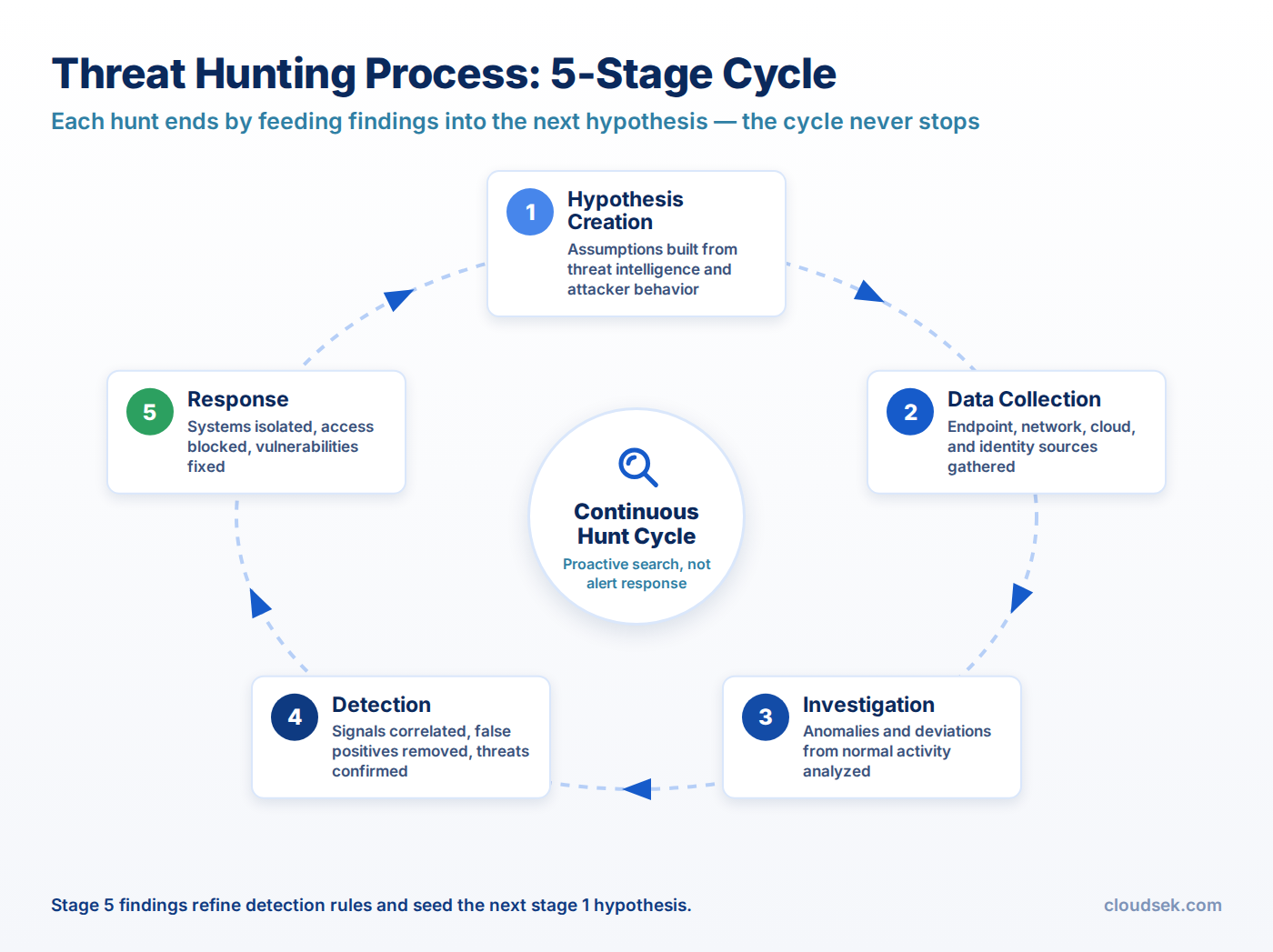
Create a testable hypothesis using threat intelligence, previous incidents, emerging attacker behavior, or known TTPs. Example: “A threat actor targeting our sector may be using scheduled tasks to maintain persistence on Windows file servers.”
Identify the systems, users, logs, and time periods needed to test the hypothesis. This may include endpoint telemetry, authentication logs, DNS activity, network flows, cloud logs, or SIEM data. Confirm that the required telemetry is available and detailed enough to support the hunt.
Search the selected data for behavior that supports or challenges the hypothesis. Hunters pivot from suspicious events into related processes, accounts, endpoints, domains, IP addresses, authentication chains, and network connections to understand the full activity path.
Determine whether suspicious activity is genuinely malicious or the result of legitimate administrative or business activity. Validate findings using asset ownership, user context, approved changes, threat intelligence, and historical behavior.
Confirmed malicious activity is escalated to incident response for containment, investigation, and remediation. If the hypothesis is not supported, document the evidence reviewed and close the hunt so the same work does not need to be repeated unnecessarily.
Turn useful findings into lasting security improvements. This can include creating or refining detection rules, updating threat-hunting playbooks, enriching indicators, documenting new attacker behaviors, and identifying telemetry gaps that security engineering teams need to address.
The process then feeds back into future hunts, allowing each investigation to improve the organization’s detection coverage and hunting maturity.
Hypothesis quality decides the outcome more than tooling does. Structured threat analysis of which actors target the organization produces sharper hypotheses than generic checklists do.
Threat hunting is commonly divided into three types based on what initiates the investigation: a known attacker behavior, a detected signal, or an organization-specific risk.
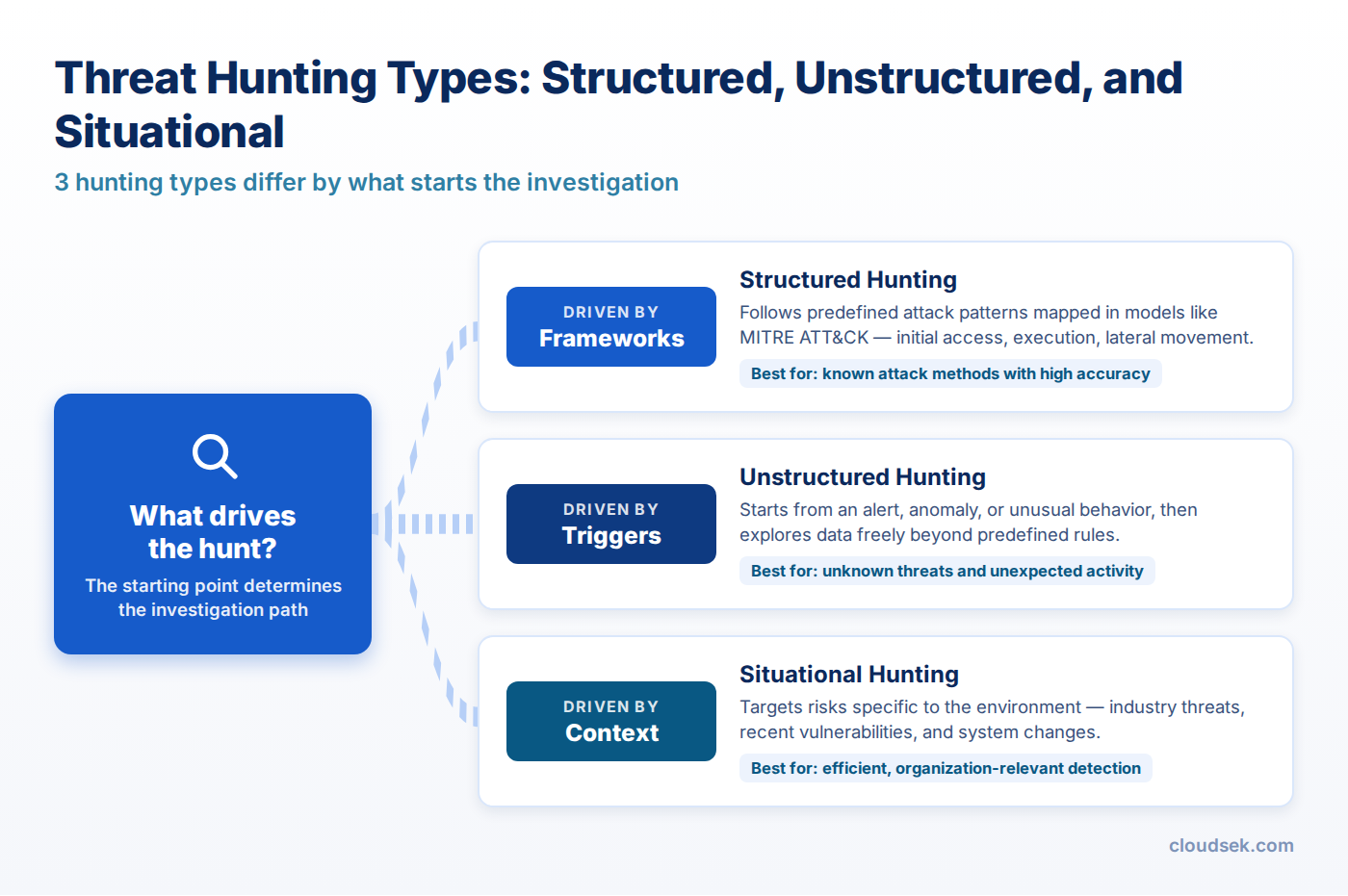
Structured threat hunting begins with a defined hypothesis based on known attacker tactics, techniques, and procedures (TTPs), often mapped to the MITRE ATT&CK framework. Hunters then search telemetry for behavioral patterns associated with those techniques, even when no known indicator of compromise is present.
Example: A team hunts for signs of credential dumping by searching endpoint and authentication logs for behaviors associated with MITRE ATT&CK technique T1003, even though no alert has been triggered.
Unstructured threat hunting begins with a trigger such as an indicator of compromise (IoC), suspicious event, or detected anomaly. Analysts investigate activity surrounding that signal to determine its origin, identify related systems or accounts, and uncover additional signs of compromise.
Example: A SOC discovers a device communicating with a known malicious IP address. Hunters trace related network connections, processes, user activity, and endpoints to determine whether the communication is part of a broader compromise.
Situational threat hunting is driven by risks specific to the organization. A hunt may focus on a critical asset, newly exposed service, emerging vulnerability, or threat campaign targeting the organization’s industry. This directs hunting resources toward environments and attack scenarios with the greatest potential impact.
Example: After learning that attackers are targeting financial institutions through exposed VPN appliances, a bank hunts specifically for unusual authentication activity, configuration changes, and suspicious sessions involving its internet-facing VPN infrastructure.
Current intelligence drives all three types of hunting. A new campaign report can seed a structured hunt, supply the indicators for an unstructured one, or shift situational focus to the systems that the campaign targets.
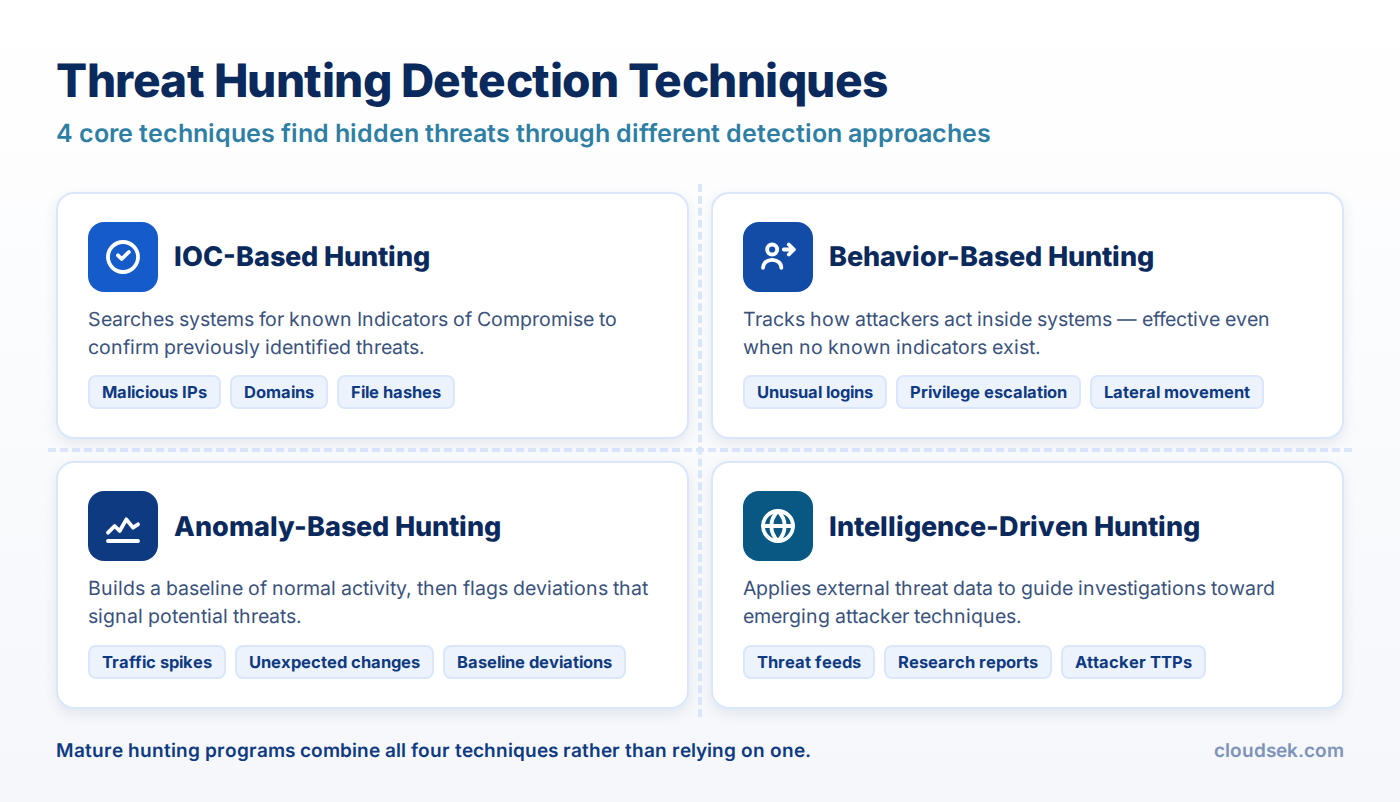
The Pyramid of Pain, published by David Bianco in 2013, ranks indicator types by how much pain denying them causes an attacker.
Hunting at the top of the pyramid forces attackers to change how they operate, not just where they host. That is why mature programs hunt for behaviors such as credential dumping with tools like Mimikatz instead of chasing a single hash.
CloudSEK researchers documented an APT36 campaign against Indian government and defense entities that delivered malware through Linux desktop entry files. The findings translate directly into a hunt.
Hypothesis: An espionage actor targeting the sector is using .desktop files disguised as PDF documents to run hidden shell commands on Linux workstations.
A clean result documents that the technique is absent and the data exists to see it. A positive result goes to incident response, and either outcome ends with a detection rule for .desktop files that launch network retrieval from temporary paths.
EDR and XDR platforms ranked as the top threat hunting tools in the SANS 2025 survey, followed by SIEM and network detection and response.
Data depth matters more than the number of tools in the stack. A hunt fails when the logs needed to test the hypothesis were never collected, which makes data gap tracking a standing output of every program, alongside broader security monitoring.
The Hunting Maturity Model, created by David Bianco, describes five levels of hunting capability.
Useful hunting metrics track outcomes instead of activity volume. Detections created from hunts, ATT&CK techniques covered, data gaps closed, and intrusions found before external notification show whether hunting improves defense.
Staffing sets the pace of progress. The SANS 2025 survey found 61% of organizations cite skilled staff shortages as a primary barrier, while 45% now update hunting methodologies as needed, up from 35% in 2024.
Hunting quality rises and falls with its hypotheses, and the best hypotheses come from knowing which adversaries target the organization and how they operate today.
CloudSEK Threat Intelligence tracks threat actors and their TTPs, exploited CVEs, malware, and ransomware campaigns, curated to a customer's industry and region. The APT36 hunt above started from exactly that kind of research, turning a published campaign into specific searches a team runs in its own SIEM and EDR.
CloudSEK's guide to how threat intelligence improves incident response and threat hunting covers the workflow from intelligence to investigation in more detail.
Dedicated threat hunters, senior SOC analysts, detection engineers, and incident responders perform it, with managed hunting providers supporting some programs.
Continuously in mature programs, with time-boxed hunts launched on a schedule and whenever new intelligence or a major vulnerability disclosure arrives.
Threat hunting searches for undiscovered intrusions. Incident response contains, investigates, and recovers from an intrusion once it is confirmed.
Yes. Small teams hunt a few high-value hypotheses on critical systems, or use a managed detection provider that includes hunting.
Log and query fluency, operating system internals, network analysis, knowledge of ATT&CK techniques, and the ability to reason from incomplete evidence.
Partially. Automation handles data collection and repeated searches, while hypothesis creation and judging ambiguous activity still require human analysts.
