🚀 أصبحت CloudSek أول شركة للأمن السيبراني من أصل هندي تتلقى استثمارات منها
اقرأ المزيد
.avif)

اختطاف النقرات (Clickjacking) هو هجوم إلكتروني يخدع المستخدمين لحملهم على النقر فوق شيء مختلف عما يظهر أمامهم، وعادة ما يتم ذلك عن طريق إخفاء زر حقيقي تحت زر وهمي. يُعرف هذا الهجوم رسمياً باسم "تعديل واجهة المستخدم" (UI redressing)، حيث يتم وضع نسخة غير مرئية من صفحة شرعية فوق صفحة مخادعة، بحيث تقع النقرة الموجهة للصفحة المخادعة على العنصر المخفي بدلاً منها. وقد صاغ الباحثان روبرت هانسن وجيريميا غروسمان هذا المصطلح في عام 2008.
هذا التهديد ليس نظرياً فحسب، فقد كشف باحثو CloudSEK عن حملة تصيد احتيالي نشطة سرقت بيانات اعتماد 1,262 ضحية من خلال تضمين صفحات تسجيل الدخول الخاصة بالشركات داخل إطارات iframe غير مرئية، وهو هجوم نجح فقط لأن تلك المواقع لم تقم بتعيين ترويسة (header) لمنع التضمين.
يستغل اختطاف النقرات عنصر iframe، وهو عنصر HTML يدمج صفحة ويب داخل أخرى. يقوم المهاجم بتحميل الموقع المستهدف، مثل صفحة تسجيل دخول بنك أو بريد إلكتروني، داخل إطار iframe ويضعه فوق صفحة مخادعة تعرض زراً مغرياً مثل "اربح جائزة".
بعد ذلك، تجعل لغة CSS الفخ غير مرئي. يضبط المهاجم شفافية إطار iframe لتكون قريبة من الصفر، مما يجعل الصفحة الحقيقية شفافة. وباستخدام خاصية z-index، التي تتحكم في ترتيب الطبقات، يضع المهاجم زر "تأكيد" المخفي بدقة تحت الزر المخادع، بحيث تمر نقرة الضحية لتصل إلى العنصر الحقيقي.
يعتمد الهجوم على كون الضحية مسجلاً للدخول بالفعل. ولأن الصفحة المضمنة تعمل على نطاقها الحقيقي مع جلسة المستخدم النشطة، فإن النقرة المخفية تحمل صلاحية حقيقية، مما قد يؤدي إلى تحويل أموال، أو تغيير إعدادات، أو منح أذونات. ولهذا السبب، تعمل ملفات تعريف الارتباط الحديثة من نوع SameSite، التي سنتناولها أدناه، على إحباط العديد من محاولات اختطاف النقرات التقليدية.
غالباً ما تكون النقرة المختطفة مجرد خطوة أولى. إذ يقوم المهاجمون بسلسلة من خطوات اختطاف النقرات، مثل إضافة عناصر إلى عربة التسوق قبل تأكيد الطلب، أو استخدامها لتنفيذ ثغرة ويب أخرى مثل البرمجة عبر المواقع (XSS).
تطور اختطاف النقرات إلى عدة أنواع، يستهدف كل منها إجراءً مختلفاً.
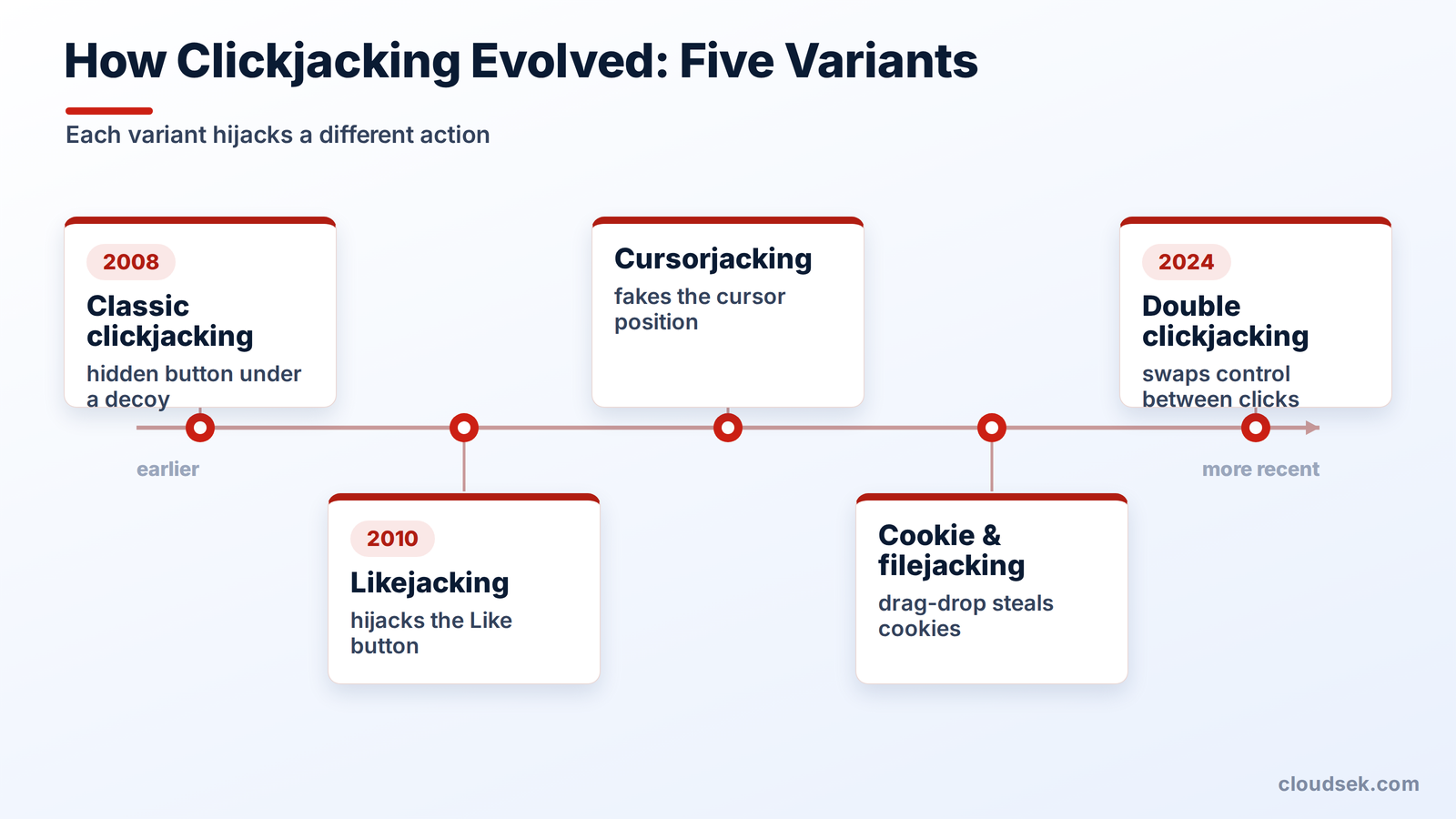
يخفي اختطاف النقرات التقليدي زراً حساساً واحداً، مثل زر الشراء أو حذف الحساب، تحت زر مخادع. ومن الحالات المبكرة لهذا الهجوم خداع المستخدمين لتغيير إعدادات كاميرا الويب والميكروفون في Adobe Flash، مما أدى إلى تفعيل المراقبة بصمت.
يستهدف اختطاف الإعجاب إجراءات وسائل التواصل الاجتماعي. ففي عام 2010 تقريباً، انتشرت برمجيات خبيثة عبر فيسبوك من خلال وضع زر "إعجاب" فوق محتوى مخادع، مما جعل الضحايا يعجبون بصفحات المهاجمين ويعيدون مشاركتها دون علمهم، مما أدى إلى نشر الاحتيال بين أصدقائهم.
يخدع اختطاف المؤشر المستخدم بشأن مكان وجود المؤشر فعلياً. فمن خلال استبدال المؤشر المرئي بآخر وهمي مزاح عن الموقع الحقيقي، يجعل المهاجم النقرة تقع في مكان لم يقصده المستخدم أبداً.
تخدع هذه الأنواع المستخدمين لحملهم على سحب وإفلات المحتوى. حيث تقوم واجهة مموهة بإغراء الضحية لتسليم ملفات تعريف الارتباط الخاصة بالمتصفح أو اختيار ملفات محلية، ليقوم المهاجم بعد ذلك بقراءتها.
كشف عنها الباحث بولوس ييبيلو في ديسمبر 2024، النقر المزدوج الخادع (double clickjacking) يستغل التوقيت بين نقرتين. تطلب الصفحة من المستخدم النقر مرتين على مطالبة غير ضارة، ثم تستبدل ذلك بعنصر تحكم حساس بين النقرتين، بحيث تؤدي النقرة الثانية إلى تفويض إجراء على الموقع الحقيقي.
تتجاوز هذه الثغرة جميع وسائل الدفاع القياسية، بما في ذلك X-Frame-Options، وCSP frame-ancestors، وملفات تعريف الارتباط SameSite. ونظراً لأن هذه الترويسات لا توقفها، فإن الحل يكمن في استخدام برنامج نصي (script) من جانب العميل يبقي الأزرار الحساسة معطلة حتى يتم رصد حركة فعلية من المستخدم، وهو نهج تستخدمه بالفعل شركات مثل Dropbox وStripe وGitHub.
غالباً ما يتم الخلط بين النقر الخادع وتزوير الطلبات عبر المواقع (CSRF)، لكنهما يختلفان في جانب جوهري واحد.
هذا الاختلاف يحدد طبيعة الدفاع. لا يمكن لرمز CSRF إيقاف النقر الخادع، لأن الصفحة المؤطرة يتم تحميلها بشكل شرعي على نطاقها الخاص، ويبدو الطلب طبيعياً تماماً. وحدها عناصر التحكم التي تمنع تأطير الصفحة من الأساس هي التي توفر الحماية ضد هذا الهجوم.
الدفاع الفعال ضد النقر الخادع يكون من جانب الخادم: وهو منع المواقع غير الموثوقة من تأطير الصفحة نهائياً.
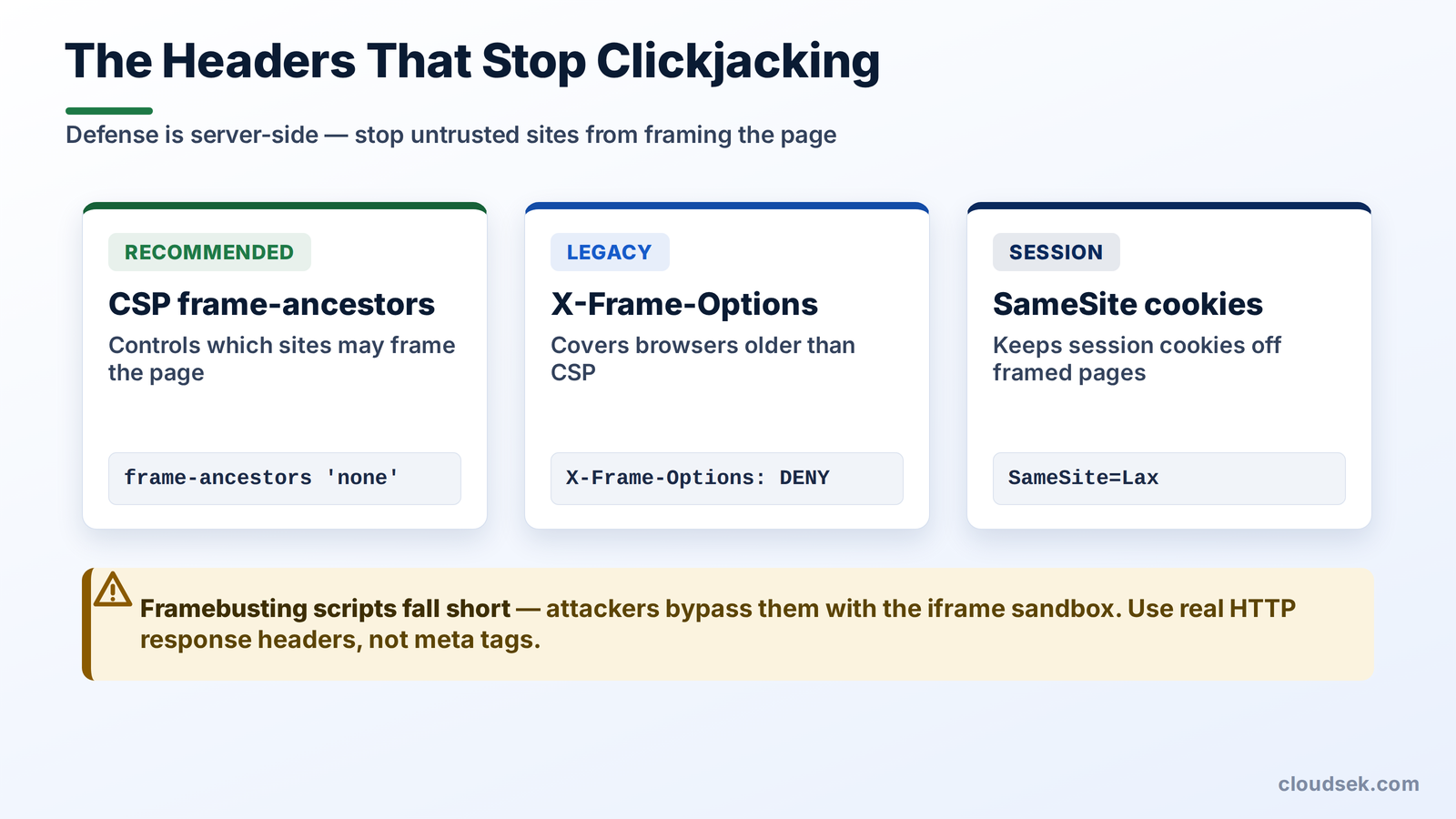
يُعد توجيه frame-ancestors ضمن سياسة أمان المحتوى (CSP) هو الدفاع الحديث والموصى به. فهو يخبر المتصفح بالمواقع المسموح لها، إن وجدت، بتضمين الصفحة في إطار. اضبط frame-ancestors على 'none' لحظر جميع عمليات التأطير، أو على 'self' للسماح فقط بنطاق الموقع نفسه.
X-Frame-Options هي الترويسة الأقدم التي حلت محلها الآن توجيهات CSP frame-ancestors. اضبطها على DENY أو SAMEORIGIN لحماية المتصفحات القديمة التي سبقت ظهور CSP. وفي حال وجود كلتا الترويسين، تعتمد المتصفحات الحديثة frame-ancestors وتتجاهل X-Frame-Options.
تتحكم سمة SameSite في ملفات تعريف الارتباط في توقيت إرسال ملفات تعريف ارتباط الجلسة مع الطلبات عبر المواقع. يؤدي ضبطها على Lax أو Strict إلى منع وصول ملف تعريف ارتباط الجلسة الخاص بالضحية إلى الصفحة المؤطرة، مما يؤدي إلى فشل هجوم النقر الخادع الذي يتطلب مصادقة. تطبق المتصفحات حالياً SameSite=Lax بشكل افتراضي، وهو ما جعل تنفيذ هجمات النقر الخادع التقليدية أكثر صعوبة.
استخدمت المواقع القديمة نصوص JavaScript لكسر الإطارات، لكنها غير موثوقة. إذ يقوم المهاجمون بتحييدها باستخدام سمة sandbox في iframe، كما أنها تفشل تماماً عندما يحظر المتصفح النصوص البرمجية. لا يزال هناك خطآن شائعان يبطلان دفاعات الترويسات: وضع هذه الترويسات في وسم meta بدلاً من ترويسة استجابة HTTP، وهو ما تتجاهله المتصفحات، ونسيانها في صفحات الخطأ أو لوحات التحكم. للحصول على قائمة مرجعية شاملة للدفاع المتعدد الطبقات، فإن ورقة غش الدفاع ضد النقر الخادع من OWASP هي المرجع المعتمد.
لا تكتمل الحماية من هجمات النقر الخفي (Clickjacking) إلا بشموليتها، وغالباً ما تغفل المؤسسات الكبرى عن إضافة الترويسات الأمنية في نطاق فرعي منسي، أو موقع تجريبي، أو لوحة تحكم. تلك الثغرة الواحدة هي ما استغلته حملة التصيد الاحتيالي المذكورة أعلاه.
CloudSEK BeVigil يرسم خريطة لأصول الويب الخارجية للمؤسسة ويحدد المواقع التي تفتقر إلى ترويسات منع الإطارات (anti-framing headers)، مثل X-Frame-Options وCSP frame-ancestors، قبل أن يتمكن المهاجم من استغلالها. فهو يكشف الصفحات المعرضة للخطر بدلاً من انتظار وقوع الاختراق، مما يسد الثغرات التي غالباً ما تتركها عمليات التدقيق اليدوي للترويسات.
نعم، يُعد النقر الخفي غير قانوني في معظم الولايات القضائية لأنه يتضمن إجراءات غير مصرح بها وعمليات احتيال. كما أن استخدامه لسرقة بيانات الاعتماد أو الأموال يعد انتهاكاً لقوانين إساءة استخدام الحاسوب والاحتيال.
لا، لا يمكن لبرامج مكافحة الفيروسات إيقاف النقر الخفي، لأن الهجوم يستغل غياب عناصر التحكم في الإطارات بالموقع الإلكتروني، وليس جهاز المستخدم. تعتمد الحماية على قيام الموقع بضبط ترويسات منع الإطارات.
قم بتحميل الموقع داخل إطار (iframe) تجريبي: إذا ظهر محتوى الموقع، فهذا يعني أن الصفحة تفتقر إلى حماية الإطارات. كما يمكن التأكد من وجود عناصر التحكم في الإطارات من خلال فحص ترويسات الاستجابة باستخدام أدوات المطور في المتصفح، أو أداة curl، أو موقع securityheaders.com.
يعمل النقر الخفي على اختطاف نقرة المستخدم داخل موقع حقيقي يتم عرضه في إطار، بينما يخدع التصيد الاحتيالي الضحية لزيارة موقع مزيف وإدخال بياناتها. وغالباً ما يجمع المهاجمون بين الاثنين، من خلال وضع نموذج تصيد فوق صفحة شرعية معروضة في إطار.
لا، لا يمنع HTTPS النقر الخفي؛ فهو يقوم فقط بتشفير البيانات أثناء النقل. يتطلب إيقاف النقر الخفي استخدام عناصر تحكم في الإطارات مثل CSP frame-ancestors أو X-Frame-Options.
نعم، يعمل النقر الخفي على الأجهزة المحمولة من خلال نوع فرعي يسمى "اختطاف اللمس" (tapjacking)، والذي يضع طبقات غير مرئية لاختطاف لمسات المستخدم. ويمكن لكل من متصفحات الهاتف والتطبيقات الضارة تنفيذ هذا الهجوم.
