🚀 أصبحت CloudSek أول شركة للأمن السيبراني من أصل هندي تتلقى استثمارات منها
اقرأ المزيد
.avif)

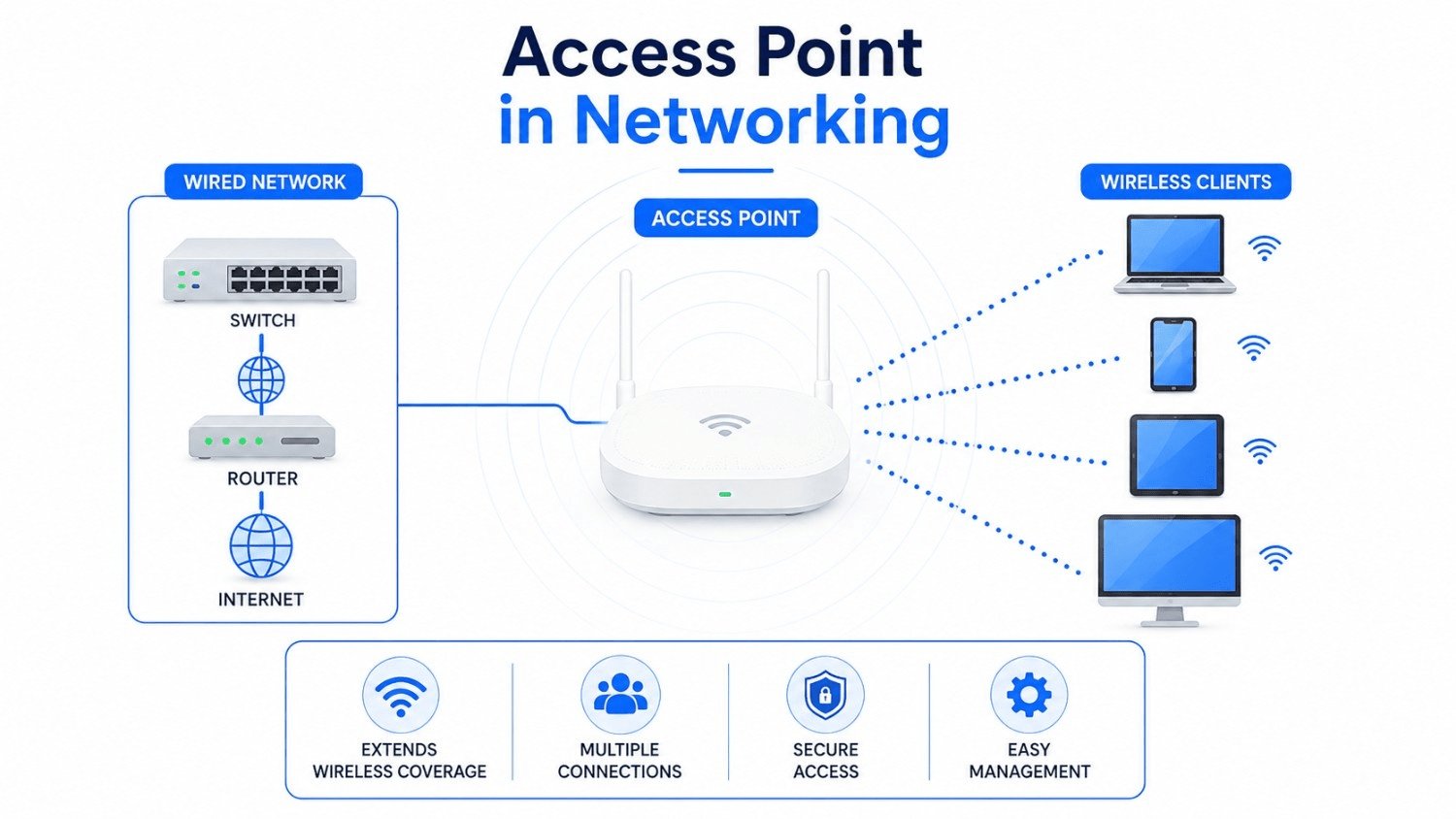
An access point is a networking device that connects wireless devices to a wired local area network (LAN) over Wi-Fi. The access point operates at Layer 2 of the OSI model, the data link layer, bridging radio traffic from laptops, smartphones, and IoT sensors onto Ethernet cabling.
Demand for this hardware keeps climbing: ABI Research, cited in the Wireless Broadband Alliance’s 2026 industry report, forecasts 117.9 million Wi-Fi 7 access point shipments in 2026, up from a projected 66.5 million in 2025. Offices, campuses, hospitals, and warehouses route nearly every wireless connection through these devices.
Each access point doubles as a doorway into the network, which makes the device both core infrastructure and a target. Sections below explain how access points work, the 7 operating modes they support, comparisons against routers and mesh systems, and the security risks that follow poor configuration.
An access point works by receiving data from the wired network, converting the data into radio signals, and broadcasting those signals to nearby wireless clients. Traffic from those clients follows the reverse path back onto the Ethernet cable. Six stages define the process:
Managed deployments add a seventh behavior: roaming. Neighboring access points exchange client information so a moving device hops between them without dropping a voice or video session.
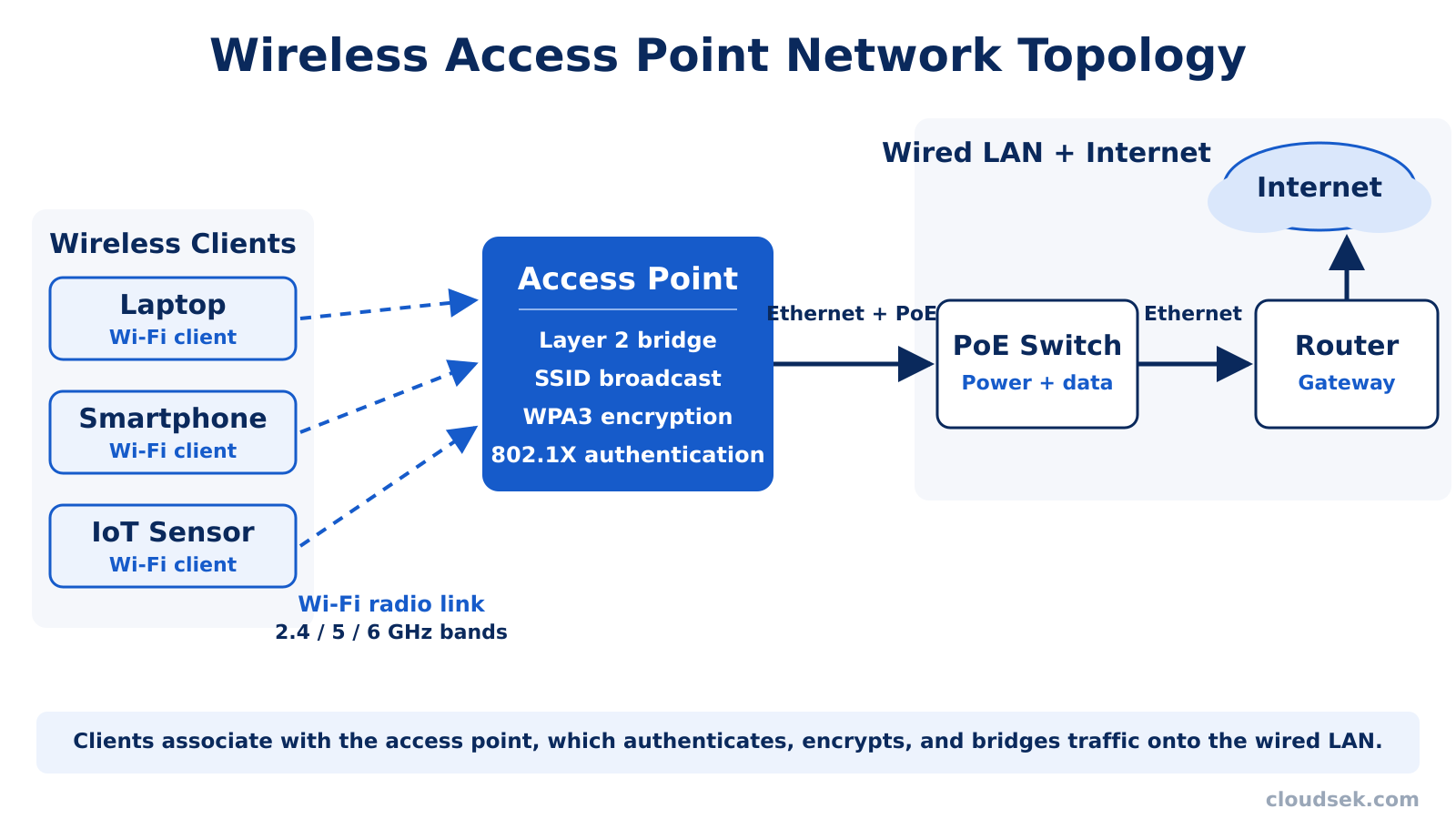
Five components carry the workload inside a typical enterprise unit:
Access points transmit on 3 frequency bands: 2.4 GHz, 5 GHz, and 6 GHz. Signals in the 2.4 GHz band travel farther and penetrate walls more effectively, though the band suffers congestion from Bluetooth gear, microwave ovens, and older Wi-Fi hardware.
Higher bands trade reach for capacity. Traffic on 5 GHz moves faster across shorter distances, while the 6 GHz band, opened for Wi-Fi 6E and Wi-Fi 7 hardware, offers wide channels with minimal interference.
Two groupings organize access points: types defined by management architecture and types defined by deployment environment. Vendors build hardware for each combination, so a single product line spans indoor cloud-managed units and outdoor controller-based units alike.
Enterprise access points support 7 operating modes, and the active mode determines the role the device plays on the network. Firmware from each vendor adds proprietary variations, though the modes below form the vendor-neutral core.
An access point differs from a router in function: the access point provides wireless entry into a LAN, while the router directs traffic between networks and toward the internet. Consumer wireless routers blur the line because one box combines routing, Wi-Fi radio, firewall, and address assignment duties.
Enterprise networks keep those roles separate, pairing dedicated routers with fleets of access points cabled through switches. Four device categories compete for the same coverage problem, and the differences concentrate in connection method and scale:
Range extenders halve effective throughput on each relay because a single radio both receives and retransmits. That penalty explains why enterprises favor cabled access points over extenders for any deployment beyond a single room. A router alone serves apartments and small homes; access points become necessary once floor area, user count, or reliability needs exceed what one radio in one corner delivers.
Density is the first reason enterprises deploy access points: wireless demand outgrew what a lone router covers. A modern office floor carries laptops, phones, badge readers, cameras, and environmental sensors, and dense deployments spread that load across dozens of radios. Roaming standards such as 802.11k, 802.11v, and 802.11r hand moving clients between units fast enough that calls survive the transition.
Centralized control gives IT teams a second reason. A controller or cloud dashboard pushes firmware, security policy, and channel plans to every unit at once, while virtual LAN (VLAN) tagging keeps guest, corporate, and IoT traffic on separate network segments. Machine learning features on current platforms tune channels and transmit power automatically, trimming the manual radio planning that consumed engineering hours a decade ago.
Connectivity roles beyond laptops form a third driver. Ceiling-mounted units double as onramps for Bluetooth, Zigbee, and Thread sensors in smart buildings, and enterprises increasingly offload cellular data onto Wi-Fi as 5G traffic grows. Hospitals, universities, hotels, and logistics warehouses lean on the same hardware pattern for these reasons.
Placement determines whether a deployment succeeds. Site surveys map floor plans, wall materials, and interference sources before installation, since concrete, metal shelving, and elevator shafts absorb or reflect radio energy. Central ceiling mounts outperform corner placements because the signal radiates outward in all directions.
Coverage cells need modest overlap so clients roam without gaps, yet heavy overlap on one channel creates co-channel interference that drags throughput down. Planners stagger channels across neighboring units and tune transmit power to balance reach against noise.
Troubleshooting follows the same variables. Weak signal points to repositioning, persistent slowdowns trace back to channel congestion, and frequent disconnects during movement implicate roaming settings rather than hardware faults.
IEEE 802.11 standards define the speed, bands, and features an access point supports, and the Wi-Fi Alliance certifies hardware against each Wi-Fi generation. Certification ensures interoperability: a Wi-Fi CERTIFIED 7 unit from one vendor works with certified clients from any other. The Wi-Fi Alliance projects 2.1 billion Wi-Fi 7 devices entering the market by 2028, so procurement cycles now center on the current generation.
Each generation carries a defining technique. MIMO (multiple input, multiple output) sends parallel spatial streams across several antennas, OFDMA (orthogonal frequency-division multiple access) packs many small transmissions into one channel, and Multi-Link Operation joins two or more bands at once for lower latency on Wi-Fi 7 clients.
Work on Wi-Fi 8, designated 802.11bn, is underway at the IEEE with reliability rather than raw speed as the headline goal. Buyers weighing hardware refreshes in 2026 balance Wi-Fi 7 capacity gains against the installed base of Wi-Fi 6 clients.
To choose an access point, buyers weigh 6 factors against the environment the hardware serves. Selection mistakes surface later as dead zones, congestion, or forced upgrades.
Security risks around access points concentrate where radio meets network, since anyone within signal range interacts with the device before a firewall inspects the traffic. Three threat patterns recur across wireless incidents.
A rogue access point is any unit attached to a network without authorization. Employees create rogues innocently by plugging consumer gear into office Ethernet jacks, while attackers plant them deliberately to open a wireless backdoor past perimeter defenses. Either origin hands an intruder a foothold that chains into a broader attack path toward sensitive systems.
Detection depends on wireless intrusion prevention systems (WIPS) and on units running rogue detector mode, both of which compare observed MAC addresses against an authorized inventory. Network access control adds a second layer by refusing switch ports to unknown hardware.
An evil twin attack copies the SSID of a legitimate network onto attacker-controlled hardware, luring nearby devices into joining the impostor. Victims spot a familiar network name at an airport, hotel, or coffee shop, connect, and route every request through equipment the attacker owns. Fake captive portals then harvest corporate credentials, borrowing tactics from established types of social engineering attacks.
State actors run the same playbook at close range. In 2018, Dutch intelligence disrupted a Russian GRU military intelligence team parked outside the Organisation for the Prohibition of Chemical Weapons in The Hague with Wi-Fi interception gear. Documentation released by the Dutch Ministry of Defence shows how far attackers travel to exploit wireless entry points.
Encryption weaknesses turn an access point into an open microphone. WEP (Wired Equivalent Privacy) broke more than 2 decades ago, and KRACK, the 2017 key reinstallation attack tracked under CVE-2017-13077 and related identifiers, showed that even WPA2 could be broken on unpatched clients and access points. That’s one reason WPA3 is now the baseline. A nearby attacker exploiting KRACK could decrypt frames the victim assumed were protected.
Misconfiguration multiplies the exposure. Default administrator credentials, guest networks bridged onto corporate VLANs, and management interfaces reachable from the public internet each hand attackers a shortcut. Exposed management interfaces in particular surface constantly during continuous attack surface management scans, since administrators forget that a configuration page facing the internet invites brute force attempts.
Two of these risks are visible from outside the building. Management interfaces and controllers reachable from the internet, and networking firmware running versions with known CVEs, are exactly what external attack surface monitoring is built to find. CloudSEK BeVigil scans internet-facing assets for open ports, exposed services, and known vulnerabilities, and CloudSEK Threat Intelligence flags which networking-device CVEs attackers are actively exploiting, so patching starts with the flaws already being used. Credentials harvested through evil twin portals often resurface on criminal markets, where CloudSEK XVigil watches for an organization’s leaked logins. Rogue access points and evil twins themselves are a local, radio-range problem: detecting them remains the job of WIPS and rogue detector mode, not external monitoring.
To secure an access point, administrators harden 7 settings that close commonly exploited gaps. NIST codifies wireless LAN hardening in Special Publication 800-153, and the steps below reflect its core controls alongside current Wi-Fi Alliance requirements.
One consumer access point supports roughly 10 to 50 devices, while enterprise models handle 100 to 500 or more concurrent clients. Radio count, channel width, and application bandwidth set the practical ceiling.
A wireless access point typically covers roughly 30 to 50 meters (100 to 150 feet) indoors, less on 5 GHz and 6 GHz and through dense walls. Outdoor units reach several hundred meters with clear line of sight and directional antennas.
Yes, an access point can work without a router for local wireless connectivity, letting clients reach printers, file servers, and each other on the LAN. Internet access still requires a routing device upstream.
No, access points do not universally require PoE. Many units accept a DC power adapter, and a PoE injector powers PoE-only models where switches lack powered ports.
An access point is physical hardware that adds Wi-Fi to a wired network, while a hotspot is a location or service offering internet over Wi-Fi. Phones create hotspots by sharing cellular data.
No, hiding the SSID does not make an access point more secure. Client devices still transmit the network name inside probe requests, which free wireless sniffers capture within seconds. Strong encryption protects networks; obscurity does not.
