What Is Sandboxing? Benefits and How It Works

Sandboxing safely runs suspicious files in isolation to detect malicious behaviour before systems are affected.
Published on
Friday, January 23, 2026
Updated on
January 23, 2026

Modern cyber threats are engineered to resemble legitimate files, emails, and scripts, activating only after evading perimeter controls. This attack pattern succeeds because more than 90% of cyberattacks originate from email-based vectors, while signature-based antivirus fails to detect zero-day and previously unknown malware.

Sandboxing eliminates this visibility gap by executing suspicious files in isolated environments and analysing real runtime behaviour before deployment on production systems. Behaviour-based execution exposes malicious activity, shortens dwell time, and blocks threats prior to operational impact.

Here we examines how sandboxing works, why it is essential for detecting unknown threats, the sandboxing types used in current security operations, practical enterprise use cases, and how sandbox-driven intelligence strengthens early detection and response across security workflows.

What Is Sandboxing?

Sandboxing is a cybersecurity technique that executes untrusted files or code within a controlled, isolated environment before they reach production systems, enabling direct visibility into runtime behaviour without operational risk. This execution-based approach exposes malicious activity that static inspection fails to detect.

This capability is critical because modern malware actively bypasses signature-based detection. PatentPC research shows that more than 60% of malware samples use evasion techniques such as delayed execution, obfuscation, and environment awareness. Forced execution in a monitored environment neutralises these techniques and reveals behaviours including privilege escalation, command-and-control communication, and payload deployment.

Controlled execution acts as an enforcement decision point. Behavioural evidence determines whether content is allowed, blocked, or contained, improving detection accuracy in environments where nearly one-third of breaches involve malware that initially appears benign.

Benefits of Sandboxing

Sandboxing delivers four core benefits that strengthen threat prevention and operational resilience:
  • Early threat containment
    Sandboxing detects unknown, evasive, or zero-day threats before execution, stopping attacks prior to live system exposure.

  • Higher detection accuracy
    Behaviour-based analysis identifies runtime signals such as file encryption, registry modification, and outbound communication that signature-based tools miss.

  • Faster and more confident response
    Behavioral verdicts reduce false positives and remove manual verification delays, enabling immediate and decisive security actions.

  • Reduced operational and business impact
    Blocking threats before they spread preserves system uptime, limits blast radius, and supports business continuity.

How Does Sandboxing Work?

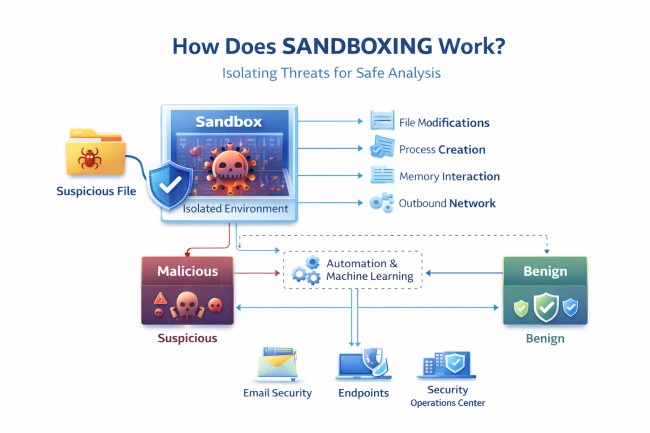
how sandboxing work

Sandboxing operates by executing suspicious files or code within a controlled environment that replicates a production operating system. The file executes as intended, while all activity remains confined to an isolated execution space.

During execution, the sandbox records behavioural indicators including file modifications, process creation, memory interaction, and outbound network communication. These indicators are analysed to classify behaviour as malicious or benign.

Isolation from production systems and internal networks ensures any harmful activity remains contained. This containment enables security controls to block threats before lateral movement or propagation occurs.

Modern sandbox platforms apply automation and machine learning to produce rapid verdicts and actionable intelligence, supporting real-time decisions across email security, endpoints, and SOC workflows.

What Can Be Tested in a Sandbox Environment?

A sandbox environment is an isolated, controlled execution space used to run and observe untrusted files, code, or links without affecting live systems.

Sandboxing tests commonly:

  • Email attachments and embedded content — documents, HTML bodies, images, scripts, and macros used to deliver ransomware or spyware

  • Executable files and installers — binaries that may drop payloads, establish persistence, or initiate command-and-control communication

  • Scripts and command-line payloads — PowerShell, JavaScript, batch files, and fileless malware abusing trusted system tools

  • Third-party applications and unsigned software — external programs that may contain hidden logic or background activity

  • URLs and redirected links — shortened links and web redirects leading to phishing pages or malware downloads

By isolating and observing these elements, sandboxing exposes concealed threats that traditional security controls often fail to detect.

Types of Sandboxing in Cybersecurity

Sandboxing types differ by analysis depth, execution realism, and deployment model, each balancing speed, visibility, and operational scale.

  1. Static sandboxing inspects a file’s structure without execution, analysing metadata, embedded scripts, and known patterns to identify indicators of compromise before runtime.
  2. Dynamic sandboxing executes files in a simulated environment to capture real-time behavior such as file system changes, process creation, and network communication, exposing evasive or obfuscated threats.
  3. Cloud-based sandboxing delivers scalable, remote execution that integrates with email gateways, firewalls, and endpoints, enabling high-volume analysis without local infrastructure limits.
  4. Agentless sandboxing operates at the network or gateway level without endpoint installation, inspecting traffic and files while preserving device performance and user experience.

Sandboxing vs Antivirus vs Virtualization

Feature / Aspect Antivirus Sandboxing Virtualization
Primary Function Detects known threats using signatures or heuristics Executes and observes file behavior in isolated environment Emulates full operating systems for general-purpose use
Detection Approach Signature-based or rule-based matching Behavior-based analysis during execution Not inherently threat-focused
Effectiveness Against Known malware Unknown, obfuscated, or zero-day threats Not specifically designed for malware detection
System Resource Use Lightweight Moderate — runs targeted analysis environments Heavy — requires OS-level emulation
Speed of Analysis Very fast Fast, depending on environment configuration Slower due to full system overhead
Use Case Endpoint protection, baseline security Advanced threat detection, pre-execution analysis Software testing, isolated OS execution
Isolation Level Minimal — relies on host system Strong — runs in contained sandbox Full OS isolation, broader scope
Threat Evasion Resistance Weak against new or modified malware Strong — detects actions instead of relying on known patterns Depends on configuration, not focused on stealth malware

Sandboxing Use Cases

Sandboxing is applied across multiple layers of modern cybersecurity architecture to stop threats before they cause damage. It enhances both automated detection systems and manual investigation workflows.

  • Email security gateways use sandboxing to analyse attachments and embedded links in real time, blocking delivery and triggering alerts before messages reach users.
  • Endpoint protection platforms (EPP) route suspicious downloads and executions to sandboxes for behavioral analysis, allowing threats to be quarantined even when antivirus tools fail.
  • Security Operations Centers (SOCs) rely on sandboxing to validate malware samples during threat hunting or incident response, exposing full behavior chains for faster decision-making.
  • Research and malware analysis teams use sandboxing to safely examine unknown threats, uncovering command-and-control activity, persistence mechanisms, and data exfiltration tactics.
  • DevSecOps pipelines apply sandboxing to third-party code, plug-ins, APIs, and uploaded artifacts to prevent hidden threats from entering production systems.

Who Uses Sandboxing and Why?

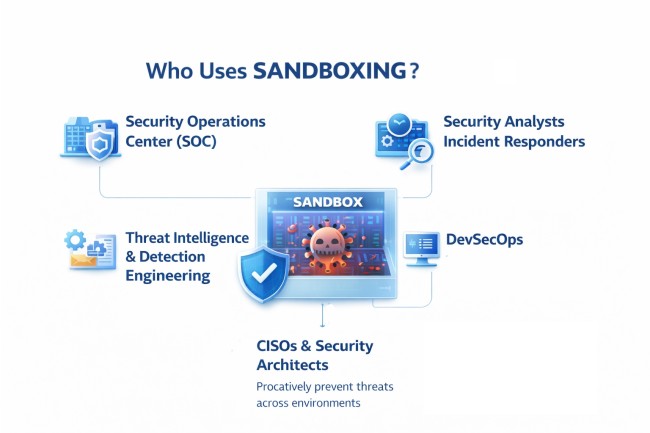
Sandboxing is used by cybersecurity professionals across operational, defensive, and investigative roles to identify threats before they execute in live environments. Each group relies on sandboxing for targeted outcomes.
who use sandboxing
  • Security Operations Centers (SOCs) use sandboxing to validate suspicious files during triage, confirming malicious behavior through real-time execution analysis.
  • Security analysts and incident responders rely on sandbox outputs to trace malware behavior, extract indicators of compromise, and understand attack techniques, accelerating containment.
  • Threat intelligence and detection engineering teams use sandbox-derived behavior to enrich rules, improve detections, and track evolving threat patterns.
  • DevSecOps teams integrate sandboxing into CI/CD pipelines to test code dependencies and updates, preventing hidden threats from entering production environments.
  • CISOs, security architects, and managed security providers adopt sandboxing as a proactive control, supporting Zero Trust strategies and scalable threat prevention across environments.

Real-World Example of Sandboxing in Action

Case Study: Sandboxing Stops a Hidden Email Threat

Industry: Financial Services
Attack Vector: Email attachment (Excel file)

Scenario
A financial services company received a seemingly legitimate Excel attachment as part of routine client communication. The file passed traditional antivirus checks and raised no initial alerts.

Detection
Before delivery, the secure email gateway automatically routed the attachment to a cloud-based sandbox. Within seconds of execution, the file launched PowerShell, modified registry entries, and attempted an outbound connection to a known command-and-control server.

Response
The sandbox generated a malicious verdict in under a minute, triggering automated blocking, alerting the Security Operations Center (SOC), and stopping further distribution across the network.

Outcome
The threat contained pre-execution, with no user interaction, no endpoint compromise, and no downtime. Sandbox telemetry captured the full attack chain and was later used to strengthen internal detection rules against similar threats.

Sandboxing and Threat Intelligence Correlation

The correlation between sandboxing and threat intelligence lies in signal generation and signal meaning, a relationship central to modern threat intelligence programs. Sandboxing produces high-fidelity behavioral evidence, while threat intelligence interprets that evidence to reveal broader attacker intent and activity.

When sandboxing executes suspicious files in isolation, it captures how a threat behaves, including execution flow, dropped artifacts, command-and-control attempts, persistence mechanisms, and lateral movement indicators. On their own, these observations describe a single event rather than the full threat context.

Threat intelligence adds that missing context by correlating sandbox-derived behaviors across multiple samples, timelines, and environments. This correlation exposes shared infrastructure, reused techniques, and recurring attack patterns, allowing security teams to move from isolated detections to campaign-level understanding and predictive defense, as explained in What Is Threat Intelligence. 

Related Posts
What Is Graymail? Risks, Examples, and Detection
Graymail is legitimate but low-value email, such as newsletters, promotions, and notifications that users once consented to receive, but no longer find useful.
What Is Sandboxing? Benefits and How It Works
Sandboxing safely runs suspicious files in isolation to detect malicious behaviour before systems are affected.
What Is a Zero-Day Attack? Examples and Why It’s Dangerous
Zero-day attack is a cyberattack that exploits an unknown software vulnerability before a patch, fix, or detection rule is available.

Start your demo now!

Schedule a Demo
Free 7-day trial
No Commitments
100% value guaranteed

Related Knowledge Base Articles

No items found.