🚀 CloudSEK featured in the 2026 Frost Radar™!
Read more
.avif)

SaaS security is the practice of protecting an organization’s data, identities, configurations, access permissions, and connected applications within software-as-a-service environments.
It covers how SaaS applications are configured, who and what can access them, how sensitive data is stored and shared, and how integrations such as OAuth apps, APIs, and third-party services introduce risk. Common SaaS environments include Microsoft 365, Google Workspace, Salesforce, Slack, and Snowflake.
SaaS security operates under a shared responsibility model: the provider secures the underlying service and infrastructure, while the customer is responsible for securing its tenant, identities, permissions, data, configurations, and integrations.
Attackers target that customer-side layer because a valid session opens the same doors as a valid employee. CloudSEK researchers documented how infostealer malware abused an undocumented Google OAuth endpoint called MultiLogin to regenerate expired Google session cookies and keep access to accounts even after a password reset. First advertised on Telegram in October 2023, the technique had spread by late December to six infostealer families: Lumma, Rhadamanthys, RisePro, Stealc, Meduza, and WhiteSnake.
Every SaaS contract splits security duties between the provider and the customer, and attackers have found most of their recent openings on the customer side of that line. Providers run the data centers, patch the application, and keep the service available. Customers decide who can log in, what each account can access, which settings are enabled, and which third-party apps receive tokens.
A provider breach remains possible, but the recurring failure pattern is a customer tenant with weak MFA coverage, stale accounts, or over-permissioned integrations. SaaS security programs concentrate on those customer-owned rows, because no provider patch fixes them.
SaaS security safeguards five interconnected asset groups within each tenant, and if an attacker compromises any one of them, they gain access to the others.
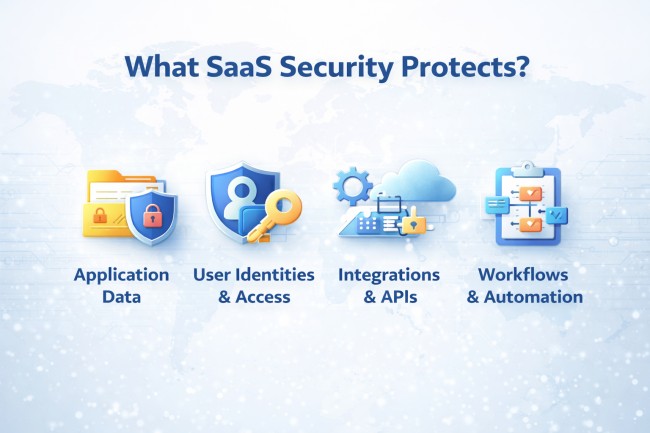
Employee, contractor, and guest accounts carry the permissions that determine what data each person can access. Admin roles deserve the closest watch, since a single global administrator in Microsoft 365 or a super admin in Google Workspace controls every other account and setting in the tenant. Guest accounts and former employees who were never removed keep access that nobody reviews.
Service accounts, API keys, OAuth tokens, bots, and AI agents multiply with every new integration, and none of them can complete an MFA prompt. A token granted to a connected app keeps working until someone revokes it, independent of the user's password. CloudSEK's BeVigil research found hardcoded SaaS API keys for Mailgun, MailChimp, and SendGrid in about half of 600 analyzed mobile apps, putting more than 54 million app users at risk.
Each SaaS platform exposes hundreds of settings covering sharing defaults, legacy authentication, external collaboration, mailbox forwarding, and app consent. A single change, such as allowing users to consent to any OAuth app, reshapes the tenant's risk overnight. Configuration drift happens as admins make exceptions and as vendors ship new features with permissive defaults.
Business data inside SaaS platforms includes files, CRM records, chat messages, source code, support tickets, and full customer databases. Anyone-with-the-link sharing, public calendars, and external guest access expose that data without any account compromise at all. Data loss prevention and data security posture tools classify sensitive content and flag where it is shared.
Audit logs record sign-ins, permission changes, file access, and admin actions, and investigations depend on them. Retention varies by license tier: Microsoft's Purview documentation lists 180 days of retention for Audit (Standard) and one year for Audit (Premium), with 10-year retention sold as an add-on. Teams that forward logs to a SIEM keep evidence past those limits.
SaaS breaches in recent years follow a consistent pattern: attackers log in with stolen or abused access instead of hacking the platform.
Infostealer malware on a personal or unmanaged device captures saved passwords and cookies for every SaaS app the victim uses, and those logs are resold on dark web markets. The 2024 Snowflake campaign showed the scale: Mandiant's UNC5537 investigation found that at least 79.7% of the accounts the attacker used had prior credential exposure, and approximately 165 organizations were notified. The affected customer instances did not require MFA, and some credentials had gone unrotated for as long as four years.
A stolen session cookie represents an already-completed login, so replaying it skips the password and the MFA prompt entirely. Attackers collect these tokens through infostealers and through adversary-in-the-middle phishing kits that proxy the real login page. Short session lifetimes, device-bound tokens, and revoking all sessions after an incident cut the value of a stolen cookie.
Connected apps hold standing OAuth tokens into core platforms, so compromising one integration vendor exposes every customer that installed it. Between August 8 and at least August 18, 2025, the actor tracked as UNC6395 used compromised OAuth tokens for the Salesloft Drift app to pull data from Salesforce customer instances and search it for AWS keys, passwords, and Snowflake tokens, according to Google Threat Intelligence Group. This SaaS-to-SaaS path is a form of third-party data breach that no password reset touches.
Public sharing links, open guest access, disabled MFA for legacy protocols, and permissive app-consent settings expose data with no attacker effort at all. Misconfigurations persist because SaaS admin consoles spread these settings across many pages and each vendor names them differently.
Users collect roles as they change teams, and admin rights granted for a one-time task stay in place for years. Accounts left active after offboarding, especially ones created outside SSO, give former staff and attackers a quiet way back in, a common route to account takeover.
Employees sign up for SaaS tools and AI assistants with a corporate email and upload company data without security review. These unsanctioned apps sit outside SSO, MFA policy, and logging. Shadow AI adds a newer twist, since AI features and copilots inside approved SaaS apps read whatever data the signed-in user can already reach.
SaaS security tools differ mainly in where they watch the path between the user and the data: the tenant configuration, the network route, or the identity layer.
SSPM tools connect to each SaaS platform through its admin APIs, read the tenant's configuration, users, and connected apps, and compare them against security baselines. Findings include disabled MFA, risky sharing defaults, over-permissioned OAuth grants, and inactive admins, with guided or automated fixes. SSPM needs no traffic inspection and no endpoint agent.
A cloud access security broker sits between users and cloud services, either inline as a proxy or through API connections. Inline CASB discovers shadow SaaS from traffic, blocks risky uploads, and enforces data loss prevention in real time. API-mode CASB overlaps with SSPM for data scanning but focuses less on configuration posture.
SSE platforms bundle CASB with a secure web gateway and zero trust network access, delivered from the cloud. SSE governs how users reach SaaS apps from any device or location, while SSPM governs how the apps themselves are configured.
ITDR tools analyze identity provider and SaaS sign-in logs for identity threats such as impossible travel, token replay, MFA fatigue, and suspicious privilege grants. ITDR responds by revoking sessions, forcing reauthentication, or disabling accounts.
Mature programs combine these categories: SSPM hardens the tenant, CASB or SSE controls access paths, and ITDR catches account misuse that configuration alone cannot prevent.
SaaS Security is best understood as a layered model, where each layer addresses a specific category of risk inherent to SaaS platforms. These layers work together to provide defense-in-depth across identity, data, and application behavior.
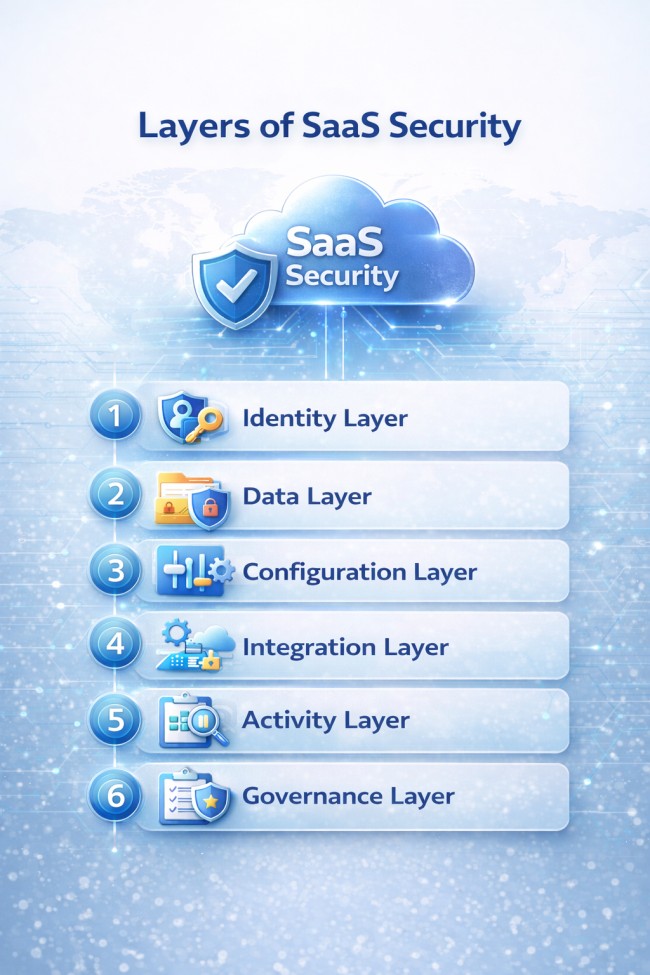
Here is the breakdown of Saas Security Layers:
SaaS security covers applications a vendor runs, and the customer only configures, while cloud security in the IaaS and PaaS sense covers infrastructure the customer builds and operates, such as virtual machines, containers, storage buckets, and cloud IAM roles.
The tooling follows that same split between applications and infrastructure. Cloud security posture management (CSPM) and cloud workload protection scan AWS, Azure, and Google Cloud resources for exposed storage, open ports, and vulnerable workloads. SaaS security tools never touch servers or code; they work through vendor APIs on identities, settings, data sharing, and integrations. Both disciplines share identity as the primary attack surface, which is why identity provider hardening appears in both programs.
Effective SaaS security programs apply the following controls in order, starting with visibility and ending with continuous monitoring:
These controls map directly onto zero trust security, which treats every session, device, and integration as untrusted until verified.
SSPM, CASB, and ITDR all watch activity inside or at the edge of the tenant, yet the Snowflake and MultiLogin cases began somewhere none of them look: on an infected laptop and in a dark web log listing. By the time a stolen credential appears in SaaS sign-in logs, the attacker is already logged in.
ClouSEK XVigil closes that gap by monitoring deep and dark web forums, leaked-data marketplaces, paste sites, and encrypted channels for credentials and code tied to a specific organization. Security teams receive early warning on leaked employee credentials and exposed repositories, prioritized by exploitability, so they reset passwords and revoke sessions while the exposure is still an initial access vector and not an active intrusion.
No. SSPM checks the configuration of SaaS applications such as Microsoft 365 and Salesforce, while CSPM checks infrastructure resources in AWS, Azure, and Google Cloud.
It depends on the customer's configuration. Providers patch faster than most in-house teams, but misconfigured SaaS tenants expose data to the internet more easily than internal servers.
No. SSPM and API-based CASB connect directly to SaaS platforms through APIs. Only inline CASB and SSE use endpoint agents or traffic routing.
Yes. SaaS providers protect against their own failures, not against user deletion, malicious admins, or ransomware syncing encrypted files. Retention and recycle bins expire after fixed periods.
SOC 2, ISO/IEC 27001, ISO/IEC 27017, CSA STAR, and FedRAMP assess SaaS providers. Customers map their own tenant controls to frameworks such as NIST CSF and CIS Benchmarks.
Yes, in limited cases. Vendor support staff can access customer data under contract terms, and features such as Microsoft Customer Lockbox require customer approval before that access happens.
SaaS configurations need continuous automated checks, plus a manual review after every major vendor feature release and at least once per quarter.
Yes. Built-in controls such as Microsoft Secure Score, Google Workspace security recommendations, and CIS Benchmarks cover MFA, sharing, and admin hardening without an SSPM license.
No. Small businesses run email, finance, and customer data in SaaS apps, and attackers use the same stolen-credential methods against them as against enterprises.
