What Is Quishing? QR Phishing Attacks, Examples & Prevention
Quishing is a phishing attack that hides a malicious link in a QR code. See how it bypasses email filters and MFA, real examples, and how to prevent it.
Quishing, or QR phishing, is a phishing attack that hides a malicious link inside a QR code, so the victim scans an image instead of clicking a visible URL. The code opens a fake login page, a fraudulent payment form, or a malware download on the victim's phone.
QR phishing removes the one check most people rely on, which is reading a link before opening it. The destination stays hidden until a camera decodes it, and the scan happens on a personal phone that corporate email filters and endpoint tools never see.
Attackers pair that blind spot with lures people already trust, such as parking machines, invoices, parcel notices, and requests to re-enroll multi-factor authentication. The pages behind those codes increasingly steal session tokens, not just passwords, so a single scan hands over full account access.
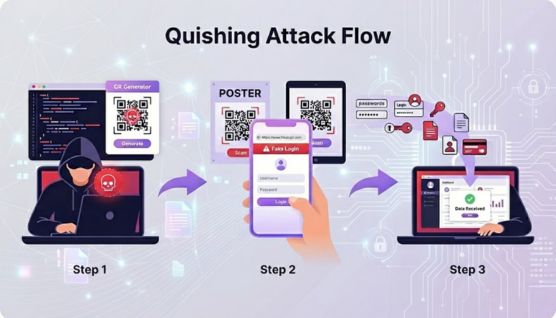
Quishing Attack Chain: From QR Code to Stolen Session
A quishing attack starts with a cloned web page and ends with an attacker using stolen credentials or session tokens. The stages in between follow a consistent pattern.
Building the landing page. Attackers clone a Microsoft 365, Okta, Google, bank, or parking payment page, and phishing-as-a-service (PhaaS) kits such as Tycoon2FA supply the templates, hosting, and credential collection.
Encoding the URL behind redirects. The QR code points to a short link, an open redirect on a trusted domain, or a CAPTCHA page, so the final phishing address never appears in the code itself.
Delivering the code. The code arrives inside a PDF or Word attachment, an email body, a text message, a printed letter, or a sticker placed over a genuine code in a car park.
Forcing the device switch. Scanning requires a phone, which moves the victim from a managed laptop to a device with lighter security monitoring and a truncated address bar.
Filtering visitors. Attacker infrastructure checks the device type, IP address, and browser language, then serves the phishing page only to real mobile visitors and shows security scanners a harmless page.
Capturing credentials, card data, or session tokens. An adversary-in-the-middle (AiTM) proxy relays the victim's login to the real service and keeps the session cookie issued after multi-factor authentication.
Exploiting the access. The attacker reads email, sends internal phishing from the compromised mailbox, redirects payments, or sells the session to other criminals.
Why Is Quishing So Effective?
Quishing is effective because it hides the destination URL, evades text-based email scanning, moves the victim onto an unmanaged phone, and ends on pages that defeat standard multi-factor authentication.
QR Codes Hide the Destination URL
A QR code stores data as a grid of black and white modules that only a scanner reads. No hover preview exists, so the victim commits to the scan before learning where it leads.
Phone cameras display a short URL preview, but a lookalike domain or a redirect on a trusted site looks harmless in that small banner.
Email Security Tools Read Text, Not Images
Secure email gateways inspect, rewrite, and sandbox URLs written as text. A URL encoded inside an image or a document attachment gets none of that treatment unless the tool renders and decodes the QR code first.
Attackers keep reshaping the QR image itself to defeat automated decoding. Barracuda researchers documented split and nested QR codes in 2025: the Gabagool PhaaS kit split one code into 2 separate images, and Tycoon 2FA wrapped a malicious code around a legitimate one that pointed to Google.
Mobile Devices Fall Outside Corporate Security Controls
Personal phones used for a quick scan fall outside endpoint detection and response (EDR) coverage and corporate web filtering in many organizations.
The FBI's January 2026 FLASH alert on Kimsuky quishing named this pivot to unmanaged mobile devices as the reason quishing now ranks as a high-confidence, MFA-resilient identity intrusion vector for enterprises.
AiTM Landing Pages Defeat Standard MFA
Many quishing pages run adversary-in-the-middle kits that proxy the victim's login to the real service. The victim completes the password and MFA prompt, the service issues a session cookie, and the proxy captures that cookie for replay.
The FBI reports that many quishing operations end in session token theft and replay, which avoids the failed-MFA alerts defenders watch for.
CloudSEK's investigation of BigBear 2.0, an Evilginx2-based phishing-as-a-service platform, shows the scale of this back end. Its admin panel held 474 complete MFA-bypassed Microsoft 365 authentications and 4,148 session cookies, and custom JavaScript disabled FIDO2 prompts to push victims toward phishable methods. BigBear victims reached the proxy through phishing links, and a QR code delivers victims to the same kind of AiTM page.
Everyday Contexts Lower Suspicion
Scanning a code on a parking machine, a restaurant table, or a benefits enrollment letter feels routine.
Attackers layer urgency on top of that routine with unpaid fines, expiring passwords, failed deliveries, and payroll updates, a pattern shared with other social engineering attacks.
Types of Quishing Attacks
Quishing attacks differ by where the malicious code appears and what the scan triggers.
Attachment quishing: A QR code is placed inside a PDF or Word document styled as an invoice, contract, or HR notice.
Email body quishing: The code appears as an image in the message itself, next to a spoofed Microsoft, DocuSign, or payroll logo.
Sticker overlay quishing: A printed sticker covers a genuine code on a parking machine, EV charger, poster, or menu.
Payment QR swaps: A fraudulent code replaces a merchant's payment code or a cryptocurrency wallet address, so the funds reach the attacker.
Messaging app quishing: A QR code arrives by text message, WhatsApp, or Telegram as a parcel fee, toll notice, or refund offer, extending smishing and other phishing techniques to image-based lures.
Postal quishing: A printed letter or unsolicited parcel carries a QR code posing as a tax, bank, or delivery notice.
Malware delivery quishing: The code opens an app download or file instead of a login page, installing malware such as banking trojans or remote access tools on the phone.
Spear quishing: A tailored QR lure targets a specific person, following the spear phishing playbook of researched pretexts and trusted senders.
Quishing vs. Phishing vs. QRLJacking: Key Differences
Phishing and quishing differ in how the malicious link reaches the victim, while quishing and QRLJacking differ in whether a fake website is involved at all.
Attribute
Phishing
Quishing
QRLJacking
Lure Format
Clickable link in an email, text, or web page
QR code in an attachment, email body, print, or sticker
Live QR login or device-pairing code copied from a real platform
URL Visible Before Action
Yes, through hover or long-press preview
No, hidden until a scanner decodes it
No, the code starts a genuine login session
Device Used
Device that received the message
Personal phone
Phone running the targeted app
Fake Website Involved
Yes
Yes
No, the platform's own login flow is abused
What the Attacker Gains
Credentials, card data, or a malware install
Credentials, session tokens, or payments
An authenticated session or a linked device
Visibility to Email Filters
High, text URLs are scanned
Low, the URL is inside an image
Very low, delivery happens in chat or on a web page
Primary Defense
URL filtering and phishing-resistant MFA
QR decoding, mobile protection, and phishing-resistant MFA
Login confirmation prompts and linked-device reviews
What Is QRLJacking?
QRLJacking, short for Quick Response Login Jacking, refers to a session hijacking attack that abuses a real platform's QR-based login or device-pairing flow.
The attacker opens the login page on their own machine, copies the live QR code, and presents it to the victim as a verification or invite code. The victim's scan approves the attacker's session.
Device-linking attacks abuse the same trust in legitimate QR flows inside messaging apps. Google Threat Intelligence Group reported in February 2025 that Russia-aligned espionage groups disguised Signal's device-linking QR codes as group invites and security alerts, which gave attackers a live copy of victims' messages. CloudSEK's guide to Signal app scams explains how that linked-device takeover works.
QR Phishing Statistics and Trends in 2026
QR phishing volumes surged in early 2026 and then fell after Microsoft's Digital Crimes Unit disrupted the Tycoon2FA phishing platform in March. The figures below come from Microsoft Threat Intelligence and the UK's national fraud reporting service.
Peak volume: Microsoft counted 18.7 million QR code phishing attacks in March 2026, the highest monthly volume in at least a year, up from 7.6 million in January.
Post-disruption decline: QR phishing fell for 3 consecutive months to 8.3 million attacks in June, returning to mid-2025 levels, according to Microsoft's Q2 2026 email threat landscape report.
Delivery format rotation: PDF attachments carried 79% of QR code attacks in April before dropping to 58% in June, while DOC and DOCX files rose to 40%.
Kit concentration: QR code campaigns redirecting to Tycoon2FA domains fell from a peak share of 33% in November 2025 to 14% by June 2026.
Consumer losses: Action Fraud received 784 quishing reports between April 2024 and April 2025, with almost £3.5 million lost, and car parks were the most frequent setting.
The June decline reflects one disrupted platform, not a solved problem. Microsoft described the swap between PDF and Word document delivery as a pattern that recurred throughout the past year, which points to operators changing formats instead of abandoning QR codes. Quishing remains one of the top phishing attack trends security teams track in 2026.
In May and June 2025, North Korea's Kimsuky group sent spear-phishing emails with embedded QR codes to think tanks and a strategic advisory firm, according to the FBI.
One email invited recipients to a conference that did not exist. Its QR code led to a registration page and then to a fake Google login page built to harvest credentials.
Fake Parking Stickers in the UK and Texas
Action Fraud identified car parks as the most frequent location for quishing, with criminals placing stickers over the QR codes on parking machines.
In January 2022, the City of Austin found fraudulent QR stickers on 29 of its parking pay stations after inspecting more than 900, and the codes sent drivers to a fake payment site.
Austin's parking system never used QR codes, so every code on its meters was fraudulent by definition.
Seller Verification and Government Impersonation Lures
Action Fraud reports showed sellers on online shopping platforms receiving QR codes by email to verify accounts or collect payment for sold items. Other quishing emails impersonated HMRC and UK government schemes to collect personal and financial details.
Warning Signs of a Quishing Attack
Warning signs of a quishing attack show up in the physical condition of the code, the message around it, and the page it opens.
Quishing Warning Signs for Individuals
A sticker that peels, looks misaligned, or covers another printed code.
An unexpected QR code in an email, text, or letter, especially one asking to verify an account, pay a fee, or re-enroll MFA.
A decoded URL with a misspelled brand, an unrelated domain, a URL shortener, or several redirects before the page loads.
A login page that asks for a password right after a scan, when the real service keeps the user signed in on that phone.
A payment screen showing a merchant or payee name that does not match the business.
A request to install an app or grant device permissions that a payment or login page has no reason to need.
Quishing Detection Signals for Security Teams
Emails with an image-only body, or a one-page PDF or Word attachment that contains a single QR code and an urgent call to action.
Sign-ins from a new mobile device or unfamiliar internet provider minutes after a user receives a QR-bearing email.
Session cookies replayed from a different IP address, network, or device than the one that completed MFA.
Inbox rules, forwarding rules, or OAuth consent grants created shortly after a mobile sign-in.
Messages from a compromised mailbox that repeat the same QR lure to colleagues and partners.
These signals point to account hijacking already in progress. Responders revoke session tokens first and then reset the password, because a reset alone leaves stolen sessions active on some services.
How to Prevent Quishing
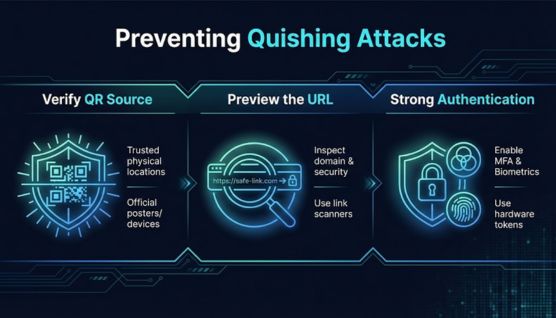
To prevent quishing, individuals verify every QR destination before acting on it, and organizations decode QR codes in email, enforce phishing-resistant MFA, and extend protection to mobile devices.
To prevent quishing, individuals verify every QR destination before acting on it, and organizations decode QR codes in email, enforce phishing-resistant MFA, and extend protection to mobile devices.
Quishing Prevention for Individuals
Use the phone's built-in camera for scanning, not a third-party QR scanner app.
Read the full URL preview before opening it, and type the service's known address manually when in doubt.
Avoid entering passwords, card numbers, or one-time codes on any page opened from an unsolicited QR code.
Pay for parking, tolls, and utilities through the official app or website, not a code on a sign or machine.
Check the payee name on every payment confirmation screen before approving a transfer.
Report QR codes in suspicious work emails to the security team without scanning them.
Enable passkeys or security keys on important accounts wherever the service supports them.
Quishing Prevention for Organizations
Decode QR codes at the email gateway. Choose email security that renders images and attachments, extracts QR codes, including split, nested, and ASCII-drawn variants, and scans the decoded URL.
Enforce phishing-resistant MFA with no fallback. FIDO2 security keys and passkeys bind authentication to the real domain, and removing SMS or push fallback stops kits that try to downgrade the method.
Protect session tokens. Apply conditional access, device compliance checks, and token protection or continuous access evaluation, and revoke refresh tokens after any suspected compromise.
Bring mobile devices into scope. Use mobile device management and mobile threat defense on every phone that accesses corporate accounts.
Train with QR-specific simulations. Include QR codes in phishing simulations and physical sticker tests, not only link-based lures.
Audit printed QR codes. Inspect codes on premises, in parking areas, and on customer-facing materials, and print codes that resolve to a short branded domain customers recognize.
Monitor for brand impersonation. Track lookalike domains and fake pages that use the organization's name, because customer-facing quishing needs convincing brand impersonation.
What to Do After Falling for a Quishing Scam
After falling for a quishing scam, close the page, secure the affected account, and report the incident quickly, because stolen session tokens stay usable until they are revoked.
Close the page immediately. Enter no further information and approve no prompts the page displays.
Change the password from a trusted device. Type the service's address manually, and change the password on any other account that reuses it.
Sign out of all sessions. Use the account's security settings to end active sessions, because a password change does not end every stolen session on every service.
Contact the bank or card issuer. Report any card details or payments entered on the page, and request a card block or chargeback.
Check for unfamiliar apps and account changes. Remove unknown apps from the phone, and review recovery email addresses, forwarding rules, and linked devices.
Notify the security team at work. Responders revoke tokens and search other mailboxes for the same lure.
File a report with the national authority. US victims report to the FBI's IC3 and the FTC. UK victims report to Report Fraud, which replaced Action Fraud in December 2025. Indian victims report at cybercrime.gov.in or call 1930.
Monitor accounts for several weeks. Watch statements, login alerts, and leaked credential monitoring results for activity tied to the stolen data.
Frequently Asked Questions About Quishing
Can scanning a QR code hack a phone?
No, not by itself. Scanning decodes text, such as a URL. Harm starts when the user opens the link and then enters data, approves a payment, or installs an app.
Do phone cameras detect malicious QR codes?
No. Built-in camera apps on iPhone and Android show a preview of the decoded URL, but that preview does not confirm whether the destination is safe.
Are third-party QR code scanner apps safe?
No, not always. Some third-party scanner apps request excessive permissions or have carried malware, so the phone's built-in camera is the safer way to scan QR codes.
Is it safe to scan QR codes on restaurant menus?
Yes, when the code is printed on the menu and opens the restaurant's own domain. A sticker layered over a menu, or a table card, deserves a closer check.
Is scanning a UPI QR code to receive money a scam?
Yes. On UPI, scanning a QR code and entering a PIN sends money. No genuine refund, prize, or buyer payment requires the recipient to scan a code.
Which MITRE ATT&CK technique covers quishing?
MITRE ATT&CK tracks quishing under T1660, the Phishing technique in its Mobile matrix, as cited in the FBI's January 2026 alert on Kimsuky campaigns.
Cybersecurity risk management is the process of identifying, assessing, and treating cyber risk. Explore its steps, frameworks, quantification, and best practices.
A keylogger secretly records every keystroke to steal passwords and data. Learn its types, how it works, its infostealer evolution, and how to detect and remove it.
Smishing is phishing by text message, using fake SMS to steal data and money. Learn how it works, its scam types, red flags, and how to spot and prevent it.
.avif)