🚀 CloudSEK featured in the 2026 Frost Radar™!
Read more
.avif)

Graymail is legitimate bulk email that a recipient once opted into but no longer reads, including newsletters, promotional campaigns, and automated product notifications.
Consent without engagement produces the pattern that defines the category, because authorization happened once and engagement stopped while delivery continued. Security filters pass every message, since nothing inside them is malicious.
Mail that nobody reads trains recipients to clear the inbox by pattern instead of by content, and that habit gives a phishing message exactly the opening it needs to survive first contact.
Graymail arrives in four recognizable forms, and each one entered the inbox through a legitimate opt-in.
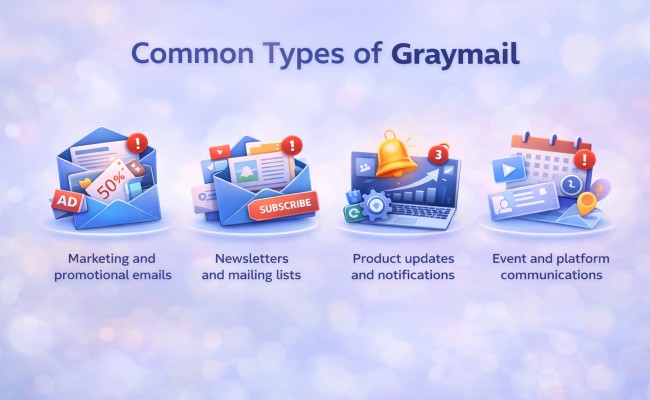
All four share legitimate origin, so every message passes authentication, carries no payload, and arrives from a sender the organization has no grounds to block.
Graymail differs from spam and phishing on consent and intent. Spam arrives without permission, phishing arrives with fraudulent intent, and graymail arrives with permission the recipient granted and forgot.
Nothing inside a newsletter compromises an account on its own, which makes graymail risk behavioral, not technical. A mailbox holding 200 unread newsletters conditions its owner to delete on sight, and the same reflex applies when a spoofed message arrives.
Graylisting operates as a delivery control, not a mail category. A receiving server temporarily rejects mail from an unrecognized sender and waits for the retry that legitimate mail servers perform automatically and most spam infrastructure skips. Graymail describes mail that has already cleared delivery and reached the mailbox.
Mail platforms classify graymail through sender complaint history instead of content inspection. Microsoft assigns inbound messages a bulk complaint level, a 0 to 9 score estimating how likely recipients are to complain about that sender.
Each score maps to a complaint band that decides what the platform does with the message. A BCL of 0 marks mail that is not bulk, 1 through 3 marks bulk senders drawing few complaints, 4 through 7 marks a mixed record, and 8 or 9 marks senders drawing high complaint volumes. Default anti-spam policy acts at a threshold of 7 and routes matching mail to Junk Email, the Standard preset acts at 6, and the Strict preset acts at 5 and quarantines instead.
Complaint rate drives the score more than any other signal. A sender whose recipients press the junk button at scale accumulates poor reputation across the receiving platform, and mail from that sender lands in Junk Email for every tenant running default policy.
Open rates, deletion without reading, and absence of replies feed relevance scoring at the mailbox level. Sustained disengagement across a large recipient population marks a sender as bulk long before any individual user reports a message.
Campaign templates, promotional language, unsubscribe headers, and repeating send schedules identify commercial intent. Context filtering adds a second layer by weighing whether a message matches the recipient's role, active projects, and recent correspondence.
Message headers record the verdict behind every delivery decision. Administrators reading a header trace recover the bulk score, the filtering verdict, and the unsubscribe mechanism the sender exposed.
Graymail creates security risk by consuming the attention that threat recognition requires. Here are the main security risks created by graymail volume:
Attention Erosion and Alert Fatigue
Triage speed climbs in direct proportion to volume, and an inbox cleared at several messages a minute leaves no room for sender verification, link inspection, or the pause that catches an unusual payment request.
A business email compromise invoice or a credential prompt lands among forty promotional messages, and the visual similarity between the two categories does the attacker's work. Targeted spear phishing gains the most from this environment, since a single well-researched message needs only one skimmed reading to succeed.
Attackers generate graymail deliberately by subscribing a target address to thousands of newsletters and signup forms, which floods the mailbox with authenticated, payload-free mail that no filter has grounds to block. Security alerts arriving during the flood sit buried underneath it. A 2026 Communications of the ACM analysis of 24 subscription bombing campaigns documented targets subscribed to more than 10,000 mailing lists in a single operation.
MITRE ATT&CK tracks the method as technique T1667. Ransomware operators, including Black Basta, have paired an email flood with a follow-up voice call posing as IT support, turning the manufactured chaos into a social engineering pretext for remote access.
Graymail persists because it never triggers the reflex that spam and phishing trigger. Familiar senders and lawful content place it outside the reporting workflow, so volume accumulates without a single user complaint reaching the security team.
Employees weigh the small effort of unsubscribing against the chance of losing a message that matters later, and deleting feels like the safer choice every single time.
Reduction starts with the subscription instead of the message. Deleting mail clears the inbox for a day, while removing the list entry stops delivery permanently.
Individual habits do not scale across a workforce of any size. Policy and automation carry the load in any organization above a few dozen mailboxes.
Graymail filtering belongs to the mail platform, where anti-spam policy, bulk thresholds, and mailbox rules handle newsletters and campaign traffic. CloudSEK works on a different part of the problem: the phishing infrastructure built to reach a workforce that has stopped reading carefully.
XVigil, CloudSEK's digital risk protection platform, monitors surface, deep, and dark web sources for the assets attackers stage before a campaign sends its first message. Fake domains, brand impersonation pages, and leaked employee credentials surface while the operation is still being assembled.
A phishing domain removed through domain takedown never reaches the mailbox where alert fatigue would decide whether anyone looked twice, which makes takedown coverage a control on the same risk that graymail volume amplifies.
No. Graymail comes from senders operating under recipient consent and marketing law, which places it outside spam regulation such as CAN-SPAM and GDPR enforcement.
Up to two days. Google and Yahoo require bulk senders to process unsubscribe requests within 48 hours of receiving them.
No. Graymail carries no malicious payload by definition, though attackers who compromise a bulk sending platform deliver malware from that trusted sender address.
No, for legitimate senders. Reputable businesses honor the request, while unsubscribe links inside spam confirm a live address and increase incoming volume.
Yes. Graymail follows US convention and greymail follows British convention, and both spellings describe the same category of bulk email.
Email administrators own the anti-spam policy and bulk thresholds, working with the security team on reporting workflows and exception handling.
