🚀 CloudSEK featured in the 2026 Frost Radar™!
Read more
.avif)

Key Takeaways:
Fake hacking is a cyber scam where attackers claim to have hacked a device even though no intrusion occurred. Scammers use fabricated warnings, scripted threats, and technical-sounding language to make victims believe a breach is real.
Unlike real hacking, which requires exploiting vulnerabilities, fake hacking depends entirely on psychological manipulation. No malware, unauthorized access, or system changes take place.
Because fake hacking requires little skill, it has become widespread online. Understanding how these claims work helps users avoid panic and take proper verification steps before reacting.
Fake hacking relies on illusions designed to trigger fear, urgency, and confusion. These tactics often use theatrical elements to imitate real cyberattacks.
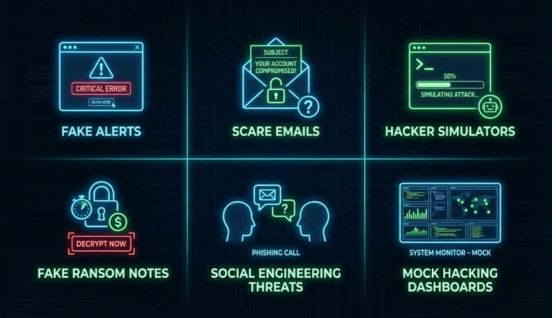
These approaches often reuse templates, exaggerated claims, and generic language. They become easier to identify once you understand their patterns.
Attackers use fake hacking because it enables extortion without needing technical skills. Scammers can pressure victims into paying through fear alone.
Psychological manipulation is central to the tactic. When individuals believe their privacy is compromised, they may react impulsively before verifying the claim.
The low barrier to entry attracts non-technical scammers who rely on scripts, copied templates, or online “scareware kits” to run these scams.
Real hacking requires exploiting vulnerabilities, injecting malware, or bypassing authentication. Fake hacking produces no system changes, no logs, and no indicators of compromise.
Real breaches leave traces: unfamiliar login attempts, modified settings, data changes, or malware activity. Fake hacking provides no verifiable evidence, relying solely on statements or screenshots.
Real hacking is unauthorized access, which is a criminal offense. Fake hacking is a form of cyber scam designed to intimidate victims into paying without any actual intrusion.
If your files, settings, passwords, and device behavior remain normal, the claim is likely fake. Legitimate hacks leave clear forensic indicators.
Statements like “We have full control of your device” or “Your data is downloaded” without specifics are common scam templates. Real attackers do not use vague claims.
Fake hackers often push immediate cryptocurrency payments. Urgency is used to prevent victims from verifying the truth.
Many scammers use unrealistic timestamps, impossible IP addresses, or incorrect technical terminology. These errors are signs of fabrication.
Paying scammers marks you as a “responsive target,” increasing the likelihood of repeated extortion attempts. Many scammers share responsive victims’ contact information.
Believing you were hacked leads to fear, stress, and anxiety. Emotional pressure can cause poor decision-making and unnecessary financial loss.
Responding to fake hacking can expose you to additional scams, including phishing attempts, scareware downloads, and impersonation attacks.
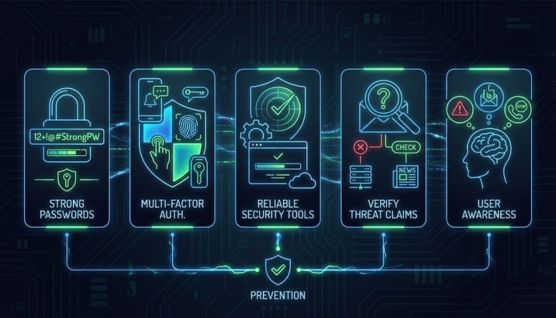
Use strong passwords and enable multi-factor authentication for all important accounts. This minimizes the risk of actual intrusion and reinforces confidence when fake threats appear.
Quality antivirus and endpoint protection tools identify real threats. If these tools show no alerts, fake hacking messages become easier to dismiss.
Use this quick verification checklist:
Understanding common scam behaviors makes fake hacking instantly recognizable. Awareness reduces emotional impact.
Start by checking for unusual system activity: unknown logins, altered settings, or unauthorized apps. If nothing has changed, the threat is likely fabricated.
Do not respond to the scammer or send money. Silence prevents further manipulation and reduces the likelihood of ongoing targeting.
If unsure, consult a cybersecurity professional or report the attempt to your local cybercrime authority. Agencies such as the FTC, IC3, or national CERT teams provide guidance and help track these scams.
Security tools with continuous monitoring help identify genuine compromise and separate real alerts from fake claims.
Email filtering blocks fraudulent extortion messages and prevents scare tactics from reaching your inbox.
Regular, automated backups protect your data even in real incidents, minimizing fear-based reactions to fake threats.
No. Fake hacking involves false claims without actual intrusion. Scammers depend on fear, not technical access.
They use intimidation to pressure victims into paying quickly. These scams rely entirely on psychological manipulation.
Some pop-ups and scareware pages may link to malicious downloads. Avoid clicking any suspicious warnings.
Vague statements, lack of proof, and urgent demands for payment are clear signs of fake hacking. Real breaches contain verifiable indicators.
Yes. Reporting to agencies like IC3 or your local cybercrime unit helps track scammers and protects others from similar attempts.
Fake hacking is a psychological tactic, not a technical intrusion. Recognizing the difference empowers users to stay calm and respond correctly.
By verifying claims, using proper security practices, and understanding scam patterns, individuals can avoid extortion and remain secure against these low-skill but effective intimidation attempts.
