🚀 CloudSEK featured in the 2026 Frost Radar™!
Read more
.avif)

Key Takeaways:
A SOAR platform helps security teams deal with alerts and incidents in a more organized and predictable way. Instead of jumping between multiple tools, analysts can review information, investigate activity, and follow response steps from a single place.
The platform supports this process by automating common investigation tasks such as collecting context, pulling threat intelligence, and structuring evidence. Response playbooks provide guidance, helping teams approach incidents consistently even when alert volumes increase.
As security environments grow more complex, manual processes become harder to manage at scale. A SOAR platform gives the Security Operations Center a structured foundation for handling incidents without slowing down day-to-day operations.
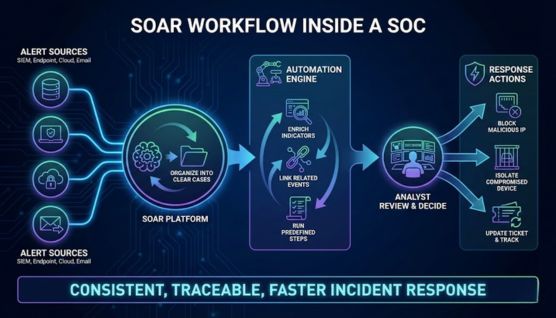
SOAR tools work by receiving alerts from sources like SIEM systems, endpoint protection, cloud services, and email security tools, then organize that information into clear cases. Each case presents the details analysts need to understand what happened and how serious the situation is.
Automation handles much of the background work by enriching indicators, linking related events, and running predefined response steps. Analysts can then focus on reviewing findings and deciding how to proceed instead of repeating the same manual checks.
Response actions can also be triggered directly through connected systems, such as blocking a malicious IP address, isolating a compromised device, or updating a ticket for tracking and escalation. This approach allows the SOC to act quickly while keeping every response step consistent and traceable.
We reviewed SOAR platforms based on how effectively they support real incident response workflows, not feature volume. Emphasis was placed on consistency, analyst control, and reliability during sustained alert activity.
Evaluation covered automation depth, integration coverage, and alignment with core SOC tasks such as triage, enrichment, containment, and case handling. Attention was also paid to whether workflows remain readable and maintainable as response logic scales.
Operational fit was examined across team size, security stack compatibility, and maturity level. Platforms were assessed on their ability to support cloud, enterprise, and multi-tenant environments without adding unnecessary complexity.
Cortex XSOAR centralizes incident handling, enrichment, and response actions into structured playbooks. Teams use it to keep response steps consistent across analysts and shifts.
The platform supports high operational throughput in large SOCs. Palo Alto Networks documents that Cortex XSOAR deployments can handle tens of thousands of incidents per day, depending on playbook execution patterns.
Response quality improves when playbooks are maintained as operational runbooks. This keeps automation aligned with real investigation paths instead of static logic.
Splunk SOAR focuses on precise response logic and deep workflow control. Security teams use it to automate complex decision paths across multiple tools.
Splunk states the platform supports 300+ integrations and 2,800+ automated actions through its connector framework. This breadth supports highly customized response pipelines.
Automation remains manageable when workflows are clearly documented and reviewed. That discipline prevents logic sprawl as automation expands.
IBM QRadar SOAR emphasizes structured case handling and investigation tracking. It keeps timelines, evidence, and analyst actions tied to a single case record.
IBM documents 300+ bidirectional integrations, allowing cases to exchange context with security and IT systems. This supports environments with formal escalation and audit requirements.
The platform suits organizations where documentation and traceability matter as much as containment speed. Long-running incidents remain organized and reviewable.
Google Chronicle SOAR connects detection and response in cloud-heavy security stacks. Playbooks act directly on high-confidence alerts without manual handoffs.
Google states Chronicle SOAR can orchestrate workflows across 300+ integrated tools. This scale supports environments with high alert volume and distributed assets.
Teams commonly automate identity actions, endpoint isolation, and cloud workload response. This reduces console switching during active incidents.
Microsoft Sentinel integrates automation through Azure Logic Apps. This keeps response actions aligned with Microsoft security services.
Microsoft documents 350+ data connectors and a security content catalog covering hundreds of integrated solutions. This supports hybrid and multi-cloud visibility.
Playbooks are commonly used for enrichment, alert routing, and containment. Automation stays effective when focused on repeatable actions.
Swimlane enables automation without heavy scripting. Analysts and engineers can build workflows directly using low-code components.
Swimlane Turbine materials reference thousands of pre-built connectors and automation blocks. This shortens deployment time for common use cases.
Teams usually start with phishing, alert enrichment, or ticketing workflows. Playbooks evolve based on analyst feedback.
Key Highlights
Rapid7 InsightConnect focuses on connecting tools and automating response steps quickly. It is commonly used for enrichment and containment workflows.
Rapid7 states InsightConnect supports 300+ plugins, with many available as open source. This helps teams integrate mixed security stacks.
Smaller workflows tend to perform better over time. Automation stays resilient when scoped to clear outcomes.
ServiceNow Security Operations links security response with IT service workflows. Incidents follow the same tasking and approval structure used elsewhere in the organization.
IntegrationHub provides hundreds of pre-built spokes for external systems. This reduces custom development for enterprise integrations.
The platform supports coordination across SOC, IT, and risk teams. Work remains visible and accountable.
ThreatConnect connects threat intelligence directly to response workflows. Indicators and context influence prioritization and escalation.
The platform integrates with 150+ security tools, according to ThreatConnect. This allows intelligence to feed enrichment and automation.
Teams reduce noise by focusing on relevant threats. Response effort aligns with risk.
FortiSOAR supports multi-tenant security operations. Managed providers use it to standardize responses across customers.
Fortinet references 100+ playbooks and 50+ connectors for automation. These support shared response logic with tenant separation.
Reusable playbooks help scale response quality. Each environment remains isolated.
SOAR solutions improve security operations by turning alert handling and incident response into a structured, automated process rather than a manual, tool-by-tool effort.
By automating enrichment, correlation, and initial investigation steps, SOAR tools reduce the time between alert detection and response. This allows security teams to contain threats sooner instead of spending time gathering basic context.
SOAR platforms remove repetitive manual actions from daily operations by executing predefined playbooks. Tasks like checking indicators, validating alerts, and triggering response actions run automatically within the same workflow.
SOAR solutions ensure incidents are handled using the same response logic every time. This consistency reduces errors, improves handoffs between analysts, and keeps investigations aligned with internal procedures.
Instead of working across disconnected dashboards, SOAR products coordinate actions across integrated security tools. Blocking IPs, isolating hosts, or updating tickets can happen from one response flow rather than separate systems.
As alert volumes grow, SOAR platforms allow security teams to handle more incidents without increasing manual effort. Automation makes it possible to scale response capacity while maintaining visibility and control.
Choosing a SOAR product requires more than comparing feature lists, since the right choice depends on how well the tool fits existing workflows, systems, and response goals.
A SOAR product should connect smoothly with the security tools already in use, such as SIEM platforms, endpoint protection, email security, and cloud services. Strong integrations reduce friction and prevent gaps during investigations and response.
Not all automation is equal, so it is important to understand how much control the platform provides over response logic. Effective SOAR solutions allow teams to automate both simple tasks and multi-step incident workflows.
Playbooks shape how incidents are handled day to day, so flexibility matters more than quantity. A good SOAR tool lets teams adjust response steps as threats and processes evolve.
A SOAR product should support analysts with clear case views and logical workflows rather than adding complexity. An interface that matches how analysts work makes automation easier to adopt and maintain.
Deployment options matter because security environments vary across organizations. Some teams prefer cloud-based SOAR platforms, while others require on-premises or hybrid setups due to compliance or data handling needs.
SOAR platforms play an important role in modern security operations by helping teams manage alerts and incidents more effectively. Automation and orchestration reduce manual effort and bring structure to investigation and response workflows.
Different SOAR tools serve different operational needs, ranging from enterprise-scale coordination to simpler automation for smaller teams. Selecting the right solution depends on how well it aligns with existing systems and response processes.
A well-fitted SOAR platform improves response speed, consistency, and visibility across security operations. Long-term value comes from practical fit rather than feature volume or platform popularity.
A SOAR platform is used to manage security incidents by automating investigation steps and coordinating response actions. It helps security teams handle alerts more efficiently without relying on manual workflows.
A SOAR platform improves incident response by automating tasks such as alert enrichment, evidence collection, and response execution. This shortens response time and keeps handling consistent across incidents.
SIEM tools focus on collecting logs and detecting security events. SOAR platforms take alerts from SIEM and manage investigation, orchestration, and response activities.
SOAR platforms do not replace SIEM tools because they serve different purposes. SIEM handles detection, while SOAR handles what happens after an alert is generated.
SOAR platforms can support small teams by reducing repetitive investigation work. Automation allows limited staff to manage alerts more effectively.
Many SOAR tools support visual or low-code workflows. Coding is only required for advanced or highly customized automation.
Yes, free and open-source SOAR platforms include Shuffle, TheHive with Cortex, and StackStorm. These tools offer basic automation and response capabilities but require more setup and lack enterprise-level integrations and support.
Alert enrichment and initial triage should be automated first. These steps reduce analyst workload immediately and improve response speed.
