🚀 CloudSEK featured in the 2026 Frost Radar™!
Read more
.avif)

Brave is the best secure browser for most people in 2026 because it blocks trackers, ads, and fingerprinting by default and receives fast security patches from Chromium.
Tor Browser is the strongest choice for anonymity, and Mullvad Browser offers the best fingerprinting defense without the Tor network.
A secure browser does two jobs: it resists attacks such as malicious sites and exploits, and it limits tracking. Few browsers lead on both, so each pick below is matched to the job it does best.
The table compares each browser on the protections that matter most, based on default settings as of October 2026:
We assessed each browser against official documentation, release notes, and security advisories current to October 2026. The criteria were:
Brave blocks trackers, third-party ads, cross-site cookies, and phishing sites out of the box through its Shields feature. Its fingerprinting defense, which Brave calls "farbling," slightly randomizes device signals for each site and session, so trackers cannot build a stable profile.
Every Brave connection is upgraded to HTTPS by default, and the browser receives Chromium security fixes on Google's fast schedule. Desktop users get a private window that routes traffic through Tor.
Firefox's Enhanced Tracking Protection blocks social trackers, cross-site tracking cookies, cryptominers, and known fingerprinting by default. Total Cookie Protection, on by default since June 2022, keeps each site's cookies in a separate jar so they cannot follow users across sites.
Firefox 151, released in May 2026, strengthened fingerprinting protection in the default mode. The release notes report a drop in uniquely identifiable users of about 14% on average and about 49% on macOS.
Tor Browser routes traffic through three volunteer relays, so websites never see the user's real IP address. It is built on Firefox ESR and isolates cookies and site data to the site in the address bar.
Margins added around each page, a technique called letterboxing, hide the real browser window size from websites.
Three security levels, Standard, Safer, and Safest, let users trade site features for protection. Safest mode turns off JavaScript on all sites and blocks some fonts and images. CloudSEK's guide to dark web browsers covers Tor in more depth.
Mullvad Browser, released in April 2023 and developed in collaboration with the Tor Project, applies Tor Browser's anti-fingerprinting design without routing traffic through Tor. Every user looks alike, which defeats browser fingerprinting without slowing connections.
It ships with uBlock Origin and is free and open source. Users pair it with a VPN to hide their IP address.
Safari's Intelligent Tracking Prevention blocks all third-party cookies by default on Mac, iPhone, and iPad. Safari 26 extended Advanced Fingerprinting Protection from private browsing to all browsing.
Apple's Lockdown Mode adds protection for people at risk of targeted spyware. It disables JavaScript just-in-time compilation and other complex web features that exploits target.
Google Chrome leads the field on exploit defense far more than it does on privacy. Google moved to weekly security updates starting with Chrome 116 to shrink the patch gap, the window between a fix landing in code and reaching users.
Site isolation runs every website in its own separate process on desktop computers. Enhanced Safe Browsing checks sites and downloads in real time but sends more browsing data to Google.
Edge's enhanced security mode disables JavaScript just-in-time compilation on unfamiliar sites, or on all sites in Strict mode, removing a common exploit target. Microsoft Defender SmartScreen warns about phishing sites and checks downloads.
Edge's tracking prevention runs at the Balanced level by default for every user. Businesses manage Edge centrally through Group Policy and Microsoft Intune.
LibreWolf is a privacy-focused version of Firefox with telemetry removed and uBlock Origin preinstalled. Its hardened defaults deliver strict privacy from the first launch.
Updates arrive within three days in most cases of each Firefox release, but LibreWolf has no automatic updater and relies on package managers.
DuckDuckGo's browser blocks most third-party trackers before they load, with no setup. The Fire Button erases tabs, cookies, and site data in one tap.
On Android, App Tracking Protection extends tracker blocking to other apps on the phone. On desktop, the browser uses the operating system's own rendering engine.
Vivaldi includes a built-in tracker and ad blocker and end-to-end encrypted sync, protected by a password Vivaldi never receives. Per-site settings let users apply strict rules to risky domains only.
Several browsers that appear on other lists fell short on maintenance, transparency, or trust:
A secure browser protects the device from attacks, while a private browser protects the user from tracking. The two goals overlap but are not the same.
Security features include fast patching, sandboxing, site isolation, and phishing and download warnings. Privacy features include tracker blocking, cookie isolation, and fingerprinting defense. Chrome is strong on security but weak on privacy, while Tor Browser is strong on privacy but slower to use.
Different secure browsers approach security in their own way, so the right choice depends on which protections matter most to you.
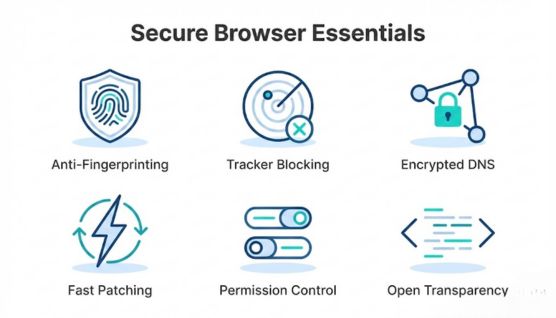
Fingerprinting protection reduces the signals websites use to identify a device, keeping profiles from forming even without cookies. Browsers that standardize or limit these signals offer more stable privacy in real-world use.
Strong tracker blocking stops common advertising networks, analytics platforms, and hidden scripts from following activity across sites. Built-in blocking tends to stay more consistent than depending on extensions alone.
Encrypted DNS prevents ISPs and third parties from logging the domains you visit. DNS-over-HTTPS or DNS-over-TLS support reduces passive collection during routine browsing.
Fast patch cycles keep the browser protected from new exploits that emerge every month. Browsers with delayed updates often accumulate risk even if they appear feature-rich.
Clear permission controls help limit site access to cameras, microphones, location data, and notifications. A browser that makes these settings easy to review tends to stay safer in day-to-day use.
Open-source transparency allows researchers to audit the code and check for unwanted telemetry. This reduces the trust gap and makes privacy behavior easier to verify.
Even the most secure browser leaves gaps that attackers exploit every day. The biggest are:
These settings raise protection in any browser, including every browser on the list above:
Consumer privacy browsers rarely suit company devices, because IT teams need central control. Businesses standardize on browsers they can manage at scale:
Secure browsers in 2026 deliver stronger protections than previous years, but the right choice still depends on your specific browsing habits. A browser only helps when its defenses remain consistent during everyday tasks.
Brave fits most users because it combines strong blocking behavior with fast performance, while Tor and Mullvad serve people who need anonymity or fingerprint resistance. Firefox, LibreWolf, and Vivaldi support users who prefer more direct control over privacy settings.
Simpler options like DuckDuckGo and Epic suit those who want privacy without heavy decision-making, and Avast remains useful for shoppers and banking-focused workflows. Matching a browser to your real-world needs always results in better security than choosing based on features alone.
No. Incognito and private modes only stop the browser from saving history and cookies locally. Websites, employers, and internet providers still see the activity.
No. A VPN hides the IP address and encrypts traffic on the network, but it does not block trackers, fingerprinting, malicious sites, or exploits.
Yes, compared with reused passwords, but infostealer malware treats browser-saved passwords as a primary target. A dedicated password manager with MFA offers stronger protection.
Yes, outside the EU. Apple requires iOS browsers to use its WebKit engine, so engine-level security matches Safari, while tracker blocking and features differ.
It depends on the jurisdiction. EU data protection rules treat fingerprinting for tracking as processing personal data, which requires a legal basis such as consent.
No. A secure browser blocks malicious sites and risky downloads, but malware that arrives through email, USB drives, or pasted commands needs endpoint protection.
