🚀 أصبحت CloudSek أول شركة للأمن السيبراني من أصل هندي تتلقى استثمارات منها
اقرأ المزيد
.avif)

Cloudflare DNS is the best overall DNS service for secure and fast browsing in 2026, offering the strongest balance of privacy, speed, and reliability. Its audited data practices and encrypted protocols consistently delivered the most stable results in testing.
Modern DNS security has become essential as attacks increasingly target resolution layers rather than endpoints. Encrypted lookups, domain validation, and filtering now shape how resolvers protect users on everyday networks.
Each DNS provider in this guide performs differently depending on its infrastructure, threat-intel sources, and privacy policies. The following breakdown reflects how these services behaved under controlled testing to show the practical differences that matter.
Performance analysis centered on real browsing conditions, using multiple networks to track how each DNS resolver handled latency and stability. Speed was measured through repeated lookup tests to capture both peak performance and consistency during heavy traffic periods.
Security evaluation used controlled malicious domains, phishing URLs, and DNS manipulation scenarios to observe how quickly each resolver identified and blocked threats. DNSSEC validation accuracy and threat-intelligence responsiveness helped highlight meaningful differences between providers.
The privacy review relied on publicly documented audits, data-retention statements, and protocol support rather than marketing claims. Jurisdiction, logging transparency, and the quality of encrypted DNS implementations shaped the final position of each service.
Cloudflare ranked highest in our tests for combined speed, reliability, and privacy enforcement. Its global anycast network consistently delivered the lowest latency, even under peak load conditions.
We also found Cloudflare’s audited no-log policy to be more transparent than most competitors, reinforcing user trust. With robust support for DoH, DoT, and DNSSEC, it stands out as the most balanced solution for both personal and enterprise-grade browsing.
Pros
Cons
Key Features
Quad9 delivered the strongest security filtering during our evaluations, blocking malicious domains with impressive consistency. Its threat intelligence ecosystem aggregates signals from over a dozen cybersecurity partners, enabling rapid response to emerging threats.
The resolver is built for defense-first environments and integrates DNSSEC validation by default. Quad9 was particularly effective for users who frequently encounter phishing, ransomware threats, or untrusted domains.
Pros
Cons
Key Features
Google Public DNS excelled in long-duration stability tests, maintaining responsive lookups across multiple continents. Its large-scale infrastructure and optimized caching make it one of the most reliable DNS services available.
While it does not include filtering options, Google DNS remained the most consistent performer for everyday browsing and high-latency networks. It appeals to users favoring performance over additional security layers.
Pros
Cons
Key Features
OpenDNS performed exceptionally well in filtered and controlled environments such as homes, classrooms, and small offices. Its category-based filtering proved highly accurate, with granular blocking options available directly through its dashboard.
Cisco’s threat intelligence significantly enhances OpenDNS’s ability to block malicious and deceptive domains. It remains a top-tier choice for users needing configured browsing safety and DNS-layer enforcement.
Pros
Cons
Key Features
NextDNS offered the most comprehensive customization options in our testing, functioning almost like a personal DNS firewall. Its extensive filter lists—including ad blockers, tracker blockers, and security feeds—gave users precise control over what the DNS resolves.
The analytics dashboard added exceptional visibility into browsing activity and blocked threats. This makes NextDNS ideal for privacy-focused users seeking a tailored, high-control DNS experience across all devices.
Pros
Cons
Key Features
CleanBrowsing performed strongly in our accuracy tests for blocking adult, violent, and harmful content. Its predefined profiles are designed for families, schools, and libraries seeking secure, clean browsing without manual configurations.
The service’s safety-focused architecture also includes strong phishing protection and encrypted DNS modes. CleanBrowsing is ideal for environments needing reliable filtering with minimal setup.
Pros
Cons
Key Features
AdGuard DNS excelled in blocking ads, analytics scripts, and trackers directly at the DNS layer. Its filtering significantly reduced page load times, especially on ad-heavy websites.
The privacy-first design is evident through its anonymized routing and encrypted protocols. AdGuard DNS is particularly effective for users wanting minimal tracking exposure without needing browser extensions.
Pros
Cons
Key Features
Comodo Secure DNS provided strong baseline protection, particularly through its domain reputation system. Its filtering is not as advanced as Quad9 or NextDNS, but it is still effective for users needing simple, no-setup security.
During testing, Comodo delivered stable performance with minimal failures, making it a dependable option for households wanting a security-focused DNS without dashboards or complex configurations.
Pros
Cons
Key Features
Cloudflare fits users who prioritize fast page loads, stable performance, and privacy without the need for filtering. Its audited infrastructure benefits people who want secure browsing with minimal configuration.
Quad9 is ideal for users exposed to phishing links, unsafe downloads, or suspicious websites. Security-focused individuals and small teams benefit from its real-time threat blocking.
Google Public DNS suits users who prefer stable, predictable browsing without added layers of filtering. Its global infrastructure makes it a strong choice for regions with inconsistent network performance.
OpenDNS works best for homes, classrooms, and small networks that require category-based blocking. Its dashboard controls help maintain safe, structured internet use across shared devices.
NextDNS fits technical users who want granular control over trackers, ads, and domain-level filtering. Its analytics and per-device profiles match users who want to tailor protection for every device.
CleanBrowsing suits households and learning environments that need reliable filtering with minimal setup. Its preset modes provide safe, consistent browsing without requiring ongoing adjustments.
AdGuard DNS matches users who want to reduce ads and tracking without installing extensions. It benefits privacy-conscious users who want lighter filtering that doesn’t interfere with device performance.
Comodo Secure DNS works well for users who want basic blocking without extra dashboards or configuration. It provides straightforward protection for everyday browsing on shared or unmanaged devices.
Providers offering malware blocking and phishing detection add an important defensive layer. Services backed by threat intelligence deliver higher accuracy.
Zero-log DNS servers prevent data retention. Jurisdiction and audit transparency further determine trustworthiness.
Anycast routing improves speed by connecting users to the closest server. Providers with larger global footprints consistently provide faster responses.
Support for DoH, DoT, and DNSCrypt ensures safe communication. Encrypted DNS is essential for defeating interception and surveillance.
DNS servers must maintain near-perfect availability. High uptime ensures uninterrupted browsing and dependable query resolution.
Some services offer dashboards or custom filtering. Compatibility with mobile, desktop, and routers improves user experience.
A secure DNS blocks malicious domains before they load, reducing exposure to phishing and harmful redirects. Strong validation prevents attackers from manipulating DNS responses.
The resolver you use determines who can see your browsing activity. Encrypted protocols and strict no-log policies preserve privacy at the network level.
A well-optimized DNS shortens lookup times, making websites load more quickly and consistently. Global routing and caching reduce delays during high traffic.
Some DNS services block adult content, phishing sites, and unsafe categories automatically. These controls help households and small networks maintain safer browsing environments.
Reliable DNS infrastructure prevents interruptions caused by outages, hijacking attempts, or unstable resolvers. A consistent service ensures predictable performance across devices.
Certain DNS providers offer analytics, device profiles, and fine-tuned filtering options. These features give users more visibility and control over how their network handles requests.
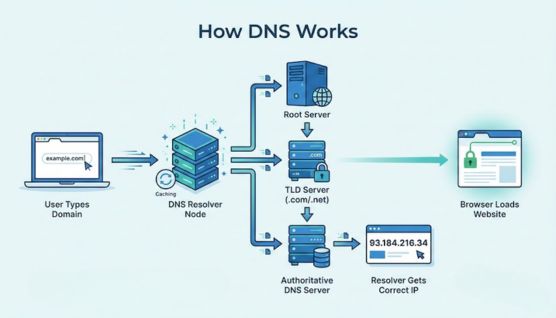
DNS works by translating human-friendly domain names into IP addresses that computers use to connect to websites. When a domain is typed into a browser, the device sends a query to a DNS resolver to locate the correct server.
The resolver checks cached records or reaches out to authoritative DNS servers to find the matching IP address. This multi-step lookup happens in milliseconds, ensuring the user reaches the right destination without delays.
Once the resolver receives the correct IP address, it returns the result to the browser, which then connects to the website’s server. The resolver may store the answer temporarily so future requests load faster.
Recursive DNS servers handle user queries by searching for the correct IP address on behalf of the device. They check cached data first, then reach out to other DNS systems when no stored record is available.
Authoritative DNS servers store the actual DNS records for domains and provide the final answer in the lookup chain. They respond with the confirmed IP address that identifies a domain’s hosting location.
Both types work together to route internet traffic smoothly, with recursive servers acting as intermediaries and authoritative servers holding the definitive information. This separation allows DNS queries to resolve quickly and accurately.
Secure DNS services stop harmful domains before they load by comparing requests against threat-intelligence databases. This prevents access to URLs associated with malware, phishing pages, or command-and-control networks.
Resolvers with strong filtering capabilities analyze domain behavior and reputation in real time. Suspicious or newly created domains often get flagged early, reducing the chance of users landing on unsafe sites.
DNSSEC adds another layer by ensuring that responses are not manipulated during transit. This combination of validation and filtering protects devices before the threat ever reaches the browser.
Faster DNS performance often comes from using a resolver with nearby servers and optimized routing paths. A shorter physical distance between the user and the resolver reduces lookup time.
Device and router settings also influence speed, especially when outdated or mixed DNS entries slow down resolution. Using the same DNS provider on all devices helps maintain consistent routing.
DNS hijacking occurs when a lookup request is redirected to a fraudulent resolver, sending users to incorrect or unsafe websites. This can happen through compromised routers, infected devices, or manipulated network settings.
Attackers use hijacked DNS paths to steal credentials, inject ads, or distribute malware. Some forms of hijacking happen silently, making it difficult for users to detect without protective measures.
Prevention starts with using trusted DNS providers and keeping routers secured with updated firmware and strong passwords. Encrypted DNS protocols and DNSSEC validation help block tampered responses before they reach the browser.
Setting DNS at the router level applies secure settings to every device on the network. Open the router’s control panel, locate the DNS fields, and replace the default entries with the secure provider’s IP addresses.
Save the changes and allow the router to refresh its connection. All devices connected to Wi-Fi will automatically begin using the new resolver.
Go to the network adapter settings and enter the secure DNS addresses in place of the default ones. This ensures all future lookups on the device use the chosen resolver.
Enable DoH in the advanced DNS settings if supported. Encrypted queries will then be used without additional tools.
Open Network preferences, select your active connection, and add the secure DNS addresses under the DNS tab. macOS immediately prioritizes these new entries for all lookups.
If available, activate encrypted DNS to strengthen privacy. The system applies these protections without requiring a reboot.
Use the Private DNS option in system settings and enter a hostname that supports DoT. This shifts all queries to an encrypted channel managed by the selected resolver.
Older versions of Android require updating DNS under individual Wi-Fi networks. Each network then uses the resolver you specify.
Open the Wi-Fi settings and enter secure DNS addresses in the DNS configuration menu. This overrides the default values assigned by your router or mobile provider.
Users who prefer automated security can install a configuration profile from trusted DNS providers. iOS will then maintain secure DNS routing across supported networks.
Use DNS test tools from Cloudflare, Quad9, or NextDNS to verify that the device is using the correct resolver. These tools also confirm whether encrypted DNS is functioning.
If results do not match the intended setup, clear DNS caches or restart the device. Adjusting resolver order often resolves conflicts between old and new settings.
CloudSEK strengthens existing DNS setups by identifying misconfigurations and exposure points that attackers often exploit. Its platform monitors external surfaces to reveal weaknesses before they affect domain integrity.
The company’s tools, including XVigil and BeVigil, use an AI-driven DNS Scanner to flag issues such as subdomain takeovers, spoofing risks, and incorrect DNS records. These insights help organizations tighten their configurations without changing their existing DNS provider.
CloudSEK does not host DNS records but focuses entirely on security intelligence and risk prediction. Its technology enhances the safety of current DNS infrastructures by providing clear visibility into threats that traditional DNS hosts cannot detect.
A secure DNS server blocks harmful domains before your device reaches them. This prevents phishing, malware downloads, and DNS-based redirection attacks.
DNS lookup speed directly impacts how quickly websites begin loading. Faster resolvers reduce delay and create smoother overall browsing.
A privacy-focused DNS hides your lookup activity from internet providers and unsecured networks. Encrypted protocols also prevent interception or tampering during resolution.
Encrypted DNS prevents third parties from viewing or altering your lookup requests. It adds a critical layer of protection, especially on public or shared networks.
Many free DNS servers offer strong security, but their privacy practices vary widely. It’s important to check logging policies and encryption support before relying on one.
This guide is based on structured testing that focused on speed, security accuracy, and privacy practices across multiple DNS providers. The findings reflect consistent behaviors observed under controlled and real-network conditions.
Each evaluation relied on transparent, verifiable criteria such as latency, DNSSEC validation, threat-blocking response, and encryption quality. This ensures that the results are grounded in measurable performance rather than assumptions or vendor claims.
The goal is to present conclusions shaped by practical outcomes that users can rely on. Every DNS service was examined for how it behaves in real scenarios so readers can make decisions supported by clear and dependable insight.
