🚀 CloudSEK featured in the 2026 Frost Radar™!
Read more
.avif)

Fingerprinting in cybersecurity is the practice of identifying a system, device, or user by analyzing the unique traits it reveals, such as how it responds to network packets, the services it runs, or the way a browser is configured. Each target leaves a distinctive signature, and collecting that signature builds a profile that recognizes it again.
Fingerprinting is dual-use. Defenders use it to inventory assets, spot unauthorized devices, and detect fraud, while attackers use it during reconnaissance to map a target before an attack.
The term spans three domains: system and network fingerprinting, which identifies machines and software; device and user fingerprinting, which tracks browsers and the people behind them; and file and data fingerprinting, which identifies files and content by their hash.
Fingerprinting is the process of identifying or profiling a system, device, or user from a set of observable characteristics. These characteristics include configuration details, protocol behavior, software versions, and hardware traits that, combined, distinguish one target from another. The result resembles a human fingerprint: a pattern distinctive enough to recognize the same entity again.
The technique is neither inherently offensive nor defensive. A security team fingerprints its own assets to understand its exposure, while an adversary fingerprints those same assets to find a way in. The value lies in the detail, since knowing the exact operating system, web server version, or browser configuration of a target turns a vague picture into a precise one.
Fingerprinting follows a consistent pattern across its many forms. A collector gathers observable signals, such as the structure of network packets, the banner a service returns, the parameters in a TLS handshake, or the attributes a browser exposes. These signals are then compared against a database of known signatures or combined and hashed into a single identifier. An active collector sends a crafted packet and measures the response, while a passive collector reads details such as the user-agent string from ordinary web requests.
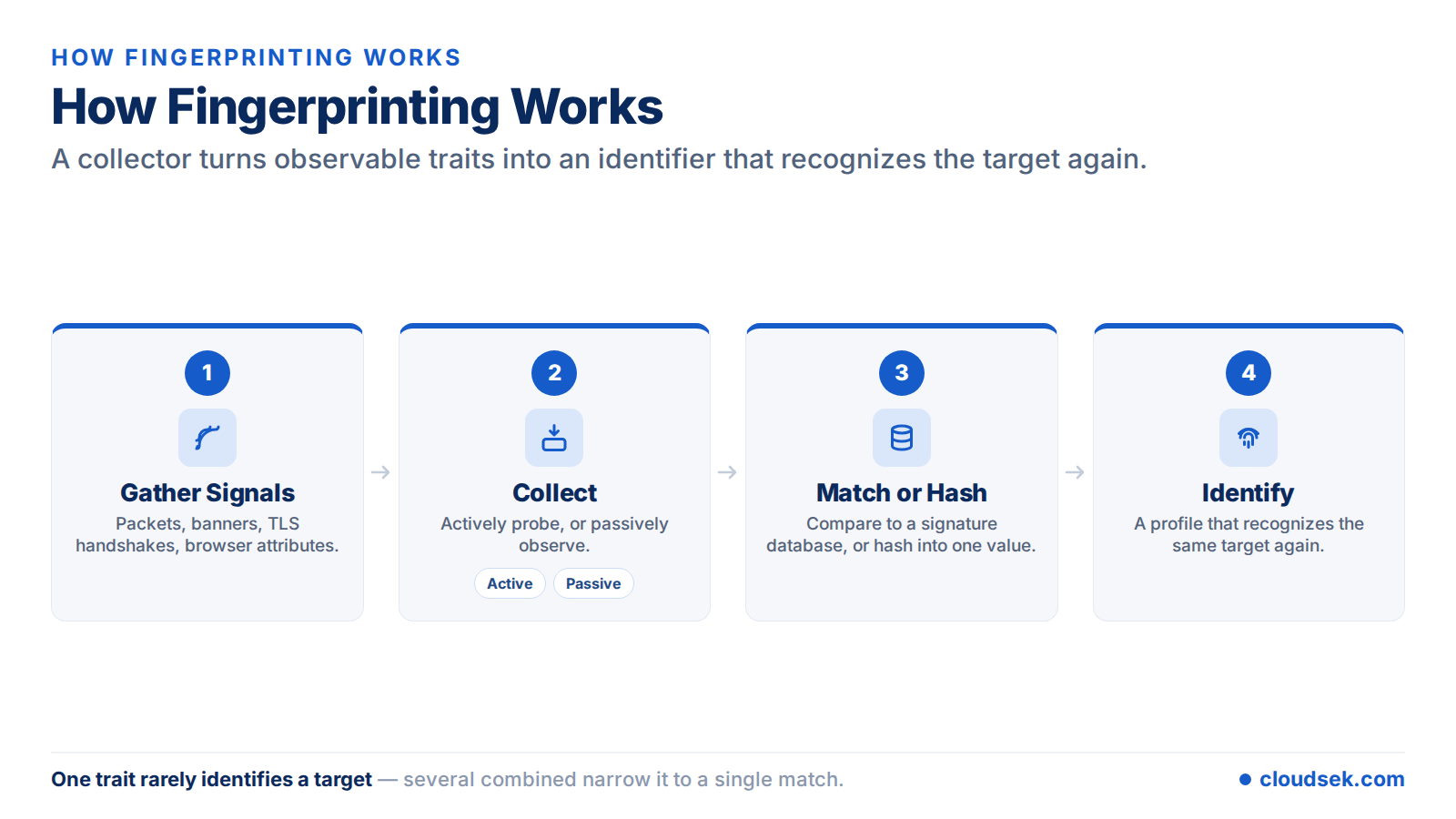
The reliability of a fingerprint depends on how distinctive the collected traits are. A single attribute rarely identifies a target on its own, but several attributes together narrow the possibilities until one match remains. This is why fingerprinting tools gather as many signals as the environment allows.
Fingerprinting methods divide into two approaches based on how they interact with the target.
Active fingerprinting trades stealth for accuracy, and passive fingerprinting trades accuracy for stealth. Many security programs combine both for a fuller picture. A penetration tester often starts passively to avoid detection, then switches to active probing once stealth is no longer the priority.
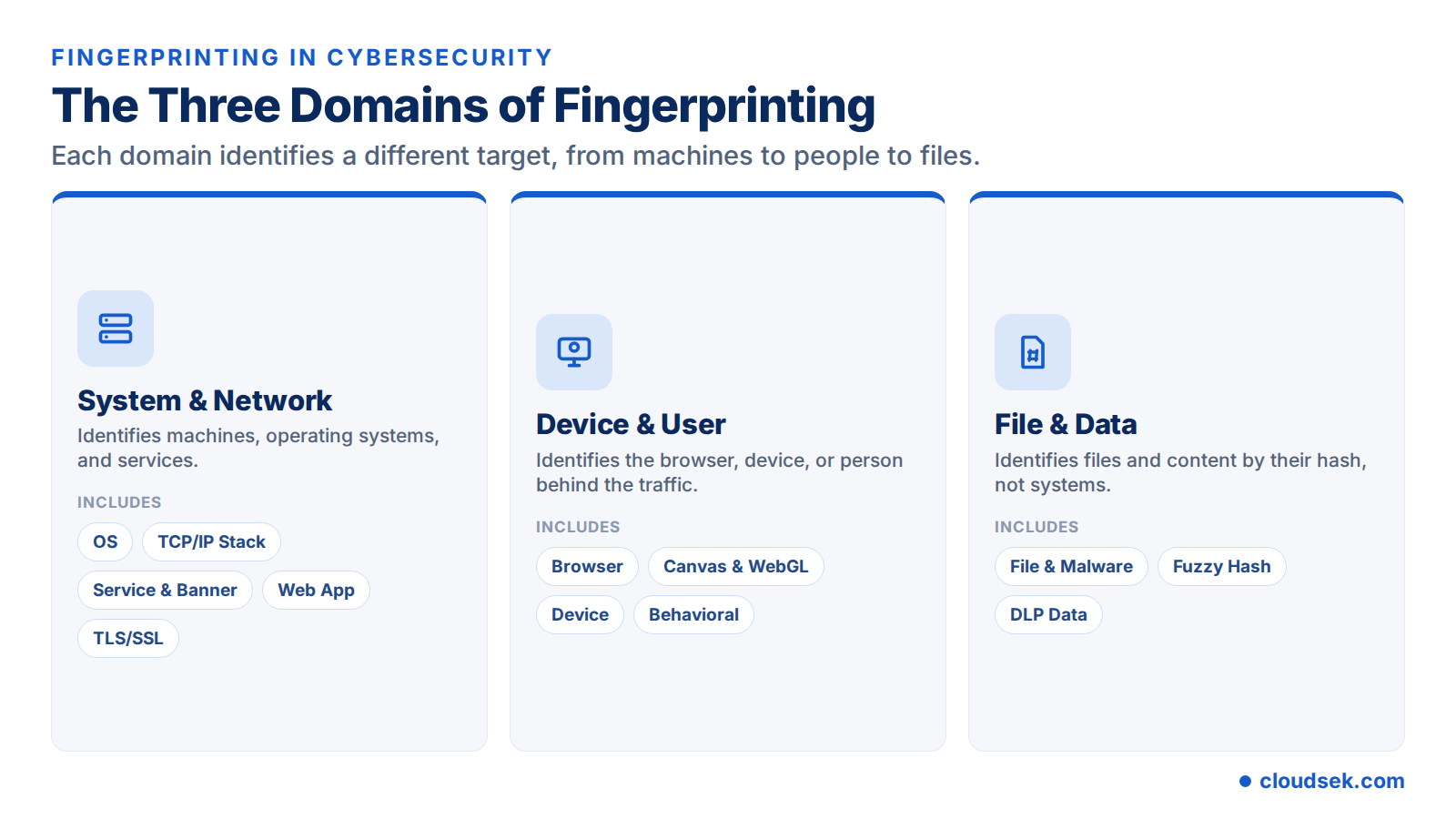
System and network fingerprinting identifies the machines, operating systems, and services that make up an environment. It is the classic use of the term in security and the foundation of reconnaissance.
OS fingerprinting identifies the operating system of a networked device. Every operating system implements the TCP/IP protocol stack slightly differently, so traits such as the default Time to Live (TTL) value, TCP window size, and the handling of malformed packets reveal the likely OS. Active tools compare probe responses against a signature database, while passive tools infer the OS from observed traffic. For example, a default TTL of 64 suggests a Linux or macOS host, while a value of 128 points to Windows.
TCP/IP stack fingerprinting is the technique underlying OS detection. It examines low-level protocol behavior, including IP identification numbers, fragmentation handling, and TCP initial sequence numbers, to match a host to a known stack implementation. Because these behaviors are built into the operating system, they are hard for a target to disguise. Nmap relies on this technique for its operating-system detection, comparing responses against a database of more than 2,600 known OS fingerprints.
Service and banner fingerprinting identifies the software running on open ports and its version, such as a specific web server or database release. Many services return a banner that names the product and version, and that detail maps directly to known vulnerabilities. Tools query each open port and record the version string the service advertises, building a map of the software in use. Pairing this with external vulnerability scanning turns version data into a prioritized list of exposures.
Web application fingerprinting identifies the technologies behind a website, including the content management system, web framework, server software, analytics, and JavaScript libraries. The clues come from HTTP response headers, cookie names, HTML structure, script paths, and characteristic file locations. Tools such as Wappalyzer and WhatWeb match these signals against signature databases. Because each technology carries its own known vulnerabilities, an outdated CMS or framework version identified this way becomes an immediate target.
TLS/SSL fingerprinting identifies a client from the way it negotiates an encrypted connection. The JA3 method hashes the cipher suites, extensions, and other parameters in the TLS ClientHello into a signature, and the newer JA4 family resists the extension-order randomization that browsers introduced to weaken JA3. Because it reads only handshake metadata, TLS fingerprinting works without decrypting traffic and is widely used to detect bots and automated tools. Anti-bot services maintain databases of known JA3 and JA4 hashes, blocking clients whose handshake matches a scripting tool rather than a real browser.
Device and user fingerprinting identifies the browser, device, or person behind web traffic. It powers fraud detection and bot prevention, and the same techniques drive cross-site tracking.
Browser fingerprinting builds a unique profile from the attributes a browser exposes, including the user agent, installed fonts and plugins, screen resolution, time zone, and language. Combined and hashed, these form an identifier that persists even when cookies are cleared or private mode is used. EFF research found that the large majority of browsers carry a unique fingerprint, with roughly 84% identifiable from these traits alone. Plugins and fonts rank among the most identifying attributes, because their exact combination varies widely between users.
Canvas and WebGL fingerprinting exploit how a device renders graphics. A script asks the browser to draw hidden text or a 3D scene using the HTML5 canvas or WebGL APIs, then reads the output. Tiny differences caused by the GPU, drivers, and operating system produce a consistent identifier. Audio fingerprinting applies the same idea to the Web Audio API, measuring how a device processes sound. Because the result stays stable for a given device yet varies across devices, it serves as a reliable hidden identifier.
Device fingerprinting combines hardware and system attributes, such as CPU and GPU model, memory, operating system, and installed fonts, into a persistent profile of a specific device. Subtle hardware traits, including clock skew (small variations in a device's clock timing), help distinguish devices that otherwise look identical. Mobile and desktop devices both expose enough hardware detail to sustain a fingerprint across apps and sessions.
Behavioral fingerprinting identifies a user from interaction patterns rather than static traits. Typing rhythm, mouse movement, scrolling behavior, and touchscreen gestures form a profile that is hard to copy. Fraud-detection systems use it to flag account takeovers when a familiar account suddenly behaves differently. Because behavior is continuous, it supports ongoing authentication rather than a single check at login.
File and data fingerprinting identifies content rather than systems or users. Here, a fingerprint is a hash, a short value derived from a file or a block of data that changes whenever the content changes.
A cryptographic hash such as SHA-256 produces a unique fingerprint for a file, and security tools match that hash against databases of known malware to flag malicious files instantly. Because a single changed byte alters the hash, attackers modify malware to evade exact-match detection. Fuzzy hashing, using tools like ssdeep, counters this by measuring similarity rather than exact equality, so variants of the same malware family still match. Import hashing, known as imphash, fingerprints a Windows executable by its import table, grouping samples built from the same code.
Data loss prevention systems fingerprint sensitive documents and records, then watch network traffic, email, and uploads for that exact content, leaving the organization. Exact fingerprints catch a specific file, while partial fingerprints catch excerpts copied into another document. This lets a system block a leak of a fingerprinted customer list or source file without inspecting every byte of unrelated traffic.
For an adversary, fingerprinting is the opening move. It belongs to the reconnaissance stage of the attack lifecycle, where attackers actively or passively gather information to support targeting. Fingerprinting tells an attacker which operating systems and software versions a target runs, which services are exposed, and which of them carry known vulnerabilities.
With that profile, an attacker selects exploits that match the target, avoids actions that would trip an alarm, and focuses effort where it succeeds. Accurate reconnaissance reduces the attacker's uncertainty, which is why detecting and limiting fingerprinting early raises the cost of an attack. Public scanning databases such as Shodan let attackers fingerprint exposed services at internet scale without sending a single packet of their own.
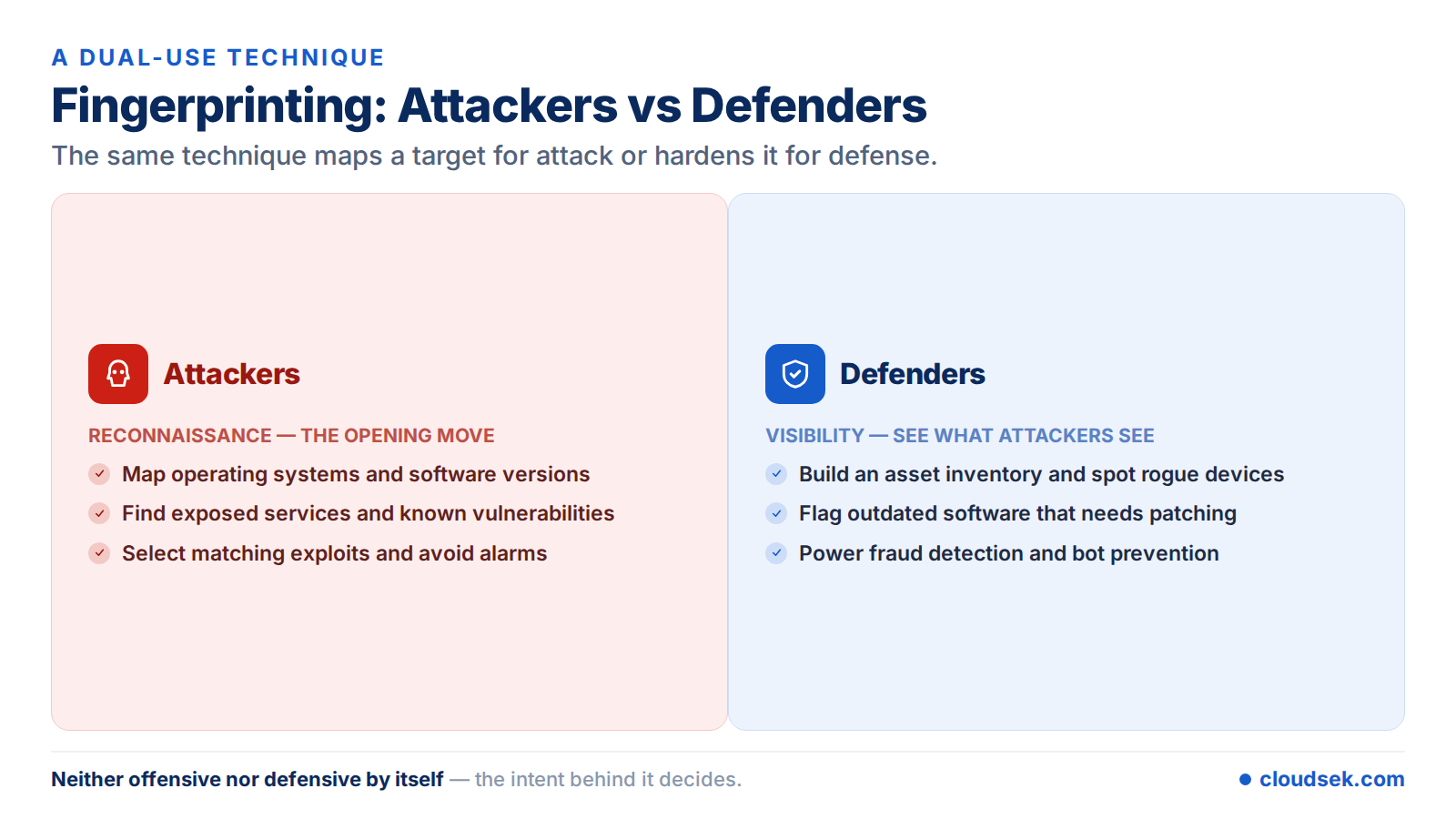
Defenders use the same techniques to see their environment as an attacker sees it. Fingerprinting builds an accurate asset inventory, flags unauthorized or unexpected devices, and identifies outdated software that needs patching. In web security, device and behavioral fingerprinting power fraud detection and bot prevention, and in incident response, fingerprints help attribute activity to a specific device or actor. Fingerprinting feeds threat intelligence, too, since a recurring TLS or device signature can tie separate incidents to the same actor.
A practical defensive step is for an organization to fingerprint its own external attack surface, mapping the internet-facing assets and versions that attackers can see. External attack surface management does this continuously, and CloudSEK BeVigil fingerprints an organization's internet-facing infrastructure across web, mobile, API, cloud, and network assets to surface the exposures attackers would find first. Visibility of this kind complements vulnerability scanning and patching rather than replacing them.
Bot and fraud detection is one of the most common commercial uses of fingerprinting. Automated tools, scrapers, and credential-stuffing bots often reveal themselves through their fingerprints, even when they spoof other signals. A request that claims to be a current browser yet carries the TLS fingerprint of a scripting library is a strong sign of automation.
Detection systems combine several fingerprints for confidence. TLS fingerprinting flags the client software, device fingerprinting checks whether the hardware profile is consistent, and behavioral fingerprinting watches for non-human interaction patterns. When a login arrives from a device whose fingerprint has never been seen on an account, the system can require additional verification before granting access.
A range of tools perform fingerprinting across these domains.
Network tools such as Nmap and p0f focus on systems, client-side tools such as FingerprintJS focus on browsers and devices, and hashing tools such as ssdeep focus on files and content.
A few scenarios show how fingerprinting plays out in practice.
The terms digital footprint and digital fingerprint describe different things. A digital footprint is the broad trail of data a user or organization leaves through normal activity, such as social media posts, registered domains, and public records. A digital fingerprint is the narrow, unique identifier derived from emitted traits, such as a TLS signature or a browser configuration.
A footprint describes everything visible about a target, while a fingerprint pinpoints a specific system or user within it. Attackers study the footprint to find targets and use fingerprints to identify the exact systems to exploit.
Fingerprinting cannot be eliminated, yet several measures reduce what a target exposes.
Reducing system exposure starts with limiting the signals a host reveals. Configure services to suppress or alter version banners, place hosts behind firewalls that filter probe traffic, and use intrusion detection to flag scanning activity. Prompt patching matters too, since a fingerprinted version only helps an attacker when it maps to an unpatched flaw.
On the web, anti-fingerprinting browsers and extensions reduce tracking by standardizing or randomizing the attributes a browser exposes, so many users look alike. For website operators, a Content Security Policy and Subresource Integrity restrict and verify third-party scripts, limiting the fingerprinting scripts that load on a page. Privacy regulations such as GDPR and CCPA further constrain fingerprinting that occurs without consent.
CloudSEK BeVigil uses fingerprinting as part of its broader external attack surface visibility. It discovers and fingerprints internet-facing assets across web, mobile, API, cloud, and network surfaces, identifying the technologies and services exposed to attackers.
Security teams use BeVigil to build an accurate asset inventory, classify exposed assets, and identify external vulnerabilities and misconfigurations before attackers can exploit them.
It depends on jurisdiction and consent. Fingerprinting itself is not illegal, but using it to track people without consent can violate privacy laws such as GDPR, CCPA, and the ePrivacy Directive.
Cookies store data on the user's device, while fingerprinting collects traits the device already exposes to build an identifier without storing anything. Because nothing is saved locally, a fingerprint persists even when cookies are cleared or private mode is used, which makes it harder to detect and remove.
Browser fingerprinting can be reduced but rarely eliminated. Anti-fingerprinting browsers, tracker-blocking extensions, and standardized configurations lower a browser's uniqueness, yet a determined tracker combines enough traits to re-identify many users. Making a browser look like many others works better than hiding individual attributes.
Footprinting is the broad gathering of information about a target's presence, such as domains, IP ranges, and employee details. Fingerprinting is the narrower identification of specific systems, software, or users from their traits. Footprinting maps the territory, and fingerprinting identifies the individual targets within it.
No. Fingerprinting is a technique, not an attack. It is a reconnaissance step that can precede an attack, and defenders use it equally for asset management and fraud detection.
JA3 is a TLS fingerprinting method that creates a hash from the cipher suites, extensions, and parameters in a client's TLS ClientHello message. The resulting signature identifies the client software, which helps detect bots and automated tools. The newer JA4 family improves on JA3 by resisting the randomization browsers use to evade it.
