🚀 Introducing Cloudsek Launchpad: a incubator for early-stage cybersecurity founders, apply today!
Read more
.avif)

A brute force attack guesses passwords, login credentials, or encryption keys through automated trial and error until one works, without exploiting any software flaw. Attackers aim at website logins, SSH servers, RDP connections, VPN portals, and password-protected files.
Picture a four-digit combination lock with no idea of the code. Someone starts at 0-0-0-0, moves to 0-0-0-1, and keeps going until it opens. A brute force attack applies the same logic digitally, with software doing the guessing in place of a person turning the dial.
Practicality comes down to the size of the search space. Short passwords and common patterns shrink it. Automation then cuts the time needed to work through whatever remains.
A four-digit PIN has exactly 10,000 possible values, which a computer works through in under a second. Passwords create far larger sets. Length, character variety, and human habits all affect how much ground has to be covered. The process runs through four stages.
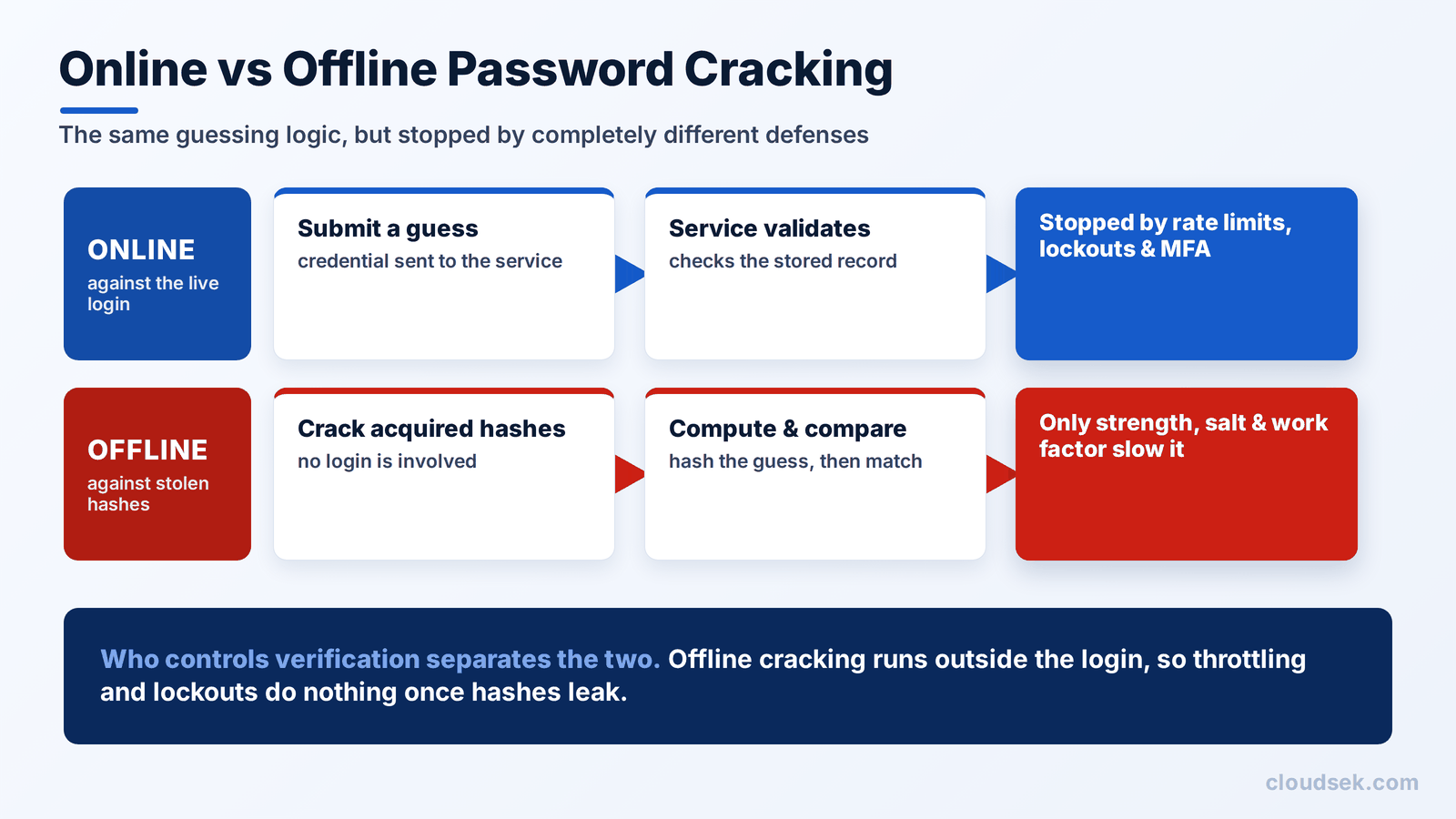
Control over verification separates the two modes. An organization can throttle attempts through its own login systems, delay repeated failures, and lock accounts. None of that applies once an attacker holds a stolen hash.
Offline cracking runs entirely on attacker-controlled hardware. Rate limiting, lockouts, and monitoring are all out of reach. Three defenses remain: password strength, the hashing scheme, and the work factor set when the credential was stored.
Cryptographic keys show the boundary clearly. In Applied Cryptography, Bruce Schneier noted that exhaustively guessing a properly generated 256-bit key runs into fundamental physical constraints, not merely the speed of current computers. The method is simple in concept. The size and randomness of the secret decide whether exhaustive guessing is realistic at all.
Brute force variants differ in what the attacker already knows before testing begins, and in how the guessing effort is organized. MITRE ATT&CK catalogs the family as technique T1110, with sub-techniques covering password guessing, password cracking, password spraying, and credential stuffing. Mapping observed activity to those identifiers tells a security operations team which log source holds the evidence. The wider MITRE ATT&CK framework covers how the technique connects to what follows.
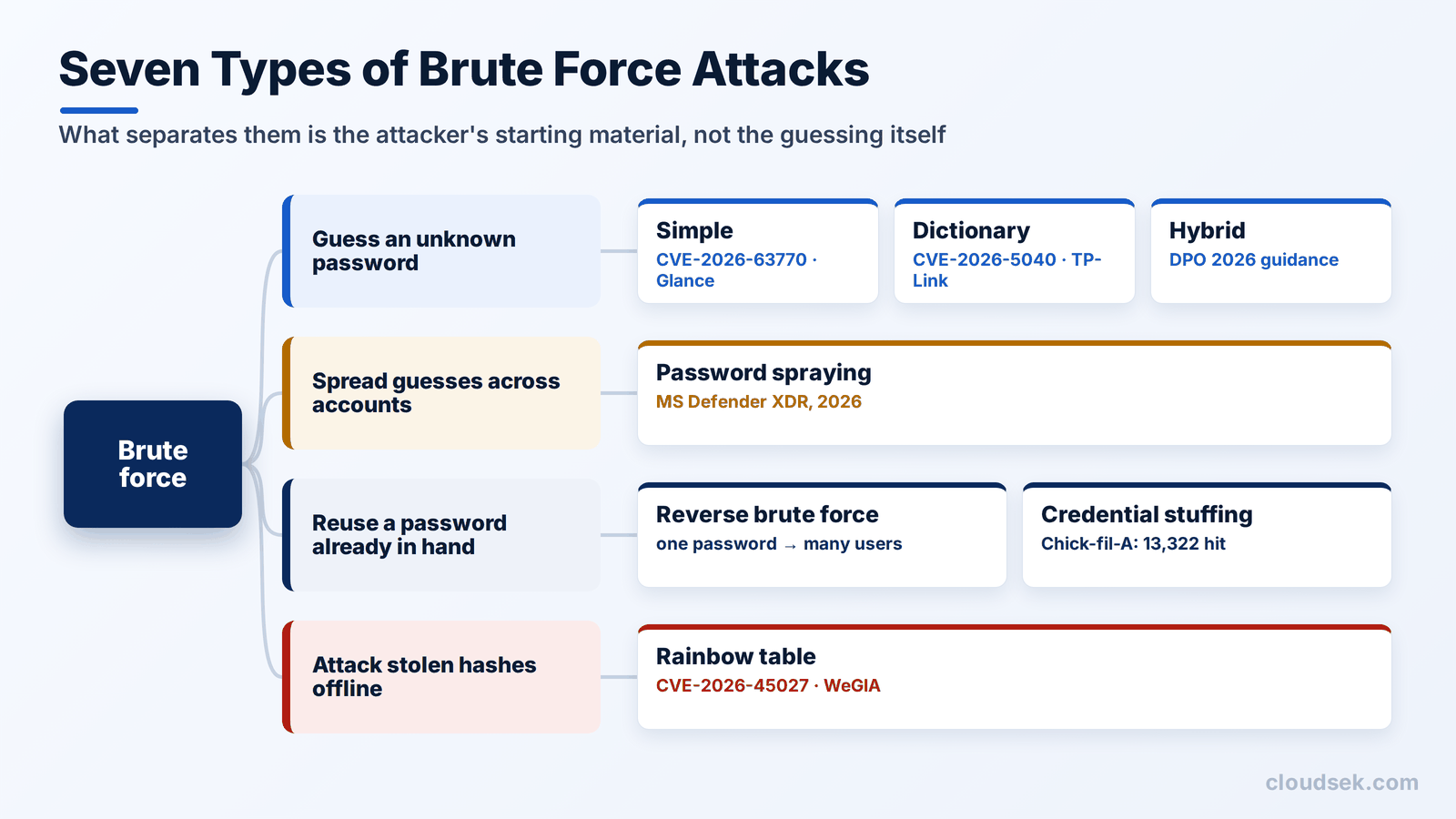
With no useful lead on the password, this method works through possible character combinations systematically. Short or predictable passwords fall far faster than long, random ones.
Per-source retry limits matter here, and they fail whenever they can be spoofed. CVE-2026-63770 was reported publicly in June 2026. Forging the X-Forwarded-For header bypassed an intended cap of five failed attempts per five minutes per IP address, letting guessing continue without restriction.
Rather than testing every mathematically possible value, a dictionary attack prioritizes common passwords, names, words, and phrases. It exploits the fact that people rarely choose passwords at random.
Weak password storage makes this far more dangerous once hashes are stolen. TP-Link disclosed CVE-2026-5040 on 14 July 2026, describing weak password hashing in its Deco M5 v1 firmware. The vendor noted that possession of a hash could enable dictionary or brute force cracking, and rated the issue 7.1 under CVSS 4.0.
This method starts from likely base words and generates structured variations: capitalizing a letter, appending a number, or swapping in a symbol. It mirrors how people actually modify passwords to satisfy complexity rules. Guidance published by Hong Kong's Digital Policy Office in 2026 describes the common patterns, including appending a birth year, changing capitalization, and substituting familiar symbols for letters.
Reverse brute force starts from a password the attacker already holds, commonly taken from a leak, then searches for a matching username. Traditional brute force pairs one account with many password guesses. Reverse brute force pairs one known password with many usernames, so monitoring for leaked credentials matters as much as password policy.
Credential stuffing uses username and password pairs exposed in an earlier breach and tests them against other sites, betting on password reuse and not on guessing anything new. In June 2026, Chick-fil-A's website and app faced a credential stuffing campaign between 17 and 19 June using credentials sourced from third parties. Breach filings later put the number of affected individuals at 13,322.
Because it relies on already-valid pairs, credential stuffing is technically distinct from brute force. MITRE treats it as a sub-technique of the same family, which reflects how closely the two sit in practice.
Instead of hammering one account with many guesses, which triggers lockouts quickly, password spraying tests a small set of common passwords across a large number of accounts. The footprint is many usernames, few passwords, and relatively few failures per individual account. Per-account thresholds alone rarely catch it.
This method uses precomputed tables mapping possible passwords to their hash values, so an attacker does not need to calculate hashes from scratch after stealing a credential database. CVE-2026-45027 documented WeGIA versions before 3.7.3 storing passwords as unsalted SHA-256 hashes. Identical passwords produced identical hashes, leaving the database exposed to a single reusable lookup. Unique per-record salting defeats the approach, because it forces a fresh calculation for every stored credential.
The seven variants differ in what the attacker starts with and which control stops them.
Any service that accepts a credential is a candidate. These targets recur because they pair reachability from the internet with authentication that lacks a second factor.
A single failed login tells a defender almost nothing. The signal comes from patterns across accounts, sources, timing, and outcomes.
Low-and-slow attempts spread over days stay under basic thresholds, so correlation matters more than any single failure count. The OWASP Authentication Cheat Sheet recommends logging authentication failures, password failures, and lockouts, then reviewing them together. No universal failure count proves an attack, because normal login volume and attacker pacing both vary by environment.
CISA and partner agencies revised an advisory in April 2026 on Russian GRU Unit 26165. The group used password guessing and spraying to enter Western logistics and technology organizations. Operators then established persistence, altered mailbox permissions, retrieved information from email servers, and exfiltrated data. Campaigns of that length are characteristic of advanced persistent threat activity and not of opportunistic crime.
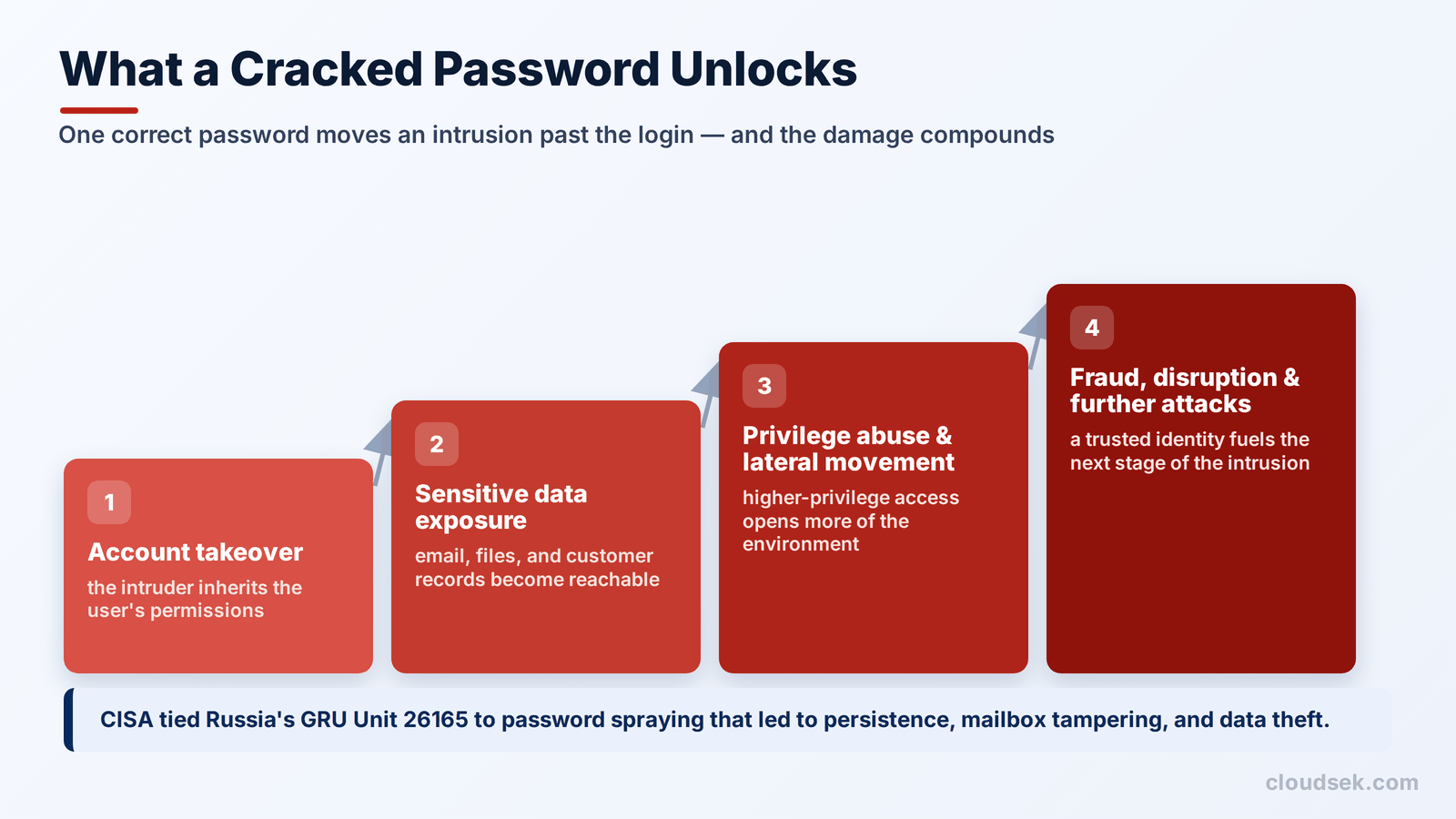
Intrusions escalate along familiar lines once valid credentials are in hand.
A successful guess does not automatically compromise an entire environment. Damage scales with the account's privileges and with whatever safeguards stand between that login and more sensitive resources.
Effective prevention has two separate jobs. One is restricting repeated guessing against live authentication systems. The other is making stolen password hashes expensive to crack offline. Controls that handle the first do nothing for the second.
Most published guidance presents multi-factor authentication as the complete answer. It is the single most effective control against online guessing, and three gaps remain open behind it.
Attackers now target the way MFA is deployed, not the factor itself. The OWASP Multifactor Authentication Cheat Sheet documents the common patterns, including repeated push notifications sent until a user approves one, and reverse-proxy phishing that relays the entire login in real time. Both produce a valid session without ever breaking the password.
Session theft sidesteps authentication completely. An adversary-in-the-middle attack captures the session token issued after MFA succeeds, and that token works on the attacker's machine with no further challenge.
Offline cracking remains untouched by any of it. MFA governs the login flow, and a stolen hash gets cracked away from that flow entirely. Salting and work factor are the only defenses that apply there, so password storage belongs in a brute force discussion even where MFA is universal.
Phishing-resistant methods such as FIDO2 or passkeys answer this best on high-value accounts. Pair them with throttling and strong hashing. They do not replace either one.
Yes. Four cases from 2026 make that plain: the CISA advisory on GRU-linked password spraying, the Chick-fil-A credential stuffing incident, the WeGIA unsalted-hash flaw, and the TP-Link weak-hashing disclosure. Each involved exposed authentication or weakly stored credentials.
Wider adoption of MFA, passkeys, and salted hashing is raising the cost of these attacks. They remain effective wherever any one of those controls is missing, which is above all on remote-access services that were stood up quickly and never revisited.
It varies with password length, complexity, and hashing strength. Short predictable passwords fall in minutes, while long unique ones can be computationally infeasible.
Brute force guesses unknown credentials. Credential stuffing replays real username and password pairs already exposed in a prior breach.
Testing a small number of common passwords against many accounts, not many passwords against one account, which avoids tripping lockout thresholds.
No. It is the strongest single control against online guessing, and it does nothing against offline hash cracking or stolen session tokens.
Yes, offline. No rate limiting applies, so the password strength and the hashing scheme are the only remaining defenses.
Through layered controls: MFA or passkeys, rate limiting, tuned lockouts, compromised-password screening, salted hashing, selective CAPTCHA, and correlated monitoring.
CloudSEK's threat intelligence team tracked a campaign it calls FortiBleed, aimed at internet-facing firewalls and SSL VPN gateways. The operators left their own back-end server browsable on the open internet. The 319 files inside held a validated credential database alongside their tooling, automation scripts, and command histories.
No zero-day was featured anywhere in it. The credentials came from reuse, brute force, and offline hash cracking against exposed devices, which is this article's subject running at industrial scale against production infrastructure.
Investigating exposed credentials before anyone reuses them is the earliest control in that chain. CloudSEK XVigil monitors external sources for organization-specific credential exposure, which gives a security team the starting point to identify affected accounts and rotate them. Enforcing MFA, throttling, and reviewing internal authentication logs remains the organization's own work.
