🚀 CloudSEK featured in the 2026 Frost Radar™!
Read more
.avif)

Weak and reused passwords still turn ordinary accounts into easy entry points for attackers. Free password generator websites reduce that risk by creating long, random, account-specific passwords without forcing users to invent secure combinations on their own.
These tools are practical during new account signups, password manager updates, admin portal setup, banking logins, SaaS access, and shared workplace account resets. Good generators also offer passphrases, length controls, symbol options, and strength checks, making it easier to match different password rules without falling back to names, dates, or familiar patterns.
CloudSEK reported in 2026 that more than 24 billion stolen credentials were circulating across dark web marketplaces, stealer logs, and underground forums. Against that level of exposure, using a free password generator website is a simple way to create unique credentials before one leaked password turns into a wider account takeover risk.
Evaluation started with a simple question: can someone create a long, random password quickly without trading security for convenience? Tools scored higher if they offered length controls, symbol and number choices, passphrase options, and visible strength feedback without forcing account creation or adding confusing settings.
Privacy carried equal weight because password creation should not expose generated credentials during use. Browser-side generation, HTTPS protection, transparent data handling, and low-distraction pages increased confidence, especially for banking logins, SaaS accounts, admin portals, and shared workplace tools.
Usability shaped placement after security and privacy checks were covered. Faster copy workflows, flexible rules, a trusted security background, and a practical fit for signups, password manager updates, and credential resets separated stronger picks from basic random-string tools.
The strongest free password generator websites combine unpredictable output, practical controls, privacy signals, and real account fit.
LastPass Password Generator is the best overall free option for people who want simple controls, quick output, and strength feedback in one place. Length settings, mixed-case letters, numbers, and symbols make it practical for email, banking, SaaS tools, shopping profiles, and password manager updates.
Visible scoring improves the choice before copying the final result. A generated string can look complex while still following a weak structure, so strength feedback gives a clearer signal before saving it.
Cleanup across old accounts also becomes less tiring. Anyone replacing reused logins can prepare separate combinations faster and reduce the risk of one exposed account opening several others.
Crack-time feedback gives the NordPass Password Generator a more educational role than a basic random-string page. Instead of only showing a new combination, it explains how long that password may take to break.
That context matters after a breach alert or password manager audit. People replacing exposed logins can move away from weak habits such as adding one number, one symbol, or one capital letter to an old phrase.
Passphrases add flexibility for accounts that may still require manual typing. Longer word-based combinations are easier to enter while avoiding names, birthdays, keyboard runs, and common dictionary phrases.
Beginners who need a safer password without security jargon will find Avast Random Password Generator easy to follow. Length, letters, numbers, and symbols appear in a simple layout, so the page feels approachable from the first use.
Browser-side output makes quick personal account setup more reassuring. Email, shopping, gaming, banking, and social profiles can receive stronger logins without unnecessary handling during creation.
Single-account setup is the clearest use case. Someone opening a new profile can generate one strong combination, save it in a trusted place, and avoid returning to a familiar phrase.
Signup forms with strict rules are easier to handle with RoboForm Password Generator. Uppercase letters, lowercase letters, numbers, special characters, and length limits can be adjusted before copying the final result.
Different systems rarely accept the same password format. Client portals, SaaS trials, admin dashboards, testing spaces, and internal apps often apply separate requirements, so rule matching reduces failed attempts.
Safe storage should follow immediately after a compliant password is created. Even a well-built combination becomes risky when saved in a note, spreadsheet, chat, or repeated pattern instead of a secure vault.
Dashlane Password Generator is strongest when speed matters but basic control still matters. A new password appears quickly, and people can adjust length, digits, letters, symbols, and lookalike characters before saving it.
Lookalike-character removal is useful for accounts where manual typing may happen. Excluding confusing characters lowers typing mistakes without pushing people toward short, memorable choices.
Routine updates become lighter with this type of experience. Finance apps, e-commerce profiles, subscriptions, email accounts, and workplace tools can all receive unique logins without making password hygiene feel like a long task.
Open-source trust makes Bitwarden Password Generator a strong choice for security-conscious readers. Random strings and passphrases sit inside a broader encrypted vault ecosystem, which makes generation and storage feel connected.
Random strings work best for accounts saved inside a manager. Passphrases fit master passwords, device access, or selected logins where typing matters more than copy-paste convenience.
Long-term password hygiene becomes easier once every account gets a separate secret. Important logins stay out of plain notes, documents, messages, and unsecured browser storage.
Proton Pass Password Generator is the better privacy-focused pick because it offers dedicated password generation alongside encrypted password management. That pairing matters for people who want both a strong new password and a safer place to store it.
Privacy-focused account setup goes beyond creating one complex string. Banking, work, identity, and personal accounts need unique passwords that do not end up in notes, screenshots, or shared messages.
Email alias support also adds value during new signups. Pairing unique passwords with aliases can reduce exposure when a service leaks data or starts sending unwanted messages.
Technical users who need bulk output get more control from PWGen Online. Multiple results, custom character sets, length rules, and export options make it useful beyond single-account password creation.
Development, testing, lab, and admin environments often need several temporary passwords at once. Bulk generation reduces manual effort during onboarding, sandbox setup, internal resets, and controlled access tasks.
Casual readers may not need every setting. Power users gain a flexible way to prepare many random combinations without repeating formats or editing strings manually.
Security.org Password Generator is useful for readers who want to understand strength while creating a new password. Length, character variety, and randomness are connected with better resistance against guessing and automated cracking.
Weak habits become easier to spot with visible feedback. Short words, familiar names, date-based formats, and simple substitutions look less appealing once strength differences are easier to see.
The page also works as a learning aid. Better choices become easier across email, banking, shopping, streaming, and social accounts because the reasoning behind safer passwords is visible.
Keeper Password Generator fits people who want random passwords and passphrases in one simple place. The experience connects password creation with safer storage habits, vault usage, and broader account security practices.
Passphrase creation is valuable for logins that need memorability. Longer word-based combinations are easier to type while still avoiding personal details, repeated formats, and predictable phrases.
Business environments benefit from more structure around password rules. Admins and employees can prepare safer logins without relying on shared notes, informal advice, or inconsistent manual choices.
Trustworthy free password generators create strong credentials safely, explain privacy handling, and keep setup simple during real account use.
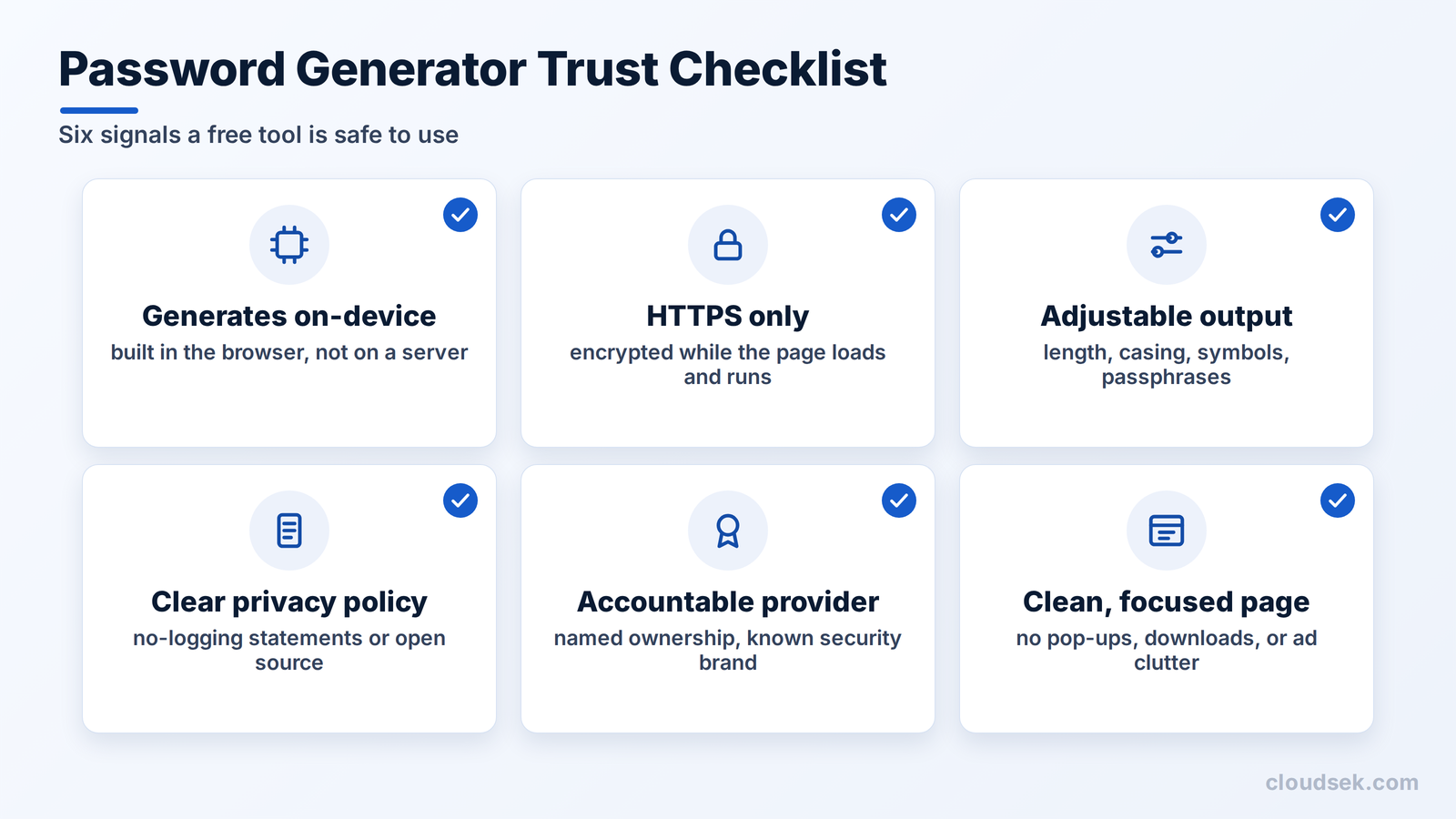
Local password creation reduces exposure during the most sensitive part of the process. Browser-side tools build the password on your device, so generated output is less likely to pass through avoidable server handling.
HTTPS keeps the session encrypted while the page loads and runs. Free generators should never be used over unsecured connections, especially for credentials tied to email, banking, work systems, or identity accounts.
Stronger generators let users adjust length, letter casing, numbers, symbols, and passphrase format. Different websites enforce different rules, so flexible controls reduce failed signups without pushing people toward weak or reused choices.
Trust improves when the website explains how generated output is handled. Local processing, no-logging statements, open-source code, or password manager integration offer stronger signals than vague security claims.
Generators from known security brands, open-source projects, or privacy-first providers usually carry more accountability than unknown pages with no ownership details. Brand reputation alone is not enough, but it gives readers useful context before they trust the page.
Security-sensitive pages should avoid pop-ups, unrelated downloads, heavy ad clutter, and suspicious scripts. Password creation should feel direct, controlled, and free from distractions that weaken trust.
Free password generator websites are worth using when they create unpredictable combinations without making security feel difficult. LastPass Password Generator is the best overall pick for most readers, while NordPass suits crack-time checks, Bitwarden fits open-source users, Proton Pass works well for privacy-focused storage, Dashlane favors quick updates, and Keeper adds passphrase flexibility.
Selection should depend on the situation rather than the brand name alone. Banking portals, admin panels, SaaS dashboards, email logins, and shared workplace tools may require different length rules, symbol settings, phrase formats, or strength indicators.
Generated credentials only reduce risk when they stay unique and are stored correctly. Pairing one of these tools with a password manager and multi-factor authentication creates a stronger routine than relying on memory, personal details, or small edits to old login details.
LastPass is the best overall for quick output, length control, and strength feedback. NordPass suits crack-time checks, Bitwarden fits open-source users, Proton Pass favors privacy-first storage, and Keeper adds passphrase flexibility.
Yes, when they use HTTPS, generate output locally in the browser, and don't store the result. Save the password in a manager afterward rather than in notes or chats.
At least 12 to 16 characters for most accounts, longer for sensitive ones. Extra length matters most when the password is random, not reused or pattern-based.
They can be, if long, random, and not built from common phrases or personal details. They're especially useful for master passwords and logins that need manual typing.
After a breach alert, suspicious login, device compromise, or manager warning, not on a fixed schedule. Uniqueness and MFA matter more than routine changes.
It's convenient but riskier if someone gains device access. A dedicated password manager offers stronger vault controls and safer sharing.
Save it in a password manager, never reuse it, and enable MFA on important accounts. For sensitive logins, also check recovery options so a weak backup method can't undo the strong password.
