🚀 أصبحت CloudSek أول شركة للأمن السيبراني من أصل هندي تتلقى استثمارات منها
اقرأ المزيد
.avif)

الوجبات السريعة الرئيسية:
البرامج الضارة هي برامج ضارة مصممة للتسلل إلى الأنظمة واستغلال الثغرات الأمنية وتنفيذ إجراءات غير مصرح بها دون إذن المستخدم. يمكنه سرقة المعلومات أو إتلاف الملفات أو إضعاف الدفاعات الأمنية أو مراقبة سلوك المستخدم.
يؤدي كل نوع من البرامج الضارة مهامًا ضارة تعرض الخصوصية أو استقرار النظام للخطر. تعتمد هذه المهام على أهداف المهاجم وحمولة البرامج الضارة.
إن فهم ماهية البرامج الضارة يوفر الأساس لتعلم كيفية عملها داخل النظام.
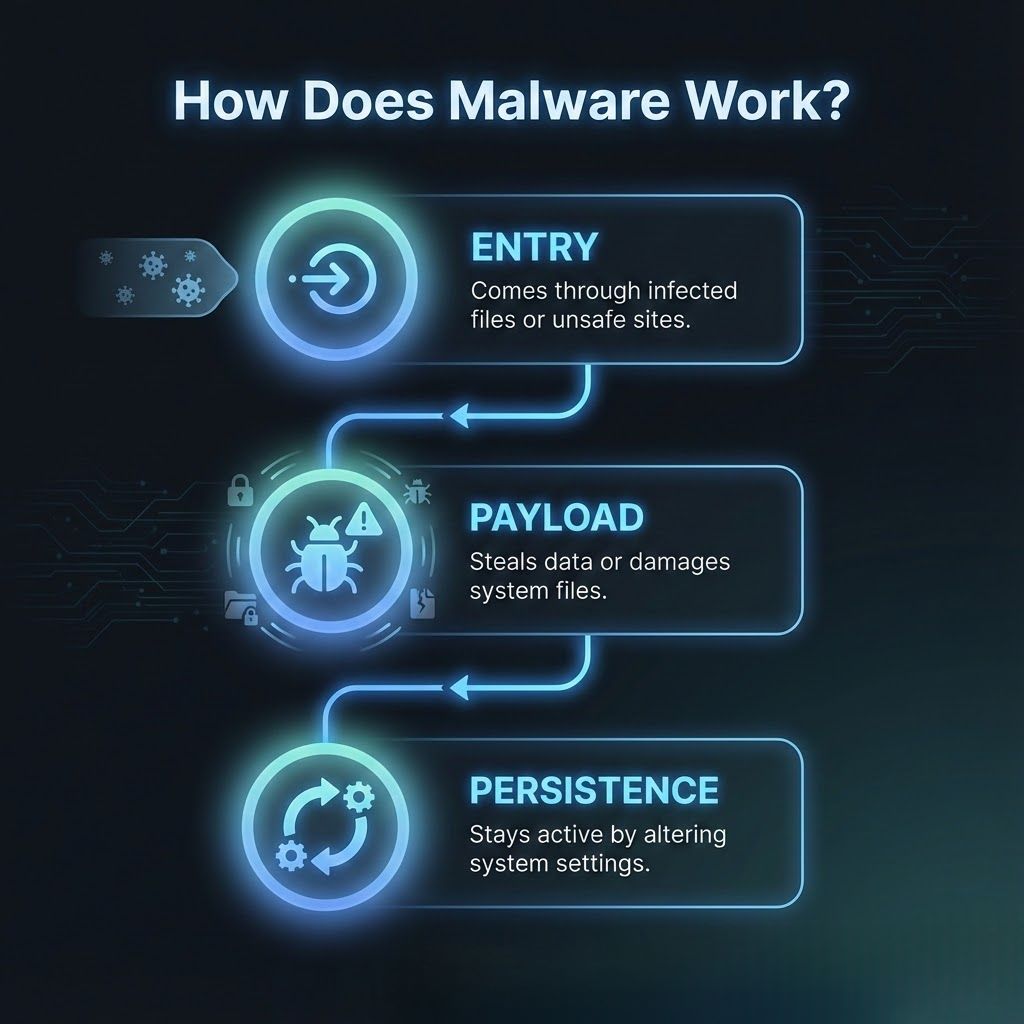
عادةً ما تدخل البرامج الضارة الأنظمة من خلال المرفقات المصابة ومواقع الويب المخترقة وتنزيلات البرامج الضارة ونقاط الضعف غير المصححة. يستخدم أساليب خادعة أو نقاط ضعف في النظام للوصول.
بمجرد دخول البرنامج الضار، ينشط حمولة قد تسجل ضغطات المفاتيح أو تتسرب البيانات أو تتجسس على سلوك المستخدم أو تفسد ملفات التشغيل. يختلف تنفيذ الحمولة حسب نوع البرامج الضارة ونية الهجوم.
تحاول العديد من سلالات البرامج الضارة إثبات الثبات عن طريق تعديل عمليات النظام أو إعدادات بدء التشغيل حتى تتمكن من الاستمرار في العمل حتى بعد إعادة التشغيل.
يقوم الفيروس بإرفاق نفسه بالملفات الشرعية ويتم تنشيطه عند فتح هذه الملفات. يمكن أن تتلف البيانات أو تنتشر عبر الشبكات من خلال المستندات المشتركة.
تنتشر الدودة تلقائيًا عن طريق نسخ نفسها عبر الأجهزة دون تدخل المستخدم. غالبًا ما يتسبب ذلك في حدوث تباطؤ واسع النطاق أو فشل الشبكة.
يتنكر Trojan كبرنامج موثوق به ويقنع المستخدمين بتثبيته. بمجرد تنشيطه، قد يؤدي ذلك إلى إنشاء أبواب خلفية أو تنزيل برامج ضارة إضافية أو سرقة بيانات الاعتماد.
تراقب برامج التجسس سرًا نشاط المستخدم وتجمع البيانات الحساسة مثل كلمات المرور أو عادات التصفح أو المعلومات المالية. يستخدم المهاجمون هذه المعلومات للوصول غير المصرح به أو سرقة الهوية.
تعرض Adware إعلانات متطفلة وقد تتعقب سلوك المستخدم من أجل الربح. غالبًا ما يتم تجميعها مع تطبيقات مجانية وتضعف كفاءة النظام.
يخفي Rootkit النشاط الضار عن طريق تغيير عمليات النظام الأساسية. يسمح للمهاجمين بالحفاظ على الوصول طويل المدى دون الكشف.
تعمل البرامج الضارة الخالية من الملفات مباشرة في ذاكرة النظام بدلاً من الاعتماد على الملفات المخزنة. هذا الأسلوب يجعل الاكتشاف صعبًا لأن أدوات مكافحة الفيروسات التقليدية تفحص الملفات بدلاً من الذاكرة.
تعمل برامج Botnet الضارة على تحويل الأجهزة المصابة إلى روبوتات يتم التحكم فيها عن بُعد. يستخدم المهاجمون هذه الأجهزة لشن هجمات كبيرة أو توزيع تهديدات جديدة.
Ransomware هو نوع من البرامج الضارة التي تمنع الوصول إلى الملفات أو الأنظمة بأكملها حتى يتم دفع الفدية. عادةً ما يقوم بتشفير الملفات المهمة ويعرض رسالة فدية تطالب بالدفع بالعملة المشفرة.
لا يمكن للضحايا الوصول إلى بياناتهم حتى يقدم المهاجمون مفتاح فك التشفير. هذا يخلق ضغطًا فوريًا على المؤسسات التي تعتمد على العمليات غير المنقطعة.
نظرًا لأنها تعطل الإنتاجية على الفور، تعتبر برامج الفدية واحدة من أخطر تهديدات الأمن السيبراني.
تقوم Crypto-ransomware بتشفير الملفات باستخدام خوارزميات قوية وتمنع المستخدمين من فتح بياناتهم. يجب أن يحصل الضحايا على مفتاح فك التشفير لاستعادة الوصول.
يحظر Locker ransomware الوصول إلى الجهاز بأكمله دون تشفير الملفات الفردية. إنه يقيد إدخال لوحة المفاتيح والماوس، مما يجعل الأجهزة غير قابلة للاستخدام.
تقوم برامج الفدية ذات الابتزاز المزدوج بسرقة الملفات الحساسة قبل التشفير. يهدد المهاجمون بنشر البيانات المسروقة إذا لم يتم دفع الفدية.
تسمح RaaS لمجرمي الإنترنت باستئجار مجموعات برامج الفدية الجاهزة. تستخدم الشركات التابعة الأدوات وتشارك أرباح الفدية مع منشئي المحتوى.
تقوم Wiper ransomware بتدمير البيانات بشكل دائم بدلاً من تشفيرها. حتى دفع الفدية لا يستعيد الملفات المفقودة.
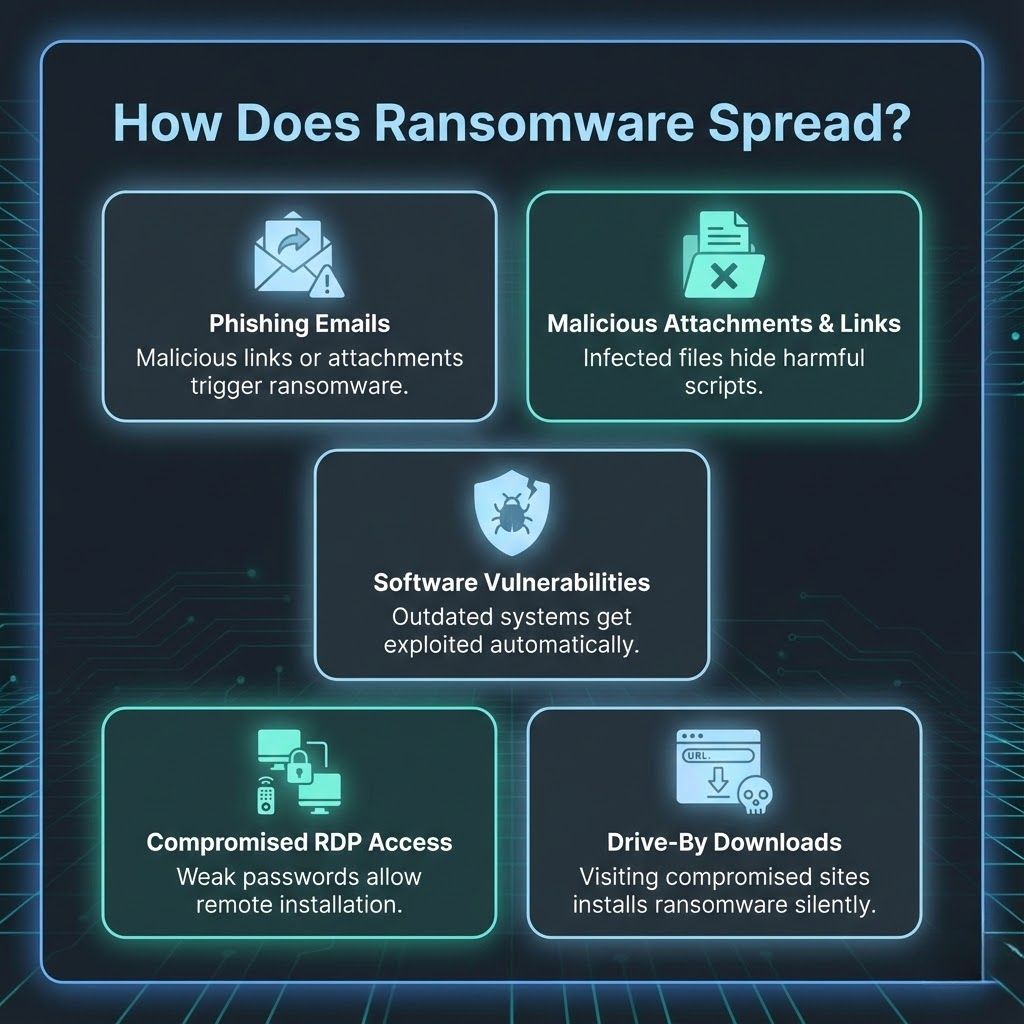
يظل التصيد الاحتيالي طريقة التسليم الأكثر شيوعًا. تحتوي رسائل البريد الإلكتروني على روابط ضارة أو مرفقات تنفذ برامج الفدية عند فتحها.
تحتوي المستندات المصابة أو الملفات المضغوطة على نصوص مخفية. يقوم المستخدمون بتشغيل برنامج الفدية من خلال التفاعل مع هذه الملفات.
تحدد مجموعات الاستغلال البرامج القديمة وتقدم برامج الفدية دون تدخل المستخدم. الأنظمة غير المصححة هي أهداف رئيسية.
تسمح كلمات المرور الضعيفة وخدمات RDP المكشوفة للمهاجمين بالوصول إلى الأجهزة عن بُعد وتثبيت برامج الفدية يدويًا.
تقوم مواقع الويب الضارة أو الصفحات المخترقة بتثبيت برامج الفدية تلقائيًا عندما يزورها المستخدمون. لا يوجد تفاعل مطلوب.
يتم إنشاء البرامج الضارة لسرقة المعلومات أو التجسس على المستخدمين أو إتلاف الأنظمة أو فتح قنوات وصول غير مصرح بها. تم تصميم برامج الفدية لغرض واحد، وهو الابتزاز المالي من خلال الملفات المشفرة أو المحظورة.
غالبًا ما تعمل البرامج الضارة بصمت وتحاول البقاء مخفية لأطول فترة ممكنة. تتسبب برامج الفدية في تعطيل فوري للنظام عن طريق منع المستخدم من الوصول إلى البيانات الأساسية.
تستخدم البرامج الضارة تقنيات ضارة مثل تسجيل المفاتيح أو نقل البيانات غير المصرح به أو تلف الملفات أو الوصول عن بُعد. تعتمد برامج الفدية على خوارزميات التشفير التي تجعل الملفات غير قابلة للقراءة حتى يتم توفير مفاتيح فك التشفير.
تعرض البرامج الضارة المستخدمين لسرقة الهوية وفقدان الخصوصية وضعف الأمان والمراقبة غير المصرح بها. غالبًا ما تعمل دون أن يتم اكتشافها وتسبب ضررًا طويل الأمد. تنتج برامج الفدية عواقب أكثر خطورة لأن البيانات المشفرة تصبح غير قابلة للاستخدام.
تواجه المؤسسات خسارة مالية وتعطلاً تشغيليًا وتعرضًا عامًا للبيانات المسروقة. يزيد كلا التهديدين من مخاطر فشل الامتثال والأضرار التي تلحق بالسمعة وعمليات الاسترداد المكلفة.
غالبًا ما يمكن إزالة إصابات البرامج الضارة باستخدام أدوات الأمان عند اكتشافها مبكرًا. هذا يقلل من الضرر طويل المدى. يعد استرداد برامج الفدية أكثر صعوبة وقد يتطلب نسخًا احتياطية نظيفة أو أدوات فك تشفير متخصصة أو إعادة بناء النظام بالكامل.
تشمل أعراض البرامج الضارة الأجهزة البطيئة والنوافذ المنبثقة غير العادية والتطبيقات غير المتوقعة والاستخدام غير الطبيعي للموارد. تعرض برامج الفدية علامات واضحة مثل الملفات المشفرة أو امتدادات الملفات المتغيرة أو شاشات القفل أو طلبات الفدية المرئية.
تعمل البرامج الضارة على تعطيل الخصوصية وإضعاف الأمان المؤسسي، مما قد يؤدي إلى كشف المعلومات الحساسة. تعمل برامج الفدية على تعطيل العمليات التجارية تمامًا ويمكن أن تغلق الخدمات الهامة، مما يتسبب في أضرار مالية شديدة وتضر بالسمعة.
تعمل التحديثات المنتظمة على إصلاح الثغرات الأمنية التي يستخدمها المهاجمون لدخول الأنظمة. إدارة التصحيح ضرورية لتقليل التعرض.
تقوم أدوات مكافحة الفيروسات واكتشاف نقاط النهاية بمراقبة السلوك غير الطبيعي ومنع البرامج الضارة من تنفيذ الإجراءات الضارة.
تسمح النسخ الاحتياطية للمؤسسات باستعادة البيانات دون دفع الفدية. يجب الاحتفاظ بالنسخ الاحتياطية دون اتصال بالإنترنت أو في بيئات آمنة منفصلة.
يؤدي تدريب المستخدمين على التعرف على الرسائل المشبوهة إلى تقليل مسار العدوى الأكثر شيوعًا. الوعي هو طبقة دفاع قوية.
تعمل أطر الثقة الصفرية على تقييد الوصول استنادًا إلى الهوية وصحة الجهاز. إنها تحد من المدى الذي يمكن أن ينتقل إليه المهاجمون داخل الشبكات.
يؤدي تقسيم الشبكات إلى عزل البيانات الحساسة ومنع انتشار العدوى. إنه يقلل الضرر عند حدوث خرق.
تعمل تصفية البريد الإلكتروني على حظر المحتوى الضار قبل وصوله إلى المستخدمين. يحدد فحص المرفقات البرامج النصية والملفات الضارة.
نعم، برامج الفدية هي شكل من أشكال البرامج الضارة التي تقوم بتأمين البيانات أو تشفيرها حتى يتم الدفع. وهي تعمل كفئة متخصصة ضمن عائلة البرامج الضارة الأوسع.
يمكن إزالة برامج الفدية، ولكن قد تظل الملفات المشفرة غير قابلة للوصول بدون نسخ احتياطية أو أدوات فك تشفير شرعية. يعتمد الاسترداد على نوع برامج الفدية وخيارات الاستعادة المتاحة.
يعد الأداء البطيء للنظام والإعلانات المتطفلة وعمليات تثبيت البرامج غير المتوقعة ونشاط الشبكة غير المعتاد من العلامات الشائعة للبرامج الضارة. توضح هذه المؤشرات أن العمليات غير المصرح بها قد تعمل في الخلفية.
تعتبر برامج الفدية أكثر خطورة لأنها تمنع الوصول إلى الملفات المهمة وتعطل القدرة على تشغيل الأنظمة بشكل طبيعي. يخلق هذا التأثير الفوري تحديات تعافي عاجلة لكل من الأفراد والشركات.
تبدأ معظم هجمات برامج الفدية برسائل البريد الإلكتروني المخادعة أو المرفقات الضارة أو التنزيلات المخترقة. يستغل المهاجمون أيضًا ثغرات البرامج غير المصححة للوصول.
يساعد فهم الفرق بين البرامج الضارة وبرامج الفدية المستخدمين على التعرف على سلوكياتهم ومخاطرهم وتأثيراتهم الفريدة. تعمل البرامج الضارة على اختراق الأنظمة بعدة طرق قد تمر دون أن يلاحظها أحد، بينما تقوم برامج الفدية على الفور بإغلاق الملفات الهامة وتسبب اضطرابًا عاجلاً.
تتطلب الحماية من هذه التهديدات عادات قوية للأمن السيبراني وتحديثات منتظمة ونسخ احتياطية آمنة ومستخدمين مدربين يمكنهم اكتشاف المحتوى المشبوه.
تضمن استراتيجية الدفاع الاستباقية سلامة رقمية أفضل وتقلل من التأثير طويل المدى للتهديدات السيبرانية المتطورة.
