🚀 أصبحت CloudSek أول شركة للأمن السيبراني من أصل هندي تتلقى استثمارات منها
اقرأ المزيد
.avif)

يظل Signal أفضل تطبيق مراسلة آمن بشكل عام في عام 2026، حيث يوفر حماية قوية دون إضافة تعقيد إلى الاتصالات اليومية. مزيجه من التشفير الموثوق والاستخدام المباشر يجعله الخيار الأفضل لمعظم الأشخاص الذين يبحثون عن محادثات خاصة وآمنة.
تطبيقات المراسلة الآمنة هي أدوات مصممة لحماية المحادثات من خلال التشفير وتقليل التعرض للبيانات. إنها تساعد في الحفاظ على المعلومات الشخصية ومحتوى الرسائل والهويات أكثر أمانًا من منصات المراسلة التقليدية.
نظرًا لاختلاف احتياجات الخصوصية من شخص لآخر، فإن النظام البيئي الأوسع يتضمن تطبيقات مصممة لإخفاء الهوية والتواصل الجماعي والمجموعات الكبيرة وحتى الاستخدام دون اتصال بالإنترنت. تسهل هذه الخيارات اختيار منصة تتوافق مع وضعك وأسلوب الاتصال الخاص بك ومستوى الخصوصية الذي تتوقعه.
قمنا بمراجعة تطبيقات المراسلة الخاصة من خلال النظر عن كثب في كيفية تعامل كل منها مع الأمان، بما في ذلك التشفير والبيانات الوصفية وممارسات التخزين. ساعدتنا هذه الخطوة الأولى على فهم أساس الخصوصية وراء كل تطبيق.
ركز الجزء التالي من العملية على الاستخدام في العالم الحقيقي لمعرفة كيفية أداء هذه التطبيقات أثناء المحادثات اليومية. لعب تسليم الرسائل وجودة المكالمات وميزات المجموعة والموثوقية العامة دورًا كبيرًا في هذه المرحلة.
لإكمال التقييم، تم تضمين التعليقات من المستخدمين على المدى الطويل عبر متاجر التطبيقات والمناقشات المجتمعية. ساعد هذا المنظور الإضافي في تسليط الضوء على نقاط القوة والمشكلات المستمرة والرضا العام بما يتجاوز اختباراتنا الخاصة.
اكتسبت Signal سمعتها باعتبارها أكثر برامج المراسلة الخاصة الموثوقة لأنها تبقي الأمور بسيطة مع حماية كل شيء في الخلفية. لا يجمع البيانات الشخصية، ويهتم التشفير بنفسه دون أي إعداد.
تبدو الدردشات والمكالمات والمحادثات الجماعية مألوفة، ولهذا السبب حتى الأشخاص الذين لا يهتمون بالأمان ينتهي بهم الأمر إلى الإعجاب بها. يراجع مجتمع المصادر المفتوحة التطبيق باستمرار، لذا فإن حمايته لا تستند إلى الثقة العمياء.
تتميز Signal لأنها توفر خصوصية قوية دون مطالبة المستخدمين بتغيير الطريقة التي يتواصلون بها عادةً. يمكن الاعتماد عليها وسهلة الالتقاط وآمنة بما يكفي للأشخاص الذين هم في أمس الحاجة إليها.
يجعل Telegram من السهل البقاء على اتصال في المجتمعات الكبيرة حيث تنتقل الرسائل بسرعة. يحافظ نظامها المستند إلى السحابة على سرعة كل شيء ومزامنته عبر جميع الأجهزة.
عندما يريد المستخدمون دردشة خاصة، يمكنهم التبديل إلى الدردشات السرية، التي تقدم شكلاً أقوى من التشفير. هذا يمنح Telegram المرونة والجاذبية الواسعة.
قنواتها وروبوتاتها وأدواتها التنظيمية تجعلها مثالية للمجموعات العامة والمبدعين. إذا كان الحجم والسرعة مهمين، فإن Telegram يتعامل مع الأمر بشكل أفضل من معظم التطبيقات الأخرى.
يتجنب Threema التفاصيل الشخصية منذ البداية من خلال منح كل مستخدم معرفًا عشوائيًا بدلاً من طلب رقم أو بريد إلكتروني. هذا يجعل من الصعب تتبع المحادثات إلى الهويات الحقيقية.
يتم تخزين جميع البيانات، بما في ذلك جهات الاتصال والرسائل، على الجهاز بدلاً من خوادم الشركة. هذا يقلل من التعرض حتى إذا حاول شخص ما الوصول إلى أنظمة الواجهة الخلفية.
يقدّر الأشخاص الذين يعطون الأولوية للخصوصية مدى مباشرة وشفافية Threema. تم تصميمه للمستخدمين الذين يريدون أن تظل محادثاتهم خاصة دون ترك المسارات الرقمية وراءهم.
تم تصميم Wire للفرق والمؤسسات التي تحتاج إلى طريقة آمنة للتواصل كل يوم. تتم حماية الرسائل ومناقشات المجموعة والمكالمات من لحظة إرسالها.
يحصل المشرفون على أدوات لإدارة الحسابات وتعيين القواعد ومراجعة النشاط عند الحاجة. هذه الأنواع من الضوابط مهمة في أماكن العمل ذات المتطلبات الأمنية الواضحة.
يعد Wire مناسبًا تمامًا للشركات التي تريد اتصالات مشفرة دون التخلي عن سهولة الاستخدام. يبدو الأمر بسيطًا أثناء تلبية الاحتياجات المهنية.
تتخذ الجلسة نهجًا مختلفًا عن طريق إزالة أرقام الهواتف ورسائل البريد الإلكتروني وأسماء المستخدمين تمامًا. بدلاً من ذلك، تحصل على معرف جلسة عشوائي يحمي هويتك.
تنتقل الرسائل عبر شبكة لامركزية لا تعتمد على خادم مركزي واحد. هذا يجعل من الصعب جدًا على أي شخص تتبع كيفية انتقال المحادثات عبر النظام.
إذا كان إخفاء الهوية أمرًا مهمًا، فإن Session تقدمه دون جعل التطبيق صعبًا للغاية في الاستخدام. إنه اختيار قوي للأشخاص الذين يريدون التواصل الذي لا يترك أي نقاط اتصال وراءهم.
يستخدم Element شبكة Matrix، التي تتيح للأشخاص التواصل عبر العديد من الخوادم المختلفة بدلاً من نظام واحد تسيطر عليه الشركة. يمنح هذا المستخدمين خيار اختيار خادم أو تشغيل خادم خاص بهم.
تدعم الغرف المشفرة المجموعات الكبيرة ومشاركة الملفات والمناقشات التي تبدو أقرب إلى أدوات الدردشة الجماعية. نظرًا لأن النظام الأساسي مفتوح المصدر، فإن التحسينات الأمنية تأتي من مجتمع واسع.
يعمل Element جيدًا للأشخاص والمؤسسات التي تريد التحكم في إعداد الاتصال الخاص بها. مرونتها تجعلها مختلفة عن تطبيقات المراسلة التقليدية.
يركز Wickr على الاتصال الآمن لأماكن العمل التي تتعامل مع المعلومات الحساسة. يمكن ضبط الرسائل والملفات بحيث تختفي تلقائيًا، مما يساعد على الحد من مخاطر التخزين على المدى الطويل.
يمكن للمسؤولين ضبط أذونات المستخدم ومراجعة السجلات وتعيين قواعد الأمان لتتناسب مع سياسات الشركة. تساعد عناصر التحكم هذه الفرق على البقاء منظمة مع حماية المحادثات الداخلية.
يستخدم Wickr على نطاق واسع في الصناعات التي تحتاج إلى حماية قوية يمكن الاعتماد عليها. إن تركيزها على أمن مكان العمل يجعلها خيارًا تجاريًا موثوقًا به.
تأخذ SimPlex الخصوصية على محمل الجد عن طريق إزالة أرقام الهواتف وأسماء المستخدمين والحسابات الدائمة. يتم بدء الدردشات من خلال روابط الدعوة الخاصة بدلاً من الملفات الشخصية القائمة على الهوية.
تنتقل الرسائل عبر مرحلات عشوائية، مما يجعل من الصعب على أي شخص معرفة من يتحدث إلى من. لا يتم الاحتفاظ بأي بيانات وصفية أو سجلات في أي وقت.
يعد SimPlex مثاليًا للأشخاص الذين يريدون إخفاء الهوية الحقيقي دون خطوات معقدة. إنها تحافظ على خصوصية الاتصالات بينما تظل سهلة الاستخدام بشكل مدهش.
قبل اختيار تطبيق مراسلة آمن، من المفيد فهم بعض النقاط العملية التي تؤثر على الخصوصية والاستخدام اليومي.
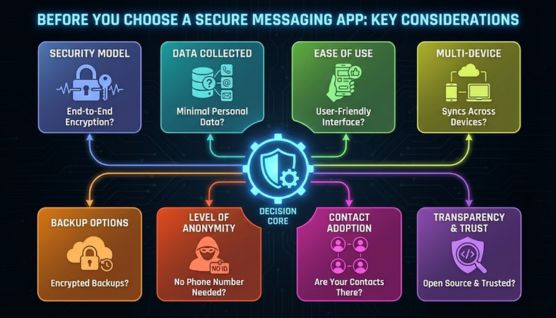
تحمي بعض التطبيقات كل رسالة من البداية إلى النهاية، بينما يقوم البعض الآخر بتشفير أجزاء من المحادثة فقط. تمنحك معرفة كيفية تعامل التطبيق مع التشفير فكرة أوضح عن الخصوصية التي تحصل عليها بالفعل.
تطلب المنصات المختلفة أنواعًا مختلفة من المعلومات الشخصية. انظر إلى ما إذا كانت الخدمة تتطلب رقم هاتف أو بريدًا إلكترونيًا أو أي بيانات تعريف قبل الاشتراك.
يجب أن يظل التطبيق الآمن مريحًا للاستخدام يومًا بعد يوم. إذا كانت الواجهة مربكة أو تبطئك، فقد تواجه مشكلة في التمسك بها.
لا تعمل جميع برامج المراسلة الآمنة بشكل جيد عبر أجهزة متعددة. تحقق مما إذا كان التطبيق يدعم أجهزة الكمبيوتر المكتبية والأجهزة اللوحية والهواتف دون إضعاف أمانها.
تتجنب بعض التطبيقات النسخ الاحتياطية تمامًا من أجل الأمان، بينما يوفر البعض الآخر تخزينًا مشفرًا. فكر فيما إذا كنت تفضل الوصول طويل المدى إلى الرسائل القديمة أو نهج «عدم ترك أي أثر».
إذا كان عدم الكشف عن هويتك أمرًا مهمًا، فابحث عن تطبيق لا يربط حسابك بهويتك الحقيقية. توفر الخيارات التي تعمل بدون أرقام هواتف أو رسائل بريد إلكتروني حدود خصوصية أوضح.
لا يعمل برنامج المراسلة الآمن إلا إذا استخدمه الآخرون أيضًا. قبل الالتزام، ضع في اعتبارك ما إذا كان أصدقاؤك أو عائلتك أو زملائك في العمل موجودون بالفعل على المنصة.
تسمح المشاريع مفتوحة المصدر لأي شخص بفحص الكود، بينما تعتمد الأنظمة المغلقة بشكل أكبر على ثقة الشركة. من المفيد اختيار تطبيق بسجل حافل تشعر بالثقة تجاهه.
غالبًا ما يعتمد اختيار تطبيق المراسلة الآمن المناسب على أكثر ما تقدره في الخصوصية أو الراحة أو أسلوب الاتصال.
تناسب Signal الأشخاص الذين يريدون خصوصية قوية دون تعقيد الأمور. إنه مثالي للمراسلة اليومية مع تشفير موثوق يعمل دون بذل جهد إضافي.
يعمل Telegram بشكل أفضل لمنشئي المحتوى والمجتمعات الكبيرة والأشخاص الذين يحتاجون إلى مراسلة جماعية سريعة. تدعم قنواتها وبرامج الروبوت والمزامنة متعددة الأجهزة المحادثات النشطة والسريعة.
يعد Threema مناسبًا للمستخدمين الذين يريدون الحد الأدنى من البيانات الوصفية ويفضلون عدم مشاركة التفاصيل الشخصية. نظام الهوية المجهول الخاص بها يروق لأولئك الذين يريدون اتصالًا بسيطًا دون ربط هويتهم.
تم تصميم Wire للفرق والمؤسسات التي تحتاج إلى اتصال داخلي آمن. أدوات الإدارة وميزات الامتثال الخاصة بها تجعلها خيارًا قويًا لبيئات الأعمال.
تعتبر الجلسة مثالية لأي شخص يحتاج إلى إخفاء عميق دون أي معرفات. إنه يعمل جيدًا للمستخدمين الذين يريدون رسائل لا تترك أي أثر وتتجنب الخوادم المركزية.
يناسب Element الأشخاص الذين يريدون المزيد من التحكم في إعداد الاتصال الخاص بهم، بما في ذلك خيار الاستضافة الذاتية. إنها مباراة جيدة للمستخدمين أو الفرق البارعة بالتكنولوجيا الذين يفضلون منصة قابلة للتخصيص.
تم تصميم Wickr لأماكن العمل التي تتطلب حماية صارمة للبيانات. إن انتهاء صلاحية رسالتها والإشراف الإداري يجعلها اختيارًا قويًا للشركات ذات المعلومات الحساسة.
SimPlex هو الأفضل للمستخدمين الذين يريدون الفصل الكامل بين الهوية والتواصل. إنه يعمل جيدًا لأولئك الذين يفضلون المراسلة بدون أرقام هواتف أو أسماء مستخدمين أو حسابات.
يناسب Proton Messenger الأشخاص الذين يستخدمون Proton Mail بالفعل أو يريدون خصوصية قانونية قوية من الحماية السويسرية. إنه مفيد لأولئك الذين يريدون بريدًا إلكترونيًا آمنًا ومراسلة في نظام بيئي واحد.
Briar هو الاختيار الصحيح للأشخاص في المناطق ذات الإنترنت غير الموثوق به أو القيود القوية. إن ميزاته غير المتصلة بالإنترنت والشبكات تجعله ذا قيمة أثناء الانقطاعات أو في البيئات عالية الخطورة.
يعتبر تطبيق Signal على نطاق واسع أكثر تطبيقات المراسلة أمانًا في عام 2026 لأنه يستخدم تشفيرًا قويًا من طرف إلى طرف ولا يجمع أي بيانات تقريبًا. إنه موثوق به من قبل خبراء الخصوصية وسهل للمستخدمين العاديين.
يوفر Threema أقوى حماية للبيانات الوصفية لأنه يستخدم معرفات مجهولة ويخزن جميع البيانات على الجهاز. يتجنب أرقام الهواتف ورسائل البريد الإلكتروني والتخزين السحابي.
Session هو أفضل تطبيق للرسائل المجهولة لأنه لا يتطلب تفاصيل شخصية ويوجه الرسائل عبر شبكة لامركزية. هذا يجعل المحادثات صعبة التتبع أو التتبع.
يعمل Briar دون اتصال بالإنترنت باستخدام Bluetooth و Wi-Fi Direct لإرسال رسائل بدون اتصال بالإنترنت. إنه مفيد أثناء الانقطاعات أو في المناطق ذات القيود الشديدة.
نعم، يمكن أن تحل تطبيقات المراسلة الآمنة محل الرسائل النصية العادية لأنها تدعم المكالمات والوسائط والمحادثات الجماعية بخصوصية إضافية. إنها تحافظ على حماية المحادثات مع تقديم نفس الميزات الأساسية.
يعد التشفير من طرف إلى طرف مهمًا إذا كنت تريد أنت والمستلم فقط قراءة رسائلك. وبدون ذلك، قد يتمكن مزودو الخدمة من الوصول إلى المحتوى.
يمكن أن تكون التطبيقات اللامركزية أكثر أمانًا لأنها لا تعتمد على خادم واحد، مما يقلل من مخاطر تسرب البيانات الكبيرة. ومع ذلك، قد يختلف الأداء حسب الشبكة.
توفر المراسلة الآمنة في 2026 المزيد من الخيارات أكثر من أي وقت مضى، ويعتمد الخيار الأفضل على ما تقدره عند التواصل. يظل تطبيق Signal الاختيار الأكثر توازنًا لمعظم الأشخاص لأنه يوفر خصوصية قوية دون إضافة تعقيد أو إعاقة المحادثات اليومية.
يريد بعض المستخدمين حماية أعمق أو بصمة رقمية أصغر، وبالنسبة لهم، توفر تطبيقات مثل Session و Threema و Simplex إخفاء هوية أقوى وتقليل تعرض البيانات. تعمل هذه المنصات على إخراج الهوية من المعادلة، مما يمنحك مزيدًا من التحكم في مقدار ما تشاركه عبر الإنترنت.
قد يحتاج البعض الآخر إلى شيء مصمم للمجموعات الأكبر أو تنسيق الفريق أو البيئات الصعبة، وهنا يأتي دور Telegram و Wire و Element و Briar. كل تطبيق يلبي حاجة معينة، مما يجعل من السهل مطابقة التطبيق المناسب بالطريقة التي تتواصل بها ومستوى الخصوصية الذي تتوقعه.
