🚀 Introducing Cloudsek Launchpad: a incubator for early-stage cybersecurity founders, apply today!
Read more








An exposed folder of development files gave CloudSEK's Global Threat Intelligence team a way to look at how an Android malware seller worked. Alongside the source code were app builders, fake download pages, maintenance notes and scripts used in an attempt to break into a rival's control panel.
The files pointed to a Telegram seller using the name 教父科技, or Godfather Tech. The same Telegram contact appeared in the software and on the download pages. On Telegram, the seller offered Android remote-access trojans, known as RATs, along with source code, setup services and gambling websites.
The files match what the seller advertised on his Telegram Channel. Much of the Android toolkit is built on 飞鹰 (Flying Eagle), a RAT codebase that has been copied and resold under several names. The files also show how buyers customize the apps, manage their own customer accounts and set up fake banking screens. There are also signs the kit is backdoored: maintenance notes record a hidden administrator account, and a bundled setup tool contains strings for collecting and uploading files.
Reading the payload templates, the panel code and the panel screenshots together gives a full picture of the RAT's capabilities. The feature set is consistent across the Flying Eagle-derived builds, whatever name a particular copy carries.
The builder turns a few templates into finished apps, renaming, re-iconing, repacking and signing each customer build, so package names differ from one buyer to the next. Inside the stub templates the original Flying Eagle class names survive and map straight to the main functions: RecordPayPassword (payment-PIN capture), LiveKeysStrok (keylogging), Webjector (web injection and overlays) and CameraCap (camera access). Persistence is tuned for real-world handsets: the apps request vendor-specific auto-start and background permissions for Xiaomi, Huawei, Honor, OPPO, vivo, Samsung, Transsion (Tecno, Infinix, itel) and others, and the bundled step-by-step guides walk the victim through disabling battery optimisation so the app keeps running after installation.
The capabilities themselves group into surveillance, credential theft and on-device fraud:
The download pages showed how a buyer could put the toolkit to use. The pack contained 102 templates copied from numbered subdomains of esou[.]bond. They used adult, dating, streaming and gambling themes, as well as familiar names such as Chrome, Google Play, UnionPay and TradingView.
Some pages did more than offer a download. They told visitors to ignore security warnings and install the app in airplane mode.

Figure 1: A banner in the template pack tells users to ignore security warnings and disconnect from the network during installation.
The builder lets a buyer change the app's name, icon, package name and server address before signing it. As a result, the same underlying software could be distributed under different names.
Installation was only part of the process. The apps requested access to features such as Accessibility, notifications, SMS and device administration to support screen reading, remote input and data collection.
The bundled instructions also asked users to relax battery restrictions and allow the app to start automatically. The templates included settings for several phone brands, including Xiaomi, Huawei, OPPO, vivo and Samsung. The aim was to keep the app running after installation.
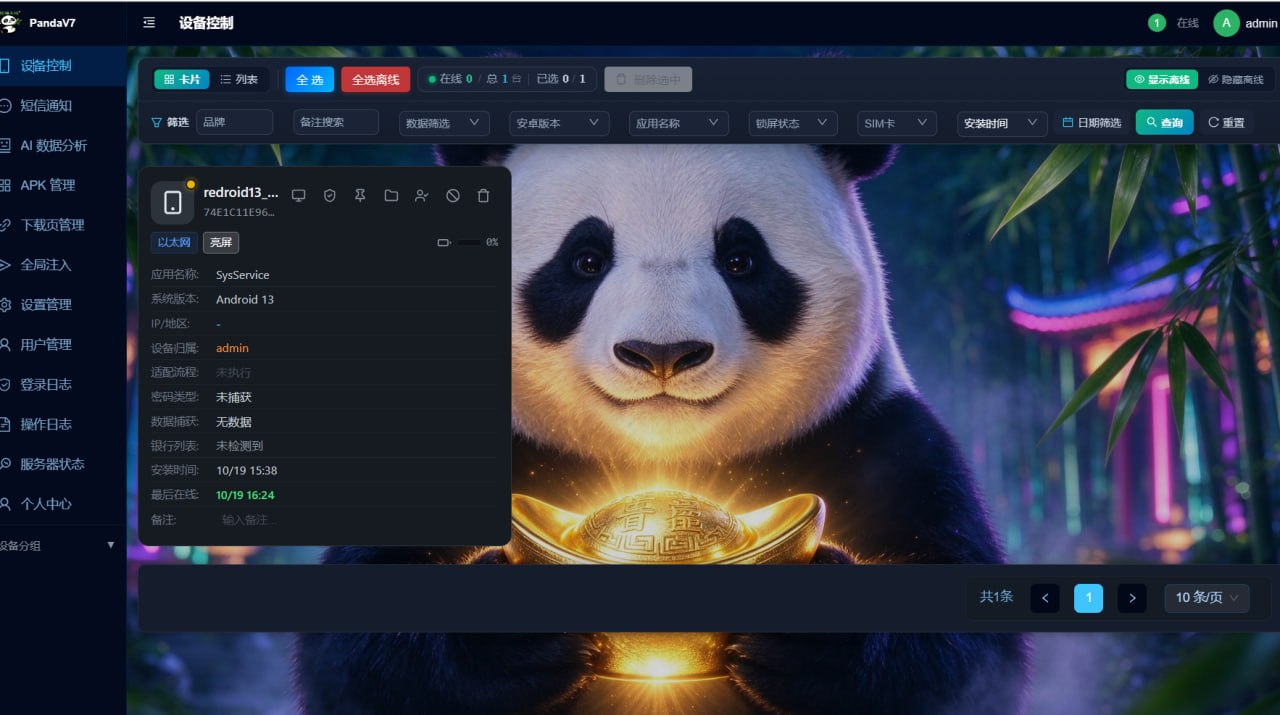
A PandaV7 screenshot showed one Android 13 test device running in Redroid, an Android emulator. The installed app was named “SysService”. Its device card displayed the account assigned to it, the type of screen lock and fields for captured information and detected banking apps.
The device-control view offered screen sharing, remote touch, screenshots, camera and microphone access. Other tabs covered messages, contacts, files, photos and password records.
Two groups of controls explained the intended use particularly clearly. One offered a black screen or a fake system-update screen to hide activity on the phone. Another dealt with lock-screen PINs and patterns. Its unlock command relied on credentials captured from the phone first.
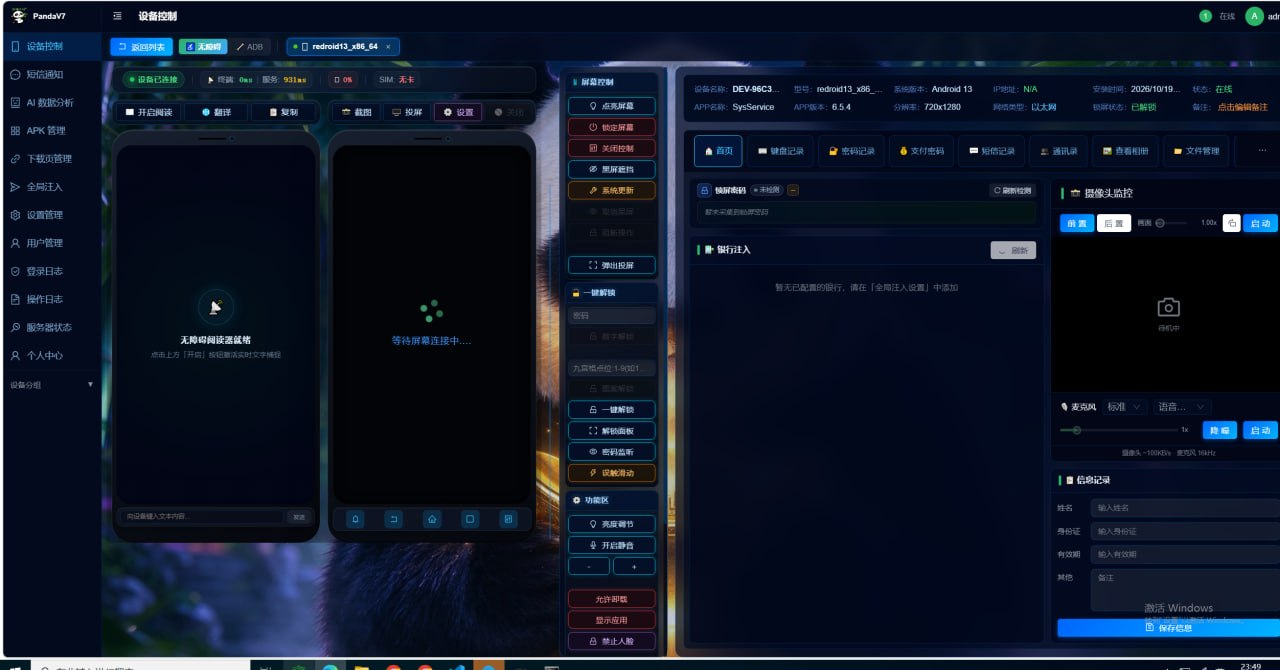
The shared code and related panels also included photo scanning for bank cards and identity documents, fields for personal details, and a face-verification video feature. These features were designed to collect information that could be used in fraud.
The seller's Telegram channel, covered below, added context to these controls. A September post described using remote access to inspect financial information and collect identity documents while hiding activity from the phone's owner. The seller was giving buyers instructions for fraud.
The exposed workspace was mirrored across two hosts, 14.128.50[.]149 and 14.128.50[.]253. It contained more than 149k files, of which 11,856 were identified as related to the Android RAT. Numbered source-code packs and file-hash inventories sat alongside working copies of the software.
The link to Godfather Tech appeared in several places. One V6 panel carried a title that translated as “V6: to buy, contact” followed by the seller’s Telegram contact. All 102 download-page templates carried an advert for the same seller. These repeated references connected the workspace to the Telegram account.
The account presented itself as a software business. It listed working hours, offered custom development and escrow trades, and stressed after-sales support. Its linked channel had 998 subscribers in a late-October 2026 snapshot and 1,037 in a November snapshot.
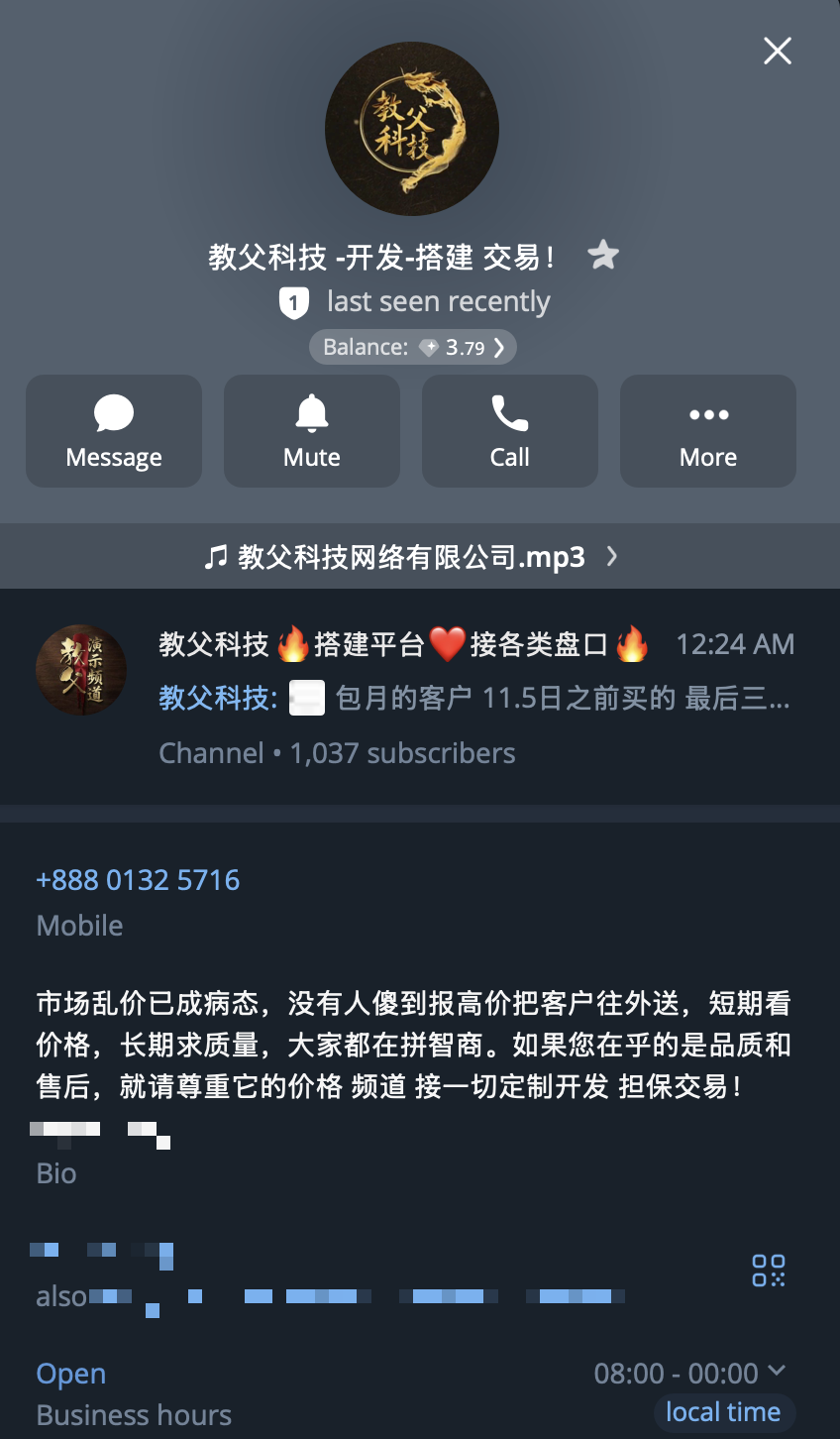
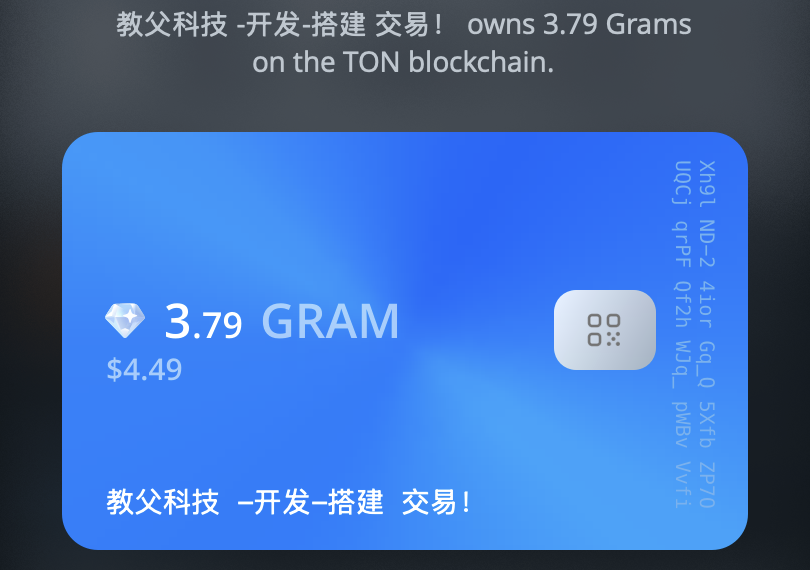
The profile also links to a TON blockchain wallet. Its balance rose from 0.50 GRAM in late October to 3.79 GRAM (about US$4.49) in November 2026. The wallet is receiving funds, but the amounts are too small for it to be the main cash-out wallet; it is still a blockchain identifier investigators can follow, for example to purchases on Telegram’s Fragment marketplace.
The channel export covered 1,443 messages posted between 3 September 2025 and 9 November 2026. Its offers included gambling sites, fake trading platforms, Telegram account-stealing tools and Android RATs.
Some posts helped explain the files. In September 2026, the seller offered to set up Flying Eagle and other mobile RATs. Later posts advertised Panda V6 and V7 source code. On 18 October, a post said 雄鹰 (Mighty Eagle) had been obtained and was available for sale. That wording points to resale as part of the business.
The profile, sales posts and maintenance notes were mainly in Chinese, linking the brand to a Chinese-speaking seller. The Godfather Tech name is separate from the Android banking malware commonly called Godfather.
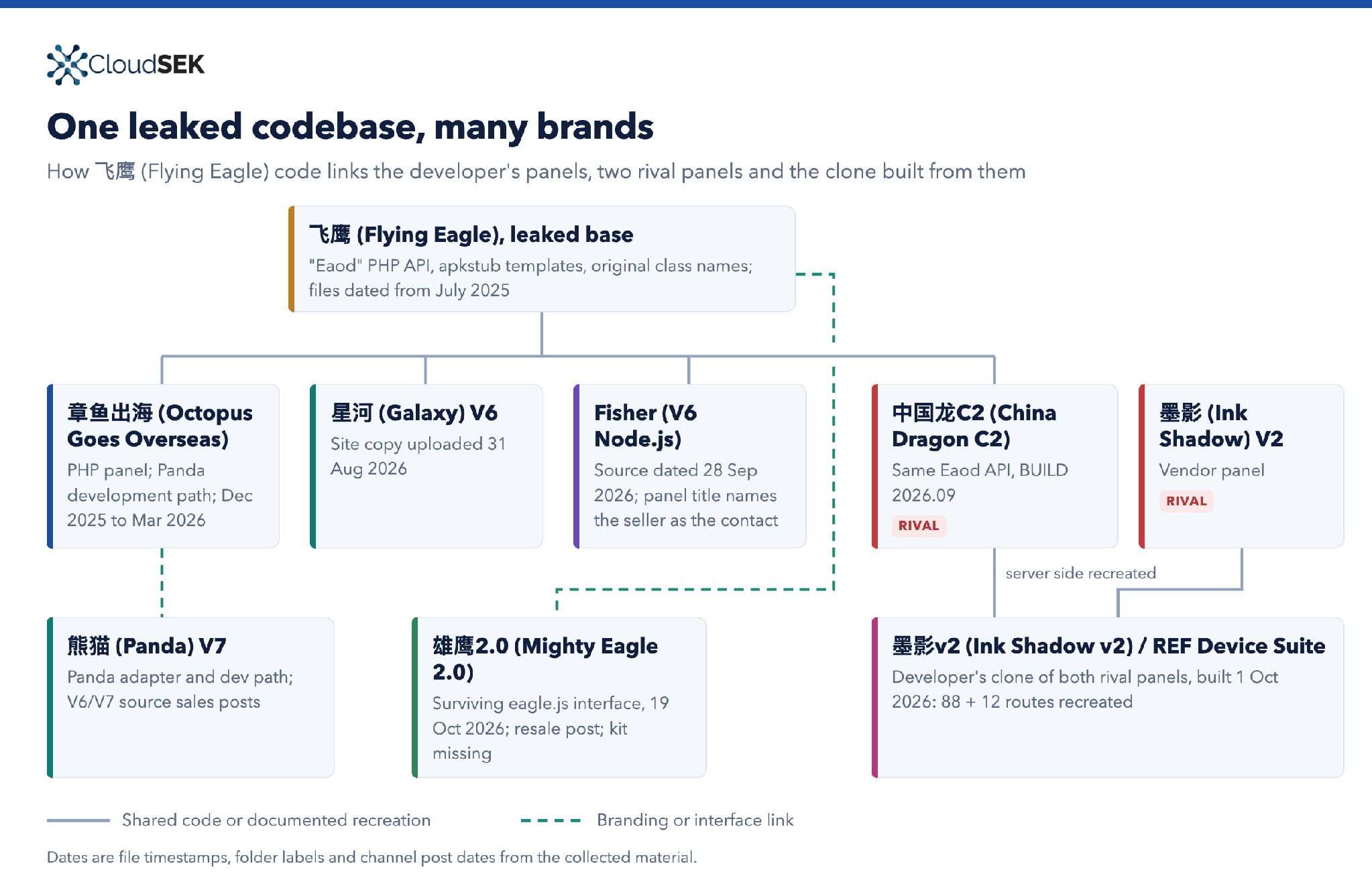
The workspace contained several names for related Android tools: 飞鹰 (Flying Eagle), 章鱼出海 (Octopus Goes Overseas), 星河 (Galaxy) V6, Fisher, PandaV7 and 雄鹰2.0 (Mighty Eagle 2.0). Looking only at the branding could make them seem like separate products.
The code gave a clearer picture. Earlier versions shared PHP server files with names beginning “Eaod”, Android app templates in the same directory structure, and classes named RecordPayPassword, LiveKeysStrok, Webjector and CameraCap. These handled payment-password capture, keystroke logging, fake screens and camera access. The repeated files and names support a shared Flying Eagle code base across those copies.
The dates in the files show how the material developed. Some Flying Eagle files were dated July 2025. Much of the Octopus work was dated December 2025 to March 2026. A Galaxy V6 upload was labelled 31 August 2026, followed by a Fisher source folder dated 28 September.
PandaV7 had further links to the earlier software. A development path used “xiongmao”, the Chinese word for panda, and a builder interface called itself the “Panda Frontend Adapter”. Channel posts also advertised Panda V6 and V7.
Mighty Eagle 2.0 was represented by its web interface, last modified on 19 October 2026; the rest of that kit was missing by the time of collection. Its menus showed similar functions, including remote control, fake banking screens and AI analysis.
CloudSEK recovered the Android payloads from the builder folder and the loot directory. We decompiled and analysed them statically, then ran them in an isolated sandbox environment with no access to the live infrastructure. We compared both sets of results with runtime evidence recovered from the seller's servers.
The two hosts held 33 APK files. After removing duplicates and the apktool framework file, they fall into eight groups. Together these cover the whole range of the toolkit: the full RAT, a lighter template, two droppers, a trojanised real app, the panel's own stub, builder-generated config shells and a cloned rival agent.
We executed the payloads in an isolated sandbox environment. The behaviour we observed matched the static findings above and the runtime records recovered from the seller's infrastructure.
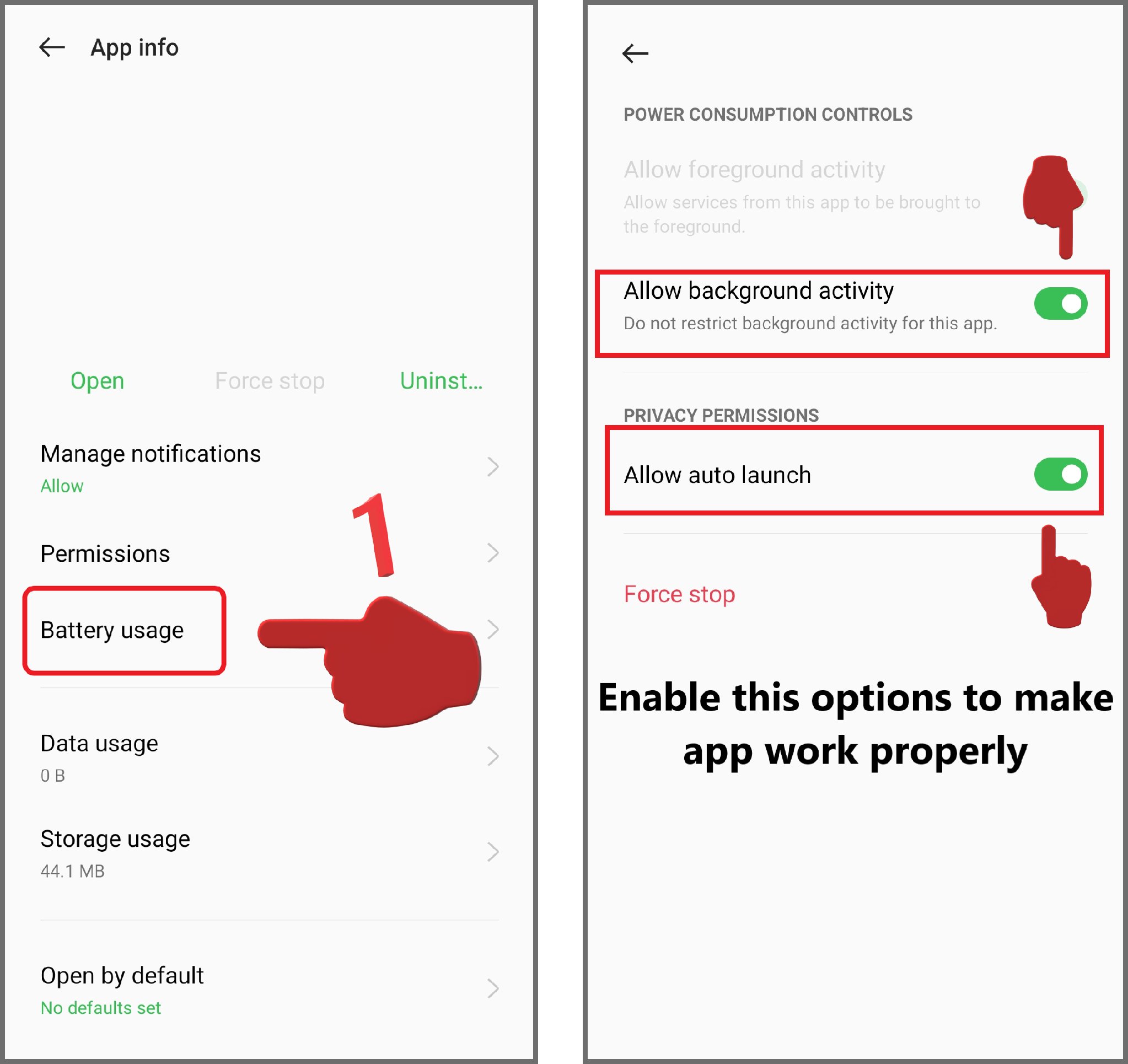
In the PandaV7, the first thing the app does after installation is ask for its own survival. Step-by-step images shipped inside the payload resources walk the victim through opening the app's battery settings and switching on background activity and auto-launch, so the RAT keeps running and restarts itself after being stopped.
The same thing appears in the related Ink Shadow v2 console. A newly installed test device registers within seconds and is listed as online, along with network type (5G), injection count and the status of Accessibility permission.
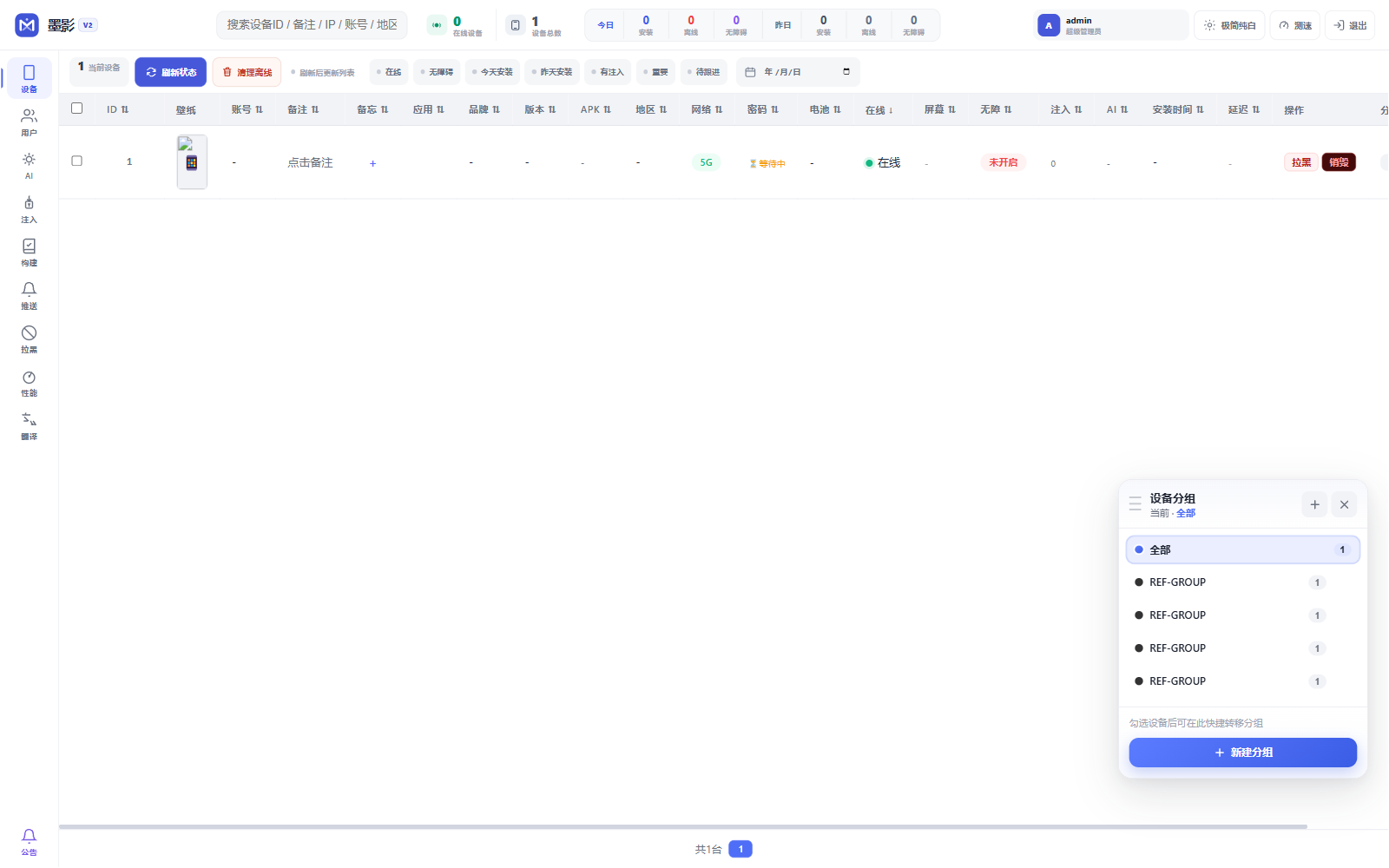
Once a device is under control, the operator works from a single console. On a tested device captured from a physical test handset (on Android 13), the console showed the device online over 5G, with 96% battery. Around it sat the live controls: lock-screen password capture, a photo-album scan that looks for bank cards and personal details, a quick panel for page injection, three black-screen modes, anti-uninstall switches, and one-click "pull black" and self-destruct commands.
The console showed that this one device exposed live screen streaming and remote touch, lock-screen password capture and one-click unlock, the bank-injection tab, and camera and microphone capture, matching the permissions and native keep-alive layer seen in the static review. Every capability seen at runtime, in our sandbox records, traces back to a permission, component or native library identified in the static analysis. The payloads work as designed.
The core of the toolkit is the overlay. The RAT never touches the bank’s own app. It is a separate app on the same phone that watches which apps the victim opens and draws a fake page on top of the real one.
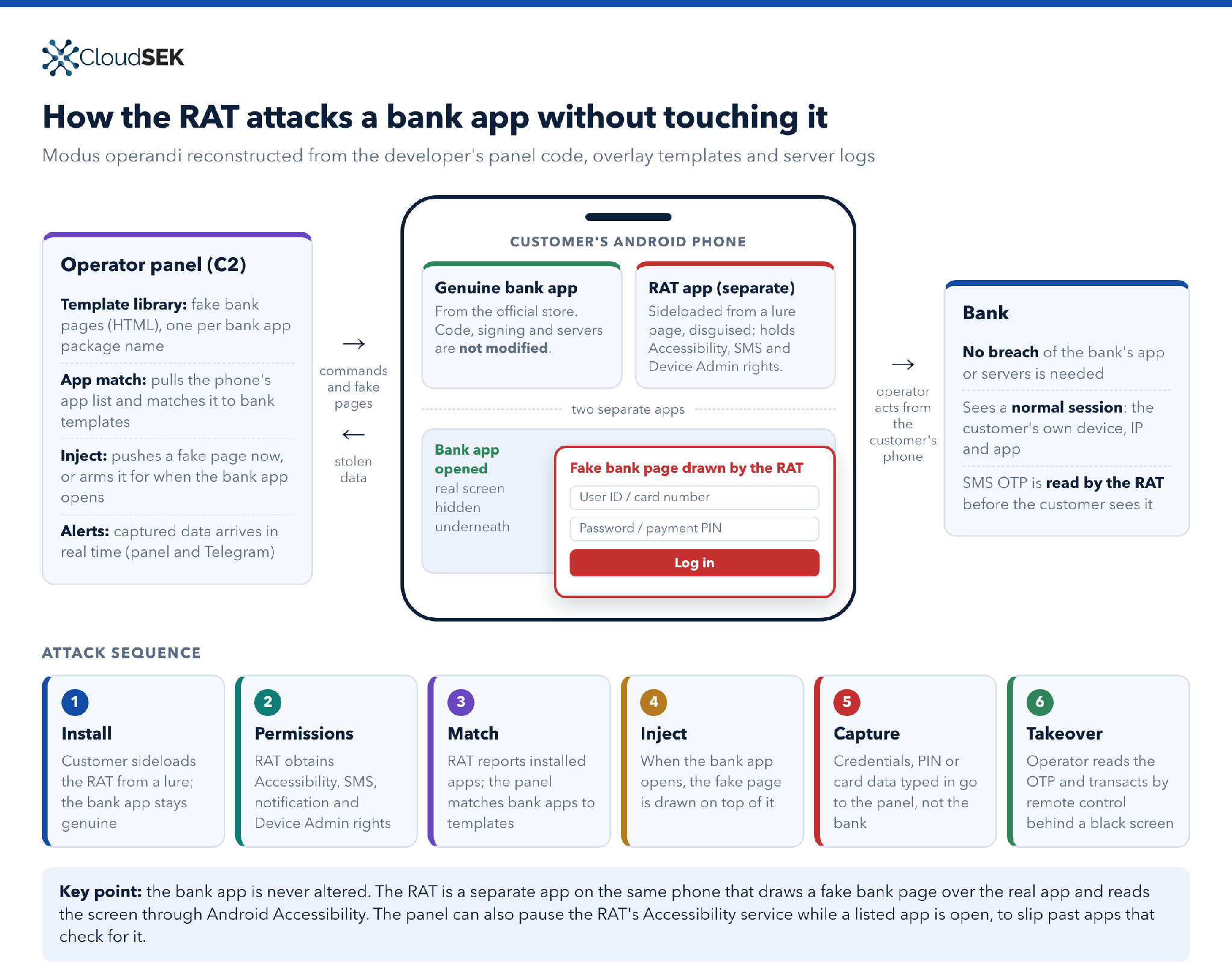
Reconstructed from the panel code, overlay templates and server logs, an attack runs like this:
1. The victim installs the RAT from a lure page.
2. Grants it Accessibility, SMS, notification and device-administrator access.
3. The RAT sends the list of installed apps to the operator’s panel, which matches them against its library of fake bank and wallet pages.
4. When the victim opens a matching app, the RAT draws the fake page over it. The operator can also push a fake page straight away.
5. Whatever the victim types, whether a login, card number, payment PIN or wallet seed words, goes to the panel, not to the bank.
6. The operator reads the SMS one-time code, unlocks the phone with the captured PIN and moves money by remote control, often behind a black screen so the victim does not see it.
The fake-screen catalogues contained entries for 182 banks across 56 countries, along with 38 crypto exchanges, wallets and payment apps. These were brands the toolkit was configured to impersonate. Their inclusion does not mean those organisations were breached or that their customers were successfully targeted.
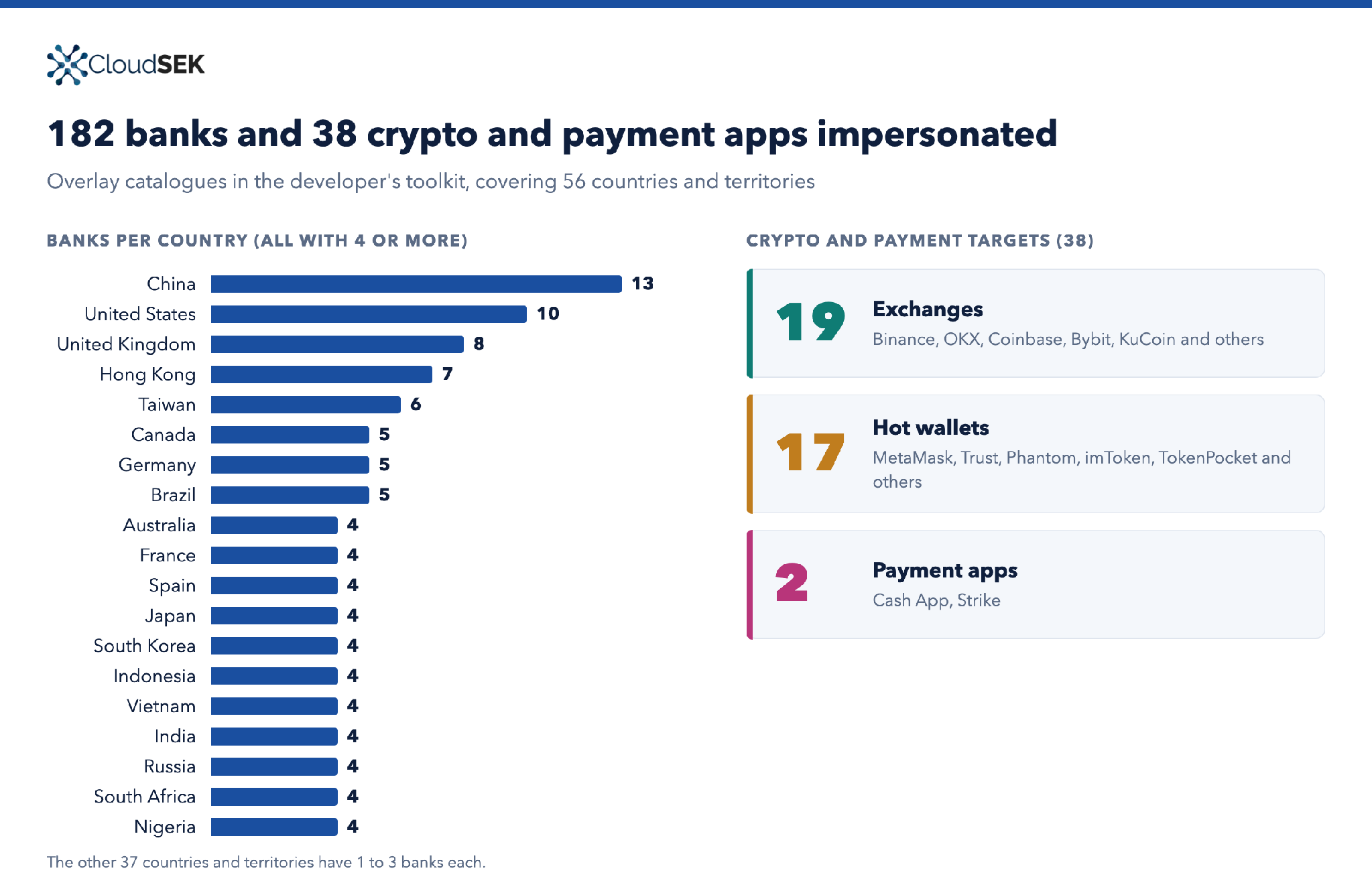
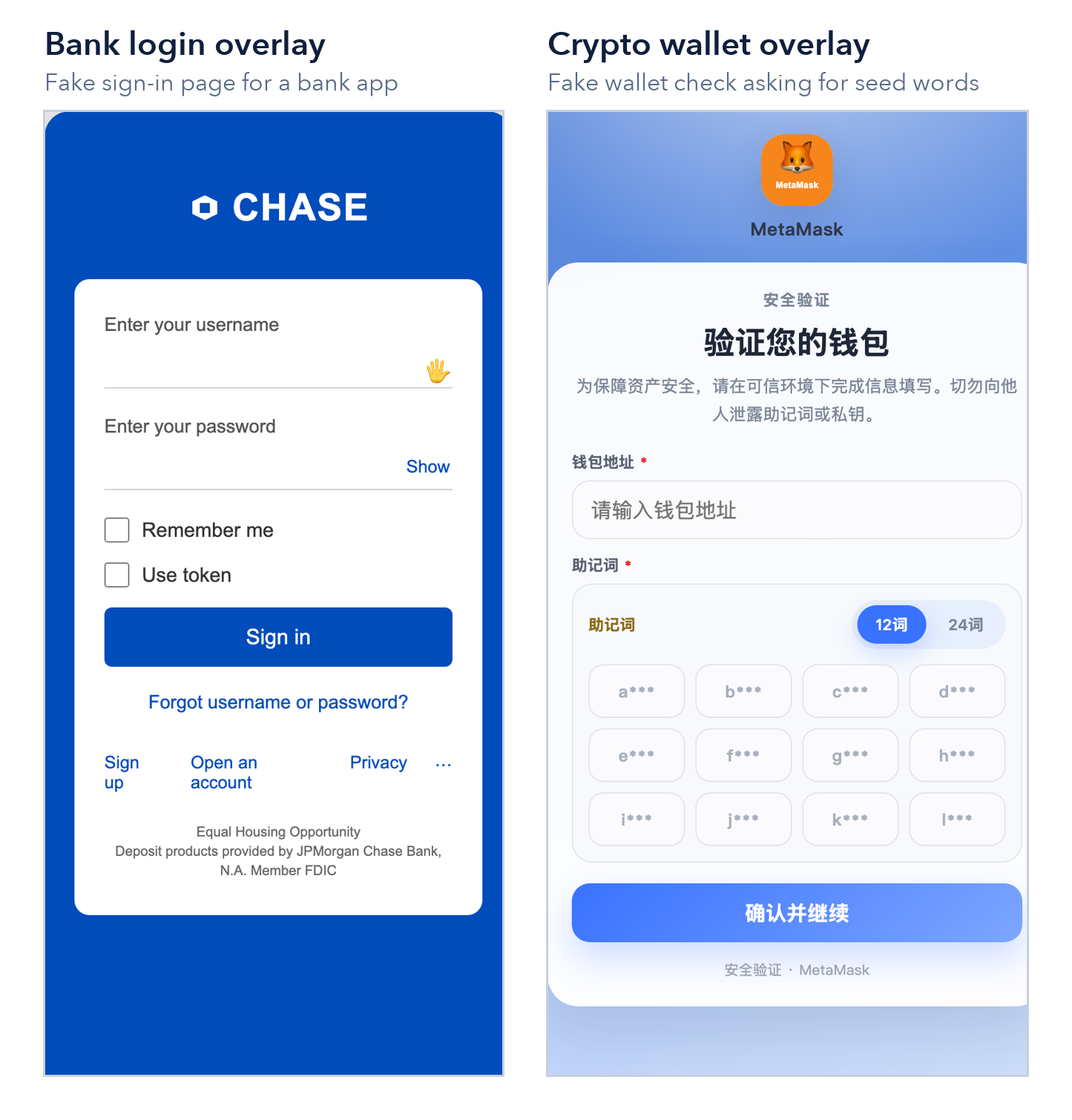
The mechanism was straightforward. A fake screen could be sent to a device immediately or set to appear when a particular app opened. It could then ask for a login, a verification code or wallet recovery words. The catalogue recorded app package names and details such as the expected number of recovery words or verification-code digits, helping the fake prompt resemble the real one.
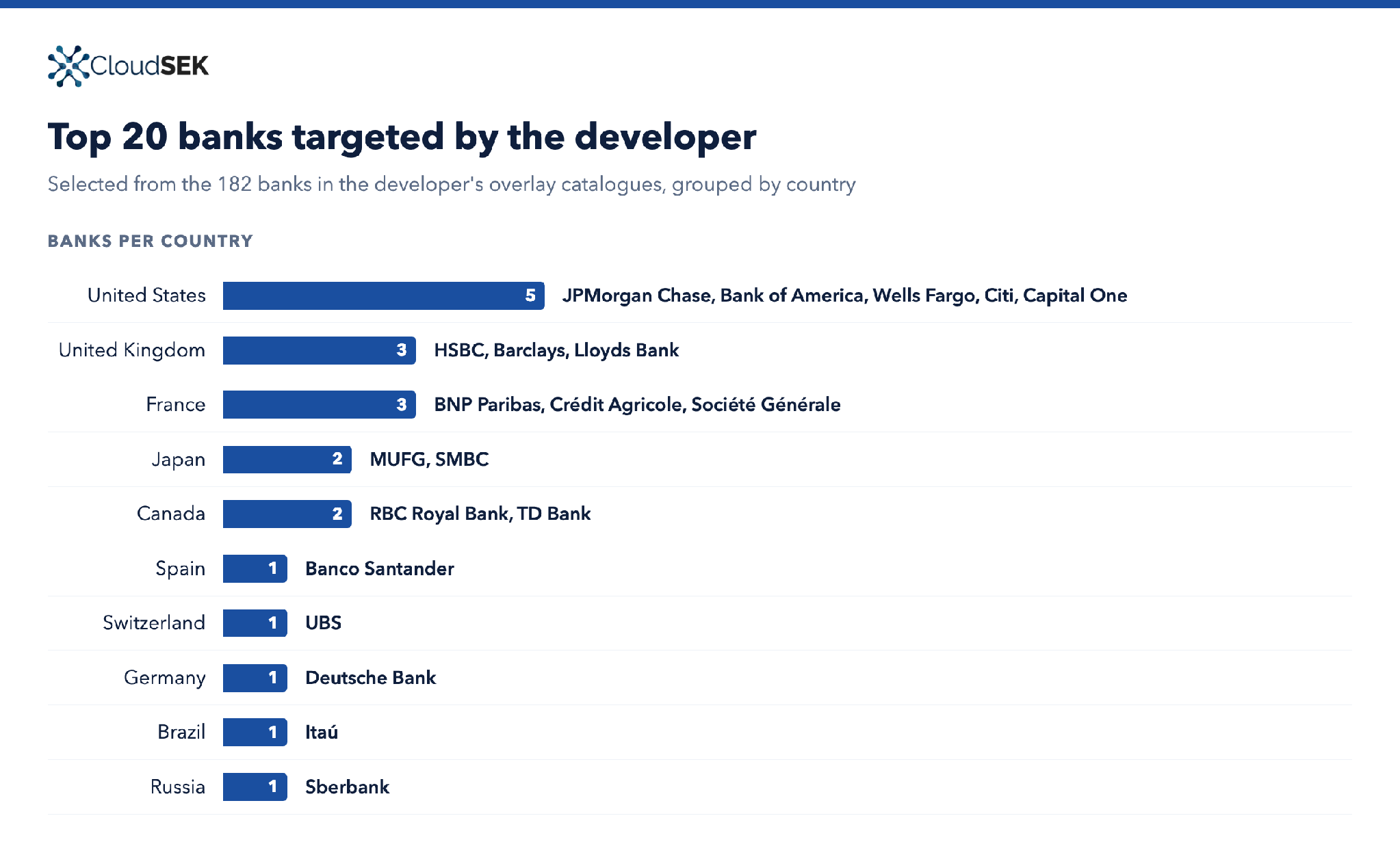
The overlay catalogues list some of the world’s best-known banks. Twenty of them are shown below.
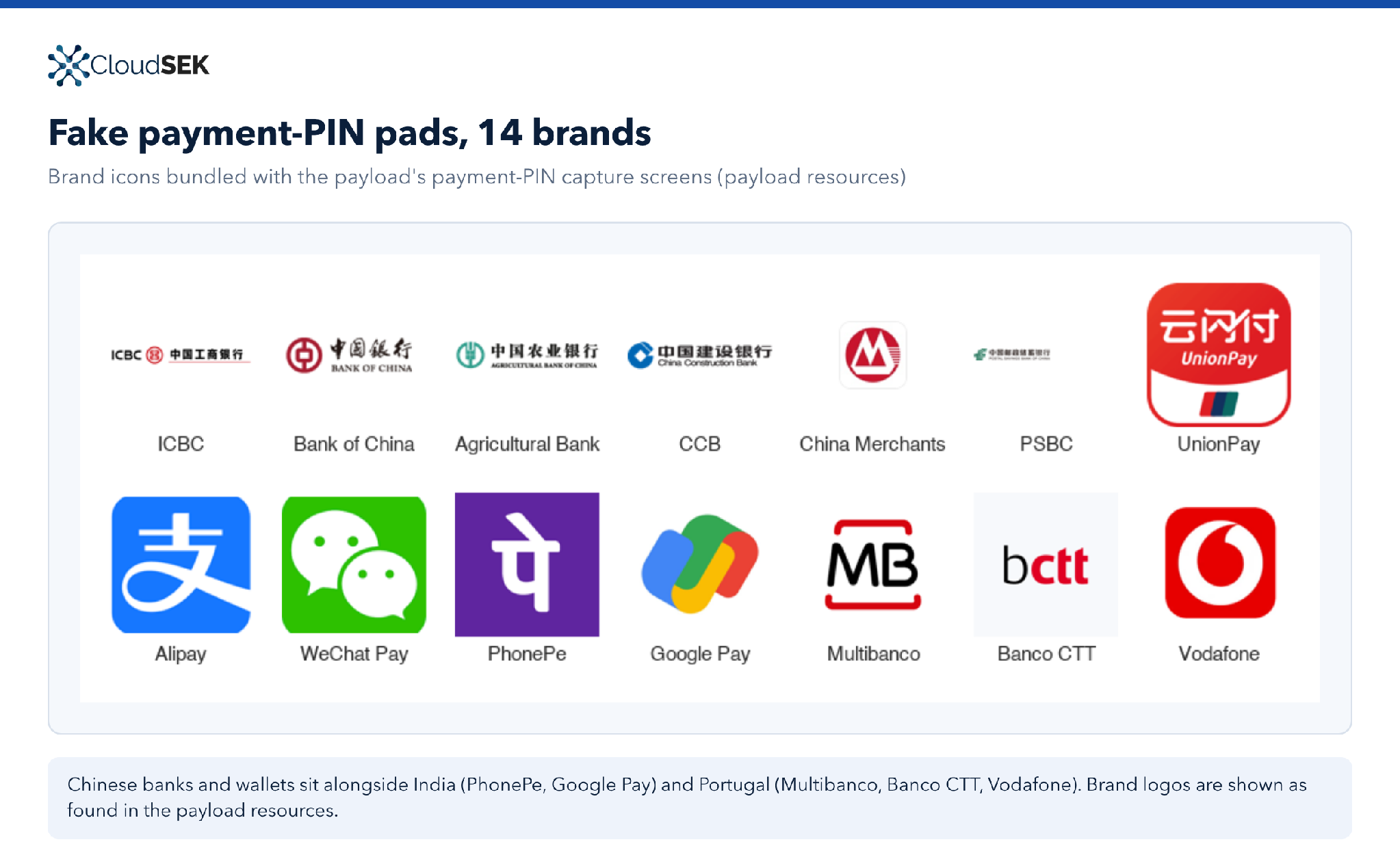
The app resources also contained payment-PIN screens using the branding of 14 providers. These included Chinese banking and payment services, PhonePe and Google Pay in India, and several Portuguese brands.
Remote control, fake prompts and access to messages could be combined in an attempt to take over an account or approve a payment. The toolkit brought those functions together in one panel.
AI showed up in both the development records and the product's sales pitch. Saved interactions described requests to coding assistants for repairs to panel functions, notifications and documentation. They also included attempts to get around refusals, with at least one assistant declining to help with the fraud toolkit.
A related panel interface offered an “AI financial analysis” feature with settings for a model-provider key. The described function used SMS content to estimate a phone owner's financial position.
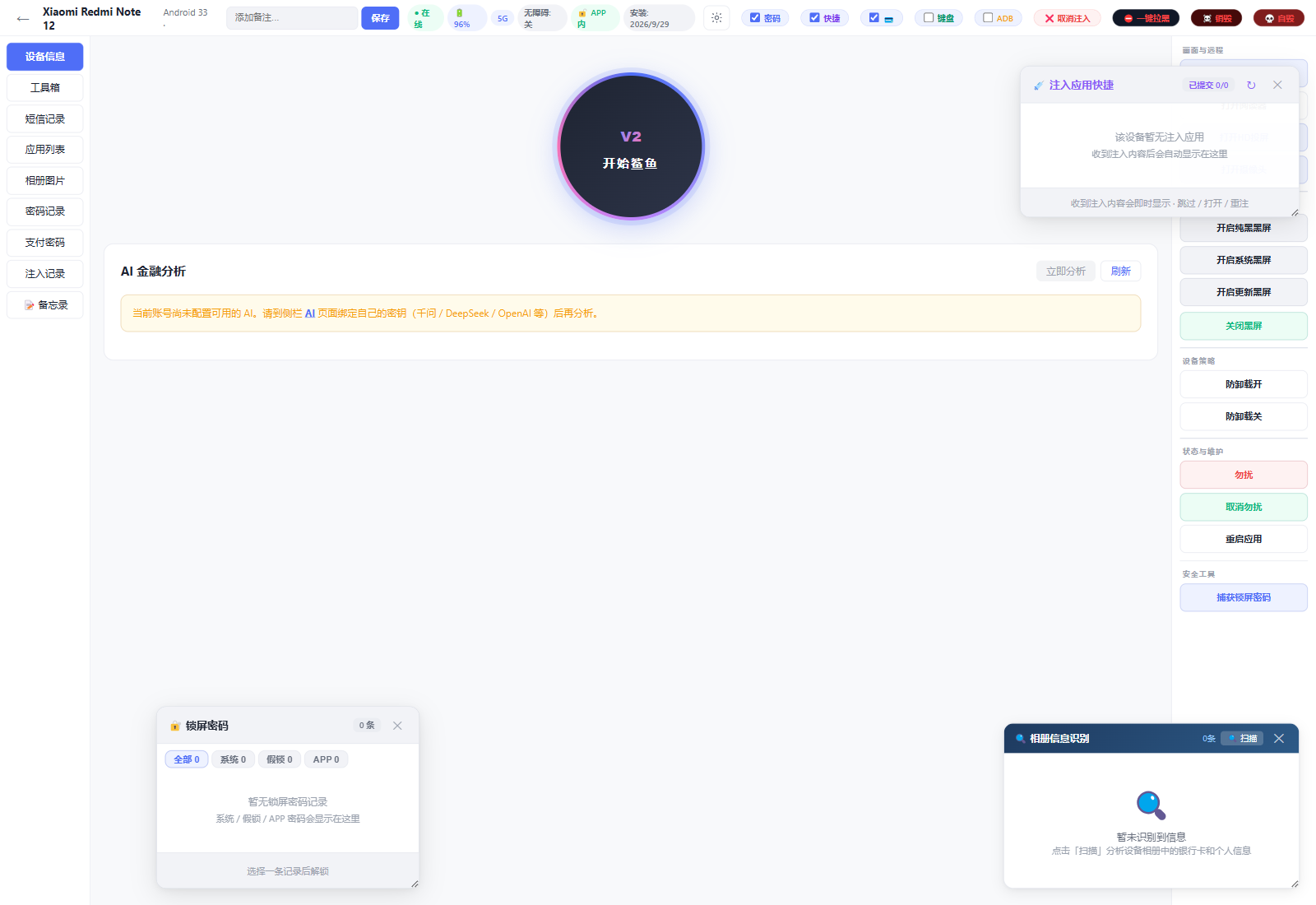
Later channel posts went further, advertising AI-generated fake pages and an engine that could read a screen and operate a phone. These remain unverified seller claims.
The clearest finding is the arsenal itself. The app templates, builder, panel code and target catalogues show a seller developing, adapting and reselling Android tools designed for bank and crypto fraud. They also show how much of the work was shared across product names.
For investigators, that makes the common code useful. Original class names, server paths and template hashes can help connect related copies. The indicators in the appendix separate the seller's material from rival infrastructure and shared tools.
The files point to several places where defenders can act:
The named language builds were Chinese, English, Japanese, French, Arabic and Korean, alongside a “global” build.
The collected Flying Eagle-derived deployment used nginx, PHP, a Node.js WebSocket service, Mosquitto MQTT, Redis, MySQL and a Python autoban service. Its PHP code exposed 47 endpoints across public API and private-handler directories.
The builder used apktool, smali/baksmali, apksigner, custom scripts and the dpt-shell packer. The Windows helper EaodEnvCheck.exe was a 143,872-byte x64 executable whose strings suggested file collection and upload.
The entries below are grouped by their role in the collected material.
These SHA-256 values identify the collected files. Each entry names its file or artefact, including shared tools and a captured rival page.
source.apk (com.node.quick.pure, V6 payload template)
f55c4621bf09b497b71beb55da8fa16ed1a7c8b5f60b2274f9289f4de4166ffe

kiss_template.apk (com.tool.move.good)
749a7ad0e6135b08ec594a1b909563e850b443bf6a20c3f890b6296bbb77b7ca

ghost_template.apk (com.ninja.magic.safe, dropper shell)
b5c1612bb553597105ad39c2bdb8f29daf94563c54889731cd0b6ee2aff05a13

migrator_full.apk (trojanised PicsArt, com.acjvxogy.dfmtdk)
fd813ab6570c596784b460e8d4006041b0480df29aef6b331c75d47f73d6b4d2

migrator.apk
136752b4546400eae540bb594173fe1b71938cc607f5ec5e454c510512b7617b

com.se.lfi.p01.apk
6395097d1684d2e738b7356c7c8f444faccf2252643dc1037525c13897c49a3c

com.se.lfi.p11.apk
4a41cbd3afee7bf08f3538f606f454035f04424a1f6174a26bcc47daf75416f0

apkstub.zip (飞鹰 payload stub template)
93015d97897b2eb2be35c5b9c787515a0531aacaf4f2da3987272dbcdfe689b3

apkstubg.zip (global stub template)
ac07c0ad02590d74f101072fe7d2ab6625ebade71b15b8fc882978c13f1c04c2

EaodEnvCheck.exe (builder helper; suspected file collection)
1f77ddbbd4ebcb4903661e5b35027efa6e15bccfdf33ddaf8f1279b213c53b12

dpt-shell.zip (packer bundled with builder)
d897e6d47118827018056034070c142cf6861edcf8209627ddf7d551009d10ef

eagle.js (雄鹰安卓远程 panel frontend)
b5dd0095e1dd5cf2f770139d9057b037b20c0c56a53c6a0966735243682811df

中国龙C2 (China Dragon C2) panel page (captured)
2fe250590004f6130ff551c8a3b89d1dfad7c4fc8383a73c6e135f8d3833c643