🚀 أصبحت CloudSek أول شركة للأمن السيبراني من أصل هندي تتلقى استثمارات منها
اقرأ المزيد
.avif)

MCP servers have become one of the fastest-growing parts of the enterprise AI attack surface. They give AI agents direct access to tools, APIs, databases, and files. That makes AI more powerful, but it also turns a single misconfigured MCP server into an entry point for attackers. A real attack chain often starts with an open MCP server, moves to credential extraction, and ends in a database breach.
MCP security safeguards Model Context Protocol servers, AI agents, and their connected tools against unauthorized access, context manipulation, and credential theft.
Adoption of the protocol arrived considerably faster than the controls around it. More than 13,000 MCP server implementations were published on GitHub during 2025, and the protocol has become the default integration layer connecting AI assistants to databases, version control, cloud infrastructure, and business-logic tools.
Each of those servers holds credentials for the systems behind it. A server reachable without authentication hands an attacker the AI agent's permissions, which is a shorter route to production data than any application vulnerability.
The Model Context Protocol (MCP) is an open standard, introduced by Anthropic in late 2024, that lets AI models and AI agents work with external tools, APIs, databases, files, and services. Instead of running in isolation, AI systems use MCP to fetch information, run actions, and exchange context with surrounding systems.
MCP security protects these environments, including the AI-agent interactions, tools, and connected systems, from unauthorized access, data exposure, and malicious activity. It covers every layer of the workflow: securing MCP servers, validating prompts and context, controlling tool permissions, protecting credentials, and monitoring AI-agent activity. Strong MCP security reduces prompt injection, unauthorized tool execution, credential leakage, and AI-driven attack paths.
CloudSEK researchers documented a complete MCP compromise in a live customer environment, moving from an unauthenticated server to live cloud credentials. The AIVigil case study records four steps, none of which required a software vulnerability in the protocol itself.
Discovery found an MCP server answering requests from the public internet with no authentication layer in front of it. Its tool definitions were readable on request, which told an attacker exactly which internal functions the connected agent was permitted to call.
An exposed tool on that server accepted a URL parameter and fetched it from the server side. Requests aimed at internal addresses returned responses, turning the MCP server into a proxy for internal network reconnaissance that no perimeter control observed.
A second tool accepted file paths without validation, giving read access to the filesystem underneath the server. Configuration files, environment variables, and application secrets became retrievable through ordinary tool calls.
Files recovered in the previous step contained active AWS IAM credentials and database secrets. Those credentials opened a route to infrastructure-wide compromise, and the entire chain ran through documented tool functionality behaving exactly as designed.
MCP follows a request-response pattern across four stages, with context passing between systems at each step. Locating the points where context crosses a trust boundary makes the risk set below legible.
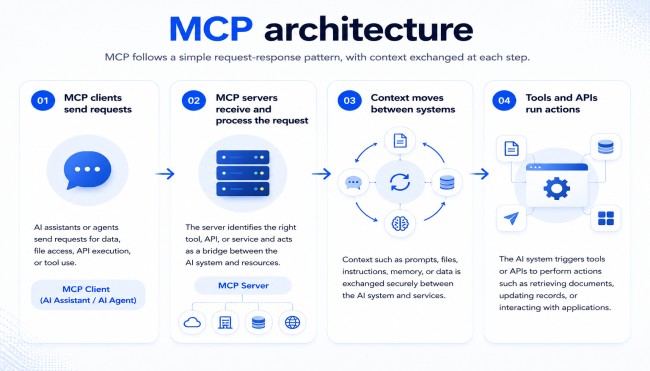
MCP environments carry risks across prompts, tool definitions, permissions, sessions, credentials, and third-party integrations. Public incidents exist for most of them, which makes this a documented threat set instead of a theoretical one.
Malicious instructions placed in files, web pages, or issue trackers override an agent's original instructions once it reads them. OWASP ranks prompt injection first among LLM application risks, and MCP raises the stakes because the compromised agent holds live tool access.
A May 2025 prompt injection against the GitHub MCP integration made a user's AI assistant leak private repository contents into a public pull request. The trigger was the assistant reading a malicious issue in a public repository.
Altered tool definitions or function descriptions redirect agent behavior without touching the model. A poisoned definition routes actions toward attacker-chosen outcomes, and the September 2025 postmark-mcp npm backdoor showed the pattern reaching production through a package registry.
Agents receive broad access to tools, APIs, and enterprise systems because narrow scoping takes deliberate work. A compromised workflow then inherits every one of those permissions, which is how the June 2025 Supabase and Cursor incident reached database contents through an agent integration.
Repeated approval prompts train users to click accept without reading. A malicious server exploits that habit to obtain permissions a user would reject on a first, careful reading, and the same reflex lets an unofficial server impersonate a trusted one during installation.
A broadly privileged MCP server acting on instructions without checking whether that specific user is authorized becomes a deputy for the attacker. Exploitation targets the gap between what the server can do and what the requesting user is permitted to do.
Weak authentication, exposed APIs, and unsafe binding turn a server into a direct entry point. A June 2025 scan found hundreds of public MCP servers bound to all interfaces with no authentication, an exposure pattern nicknamed NeighborJack, and AI exposure discovery exists because these servers appear in no asset inventory.
API keys, authentication tokens, and service credentials reach logs, prompts, memory, and unsecured storage through ordinary handling mistakes. Leaked AI credentials let an attacker act as a trusted service, and the August 2025 Nx npm compromise exposed GitHub and npm tokens at scale through exactly this route.
Every external plugin, connector, and hosted MCP service adds supply chain exposure. CloudSEK's investigation into the March 2026 LiteLLM compromise identified more than 2,500 organizations and roughly 434,000 CI/CD pipelines potentially exposed after malicious packages sat on PyPI for around 40 minutes.
False or harmful information introduced into context sources changes how an agent behaves, and poisoned context spreads across connected tools once it enters the workflow. EscapeRoute, tracked as CVE-2025-53109 and CVE-2025-53110 in Anthropic's Filesystem MCP server, allowed sandbox escape with read and write access to the host.
Stateful MCP connections turn a tool call into one step of a longer sequence, and a stolen or replayed session identifier lets an attacker resume that sequence mid-flight. Servers that accept a resumed session without re-verifying the bound token inherit whatever the original user was permitted to do.
MCP security is not left entirely to implementers, since the specification carries normative security requirements alongside the authorization framework. Four of them address the failure modes that produce the incidents above.
Compliance with these requirements is where most deployments fall short. The specification defines them clearly, and the incidents recorded through 2025 and 2026 trace overwhelmingly to implementations that skipped them rather than to flaws in the protocol design.
MCP deployments need seven controls working together, and no single one of them closes the risk set alone. Each control narrows a specific path from the list above.
Monitoring catches MCP attacks while they run, since prevention alone fails against configurations nobody knew existed. The same discovery, assessment, and triage model used for AI attack surface monitoring applies here with MCP-specific signals.
MCP security extends API security across an additional layer: the AI agent that decides which calls to make. Traditional API security governs requests between applications, where the calling logic is written by developers and behaves deterministically.
Agent-mediated requests break that assumption at the point of decision. The caller interprets natural language, reads untrusted content, and selects tools at runtime, which introduces prompt injection and tool poisoning as failure modes with no equivalent in a conventional API estate.
All classic API risks still apply beneath the agent layer. Injection flaws, broken authentication, and data exposure remain active concerns in MCP deployments. External attack surface assessments that uncover exposed APIs will likewise uncover exposed MCP servers, since both are discovered through the same process.
Governance arrangements around the two disciplines differ just as sharply as the technical models do. API security has established owners, review gates, and a decade of tooling, while MCP servers get stood up by application teams experimenting with agents, outside any inventory a security function maintains.
Discovery is the constraint in MCP security, because a server nobody registered receives no controls and appears in no review. CloudSEK's AIVigil is an AI attack surface monitoring platform that finds MCP servers, AI agents, vector databases, agentic workflows, leaked AI credentials, and shadow AI deployments from outside the perimeter, then records them as an AI Bill of Materials.
Assessment follows discovery inside the same continuous workflow, without a separate scanning cycle. MCP-specific scanning checks tool definitions for poisoning, agentic workflow analysis exposes permission abuse, supply chain scanning flags risky third-party integrations, and active red-teaming tests exposed servers for prompt injection before an attacker does.
Triage then decides which finding among many hundreds gets remediated first. AIVigil scores each exposure on agent agency, authentication state, and blast radius, and Nexus AI correlates those findings with threat actor activity and supply chain risk into validated attack graphs. The unauthenticated server described at the start of this guide surfaced through exactly that process, ahead of any attacker reaching it.
No. MCP is built for interoperability, and it enforces no authentication, sandboxing, or permission limits on its own without deliberate implementation work.
No. Local servers avoid network exposure, while tool poisoning, excessive permissions, and credential leakage apply to them identically.
No. Tool poisoning alters definitions the server returns, producing valid requests that carry nothing a signature or rule inspects for.
No. Models process instructions and data through one channel, so validation reduces success rates without eliminating the attack class.
At every server update and on a scheduled quarterly cycle, since definitions change silently when a dependency or hosted integration updates.
Engineering teams deploying servers own configuration and scoping, while security owns discovery, policy, and monitoring of agent behavior.
